
Sylvan HX-5000
Sylvan HX-5000 Hydroxyl & Ozone Generator User Manual
Modelo: HX-5000
1. Introdución
The Sylvan HX-5000 is an industrial-grade hydroxyl and ozone generator designed for air purification and odor elimination in large spaces. This unit offers the flexibility to operate in hydroxyl-only mode for occupied environments, ozone-only mode for unoccupied environments, or a combination of both for advanced treatment. It is intended for professional use in restoration and industrial applications.
This manual provides essential information for the safe and effective operation, setup, and maintenance of your HX-5000 unit. Please read it thoroughly before initial use.
2. Información importante de seguridade
- AVISO: DO NOT USE THE OZONE FUNCTION IN OCCUPIED SPACES. Ozone is a powerful oxidizer and can be harmful to humans, pets, and plants. Ensure the treatment area is completely vacant during ozone generation and for a sufficient period afterward (typically 24 hours) to allow ozone to dissipate.
- Always operate the unit in a well-ventilated area when using the hydroxyl function.
- The hydroxyl function requires an external air mover (sold separately) to effectively distribute hydroxyl molecules.
- Do not operate the unit if the power cord is damaged or if the unit shows signs of malfunction.
- Keep the unit away from water and moisture. Do not immerse in liquids.
- Asegúrese de colocar a unidade nunha superficie estable e nivelada.
- Desconecte a unidade da toma de corrente antes de realizar calquera mantemento ou limpeza.
- Este aparello non está pensado para o seu uso por persoas (incluídos nenos) con capacidades físicas, sensoriais ou mentais reducidas, ou con falta de experiencia e coñecementos, a menos que teñan supervisión ou instrucións sobre o uso do aparello por unha persoa responsable da súa seguridade.
3. Produto rematadoview
The Sylvan HX-5000 combines hydroxyl and ozone generation capabilities in a single robust unit. It features a control panel for selecting operating modes and adjusting ozone output.
3.1 Compoñentes da unidade
- Unidade principal: Houses the hydroxyl optic assemblies and ozone generator.
- Panel de control: For power, mode selection, and ozone adjustment.
- Saída de aire: Where treated air exits the unit.
- Entrada de alimentación: Para conectar o cable de alimentación.
- Manexar: Para portabilidade.

Figura 3.1: Fronte view of the Sylvan HX-5000 unit, showing the handle and the air outlet with internal components visible.
3.2 Panel de control
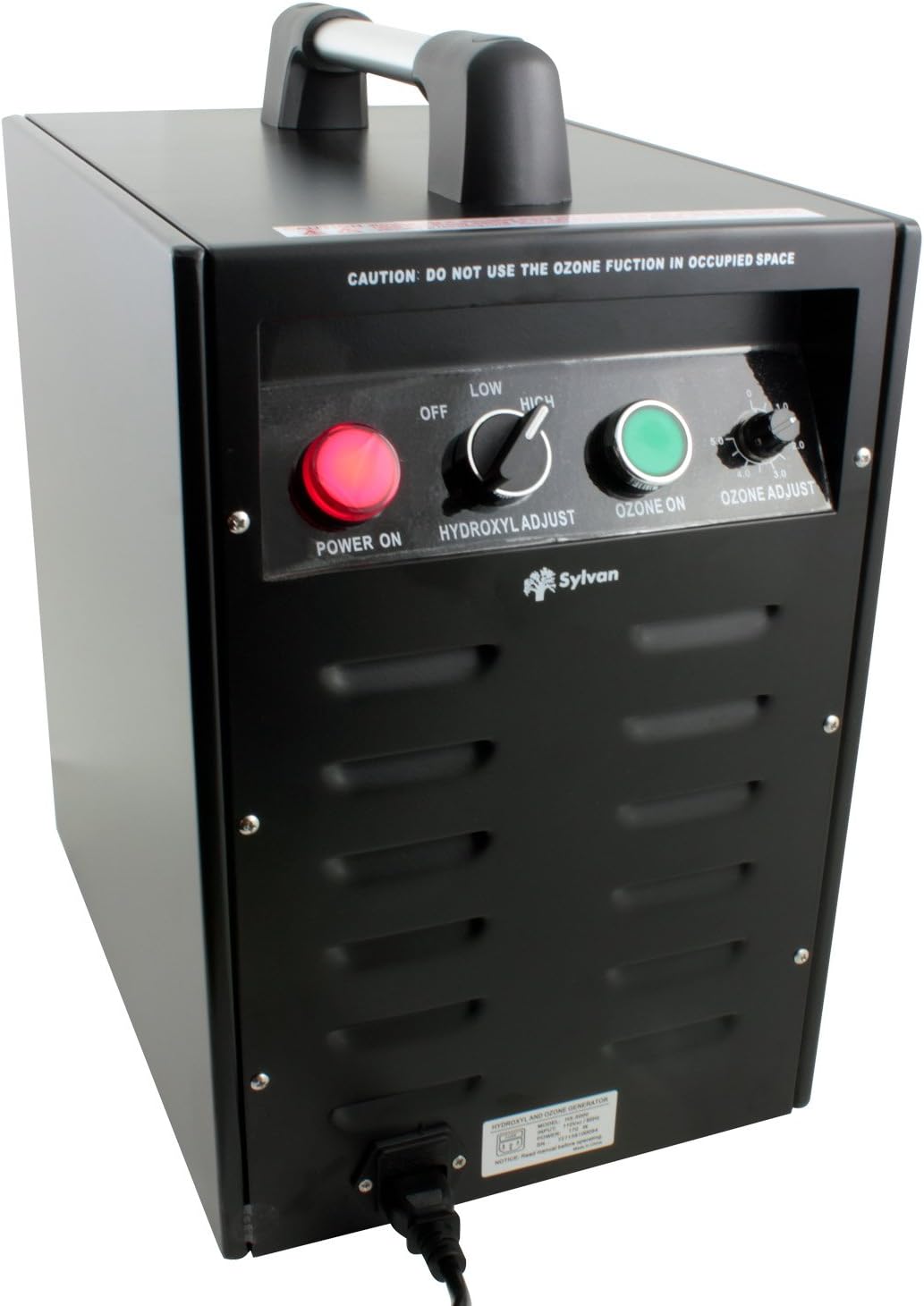
Figura 3.2: detallada view do panel de control.
- POWER ON (Red Button): Activa a unidade.
- HYDROXYL ADJUST (Toggle Switch): Selects between OFF, LOW, and HIGH hydroxyl output.
- OZONE ON (Green Button): Activates the ozone generation function.
- OZONE ADJUST (Rotary Knob): Adjusts ozone output from 0 to 5000 mg/hr.
- CAUTION Label: "DO NOT USE THE OZONE FUNCTION IN OCCUPIED SPACE"
4. Configuración e instalación
- Desempaquetar a unidade: Carefully remove the HX-5000 from its packaging. Inspect for any shipping damage.
- Colocación: Place the unit on a stable, level surface in the area to be treated. Ensure adequate clearance around the air inlet and outlet for proper airflow.
- Connect Air Mover (for Hydroxyl Function): For effective distribution of hydroxyl molecules, connect an external air mover (sold separately) to the air outlet of the HX-5000. The air mover helps circulate the treated air throughout the space.
- Conexión de alimentación: Plug the power cord into the unit's power inlet, then into a standard electrical outlet (AC power).
- Preparación da área:
- Para Hydroxyl-only treatment: Ensure the area is well-ventilated if occupied.
- Para Ozone treatment (or combined Hydroxyl + Ozone): Evacuate all humans, pets, and plants from the treatment area. Close windows and doors to contain the ozone.

Figure 4.1: Sylvan HX-5000 connected to an external air mover for hydroxyl distribution.
5. Instrucións de funcionamento
The HX-5000 offers three operating modes: Hydroxyl-only, Ozone-only, and Combined Hydroxyl + Ozone.
5.1 Hydroxyl-Only Operation (Occupied Spaces)
This mode is suitable for continuous air purification in occupied environments.
- Ensure an air mover is connected and operating to distribute hydroxyls effectively.
- Preme o ENCENDIDO (red) button.
- Establece o HYDROXYL ADJUST toggle switch to BAIXO or ALTO, depending on the treatment intensity required.
- Asegurar o OZONE ON (green) button is DESACTIVADO e o OZONE ADJUST o botón está configurado para 0.
- Allow the unit to operate for the desired duration. Hydroxyl treatment typically requires longer periods (36-48 hours for small rooms) compared to ozone.
5.2 Ozone-Only Operation (Unoccupied Spaces)
CRITICAL: Ensure the treatment area is completely vacant of humans, pets, and plants before activating ozone.
- Ensure the area is evacuated and sealed (windows/doors closed).
- Preme o ENCENDIDO (red) button.
- Establece o HYDROXYL ADJUST toggle switch to DESACTIVADO.
- Preme o OZONE ON (green) button.
- Axustar o OZONE ADJUST rotary knob to the desired output level (0-5000 mg/hr).
- Allow the unit to operate for the required treatment time (e.g., 24 hours for small rooms).
- Despois do tratamento: Turn off the unit, unplug it, and ventilate the area thoroughly for at least 24 hours before re-entry.
5.3 Combined Hydroxyl + Ozone Operation (Unoccupied Spaces)
CRITICAL: This mode is highly oxidizing. Ensure the treatment area is completely vacant of humans, pets, and plants before activating.
- Ensure an air mover is connected and operating.
- Ensure the area is evacuated and sealed.
- Preme o ENCENDIDO (red) button.
- Establece o HYDROXYL ADJUST toggle switch to BAIXO or ALTO.
- Preme o OZONE ON (green) button.
- Axustar o OZONE ADJUST rotary knob to the desired output level.
- Allow the unit to operate for the required treatment time.
- Despois do tratamento: Turn off the unit, unplug it, and ventilate the area thoroughly for at least 24 hours before re-entry.
6. Mantemento
Regular maintenance ensures optimal performance and longevity of your HX-5000 unit.
- Limpeza do exterior: Limpe o exterior da unidade cun suave, damp pano. Non empregue produtos de limpeza abrasivos nin disolventes. Asegúrese de que a unidade estea desconectada antes de limpala.
- Mantemento do filtro de aire: The unit uses an Activated Carbon filter. Regularly check and clean or replace the air filter as needed to maintain airflow and efficiency. Refer to the filter manufacturer's instructions for specific cleaning or replacement intervals.
- Hydroxyl Optic Assemblies: The hydroxyl optic assemblies (UV lamps) have a limited lifespan. If hydroxyl output diminishes, they may need replacement. Contact Sylvan customer support for replacement parts and instructions.
- Ozone Plates: Ozone generation relies on ceramic plates. If ozone output diminishes, these plates may need cleaning or replacement. Contact Sylvan customer support for replacement parts and instructions.
7 Solución de problemas
| Problema | Causa posible | Solución |
|---|---|---|
| A unidade non se acende. | Sen fonte de alimentación. Non se premeu o botón de acendido/apagado. | Comprobe a conexión do cable de alimentación e a toma de corrente. Press the red POWER ON button. |
| No hydroxyl output. | Hydroxyl switch OFF. Optic assemblies worn out. | Set HYDROXYL ADJUST to LOW or HIGH. Contact Sylvan support for replacement optic assemblies. |
| No ozone output. | Ozone button OFF. Ozone adjust knob set to 0. Ozone plates dirty/worn. | Press the green OZONE ON button. Adjust OZONE ADJUST knob to desired level. Contact Sylvan support for cleaning/replacement of ozone plates. |
| Fluxo de aire reducido. | Blocked air inlet/outlet. Filtro de aire sucio. | Ensure no obstructions. Clean or replace the Activated Carbon filter. |
If troubleshooting steps do not resolve the issue, please contact Sylvan customer support.
8. Especificacións
- Modelo: HX-5000
- Marca: Sylvan
- Dimensións do produto (P x A x A): 17" x 10" x 15"
- Peso do artigo: 35 libras
- Fonte de enerxía: AC
- Método de control: Touch, Button Control
- Tipo de filtro: Carbón Activado
- Área de cobertura: Ata 2500 pés cadrados
- Saída de ozono: 0 - 5000 mg/hr (Adjustable)
- Características especiais: Hydroxyl and Ozone Generator Combo with Adjustable Ozone Output

Figure 8.1: Dimensions of the Sylvan HX-5000 unit.
9. Garantía e soporte
For warranty information, technical support, or to order replacement parts, please contact Sylvan customer service. Refer to your purchase documentation for specific warranty terms and contact details.
Fabricante: SYLVAN
Documentos relacionados - HX-5000
 |
Sylvan SL39E Smart Lock Installation and User Manual Comprehensive installation instructions and user guide for the Sylvan SL39E Smart Lock. Learn how to install, set up the Sylvan Smart App, manage users, and configure security settings. |
 |
Sylvan SL42E Smart Lock Installation and User Manual Comprehensive installation and user guide for the Sylvan SL42E Smart Lock. Includes setup instructions, app configuration, management features, troubleshooting, and maintenance tips. |
 |
Sylvan SL38E Smart Lock Installation & User Manual Comprehensive installation and user guide for the Sylvan SL38E Smart Lock. Includes setup, app integration, maintenance, troubleshooting, and warranty information. |
 |
Guía de instalación e usuario da pechadura intelixente Sylvan SL46E Comprehensive installation and setup guide for the Sylvan SL46E Smart Lock. Learn how to install, configure the Sylvan Smart App, manage users, and maintain your smart lock. |
 |
Sylvan SL40E Smart Lock Installation and User Manual Comprehensive installation and user guide for the Sylvan SL40E Smart Lock. Includes setup instructions, Sylvan Smart App configuration, maintenance, and troubleshooting. |
 |
Sylvan SL43E Smart Lock Installation and User Manual Comprehensive installation, setup, and user guide for the Sylvan SL43E Smart Lock. Includes instructions for app configuration, Bluetooth, RFID, fingerprint setup, and maintenance. |
Ask a question about this manual
Ask about setup, troubleshooting, compatibility, parts, safety, or missing instructions. Manuals+ will review the question and use this page’s manual context to help answer it.