
1. Introdución
This manual provides essential information for the safe and effective operation of your Aputure 300d II LED Video Light. Please read this manual thoroughly before using the product to ensure proper setup, usage, and maintenance. Retain this manual for future reference.
Que hai na caixa:
- 1 x Aputure LS C300D II Led video light
- 1 x 300D II Light Cover
- 1 x caixa de control
- 1 x Hang Buckle
- 1 x cable de alimentación

Image: The Aputure 300d II LED Video Light and its accessories neatly packed in the included grey carry case.
2. Información de seguridade
Always observe basic safety precautions when using electrical equipment to reduce the risk of fire, electric shock, or injury. This product is designed for professional use in controlled environments.
- Non fagas funcionar a lámpada con mans molladas nin preto da auga.
- Garantir unha ventilación adecuada para evitar o sobrequecemento.
- Non mire directamente á fonte de luz cando estea activa.
- Use only approved power cables and accessories.
- Manter fóra do alcance dos nenos.
3. Produto rematadoview
The Aputure 300d Mark II is an advanced LED video light offering enhanced brightness, durability, and intelligent control features. It is designed for professional photography and video production, providing high-quality daylight-balanced illumination.
Características principais:
- Brillo aumentado: 20% brighter than its predecessor, capable of up to 80,000 lux when combined with the Fresnel 2X.
- Exceptional Color Fidelity: 5500K daylight-balanced with CRI and TLCI ratings of 96+ and 97+ respectively.
- Deseño robusto: Features a new yoke for 360° rotation and a handbrake locking mechanism for secure positioning.
- Funcionamento silencioso: The all-in-one control box operates silently.
- Built-in Lighting FX: Includes 8 special effects: Paparazzi, Spark, Lightning, Faulty Bulb, TV, Pulse, Flash, and Explosion.
- Control versátil: DMX512-compatibility, 2.4Ghz Aputure Wireless remote, and Sidus Link App control via Bluetooth mesh network.

Image: The Aputure 300d II LED Video Light with a standard reflector, showcasing a súa robusta construción.

Imaxe: Traseira view of the Aputure 300d II, highlighting the power connection and product labeling.
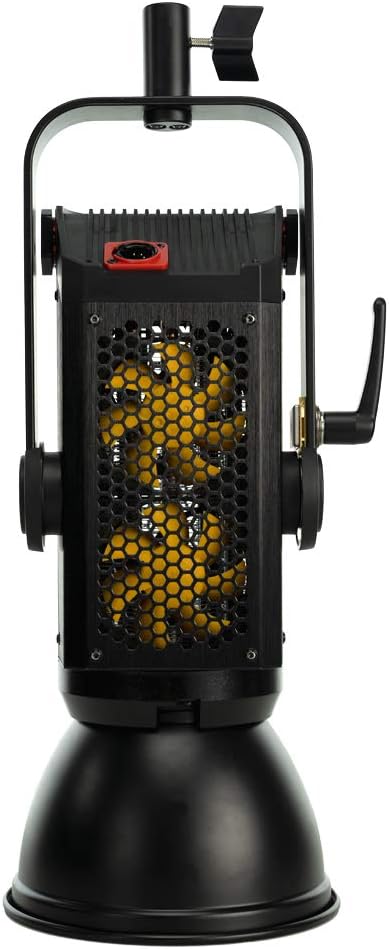
Imaxe: Lateral view of the Aputure 300d II, revealing the cooling vents for efficient heat dissipation.
4. Configuración
Follow these steps to set up your Aputure 300d II LED Video Light for operation.
- Montaxe da luz: Secure the light fixture onto a compatible light stand using the integrated yoke and handbrake locking mechanism. Ensure it is stable before proceeding.
- Conexión da caixa de control: Connect the light fixture to the all-in-one control box using the provided cable. The control box can be mounted on the light stand or placed nearby.
- Conexión de alimentación: Connect the power cord from the control box to a suitable power outlet. The control box also supports V-mount batteries for portable operation (batteries not included).
- Adxuntar modificadores: Attach any desired light modifiers, such as the included reflector or a softbox, to the front of the light fixture.

Image: The Aputure 300d II LED Video Light fully assembled on a stand with a reflector, ready for use.
Vídeo: Un funcionario acabouview of the Aputure LS C300d II LED Video Light, demonstrating its features and components.
5. Instrucións de funcionamento
The Aputure 300d II offers multiple control methods for flexibility in various shooting scenarios.
Control Box Operation:
- Encendido/apagado: Prema o botón de acendido na caixa de control para acender ou apagar a luz.
- Axustar o brillo: Use the brightness dial to adjust the light intensity from 0% to 100%.
- Access FX Modes: Press the 'FX' button to cycle through the 8 built-in lighting effects. Use the 'Trigger' button to activate effects instantly.
- Channel/Group Selection: Use the 'Channel' and 'Group' buttons to assign the light to specific channels or groups for multi-light setups.
Control sen fíos:
- 2.4Ghz Remote: Use the included Aputure Wireless remote to control basic functions and trigger FX modes.
- Aplicación Sidus Link: Download the Sidus Link App on your smartphone or tablet to control the light via Bluetooth mesh network. The app provides advanced control over brightness, effects, and other settings.

Image: The control box display of the Aputure 300d II, showing current settings for brightness, channel, and group.
6. Mantemento
Regular maintenance ensures the longevity and optimal performance of your Aputure 300d II LED Video Light.
- Limpeza: Use a soft, dry cloth to clean the light fixture and control box. Avoid abrasive cleaners or solvents.
- Almacenamento: Store the light in its original carry case in a cool, dry place when not in use.
- Inspección de cables: Comprobe periodicamente todos os cables para detectar signos de desgaste ou danos. Substitúa inmediatamente calquera cable danado.
- Actualizacións de firmware: Check the Aputure website for any available firmware updates to ensure your light has the latest features and performance enhancements.
7 Solución de problemas
If you encounter issues with your Aputure 300d II, refer to the following common solutions:
- A luz non se acende: Ensure the power cord is securely connected to both the control box and the power outlet. Check if the power button on the control box is pressed. If using V-mount batteries, ensure they are charged and properly seated.
- No Wireless Control: Verify that the 2.4Ghz remote or your device with the Sidus Link App is within range and properly paired with the light. Check battery levels on the remote.
- Aviso de sobrequecemento: Ensure the light's vents are not obstructed and that it is operating in a well-ventilated area. Reduce brightness if the warning persists.
- Brillo inconsistente: Check all cable connections. If using V-mount batteries, ensure they provide sufficient power for the desired brightness level.
For further assistance, contact Aputure customer support.
8. Especificacións
| Dimensións do produto | 13.1 x 11.1 x 24.9 polgadas |
| Peso do elemento | 24.7 libras |
| Número de modelo do artigo | Aputure C300d II |
| Marca | Aputura |
| Tecnoloxía de conectividade | Bluetooth, Radio Frequency, USB |
| Interface de hardware | Bluetooth, USB |
| UPC | 712350138745 |
9. Garantía e soporte
Aputure products are designed for reliability and performance. This product comes with a standard manufacturer's warranty. Please refer to the warranty card included in your product packaging for specific terms and conditions.
For technical support, service, or warranty claims, please visit the official Aputure website or contact their customer service department. Ensure you have your product model number (C300d II) and proof of purchase available when seeking support.