1. Introdución
Thank you for choosing TREBLAB Z2 Hybrid Active Noise Cancelling Wireless Headphones. This manual provides essential information for setting up, operating, and maintaining your headphones to ensure optimal performance and longevity. Please read it carefully before use.
2. Que hai na caixa
- TREBLAB Z2 Headphones
- TREBLAB Z2 Carrying Case
- Cable de audio de 3.5 mm (AUX)
- Cable de carga USB tipo C
- User Manual; Quick Start Guide; Catalogue; Warranty card
3. Produto rematadoview
Características dos auriculares
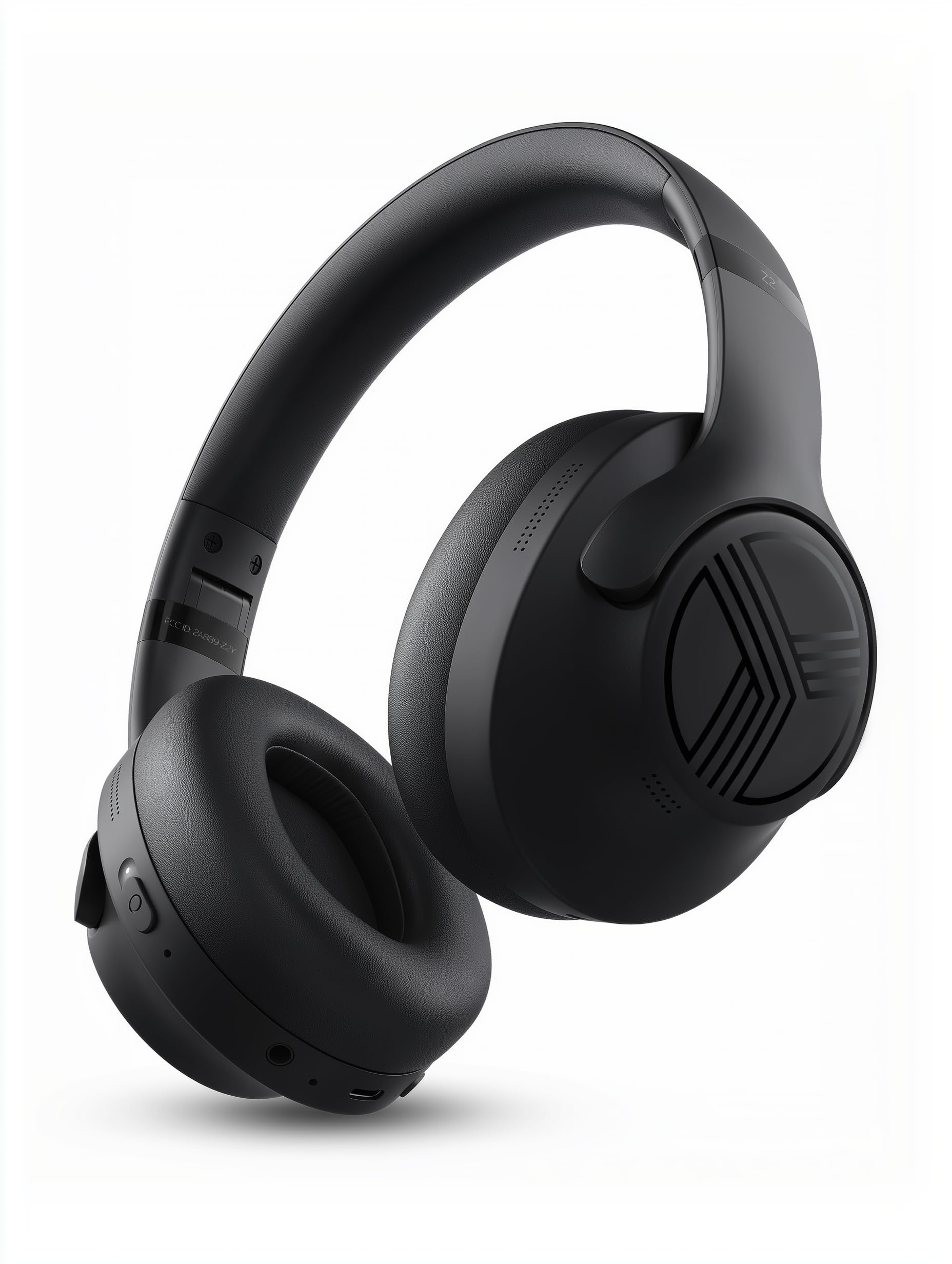
The TREBLAB Z2 headphones are designed for versatility and performance, featuring Hybrid Active Noise Cancelling (ANC) to minimize distractions, a long-lasting battery, and a comfortable, sweat-resistant design suitable for various activities.
- Cancelación activa de ruído híbrida: Blocks external noise for immersive audio.
- Tempo de reprodución ampliado: Up to 58 hours of battery life (without ANC, at 70% volume).
- Graves profundos: Powerful audio with balanced sound.
- IPX4 Water Resistant & Sweatproof: Durable for workouts and outdoor use.
- Bluetooth 5.3 e conexión multipunto: Stable wireless connection to multiple devices.
- Micrófono incorporado: Clear voice pickup for calls.
- Deseño plegable: Lightweight and comfortable for extended wear and easy storage.
Controis e portos
The headphones feature intuitive button controls for playback, volume, calls, and ANC activation. All controls and ports are conveniently located on the earcups.
- Power/Play/Pause/Phone Button: Central control for power, media playback, and call management.
- Botón para subir o volume/seguinte pista: Adjust volume or skip to the next song.
- Botón para baixar o volume/pista anterior: Adjust volume or go to the previous song.
- ANC On/Off Switch: Activate or deactivate Active Noise Cancelling.
- Micro USB/USB Type-C Charging Port: Para cargar os auriculares.
- Entrada AUX (conector de 3.5 mm): Para conexión por cable.
- Micrófono: Para chamadas mans libres e comandos do asistente de voz.
- Indicador LED: Mostra o estado de enerxía, emparellamento e carga.
4. Configuración
4.1 Carga dos auriculares
Before first use, fully charge your TREBLAB Z2 headphones. A full charge takes approximately 3 hours.
- Conecta o cable de carga USB tipo C ao porto de carga dos auriculares.
- Conecta o outro extremo do cable a unha fonte de alimentación USB compatible (por exemplo, un adaptador de parede, un porto USB do ordenador).
- O indicador LED amosarase vermello durante a carga e apagarase cando estea completamente cargado.
4.2 Emparejamento Bluetooth
Para conectar os auriculares a un dispositivo mediante Bluetooth:
- Asegúrese de que os auriculares estean cargados e apagados.
- Press and hold the Power/Play/Pause button for a few seconds until the LED indicator flashes blue and red, indicating pairing mode.
- No teu dispositivo (teléfono intelixente, tableta, ordenador), activa o Bluetooth e busca os dispositivos dispoñibles.
- Select "TREBLAB Z2" from the list of found devices.
- Unha vez emparellado correctamente, o indicador LED parpadeará lentamente en azul e escoitarás un ton de confirmación.
For multipoint connection, pair the first device, then disable Bluetooth on the first device. Put the headphones back into pairing mode and connect to the second device. Once connected, re-enable Bluetooth on the first device, and the headphones should connect to both.
5. Instrucións de funcionamento
5.1 Encendido/apagado
- Encendido: Press and hold the Power/Play/Pause button for 3 seconds.
- Apagado: Press and hold the Power/Play/Pause button for 5 seconds.
5.2 Reprodución de música
- Reproducir/Pausa: Short press the Power/Play/Pause button.
- Próxima pista: Long press the Volume Up/Next Track button.
- Pista anterior: Long press the Volume Down/Previous Track button.
- Subir volume: Short press the Volume Up/Next Track button.
- Baixar volume: Short press the Volume Down/Previous Track button.
5.3 Xestión de chamadas
- Responder chamada: Short press the Power/Play/Pause button.
- Finalizar a chamada: Short press the Power/Play/Pause button during a call.
- Rexeitar a chamada: Long press the Power/Play/Pause button for 2 seconds.
- Volver marcar: Prema dúas veces o botón de acendido/reproducir/pausa.
5.4 Cancelación activa de ruído (ANC)
To activate ANC, slide the ANC switch on the left earcup to the 'ON' position. The LED indicator will light up. Slide to 'OFF' to deactivate.
5.5 Asistente de voz
Activate your device's voice assistant (Siri, Google Assistant, Alexa) by pressing the Power/Play/Pause button for 1 second.
6. Mantemento
- Clean headphones with a soft, damp pano. Non use produtos químicos agresivos.
- Store headphones in the provided carrying case when not in use to protect them from dust and damage.
- Avoid exposing headphones to extreme temperatures, direct sunlight, or excessive moisture.
- Non intente desmontar nin modificar os auriculares, xa que isto anulará a garantía.
7 Solución de problemas
| Problema | Solución |
|---|---|
| Os auriculares non se acenderán | Asegúrate de que os auriculares estean completamente cargados. |
| Non se pode emparellar por Bluetooth | Ensure headphones are in pairing mode (flashing blue/red LED). Turn off and on Bluetooth on your device. Clear previous pairings on your device. |
| Sen son nin baixo volume | Check volume levels on both headphones and connected device. Ensure headphones are properly paired. Try a wired connection with the AUX cable. |
| ANC non funciona eficazmente | Ensure ANC switch is in the 'ON' position. Check for proper fit of earcups over ears. |
8. Especificacións
| Característica | Detalle |
|---|---|
| Nome do modelo | Z2 |
| Control de ruído | Cancelación activa de ruído híbrida |
| Versión Bluetooth | 5.3 |
| Alcance Bluetooth | 33 pés (10 metros) |
| Duración da batería (máx.) | Up to 58 hours (No ANC, 70% volume) |
| Duración da batería (ANC activado) | Up to 51 hours (ANC + Wireless, 70% volume) |
| Tempo de carga | 3 horas |
| Tamaño do controlador de audio | 40 milímetros |
| Resposta en frecuencia | 20 Hz - 20 kHz |
| Sensibilidade | 103 dB |
| Impedancia | 32 ohmios |
| Nivel de resistencia á auga | IPX4 (resistente á auga e á suor) |
| Peso do elemento | 8.5 onzas |
| Dimensións | 6.4 x 3.2 x 8 polgadas |
9. Garantía e soporte
Your TREBLAB Z2 headphones are covered by a 1-YEAR WARRANTY & 30-DAY RETURNS. For any questions, suggestions, or issues, please refer to the warranty card included in the box or contact TREBLAB customer support.
10. Galería multimedia
Imaxes do produto