
Introdución
This manual provides instructions for the Transformers Cyberverse Deluxe Class Optimus Prime action figure. This figure allows for conversion between robot and truck modes and features the Matrix Mega Shot attack. It is designed for children aged 6 years and older.

Image: Optimus Prime figure in robot mode, ready for action.
Configuración
Upon unboxing, ensure all components are present. The package includes:
- One (1) Optimus Prime action figure
- Two (2) accessories (blasters)
- One (1) build-a-figure part (for Maccadam)
- Instruction leaflet (refer to for detailed visual steps)
Inspección Inicial
Carefully remove the figure and accessories from the packaging. Inspect for any visible damage or missing parts. If any issues are found, contact customer support.
Accesorios de montaxe
The two blaster accessories can be attached to Optimus Prime's hands in robot mode. Gently push the handle of each blaster into the designated slots in the figure's hands until secure.
Build-A-Figure Part
This figure includes one part for building the Maccadam figure. Collect other Deluxe Class figures from the Cyberverse series to complete the Maccadam figure. Refer to the instructions included with each figure for assembly details of the Maccadam figure.
Instrucións de funcionamento
Converting from Robot Mode to Truck Mode
The Optimus Prime figure converts from robot mode to truck mode in 13 steps. Follow the visual instructions provided in the included leaflet for precise transformation. Key steps generally involve:
- Folding the arms and hands.
- Collapsing the legs and feet.
- Rotating and aligning body panels to form the truck chassis.
- Securing all parts to ensure a compact truck form.
The final step of conversion activates the figure’s Matrix Mega Shot attack in both robot and truck mode.
Converting from Truck Mode to Robot Mode
The Optimus Prime figure converts from truck mode back to robot mode in 6 steps. Refer to the included instruction leaflet for detailed visual guidance. This process typically involves:
- Unfolding the truck panels to reveal robot limbs.
- Extending the legs and arms.
- Positioning the head and torso.
- Locking all joints into robot configuration.
Activating Matrix Mega Shot Attack
The Matrix Mega Shot attack is activated during the final step of conversion. To reactivate the attack move, follow the specific reactivation steps outlined in the included instruction leaflet. This feature is manually operated and does not require batteries.
Mantemento
Limpeza
To clean the Optimus Prime figure, gently wipe it with a soft, dry cloth. For stubborn dirt, a slightly damp cloth can be used, followed by immediate drying. Avoid using harsh chemicals, abrasive cleaners, or excessive water, as these can damage the plastic and paint finish.
Almacenamento
Store the figure in a cool, dry place away from direct sunlight and extreme temperatures. Prolonged exposure to heat or sunlight can cause discoloration or warping of the plastic. Keep accessories and build-a-figure parts together to prevent loss.
Resolución de problemas
- Dificultade na conversión: If the figure is difficult to convert, ensure all previous steps are completed correctly and that no parts are jammed. Do not force parts, as this may cause breakage. Refer to the included instruction leaflet for visual guidance on each step.
- Articulacións soltas: Over time, joints may become slightly loose with repeated use. This is typical for action figures. If a joint is excessively loose and affects stability, contact customer support for advice.
- Accessories Not Staying Attached: Ensure accessories are fully inserted into their designated slots. If they consistently fall out, inspect the connection points for any deformities.
Especificacións
| Marca | Transformadores |
| Nome do modelo | ÓPTIMO PRIME |
| Número de modelo | E70965L00 |
| Tipo de figura | Deluxe Class Action Figure |
| Personaxe | Optimus Prime |
| Fabricante | Hasbro |
| Idade recomendada | 6 anos en diante |
| Material | Plástico |
| Altura da figura | 5 polgadas (aprox. 12.7 cm) |
| Dimensións do artigo (L x W x H) | 5.98" x 2.52" x 9.37" (15.19 cm x 6.4 cm x 23.8 cm) |
| Peso do elemento | 150 gramos |
| Conversion Steps (Robot to Truck) | 13 pasos |
| Conversion Steps (Truck to Robot) | 6 pasos |
| Característica especial | Matrix Mega Shot Attack |
| Fonte de enerxía | Manual (No batteries required) |
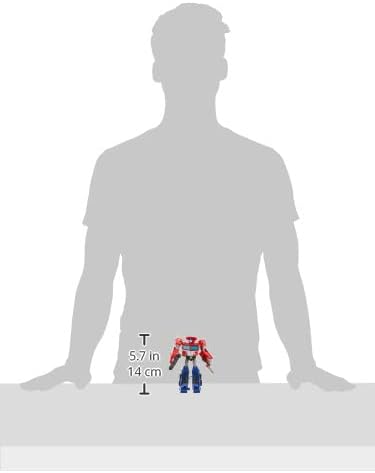
Image: Figure size comparison, showing approximate height.
Garantía e Soporte
Specific warranty information for the Transformers Cyberverse Deluxe Class Optimus Prime action figure is not provided in the product data. For details regarding warranty coverage, returns, or product support, please refer to the manufacturer's official websitio web ou póñase en contacto co vendedor ao que lle comprou o produto.
Manufacturer: Hasbro
For further assistance, visit the official Hasbro customer service portal or the website of your point of purchase.