
1. Produto rematadoview
The Schneider SC600SND is a versatile 2.0 channel soundbar designed to enhance your audio experience. It offers a total output power of 30W (15W x 2) and supports multiple connectivity options including Bluetooth, HDMI (ARC), Optical, and Aux. A unique feature of this soundbar is its convertible design, allowing it to be used as a single horizontal unit or split into two vertical speaker columns.

Image 1.1: The Schneider SC600SND Soundbar in its standard monoblock configuration.
2. Configuración
2.1 Desembalaxe e colocación
Carefully remove all components from the packaging. Ensure you have the soundbar unit, remote control, and 3.5mm Jack cable.
The SC600SND soundbar offers two primary placement options:
- Monoblock Configuration: Use the soundbar as a single horizontal unit, ideal for placing below your television.
- Split Column Configuration: The soundbar can be separated into two vertical speaker columns. This allows for flexible placement on either side of your television or entertainment unit. To split, gently twist and pull the two halves apart at the central connection point. Attach the provided bases to each column for stability.

Image 2.1: Detail of the central connection point, allowing the soundbar to be split into two columns.
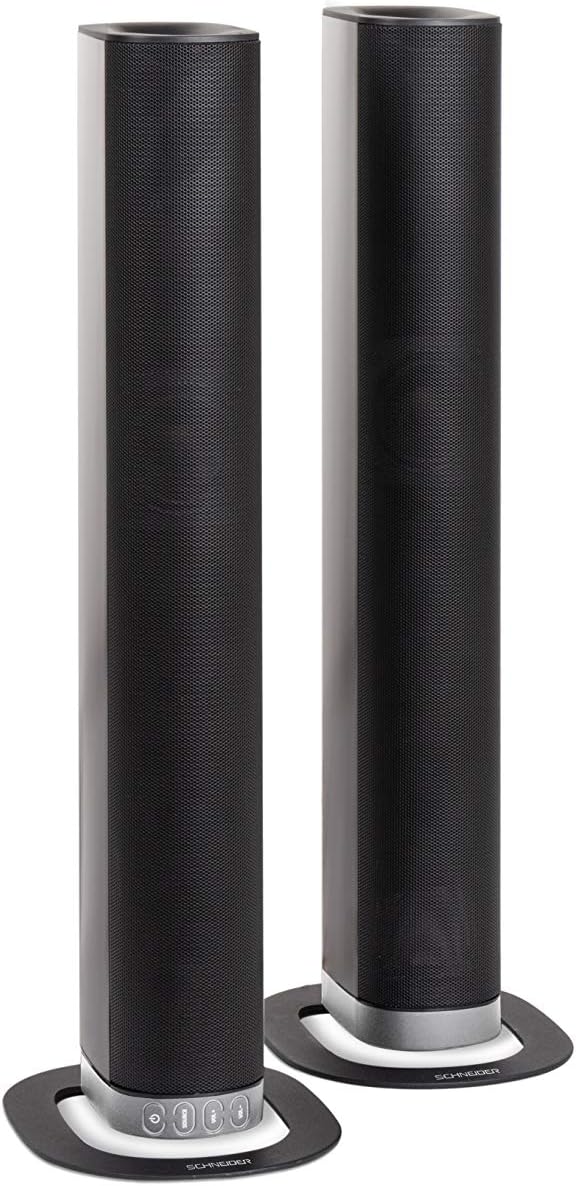
Image 2.2: The soundbar configured as two independent vertical speaker columns.
2.2 Conexión á enerxía
Connect the power cable to the soundbar's power input and then to a suitable wall outlet. The soundbar will enter standby mode.
2.3 Conexións de audio
Escolla un dos seguintes métodos para conectar a súa fonte de son:
- HDMI (ARC): For optimal audio quality and control, connect an HDMI cable from the soundbar's HDMI ARC port to your TV's HDMI ARC port. This allows your TV remote to control the soundbar's volume.
- Óptica: Connect an optical cable from the soundbar's OPTICAL input to your TV's optical output.
- AUX: Use the included 3.5mm Jack cable to connect the soundbar's AUX input to the headphone jack or audio output of your device (e.g., TV, smartphone, MP3 player).
- Bluetooth: For wireless connection, refer to the Bluetooth pairing instructions in the Operating section.
3. Instrucións de funcionamento
3.1 Encendido/apagado
Preme o Poder botón da barra de son ou do mando a distancia para acender ou apagar a unidade.
3.2 Selección da fonte
Preme o FONTE button on the soundbar or the remote control to cycle through the available input sources: Bluetooth (BT), HDMI (ARC), Optical, and AUX.

Image 3.1: On-unit control buttons for power, source selection, and volume adjustment.
3.3 Control de volume
Usa o VOL+ e VOL- buttons on the soundbar or remote control to adjust the volume. Press the MUTO button on the remote to temporarily silence the audio.
3.4 Emparejamento Bluetooth
- Select Bluetooth as the source input. The soundbar will enter pairing mode, indicated by a flashing LED.
- No teu dispositivo móbil (teléfono intelixente, tableta, etc.), activa o Bluetooth e busca os dispositivos dispoñibles.
- Select "SC600SND" from the list of devices.
- Once paired, the LED indicator on the soundbar will stop flashing and remain solid. You can now play audio wirelessly from your device.
3.5 Modos de son
The remote control includes dedicated buttons for different sound modes to optimize your listening experience:
- NOVAS: Enhances vocal clarity for news broadcasts and dialogue.
- PELÍCULA: Provides a more immersive soundstage for films.
- MÚSICA: Optimiza o audio para a reprodución de música.

Image 3.2: The included remote control with dedicated buttons for power, source, volume, mute, and sound modes.
4. Mantemento
Para garantir a lonxevidade e o rendemento óptimo da túa barra de son, segue estas pautas de mantemento:
- Limpeza: Use a soft, dry cloth to clean the exterior surfaces of the soundbar. Do not use liquid cleaners, aerosols, or abrasive materials, as these can damage the finish or internal components.
- Ventilación: Ensure that the soundbar's ventilation openings are not blocked. Proper airflow prevents overheating.
- Almacenamento: Se garda a barra de son durante un período prolongado, desconéctea da corrente e gárdea nun lugar fresco e seco, lonxe da luz solar directa e de temperaturas extremas.
- Manexo: Evite deixar caer a barra de son nin someterla a impactos fortes.
5 Solución de problemas
If you encounter issues with your SC600SND soundbar, refer to the following common problems and solutions:
- Sen enerxía:
- Ensure the power cable is securely connected to both the soundbar and a working power outlet.
- Comprobe se a toma de corrente funciona conectando outro dispositivo.
- Sen son:
- Verify that the correct input source (HDMI, Optical, AUX, Bluetooth) is selected on the soundbar.
- Increase the volume on both the soundbar and your connected audio source (e.g., TV, smartphone).
- Asegúrate de que a barra de son non estea silenciada.
- Check all audio cables for secure connections and damage. Try a different cable if possible.
- If using HDMI ARC, ensure your TV's HDMI ARC function is enabled in its settings.
- Poor Sound Quality / Distorted Audio:
- Adjust the volume levels to avoid distortion.
- Try switching between the different sound modes (NEWS, MOVIE, MUSIC) to see if one improves the audio for your content.
- Asegúrate de que a barra de son estea colocada sobre unha superficie estable e que non vibre excesivamente.
- If using Bluetooth, ensure your device is within range and there are no obstructions causing interference.
- Problemas de sincronización Bluetooth:
- Ensure the soundbar is in Bluetooth pairing mode (flashing LED).
- Make sure your device's Bluetooth is enabled and it is searching for new devices.
- Achega o dispositivo á barra de son.
- Se xa estaba emparellado, tenta desemparellar e volver emparellar o dispositivo.
- O control remoto non funciona:
- Comprobe e substitúa as pilas do mando a distancia.
- Asegúrate de que non haxa obstrucións entre o mando a distancia e o sensor da barra de son.
- Apunta o control remoto directamente á barra de son.
6. Especificacións
| Característica | Especificación |
|---|---|
| Número de modelo | SC600SND |
| Canles | 2.0 |
| Potencia de saída | 30 W (15 W x 2) |
| Tecnoloxía de conectividade | Bluetooth, HDMI (ARC), Optical, Aux |
| Comunicación sen fíos | Bluetooth |
| Método de control | Control remoto |
| Tipo de altofalante | Barra de son |
| Tamaño do altofalante | 2 polgadas |
| Fonte de enerxía | Cable eléctrico |
| Product Dimensions (Monoblock) | 80.5 x 6.2 x 9 cm |
| Peso do produto | 2.5 quilogramos |
| Compoñentes incluídos | Remote Control, 3.5mm Jack Cable |
| Cor | Negro |
7. Garantía e soporte
7.1 Garantía limitada
This Schneider SC600SND Soundbar is covered by a Limited Warranty. Please refer to the warranty card included with your product or contact your retailer for specific terms and conditions regarding warranty coverage and duration.
7.2 Atención ao cliente
For technical assistance, troubleshooting beyond this manual, or warranty claims, please contact the retailer where you purchased the product or visit the official Schneider websitio para obter información de soporte.