
1. Introdución
This manual provides detailed instructions for the proper use and maintenance of your Zerone AYNEFY0oxm4abc37 USB Endoscope. This device is designed for visual inspection in hard-to-reach areas, offering compatibility with Android smartphones and various computer operating systems. Please read this manual thoroughly before operating the endoscope to ensure optimal performance and longevity.
2. Produto rematadoview
2.1 Características principais
- Deseño compacto: Features a slim 5.5mm diameter lens for accessing narrow spaces.
- Clasificación impermeable: IP67 waterproof-rated, suitable for moist or underwater inspections.
- Iluminación axustable: Equipped with 6 adjustable LED lights to enhance visibility in dark environments.
- Imaxe de alta definición: 2.0MP CMOS HD camera provides clear and detailed images and videos.
- Construción duradeira: Crafted from high-quality materials for reliability and extended use.
- Ampla compatibilidade: 3-in-1 USB connector supports Android smartphones (with OTG function) and computers (Windows XP/W7/W8/VISTA/W10).
- Alcance estendido: Includes a 5-meter USB cable for flexible inspection tasks.
2.2 Compoñentes

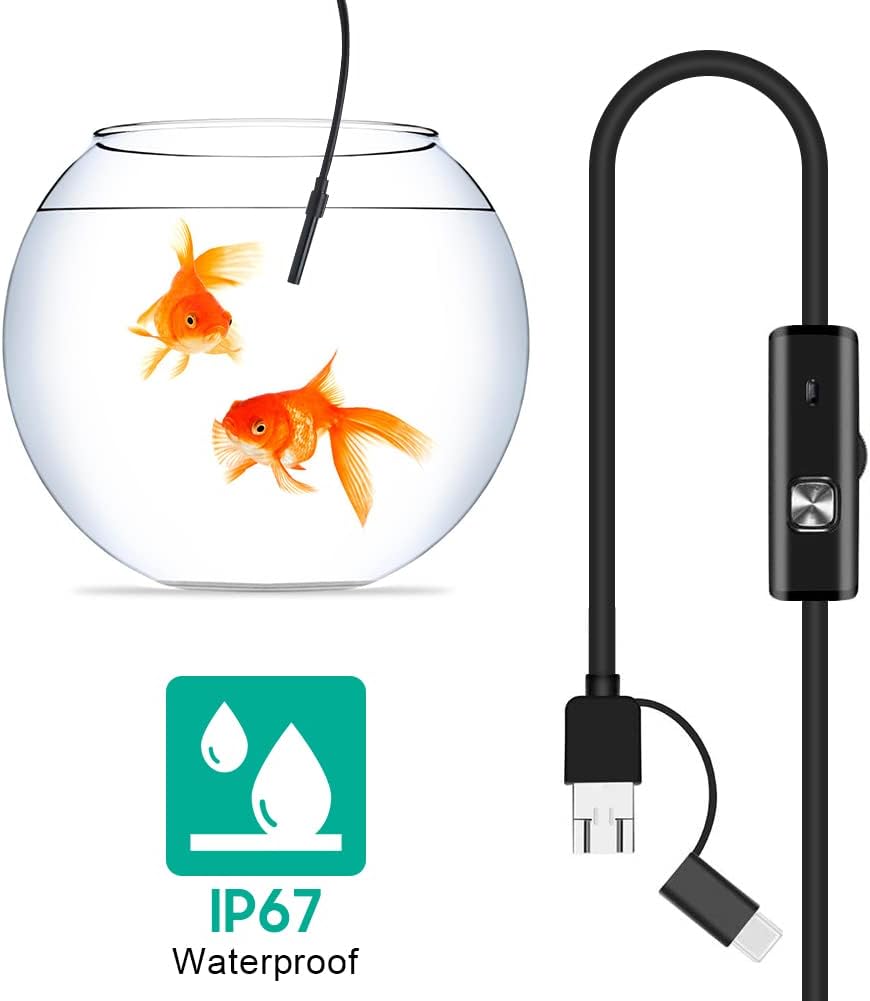


3. Configuración
3.1 Requisitos do sistema
- Dispositivos Android: Android 4.4 or higher with OTG (On-The-Go) and UVC (USB Video Class) support.
- Ordenadores: Windows XP, Windows 7, Windows 8, Windows Vista, Windows 10.
3.2 Instalación de software
For Android devices, download and install a compatible camera application from the Google Play Store that supports USB OTG endoscopes. Recommended applications include 'USB Camera', 'AN98', or 'CameraFi'. For Windows computers, the device typically functions with the built-in 'Camera' application or other webcam software. Drivers are usually installed automatically upon connection.
3.3 Conexión do endoscopio
- Para Android: Connect the appropriate connector (Micro-USB or USB-C) of the endoscope cable to your smartphone. Ensure your phone's OTG function is enabled in settings if it doesn't automatically detect the device.
- Para PC: Connect the standard USB-A connector of the endoscope cable to an available USB port on your computer.
- Open the installed camera application on your device. The endoscope feed should appear.
4. Instrucións de funcionamento
4.1 Axustar o brillo do LED
The control unit on the cable features a wheel or button to adjust the brightness of the 6 LED lights at the camera tip. Rotate the wheel or press the button to increase or decrease illumination as needed for clear viewen diversos entornos.
4.2 Uso de accesorios
- Side Mirror: Attach the side mirror to the camera tip to view objects at a 90-degree angle. This is useful for inspecting walls of pipes or tight corners.
- Imán: Attach the magnet to the camera tip to retrieve small metallic objects from inaccessible areas.
- Gancho: Attach the hook to the camera tip to retrieve small non-metallic objects.
4.3 Captura de imaxes e vídeos
Use the functions within your chosen camera application to capture still images or record video footage from the endoscope. Refer to your application's specific instructions for these features.

5. Mantemento
5.1 Limpeza
- After each use, gently wipe the camera lens and probe with a soft, dry cloth.
- Para a sucidade persistente, un lixeiro damp cloth can be used, ensuring no liquid enters the control unit or connectors.
- Do not use abrasive cleaners or solvents, as these can damage the lens or casing.
5.2 Almacenamento
- Garde o endoscopio nun lugar fresco e seco, lonxe da luz solar directa e de temperaturas extremas.
- Avoid kinking or sharply bending the cable to prevent internal damage.
- Keep the lens cap on when not in use to protect the lens from dust and scratches.
6 Solución de problemas
- No Image/Device Not Detected:
- Ensure the endoscope is securely connected to your device.
- For Android, verify that OTG function is enabled in your phone's settings.
- Proba cun porto USB diferente no teu ordenador.
- Ensure the correct camera application is open and selected (if multiple cameras are detected).
- Reinicia o teu dispositivo e téntao de novo.
- Imaxe borrosa:
- The endoscope has a fixed focal length. Ensure the object being viewed is within the optimal focal range (typically a few centimeters from the lens).
- Clean the camera lens for any smudges or debris.
- Adjust the LED brightness to prevent overexposure or underexposure.
- As luces LED non funcionan:
- Check the LED brightness adjustment wheel/button on the control unit.
- Ensure the endoscope is properly connected and receiving power.
- Fallos/conxelacións da aplicación:
- Try a different compatible camera application.
- Asegúrate de que o sistema operativo do teu dispositivo estea actualizado.
- Pecha outras aplicacións en segundo plano para liberar recursos do sistema.
7. Especificacións
| Característica | Especificación |
|---|---|
| Número de modelo | AYNEFY0oxm4abc37 |
| Diámetro da lente | 5.5 mm |
| Resolución da cámara | 2.0MP CMOS HD (Video Capture Resolution: 1080p) |
| Luces LED | 6 LEDs axustables |
| Lonxitude do cable | 5 metros |
| Clasificación impermeable | IP67 |
| Conectividade | 3-in-1 USB (USB-A, Micro-USB, USB-C) |
| Compatibilidade | Android (OTG/UVC support), Windows XP/7/8/VISTA/10 |
| Dimensións do produto | 4.72 x 4.72 x 1.38 polgadas |
| Peso do elemento | 4.6 onzas |
| Cor | Negro |
| Fabricante | Cero |
8. Garantía e soporte
For warranty information or technical support, please refer to the product packaging or contact the retailer from whom the product was purchased. You may also visit the official Zerone websitio para obter máis axuda.