
1. Introdución e finalview
The Samson CB288 Beltpack Transmitter is a key component of the Samson Concert 288 Wireless System, designed to provide reliable and high-quality audio transmission for various applications. This compact and durable transmitter offers exceptional performance and ease of use, making it ideal for musicians, presenters, and performers.
This manual provides detailed instructions on the setup, operation, maintenance, and troubleshooting of your CB288 Beltpack Transmitter to ensure optimal performance and longevity.
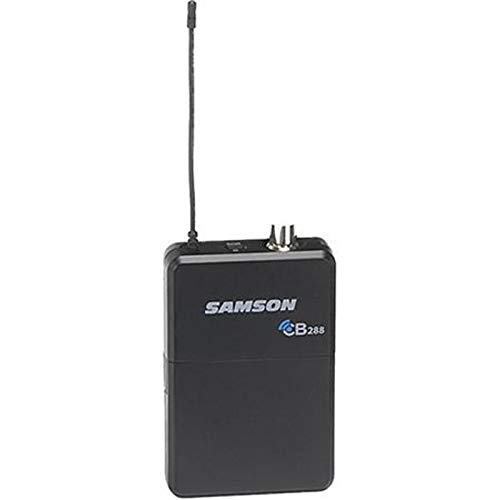
Figura 1: Fronte view of the Samson CB288 Beltpack Transmitter. The device is black with the "SAMSON CB288" logo visible on the front. An antenna extends from the top left, and two small connectors are visible on the top right.
2. Características clave
- Duración prolongada da batería: Operates for up to eight hours on two standard AA batteries.
- Amplio rango de operación: Provides a reliable operating range of up to 300 feet (line of sight).
- Specific Frequency Band: Operates within Band I, Channel A: 518-542MHz, ensuring clear and interference-free transmission.
- Versatile Input: Features a Mini-XLR (P3) input connector for various microphone and instrument connections.
- Optimized Input Impedance: Designed with a 1MOhm input impedance for broad compatibility.
- Adjustable Input Gain: Offers a 38dB input gain range, allowing precise level matching for different audio sources.
- Construción duradeira: Built to withstand the rigors of live performance and regular use.
3. Guía de configuración
3.1. Instalación da batería
- Locate the battery compartment on the rear of the CB288 Beltpack Transmitter.
- Deslice a tapa do compartimento da batería.
- Insert two fresh AA batteries, ensuring correct polarity (+/-) as indicated inside the compartment.
- Pecha a tapa do compartimento da batería de forma segura.
Nota: Always use fresh alkaline or rechargeable AA batteries for optimal performance and battery life. Remove batteries if the unit will not be used for an extended period.
3.2. Connecting a Microphone or Instrument
- Identify the Mini-XLR (P3) input connector on the top of the transmitter.
- Connect your compatible Samson microphone (e.g., LM10, HS5) or instrument cable to this input. Ensure the connector clicks firmly into place.
3.3. Acendido/apagado
- To power on, press and hold the power button located on the top of the transmitter until the indicator light illuminates.
- Para apagar, manteña premido o botón de acendido de novo ata que o indicador luminoso se apague.
3.4. Frequency Selection and Pairing
The CB288 transmitter is pre-set to Band I, Channel A (518-542MHz). For proper operation, ensure your Concert 288 receiver is also set to the corresponding frequency band and channel.
- Refer to your Concert 288 receiver's manual for specific instructions on channel selection and pairing procedures.
- Typically, the receiver will have a scan function to find an available channel, and then a sync function (often via infrared) to pair with the transmitter.
- Once paired, the receiver will indicate a stable RF connection.
4. Instrucións de funcionamento
4.1. Adjusting Input Gain
The CB288 features an adjustable input gain to optimize the audio level from your microphone or instrument before transmission. This helps prevent distortion and ensures a strong, clear signal.
- With the transmitter powered on and connected to your audio source, speak into the microphone or play your instrument at your typical performance level.
- Locate the gain adjustment control (usually a small trim pot) on the transmitter. You may need a small screwdriver or a similar tool to adjust it.
- Monitor the audio level on your Concert 288 receiver. Adjust the gain control on the transmitter until the receiver's audio level indicator shows a strong signal without clipping (peaking into the red).
- A good starting point is to set the gain so that the peak audio levels on the receiver are consistently in the green or amber range, only occasionally touching the red.
4.2. Colocación óptima
For best wireless performance, ensure the transmitter's antenna is not obstructed. Wear the beltpack on your hip or in a position where the antenna has a clear line of sight to the receiver whenever possible. Avoid placing the transmitter directly against metal objects or large body masses that could block the signal.
4.3. Indicador de estado da batería
The CB288 Beltpack Transmitter includes an LED indicator that displays battery status. A solid green light typically indicates sufficient battery power. A flashing or red light indicates low battery, and batteries should be replaced soon.
5. Mantemento
- Limpeza: Use a soft, dry cloth to clean the exterior of the transmitter. Do not use abrasive cleaners, solvents, or harsh chemicals.
- Coidado da batería: Always remove batteries from the transmitter if it will not be used for an extended period (e.g., more than a few weeks) to prevent leakage and damage.
- Almacenamento: Store the transmitter in a cool, dry place away from direct sunlight, extreme temperatures, and high humidity.
- Coidado da antena: Handle the antenna with care. Avoid bending or stressing it excessively, as this can affect performance.
6 Solución de problemas
| Problema | Causa posible | Solución |
|---|---|---|
| Sen son ou sinal débil |
|
|
| Audio distorsionado |
|
|
| Batería de curta duración |
|
|
7. Especificacións
| Modelo | CB288 Transmitter |
| Rango de frecuencias | Band I, Channel A: 518-542MHz |
| Conectador de entrada | Mini-XLR (P3) |
| Impedancia de entrada | 1MOhm |
| Rango de ganancia de entrada | 38 dB |
| Duración da batería | Up to 8 hours (with 2x AA batteries) |
| Rango de operación | 300 feet (line of sight) |
| Dimensións do produto | 4.6 x 3.2 x 1.6 polgadas |
| Peso do elemento | 4 onzas |
| Fabricante | Sansón |
| Data de primeira dispoñibilidade | 28 de agosto de 2019 |
8. Garantía e soporte
The Samson CB288 Beltpack Transmitter is covered by a Samson 2 Year Limited Warranty. Esta garantía cobre os defectos nos materiais e na fabricación no uso normal.
For detailed warranty information, technical support, or service inquiries, please visit the official Samson website or contact their customer support. You can often find FAQs, driver downloads, and service center locations on their support pages.
Samson Official Websitio: www.samsontech.com
Para obter recursos adicionais e información sobre o produto, tamén podes visitar o sitio web Samson Store on Amazon.