
1. Introdución
This manual provides detailed instructions for the proper use and maintenance of your ELECTROPRIME SK-892 Mini Digital Voice Recorder. Please read this manual thoroughly before operating the device to ensure optimal performance and longevity. Keep this manual for future reference.
2. Produto rematadoview
The ELECTROPRIME SK-892 is a compact and portable digital voice recorder designed for discreet audio capture and playback. It features 8GB of internal storage and a simple one-switch operation.
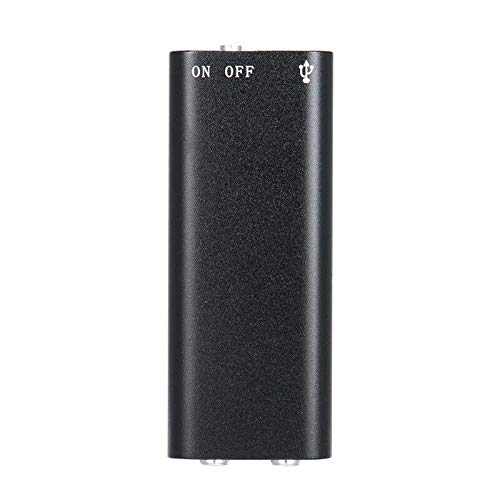
Figura 2.1: Arriba view of the ELECTROPRIME SK-892 Mini Digital Voice Recorder, highlighting the ON/OFF switch and the USB port for connectivity.
Compoñentes do dispositivo:
- Interruptor ON / OFF: Controls power and recording functions.
- Porto USB: Used for charging the device and connecting to a computer for data transfer.
- Conector para auriculares (3.5 mm): For audio playback using earphones.
- Luz indicadora: Ofrece información sobre o estado (por exemplo, gravación, carga).
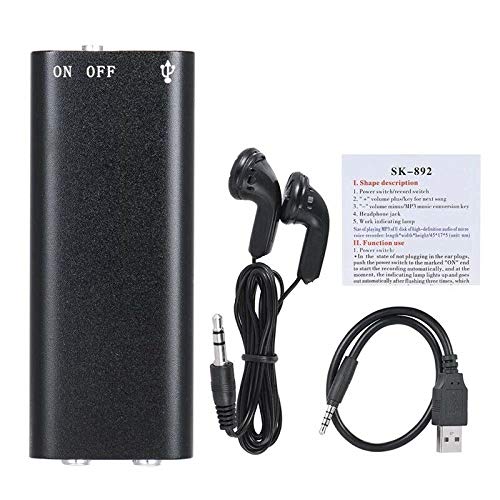
Figura 2.2: The SK-892 recorder shown with its accessories, including wired headphones and a USB charging/data cable. The small instruction card is also visible.
3. Configuración
3.1 Carga do dispositivo
- Connect the small end of the provided USB cable to the USB port on the recorder.
- Connect the other end of the USB cable to a powered USB port on a computer or a USB wall adapter (not included).
- The indicator light will illuminate during charging. Once fully charged, the light may change color or turn off.
- Unha carga completa adoita tardar aproximadamente de 2 a 3 horas.
3.2 Encendido inicial
To power on the device, slide the ON/OFF switch to the "ON" position. The indicator light will briefly flash, indicating the device is ready for operation.
4. Instrucións de funcionamento
4.1 Gravación de audio
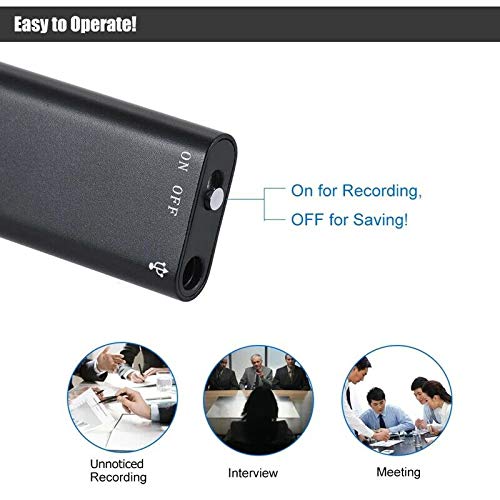
Figura 4.1: Detail of the SK-892's ON/OFF switch, illustrating its dual function for initiating recording and saving files.
- Asegúrate de que o dispositivo estea suficientemente cargado.
- To begin recording, slide the ON/OFF switch to the "ON" position. The device will automatically start recording. The indicator light will typically flash or remain steadily lit during recording, then turn off to indicate discreet operation.
- To stop recording and save the audio file, slide the ON/OFF switch to the "OFF" position. The indicator light will flash a few times and then turn off, confirming the recording has been saved and the device is powered down.
Nota: Ensure the switch is fully in the "OFF" position to properly save your recordings and prevent data loss.
4.2 Reproducción de gravacións
- Connect the provided headphones (or your own 3.5mm headphones) to the headphone jack on the recorder.
- Slide the ON/OFF switch to the "ON" position. The device will typically begin playing the most recent recording or cycle through recordings.
- Further controls for playback (e.g., next track, volume) may be available through the connected headphones if they feature inline controls, or by briefly toggling the ON/OFF switch (refer to the small instruction card for specific playback controls if available).
- To stop playback, slide the ON/OFF switch to the "OFF" position.
4.3 Conectando a un ordenador
Para transferir gravacións ao teu ordenador ou xestionar files:
- Ensure the recorder is powered "OFF".
- Connect the recorder to your computer using the supplied USB cable.
- Your computer should recognize the device as a removable disk (similar to a USB flash drive).
- Navigate to the device's storage to access your recorded audio files (usually in a folder named "RECORD" or similar).
- Podes copiar, mover ou eliminar files segundo sexa necesario.
- Safely eject the device from your computer before disconnecting the USB cable to prevent data corruption.
5. Mantemento
- Manteña o dispositivo seco. Evite a exposición á humidade ou a líquidos.
- Limpa o dispositivo cun pano suave e seco. Non empregues produtos químicos agresivos nin produtos de limpeza abrasivos.
- Evite deixar caer o dispositivo ou sometelo a fortes impactos.
- Garda o dispositivo nun lugar fresco e seco cando non estea en uso.
- Cargue o dispositivo regularmente, mesmo se non o usa con frecuencia, para manter a batería en bo estado.
6 Solución de problemas
| Problema | Posible Solución |
|---|---|
| O dispositivo non se acende. | Ensure the device is fully charged. Connect to a USB power source and check the indicator light. |
| Non se pode gravar audio. | Check if the device has sufficient battery. Ensure the ON/OFF switch is moved fully to the "ON" position. Verify there is enough free storage space. |
| Recordings are not saving. | Ensure the ON/OFF switch is moved fully to the "OFF" position to properly save the file. Do not disconnect power during recording or saving. |
| Cannot hear playback. | Ensure headphones are securely connected. Check headphone functionality with another device. Verify the device is powered "ON" for playback. |
| Dispositivo non recoñecido polo ordenador. | Ensure the recorder is powered "OFF" before connecting to the computer. Try a different USB port or cable. Restart your computer. |
7. Especificacións
- Modelo: SK-892
- Capacidade de almacenamento da memoria: 8 GB
- Formato de audio: MP3
- Interface de hardware: USB
- Dispositivos compatibles: MP3 Player (for playback)
- Fabricante: ELECTROPRIME
- Número de peza do artigo: ASHA20BEBUBEB19894
8. Garantía e soporte
For warranty information or technical support, please refer to the documentation included with your purchase or contact ELECTROPRIME customer service through their official channels. Please have your model number (SK-892) and purchase details ready when contacting support.
Para obter máis axuda, pode visitar o ELECTROPRIME brand page on Amazon.


