
Introdución
This manual provides comprehensive instructions for the proper use and maintenance of your ELECTROPRIME 8GB Rechargeable USB LCD Digital Voice Recorder, Model ASH20BEBUBEB26998. Please read this manual thoroughly before operating the device to ensure optimal performance and longevity. Keep this manual for future reference.
Produto rematadoview
The ELECTROPRIME Digital Voice Recorder is a compact and versatile device designed for high-quality audio recording and MP3 playback. It features an LCD screen for easy navigation, 8GB of internal storage, and a rechargeable battery.
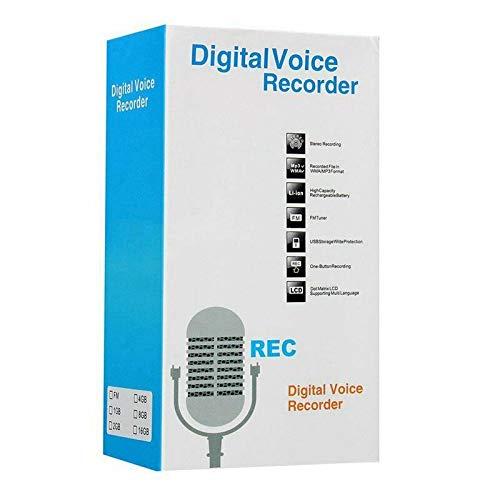
Figure 1: ELECTROPRIME Digital Voice Recorder with included accessories, including earphones, USB cable, and telephone adapter.
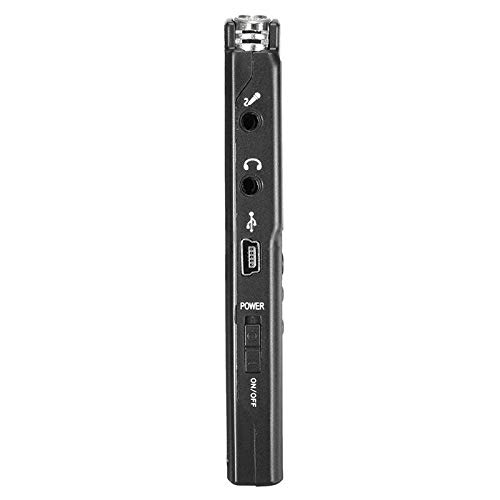
Figura 2: Lateral view of the recorder, highlighting the USB port, headphone jack, microphone input, and power switch.
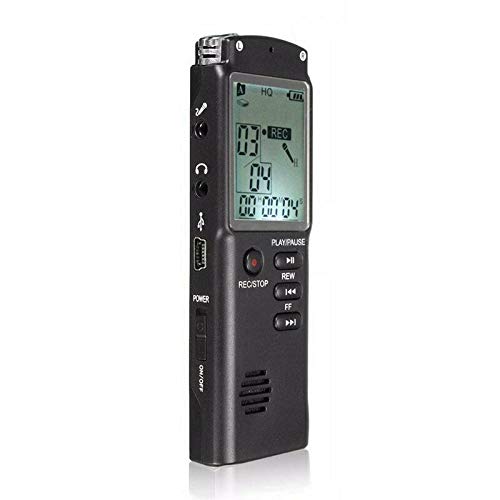
Figura 3: Fronte view of the recorder, displaying the LCD screen with recording information and control buttons.
Configuración
- Cargando o dispositivo: Connect the recorder to a computer's USB port or a USB wall adapter using the provided USB cable. The LCD screen will indicate charging status. A full charge typically takes 2-3 hours.
- Encendido/apagado: Locate the ON/OFF switch on the side of the device. Slide it to the "ON" position to power on and to the "OFF" position to power off.
- Configuración inicial: Upon first power-on, you may need to set the date and time. Use the navigation buttons (REW, FF) and Play/Pause button to adjust and confirm settings.
Instrucións de funcionamento
Gravación de audio
- Comezar a gravar: With the device powered on, press the REC/STOP button once. The LCD will display "REC" and a timer, indicating that recording has started.
- Pausa a gravación: Durante a gravación, prema o REPRODUCIR/PAUSA button to pause. Press it again to resume.
- Deter a gravación: Preme o REC/STOP button again to stop recording. The recording will be saved automatically.
Reproducir gravacións
- Acceso ás gravacións: In standby mode, use the REW or FF buttons to navigate through your saved recordings.
- Reproducir/Pausa: Preme o REPRODUCIR/PAUSA button to start playback of the selected recording. Press again to pause.
- Axustar o volume: Use the volume control buttons (if present, typically on the side or via menu) to adjust playback volume.
Transferencia Files a un ordenador
- Conectar: Connect the recorder to your computer using the USB cable.
- Access Device: The recorder will appear as a removable disk drive on your computer.
- Transferencia: Open the drive, locate your audio files (usually in a folder like "RECORD" or "VOICE"), and copy them to your computer.
Using as an MP3 Player
The device supports MP3 audio playback. Transfer MP3 files to the device's internal storage via USB connection. Use the REW e FF botóns para seleccionar pistas e REPRODUCIR/PAUSA para controlar a reprodución.
Mantemento
- Limpeza: Usa un pano suave e seco para limpar o exterior do dispositivo. Non empregues produtos de limpeza líquidos nin disolventes.
- Coidado da batería: Para prolongar a duración da batería, evite descargar completamente o dispositivo con frecuencia. Cárgueo regularmente, mesmo se non o usa durante períodos prolongados.
- Almacenamento: Garde o dispositivo nun lugar fresco e seco, lonxe da luz solar directa, de temperaturas extremas e de alta humidade.
- Evitar impacto: Protexa o dispositivo de caídas e impactos, que poden danar os compoñentes internos.
Resolución de problemas
| Problema | Posible Solución |
|---|---|
| O dispositivo non se acende. | Ensure the battery is charged. Connect to a USB power source and try again. Check the ON/OFF switch position. |
| Non se pode gravar audio. | Check if the device has sufficient memory. Delete old files if necessary. Ensure the microphone is not obstructed. |
| Dispositivo non recoñecido polo ordenador. | Try a different USB port or cable. Ensure the device is powered on when connected. Restart your computer. |
| Mala calidade de audio. | Ensure the recording environment is quiet. Keep the device close to the audio source. Check recording settings (if adjustable). |
Especificacións
- Marca: ELECTROPRIME
- Número de modelo: ASH20BEBUBEB26998
- Capacidade de almacenamento da memoria: 8 GB
- Formato de audio: MP3
- Interface de hardware: USB
- Dispositivos compatibles: Reproductor de MP3
- Fonte de enerxía: Batería recargable (carga USB)
Garantía e Soporte
Specific warranty information for this product is not provided in the available documentation. For warranty claims or technical support, please contact your retailer or the manufacturer, ELECTROPRIME, directly. Retain your proof of purchase for any warranty-related inquiries.
For further assistance, please refer to the official ELECTROPRIME websitio ou póñase en contacto co seu departamento de atención ao cliente.