1. Introdución
The Paww WaveCast is a portable Bluetooth 5.0 audio transmitter designed to wirelessly stream audio from non-Bluetooth devices to Bluetooth headphones or speakers. It features aptX Low Latency technology for synchronized audio and an extended range of up to 100 feet (30 meters). The device supports connecting to two audio receivers simultaneously, making it suitable for shared listening experiences.
Vídeo: Introducing Paww WaveCast. This video provides an overview of the Paww WaveCast Portable Bluetooth Audio Transmitter and its primary functions.
2. Que hai na caixa
- Paww WaveCast Portable Bluetooth Audio Transmitter
- Manual de usuario
- Cable de carga micro-USB
3. Información de seguridade
Please read and follow these safety guidelines to ensure proper use and prevent damage to the device or injury:
- Manexar as baterías con coidado.
- Evite expoñer o dispositivo á auga ou a temperaturas extremas.
- Do not use the device while sleeping or operating machinery.
- Manter fóra do alcance dos nenos.
4. Produto rematadoview
The Paww WaveCast features a compact design with integrated audio jacks and intuitive controls.

Imaxe: Arriba view of the Paww WaveCast, highlighting the central power/pairing button, two headphone icons indicating dual connection capability, and four LED battery/status indicators.

Imaxe: The Paww WaveCast with its single 3.5mm audio jack extended, ready for connection to standard audio ports.
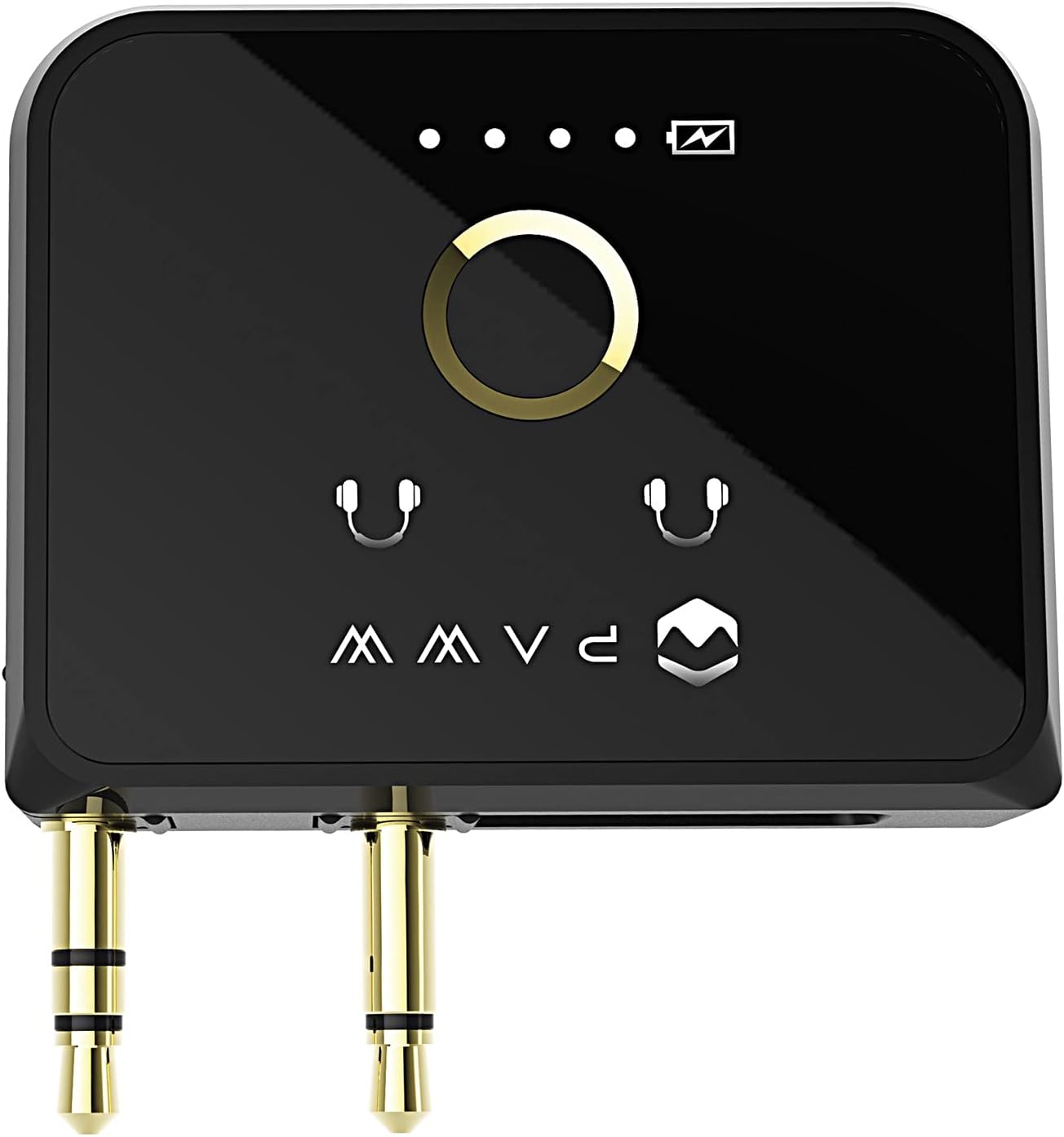
Imaxe: The Paww WaveCast with both dual 3.5mm audio jacks extended, suitable for in-flight entertainment systems or other dual-jack audio sources.

Imaxe: Lado view of the Paww WaveCast, displaying the micro-USB charging port.
5. Configuración
5.1 Carga do dispositivo
Before first use, fully charge your WaveCast. Connect the supplied micro-USB cable to the charging port on the device and the other end to a USB power source. A full charge takes approximately 30 minutes and provides up to 10 hours of playtime.
5.2 Emparellamento con auriculares/altofalantes Bluetooth
- Ensure your WaveCast is charged and powered on.
- Press and hold the central button on the WaveCast until the LED indicators begin to flash, indicating pairing mode.
- Coloca os teus auriculares ou altofalantes Bluetooth en modo de emparellamento (consulta os seus respectivos manuais para obter instrucións).
- The WaveCast will automatically search for and connect to nearby Bluetooth devices. Once connected, the LED indicator(s) will show a steady light.
- To connect a second pair of headphones, repeat steps 2-4.
5.3 Conexión a unha fonte de son
The WaveCast is compatible with any device that has a 3.5mm audio output port.
- Single 3.5mm Port: Extend the single 3.5mm audio jack from the WaveCast and insert it into the audio output port of your device (e.g., TV, gym equipment, Nintendo Switch).
- Dual 3.5mm Ports (e.g., In-flight Entertainment): Extend both 3.5mm audio jacks from the WaveCast and insert them into the corresponding dual audio ports of the entertainment system.
6. Instrucións de funcionamento
6.1 Encendido/apagado
- Encendido: Press and hold the central button for a few seconds until the LED indicators light up.
- Apagado: Press and hold the central button for a few seconds until the LED indicators turn off.
6.2 Transmisión de audio
Once connected to an audio source and paired with your Bluetooth headphones/speakers, audio will automatically stream wirelessly. The WaveCast's aptX Low Latency codec ensures minimal audio delay, providing a synchronized experience for video content.
6.3 Extended Range
The WaveCast utilizes Bluetooth 5.0 technology to offer an extended wireless range of up to 100 feet (30 meters) in optimal conditions, allowing for greater freedom of movement while listening.
7. Mantemento
- Limpa o dispositivo cun pano suave e seco. Non empregues produtos químicos agresivos nin materiais abrasivos.
- Garda o dispositivo nun lugar fresco e seco cando non estea en uso.
- Evite deixar caer o dispositivo ou sometelo a fortes impactos.
- To preserve battery life, charge the device regularly and avoid fully discharging it for extended periods.
8 Solución de problemas
- Sen audio: Ensure the WaveCast is fully charged, powered on, and correctly plugged into the audio source. Verify that your headphones/speakers are paired and powered on. Check the volume levels on both the audio source and your receiving device.
- Problemas de emparellamento: Make sure both the WaveCast and your headphones/speakers are in pairing mode. Try turning both devices off and on again. Ensure no other Bluetooth devices are interfering with the pairing process.
- Poor Audio Quality/Disconnections: Ensure the WaveCast and receiving device are within the 100-foot range and there are no significant obstructions. Reduce interference from other wireless devices.
- Problemas de carga: Verify the micro-USB cable is securely connected to both the WaveCast and the power source. Try a different USB cable or power adapter.
9. Especificacións
| Marca | Paww |
| Número de modelo | PW-2019WC-BK |
| Tecnoloxía de conectividade | Sen fíos (Bluetooth 5.0) |
| Fonte de enerxía | Alimentado por batería (1 batería de iones de litio incluída) |
| Duración da batería | Approximately 10 hours playtime (30 min charge) |
| Característica especial | Lightweight, aptX Low Latency |
| Material | Aluminio |
| Peso do elemento | 6.7 onzas |
| Dimensións do paquete | 6.1 x 4.13 x 2.13 polgadas |
10. Garantía e soporte
10.1 Información da garantía
For detailed warranty information regarding your Paww WaveCast, please refer to the warranty card included with your product or visit the official Paww websitio. Os termos e condicións da garantía poden variar segundo a rexión.
10.2 Atención ao cliente
If you encounter any issues or have questions not covered in this manual, please contact Paww customer support through their official websitio web ou a información de contacto proporcionada coa túa compra. Tamén podes visitar o Paww Store on Amazon para obter recursos adicionais.