
Introdución
Thank you for choosing the Zelotes F-35 2.4GHz Vertical Wireless Rechargeable Gaming Mouse. This ergonomic mouse is designed to provide a comfortable and efficient user experience, reducing wrist strain during extended use. Featuring multiple connectivity options and customizable buttons, it is ideal for both productivity and gaming on various devices.
Características do produto
- Deseño vertical ergonómico: Positions the hand in a natural handshake posture to minimize wrist and forearm strain.
- Conectividade multimodo: Supports 2.4GHz wireless via USB dongle, Bluetooth 1, and Bluetooth 2 for versatile device pairing.
- Batería recargable: Built-in rechargeable battery for convenience.
- DPI axustable: Up to 2400 DPI for precise cursor control, suitable for various tasks and gaming.
- 6 botóns programables: Includes left/right click, scroll wheel, DPI button, and forward/backward buttons for enhanced functionality.
- Sensor óptico: Reliable and accurate tracking on most surfaces.
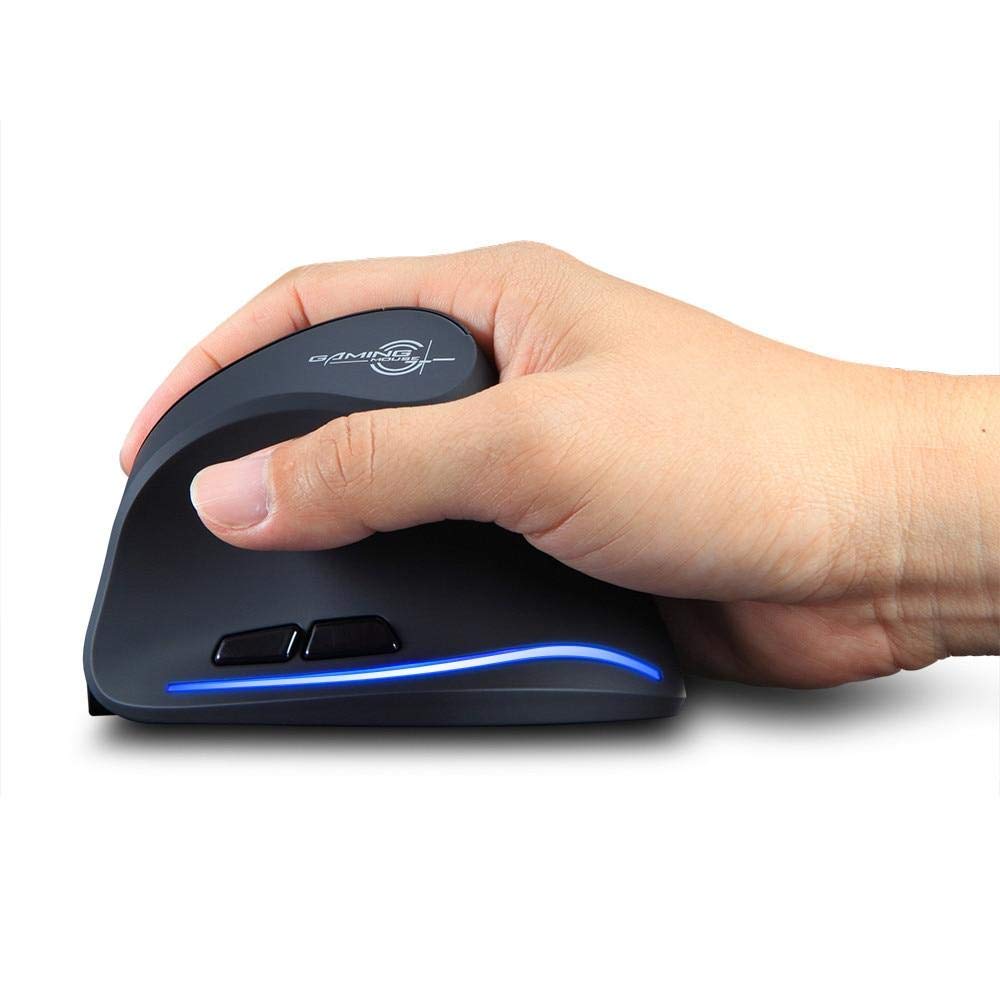
Image: The Zelotes F-35 Vertical Wireless Gaming Mouse, showcasing its unique ergonomic shape and illuminated accents.

Image: A visual comparison illustrating the natural hand position with a vertical mouse versus the twisted wrist position with a traditional horizontal mouse, highlighting the ergonomic benefits.
Instrucións de configuración
- Encendido: Localiza o interruptor ON/OFF na parte inferior do rato e deslízao á posición "ON".
- Seleccionar o modo de conexión: The mouse supports three connection modes: 2.4GHz wireless (via USB dongle), Bluetooth 1, and Bluetooth 2. Use the 'Mode Switch' button on the bottom of the mouse to cycle through these options. The corresponding indicator light will illuminate.
- Conexión sen fíos de 2.4 GHz:
- Remove the USB receiver dongle from its storage slot on the bottom of the mouse.
- Conecte o receptor USB a un porto USB dispoñible no seu ordenador ou portátil.
- O rato debería conectarse automaticamente.
- Conexión Bluetooth (BT1/BT2):
- Switch the mouse to either Bluetooth 1 or Bluetooth 2 mode using the 'Mode Switch'.
- On your computer or laptop, go to Bluetooth settings and search for new devices.
- Select 'Zelotes F-35' from the list of available devices to pair.

Image: The underside of the Zelotes F-35 mouse, highlighting the ON/OFF switch, mode switch, and the integrated storage slot for the 2.4GHz USB receiver dongle.
Instrucións de funcionamento
The Zelotes F-35 mouse features 6 buttons designed for intuitive control and enhanced productivity:
- Botón esquerdo para premer: Función de clic principal estándar.
- Botón dereito do rato: Función de clic secundario estándar.
- Roda de desprazamento: Scroll up or down for navigation. Can also be pressed for a middle-click function.
- Botón de axuste de DPI: Located near the scroll wheel, press to cycle through different DPI settings (e.g., 800/1200/1600/2400) to adjust cursor sensitivity.
- Botón de avance: Located on the thumb rest, typically navigates forward in web navegadores ou file exploradores.
- Botón de retroceso: Located on the thumb rest, typically navigates backward in web navegadores ou file exploradores.
Carga e batería
The Zelotes F-35 mouse is equipped with a rechargeable battery for continuous use.
- Porto de carga: The mouse features a USB-C charging port, typically located at the front base of the mouse.
- Cargando: Connect the provided USB-C cable to the mouse and the other end to a USB power source (e.g., computer USB port, wall adapter).
- Indicador de batería: The mouse may have an indicator light to show charging status or low battery. Refer to the product packaging for specific indicator behavior.
- Duración da batería: The average battery life is approximately 12 months, depending on usage.
Mantemento
- Limpeza: Usa un pano suave e seco para limpar a superficie do rato. Para a sucidade persistente, usa un pano lixeiramente seco.amp pódese usar un pano, garantindo que non entre humidade nos compoñentes internos.
- Coidados do sensor: Manteña o sensor óptico da parte inferior do rato limpo e libre de po ou residuos para garantir un seguimento preciso.
- Almacenamento: When not in use for extended periods, turn off the mouse to conserve battery life. Store the USB receiver in its designated slot to prevent loss.
Resolución de problemas
- O rato non responde:
- Asegúrate de que o rato estea acendido.
- Comprobe o nivel da batería e cárguea se é necesario.
- For 2.4GHz connection, ensure the USB receiver is securely plugged into the computer.
- For Bluetooth connection, ensure Bluetooth is enabled on your device and the mouse is correctly paired. Try re-pairing if issues persist.
- Seguimento impreciso:
- Limpa o sensor óptico da parte inferior do rato.
- Ensure you are using the mouse on a suitable surface (non-reflective, non-glass).
- Adjust the DPI setting to a comfortable level.
- Connectivity Drops:
- Ensure the mouse is within the effective range of your device (typically up to 10 meters for wireless).
- Minimizar as interferencias doutros dispositivos sen fíos.
Especificacións
| Característica | Detalle |
|---|---|
| Marca | Zelotes |
| Modelo | F-35 |
| Tipo | 2.4 GHz sen fíos, Bluetooth |
| Modo de operación | Optoelectrónico |
| Número de botóns | 6 |
| Número de rolos | 1 |
| Orientación das mans | Certo |
| Tipo de interface | USB |
| DPI | 2400 |
| Característica especial | Recargable, sen fíos |
| Detección de Movemento | Óptica |
| Dispositivos compatibles | Ordenador portátil, ordenador persoal |
| Sistema Operativo | Linux, Windows 7 (and newer) |
| Duración media da batería | 12 meses |
| Fonte de enerxía | Alimentado por batería |
| Cor | Negro |
| País de Orixe | China |
Garantía e Soporte
For warranty information and technical support, please refer to the documentation included with your product or visit the official Zelotes websitio. Tamén podes contactar co vendedor onde compraches o produto para obter axuda.