
LC-dolida usb c to hdmi vga ethernet
LC-dolida USB C to HDMI VGA USB3.0 Adapter User Manual
Model: usb c to hdmi vga ethernet
Marca: LC-dolida
1. Introdución
The LC-dolida USB C Hub Adapter is a versatile 7-in-1 device designed to expand the connectivity of your USB-C enabled laptop, tablet, or smartphone. It provides multiple ports including HDMI, VGA, Ethernet, USB 3.0, 3.5mm audio, and Power Delivery (PD) charging, enhancing your device's capabilities for various applications such as external display connections, high-speed data transfer, and network access.
2. Características clave
- Multiport Connectivity: Equipped with HDMI, VGA, RJ45 Ethernet, 3.5mm audio jack, 2x USB 3.0 ports, and a Power Delivery (PD) charging port.
- Saída de vídeo de alta resolución: HDMI supports resolutions up to 4K@30Hz, and VGA supports up to 1080P@60Hz. Both can be used simultaneously for dual display at 1080P.
- Fast and Stable Network: RJ45 Ethernet port supports up to 1000Mbps for reliable wired internet connection.
- Entrega de enerxía eficiente: USB-C PD charging port supports up to 87W to keep your device charged while using the hub.
- Transferencia de datos de alta velocidade: Two USB 3.0 ports offer data transfer speeds up to 5Gbps, allowing connection of external USB devices.
- Saída de audio: Integrated 3.5mm audio jack for connecting headphones or speakers.
- Ampla compatibilidade: Compatible with various USB-C devices including 2018/17/16 MacBook/Pro/Air, Google Chromebook Pixel, Surface Book 2, and supports Samsung Dex for compatible smartphones.
3. Contido do paquete
- LC-dolida USB C Hub Adapter (Model: usb c to hdmi vga ethernet)
- Manual de usuario
4. Especificacións
| Característica | Detalle |
|---|---|
| Marca | LC-dolida |
| Número de modelo | usb c to hdmi vga ethernet |
| Plataforma de hardware | Portátil, PC |
| Compatibilidade do sistema operativo | Windows 10 (and above for some features), macOS, Android (for Samsung Dex) |
| Peso do elemento | 3.8 onzas |
| Dimensións do paquete | 6.69 x 3.7 x 0.71 polgadas |
| Saída HDMI | Up to 4K@30Hz, 1080P@60Hz (backward compatible) |
| Saída VGA | Ata 1080P@60Hz |
| Visualización simultánea | HDMI and VGA can be used simultaneously (both at 1080P) |
| Porto Ethernet | RJ45, supports up to 1000Mbps |
| Portos USB 3.0 | 2 ports, data transfer up to 5Gbps |
| Porto de subministración de enerxía (PD) | USB-C, max 87W charging |
| Jack de audio | 3.5 mm |
| Dispositivos compatibles | Laptops, Monitors, Projectors, Smartphones (with USB-C video output support) |
5. Instrucións de configuración
- Conectar o concentrador: Plug the USB-C connector of the LC-dolida hub into the USB-C port of your host device (laptop, tablet, or smartphone).
- Connect External Displays (HDMI/VGA):
- For HDMI output, connect an HDMI cable from the hub's HDMI port to your monitor or TV.
- For VGA output, connect a VGA cable from the hub's VGA port to your monitor or projector.
- For audio output via VGA, connect a 3.5mm audio cable from the hub's audio jack to your speakers or headphones.
Nota: HDMI and VGA can be used simultaneously, but both displays will output at 1080P resolution.

Figure 1: Connecting to HDMI and VGA displays. HDMI supports up to 4K, VGA up to 1080P. 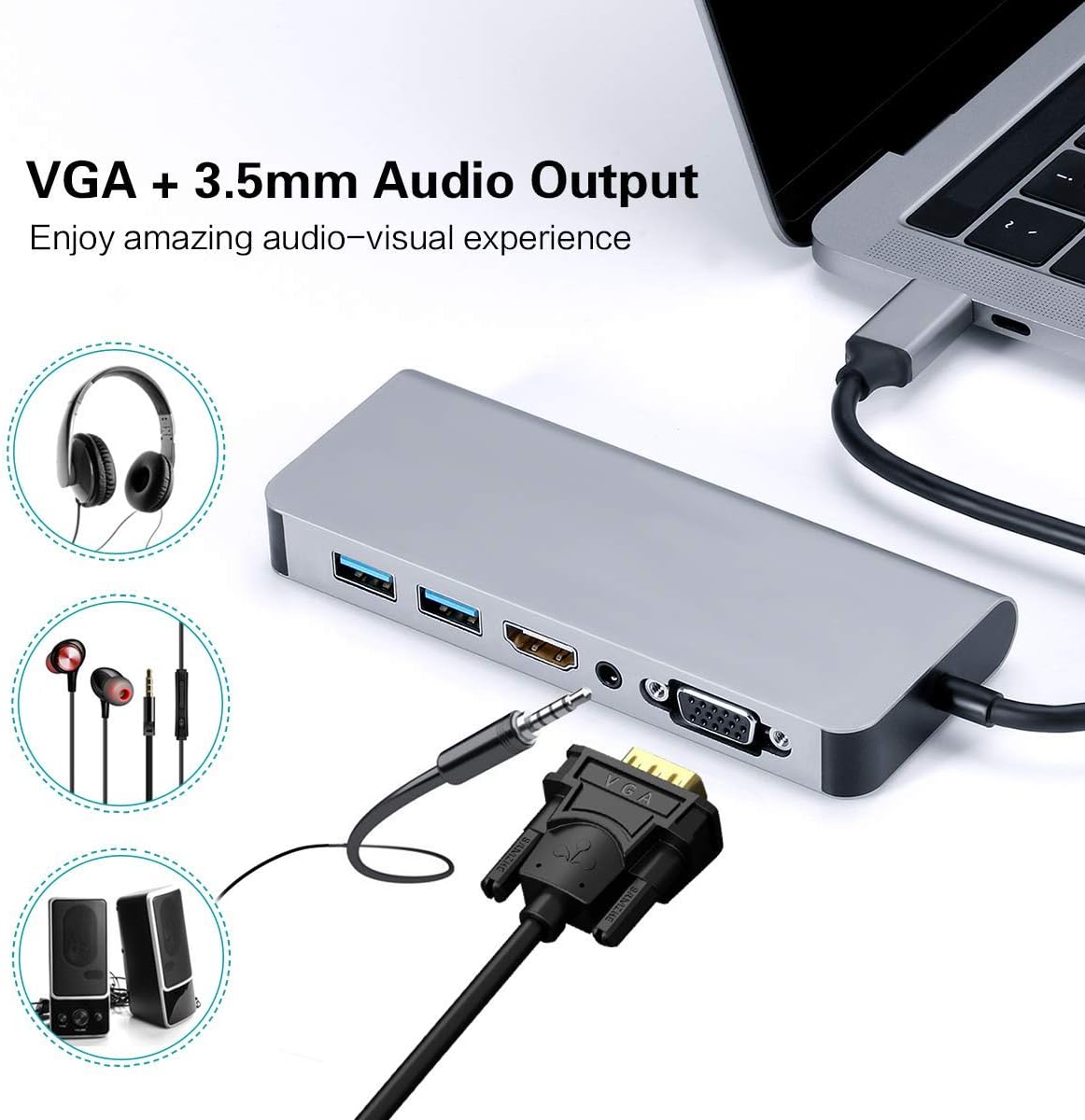
Figure 2: VGA and 3.5mm Audio Output for an enhanced audio-visual experience. - Conectarse á rede: For a stable wired internet connection, plug an Ethernet cable into the RJ45 port on the hub.
- Conectar dispositivos USB: Plug your USB peripherals (e.g., mouse, keyboard, USB drive) into the USB 3.0 ports.
- Power the Host Device: If your host device requires charging, connect your USB-C power adapter to the Power Delivery (PD) port on the hub. This allows your device to charge while using the hub's other functions.

Figure 3: Power Delivery and Data Transfer via USB 3.0 ports.
6. Instrucións de funcionamento
6.1 Modos de visualización
The hub supports both Mirror Mode and Extend Mode when connecting to external displays.
- Modo espello: Duplicates your host device's screen onto the external display(s). This is ideal for presentations or sharing content.
- Modo de extensión: Extends your desktop across multiple screens, allowing for increased workspace. This mode is typically supported by laptops.
Nota: Extend Mode functionality is primarily for laptops. For smartphones, it typically mirrors the display or activates specific desktop environments like Samsung Dex.

6.2 Samsung Dex Experience
For compatible Samsung smartphones (S10/S10+/S10e/S9/S9+/S8/S8+/S8 Active/Huawei Mate10/Pro), the hub can enable a PC-like desktop experience via Samsung Dex. To activate Dex mode, ensure external power is supplied to the hub via the PD charging port.
Nota: Samsung Dex functionality may require your phone's operating system to be upgraded to Windows 10 or above. Always ensure your device is compatible and updated.


6.3 Vídeo oficial do produto
Video 1: An official demonstration of the 7-in-1 USB C Multiport Hub by LC-Dolida, showcasing its various functions and connectivity options.
7 Solución de problemas
- Sen saída de visualización:
- Asegúrate de que o porto USB-C do teu dispositivo anfitrión admita saída de vídeo (modo alternativo de DisplayPort).
- Check all cable connections (USB-C to hub, HDMI/VGA to display).
- Verify the input source on your monitor/TV is set correctly (e.g., HDMI 1, VGA).
- Tenta reiniciar o teu dispositivo anfitrión.
- For Samsung Dex, ensure external power is connected to the hub.
- Dispositivos USB non recoñecidos:
- Asegúrate de que o concentrador estea conectado de forma segura ao dispositivo anfitrión.
- Tenta conectar o dispositivo USB directamente ao dispositivo anfitrión para confirmar que funciona.
- If using high-power USB devices, ensure external power is supplied to the hub via the PD port.
- Velocidade lenta de Ethernet:
- Check your Ethernet cable for damage.
- Asegúrate de que os controladores de rede estean actualizados no teu dispositivo anfitrión.
- Verify your router/modem is functioning correctly.
- Problemas de carga:
- Asegúrate de que o adaptador de corrente USB-C estea conectado ao porto PD do concentrador e que funcione.
- Verifica que o teu dispositivo anfitrión sexa compatible con USB-C Power Delivery.
- Some devices, like the Samsung S8+, may not charge fully or quickly through the hub if the power input is insufficient for both the hub and the device.
8. Coidados e mantemento
- Keep the hub away from water, fire, and corrosive materials.
- Evite deixar caer o cubo ou sometelo a impactos fortes.
- Non intente desmontar ou reparar o dispositivo vostede mesmo. Póñase en contacto co servizo de atención ao cliente para obter asistencia.
- Clean the hub with a soft, dry cloth. Avoid using harsh chemicals or abrasive cleaners.
- Almacene o cubo nun lugar fresco e seco cando non estea en uso.
9. Garantía e soporte
LC-dolida products are designed for reliability and performance. For any issues or questions regarding your LC-dolida USB C Hub Adapter, please contact our customer support team. We are committed to providing assistance and ensuring your satisfaction.
Please refer to the product packaging or the official LC-dolida websitio web para obter detalles específicos da garantía e información de contacto.
Ask a question about this manual
Ask about setup, troubleshooting, compatibility, parts, safety, or missing instructions. Manuals+ will review the question and use this page’s manual context to help answer it.