
HOTEC 782337032120
HOTEC 3.5mm Male to 1/4” TS Female Audio Adapter Cable
Manual de instrucións
Introdución
This instruction manual provides detailed information for the proper use, setup, and maintenance of your HOTEC 3.5mm Male to 1/4” TS Female Audio Adapter Cables. Please read this manual thoroughly before using the product to ensure optimal performance and longevity.
Produto rematadoview
The HOTEC Audio Adapter Cable set includes two distinct cables designed to facilitate audio connections between various devices. These cables are essential for connecting microphones or other audio sources with a 1/4" TS output to devices requiring a 3.5mm input, such as smartphones, cameras, or computers.
Características clave
- Comes with 2 pieces: one 3.5mm TRRS male to 1/4” TS female audio cable (TS to TRRS cable) and one 3.5mm TRS male to 1/4” TS female cable (TS to TRS cable).
- TS to TRS cable is compatible with most DSLR cameras and desktop computers which have individual microphone and headphone jacks.
- TS to TRRS cable is compatible with iPhone or most Android smartphones, tablets, and computers that have a microphone and headphone combo jack.
- Cable length: 10 inches.
- Cor: Negro.
- Braided design for durability.
Contido do paquete
- 1 x HOTEC 3.5mm TRS Male to 1/4” TS Female Audio Adapter Cable
- 1 x HOTEC 3.5mm TRRS Male to 1/4” TS Female Audio Adapter Cable

Image: The two HOTEC audio adapter cables included in the package. One cable features a 3.5mm TRS male connector, and the other features a 3.5mm TRRS male connector, both terminating in a 1/4" TS female jack.
Configuración e conexión
Proper connection of the adapter cables is crucial for correct audio transmission. Identify the correct cable for your device based on its input jack type.
Connecting to DSLR Cameras & Desktop Computers (TS to TRS Cable)
Usa o TS to TRS cable when connecting a microphone with a 1/4" TS output to devices that have separate microphone and headphone jacks, such as most DSLR cameras and desktop computers. The 3.5mm TRS male plug connects to the microphone input jack on your camera or computer.

Image: Connection diagram for the TS to TRS cable, illustrating how the 3.5mm TRS male connector interfaces with a 1/4" TS female jack, suitable for DSLR cameras and desktop computers with separate audio inputs.
Connecting to iPhone & Most Android Smartphones (TS to TRRS Cable)
Usa o TS to TRRS cable when connecting a microphone with a 1/4" TS output to devices that feature a combined microphone and headphone jack, such as iPhones, most Android smartphones, tablets, and some laptops. The 3.5mm TRRS male plug connects to the combo jack on your mobile device or computer.

Image: Connection diagram for the TS to TRRS cable, showing the 3.5mm TRRS male connector and its interaction with a 1/4" TS female jack, designed for smartphones and tablets with a single audio jack for both input and output.
Diagrama de conexión xeral
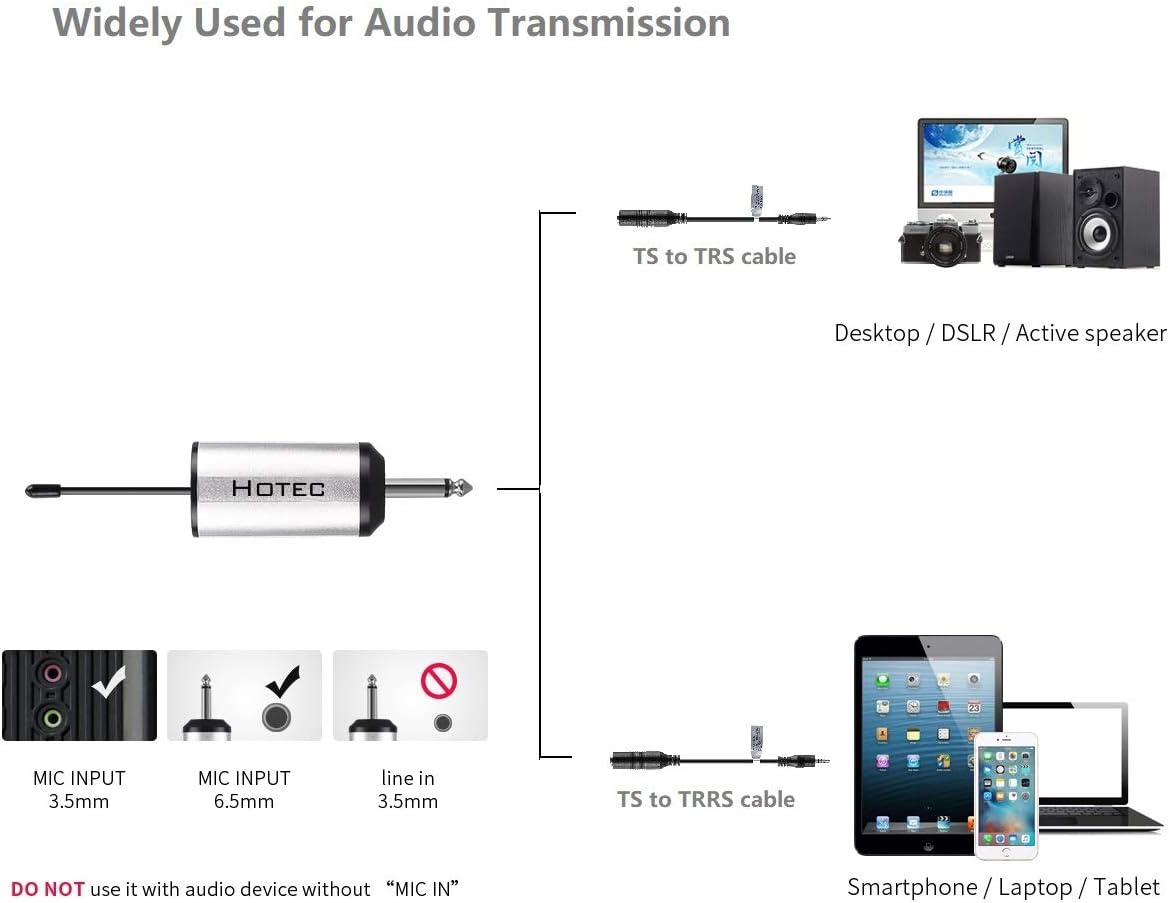
Image: A comprehensive diagram demonstrating the versatility of the HOTEC audio adapter cables, showing how the TS to TRS cable connects to desktop computers, DSLR cameras, and active speakers, while the TS to TRRS cable connects to smartphones, laptops, and tablets for various audio transmission needs.
Important Note: DO NOT use these cables with audio devices that do not have a "MIC IN" or equivalent microphone input functionality. These adapters are specifically designed for microphone input applications.
Operación
Once the correct cable is connected between your microphone (or other 1/4" TS audio source) and your recording/playback device, ensure that the audio input settings on your device are correctly configured to recognize the external microphone. Adjust input levels as needed for clear audio capture.
These cables are passive adapters and do not require external power. Their function is to correctly route the audio signal and ground connections between the different plug types.
Mantemento
To ensure the longevity and optimal performance of your HOTEC audio adapter cables, follow these maintenance guidelines:
- Limpeza: Use a soft, dry cloth to wipe the cables and connectors. Avoid using harsh chemicals or abrasive materials that could damage the insulation or metal contacts.
- Almacenamento: Store the cables in a cool, dry place away from direct sunlight and extreme temperatures. Avoid tightly coiling the cables, which can stress the internal wires and lead to damage. A loose coil is recommended.
- Manexo: Always grasp the connector housing when plugging or unplugging the cables. Avoid pulling on the cable itself, as this can damage the internal wiring or the connection to the plug.
Resolución de problemas
| Problema | Causa posible | Solución |
|---|---|---|
| No audio signal / Poor audio quality |
|
|
| Cable does not fit into jack |
|
|
Especificacións
| Atributo | Detalle |
|---|---|
| Marca | HOTEC |
| Número de modelo | 782337032120 |
| Tipo de conector | 3.5mm Male (TRS/TRRS) to 1/4" TS Female |
| Tipo de cable | Cable adaptador AUX |
| Dispositivos compatibles | DSLR Cameras, Desktop PCs, iPhone, Android Smartphones, Tablets |
| Característica especial | Cable trenzado |
| Lonxitude do cable | 10 polgadas |
| Cor | Negro |
| Número de elementos | 2 (one TRS, one TRRS) |
| Peso do elemento | 1.58 onzas |
| Usos recomendados | Audio recording, monitoring, and playback |
Garantía e Soporte
HOTEC products are manufactured to high-quality standards. For any questions, technical assistance, or support regarding your audio adapter cables, please contact HOTEC customer service. Please refer to your purchase documentation for specific warranty details.
You can find more information and contact details on the official HOTEC brand store: