
Produto rematadoview
The XINJIA Digital Watch is a robust and versatile timepiece designed for daily wear and various activities such as running, cycling, or hiking. It features a high-quality digital movement housed in a durable plastic case with a comfortable silicone strap.
Key features include a clear digital display, backlight function for low-light conditions, stopwatch, and alarm functions. The watch is designed with four intuitive buttons for easy operation and setting adjustments.
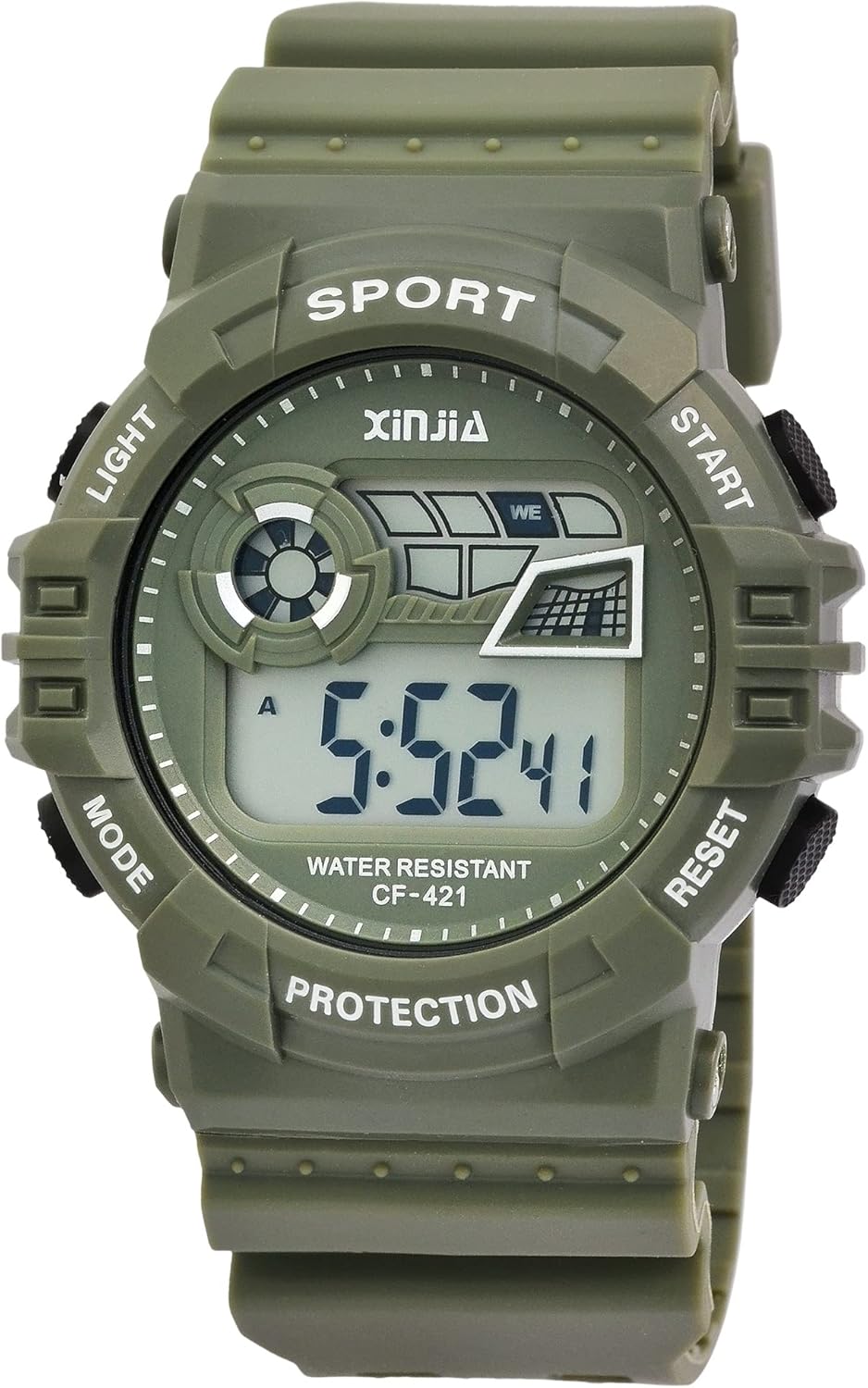
Figura 1: Fronte view of the XINJIA Digital Watch. The display shows the time, and the watch face indicates button functions such as LIGHT, MODE, START, and RESET.
Contido do paquete
- XINJIA Digital Watch (Model: 2400018)
- Pre-installed LR44 battery
- Manual de usuario (este documento)
Configuración
Configuración da hora inicial
Your XINJIA digital watch comes with a pre-installed battery. Upon first use, you may need to set the current time and date.
- Identify Buttons: The watch has four buttons located around the case. Refer to Figure 2 for button identification.

Figura 2: Lateral view showing the four control buttons. These buttons are used for navigating modes and adjusting settings.
- Entrar ao modo de configuración: Preme o MODO repetidamente ata que os díxitos da hora comecen a parpadear. Isto indica que está no modo de configuración.
- Axustar o tempo: Usa o INICIO or RESET buttons to adjust the flashing digits (hours, minutes, seconds). Press MODO again to cycle through the different time components (e.g., hours, then minutes).
- Set Date and Day: Continúa presionando MODO to move to date and day settings. Adjust these using the INICIO or RESET botóns segundo sexa necesario.
- Saír do modo de configuración: Unha vez axustados todos os axustes, prema o botón MODO button one last time to exit the setting mode and return to the normal time display.
Instrucións de funcionamento
Modos de visualización
Preme o MODO button to cycle through the different display modes:
- Visualización do tempo: Shows current time (hours, minutes, seconds), day of the week, and date.
- Modo de alarma: Allows setting and activating the alarm.
- Modo cronómetro: Para cronometrar eventos.
Usando a luz de fondo
Para iluminar a pantalla en condicións de pouca luz, prema o botón LUZ button. The backlight will remain active for a few seconds.
Usando o cronómetro
- Preme o MODO button until you reach the Stopwatch mode (usually indicated by "00:00:00" or similar).
- Preme o INICIO botón para comezar a cronometrar.
- Preme INICIO de novo para pausar o cronómetro.
- Preme o RESET botón para poñer o cronómetro a cero.
Configuración da alarma
- Preme o MODO botón ata chegar ao modo de alarma.
- Preme o INICIO or RESET buttons to adjust the alarm time (hours and minutes).
- Preme MODO to confirm the alarm time and exit the setting.
- To activate or deactivate the alarm, typically a combination of buttons (e.g., INICIO e RESET simultaneously in alarm mode, or a dedicated alarm ON/OFF indicator) is used. Refer to the display for an alarm icon.
Mantemento
Limpeza
Para limpar o reloxo, límpeo suavemente cun pano suave eamp cloth. Avoid using harsh chemicals, solvents, or abrasive cleaners, as these can damage the case or strap.
Resistencia á auga
This watch has a water resistance rating of 3 BAR (30 metros). This means it is suitable for daily use, splashes, rain, and accidental immersion. It is non axeitado for showering, bathing, swimming, snorkeling, or any water sports involving high-velocity water or prolonged submersion.
Do not operate the buttons while the watch is wet or submerged, as this can compromise the water resistance.
Substitución da batería
The watch uses one LR44 battery. When the display becomes dim or the watch stops functioning, it's time to replace the battery. Battery replacement should ideally be performed by a qualified watch technician to ensure proper sealing and maintain water resistance.

Figura 3: Traseira view of the watch, showing the stainless steel case back. This is where the battery compartment is located.
Resolución de problemas
| Problema | Causa posible | Solución |
|---|---|---|
| A pantalla está en branco ou escura. | Batería baixa ou esgotada. | Substitúa a pila LR44. |
| A hora é incorrecta. | A hora non está axustada correctamente ou pulsouse un botón accidentalmente. | Consulte a sección "Axuste da hora inicial" para restablecer a hora. |
| Os botóns non responden. | O reloxo pode estar en modo bloqueado ou ter un problema interno. | Try removing and reinserting the battery (if comfortable). If issue persists, contact support. |
| Condensation inside the display. | Exposición a cambios extremos de temperatura ou resistencia á auga comprometida. | Avoid extreme temperature changes. If condensation persists, water resistance may be compromised; seek professional repair. |
Especificacións
- Marca: XINXIA
- Número de modelo: 2400018
- Movemento: Cuarzo dixital
- Material da caixa: Plástico
- Diámetro da caixa: 46 mm
- Case Height: 16 mm
- Material da correa: Silicona
- Ancho da correa: 29 mm
- Lonxitude total: 26 cm
- Contraportada: Stainless Steel, secured with four screws
- Resistencia á auga: 3 BAR (30 metros)
- Tipo de batería: 1 LR44 (incluída)
- Dimensións do produto: 26 x 4.6 x 1.6 cm
- Peso do produto: 54.43 gramos
Garantía e Soporte
Specific warranty information for your XINJIA Digital Watch may be provided at the point of purchase or on the manufacturer's official websitio. Garde o comprobante de compra para calquera reclamación de garantía.
For technical support or further assistance, please refer to the contact information provided by your retailer or the XINJIA brand's official support channels.