
Apple iPhone 11 Pro
Manual de usuario de Apple iPhone 11 Pro
Modelo: A2160
1. Introduction to Your iPhone 11 Pro
The Apple iPhone 11 Pro is a sophisticated smartphone designed for exceptional performance and advanced multimedia capabilities. It features a Super Retina XDR display, a powerful A13 Bionic chip, and a versatile triple-camera system, making it ideal for capturing high-quality photos and videos, gaming, and augmented reality experiences.
This manual provides essential information for setting up, operating, maintaining, and troubleshooting your device.

Figura 1: Parte dianteira e traseira view of the Apple iPhone 11 Pro in Space Gray.
2. Que hai na caixa
Upon unboxing your iPhone 11 Pro, please ensure all listed items are present:
- Apple iPhone 11 Pro (Space Gray, 64GB)
- USB Cable (generic, MFi certified)
Note: Headphones and a SIM card are not included with this renewed device.
3. Especificacións técnicas
| Característica | Especificación |
|---|---|
| Nome do modelo | iPhone 11 Pro |
| Número de modelo | A2160 |
| Dimensións (produto) | 7 x 5 x 4 polgadas |
| Peso | 6.6 onzas |
| Tamaño de visualización | 5.8 Inches (Super Retina XDR OLED) |
| Resolución de visualización | 2436 x 1125 píxeles |
| Procesador | Chip biónico A13 |
| RAM | 4 GB |
| Capacidade de almacenamento | 64 GB |
| Sistema Operativo | iOS |
| Cámaras traseiras | Triple 12MP (Ultra Wide, Wide, Telephoto) |
| Cámara frontal | 12 MP |
| Tipo de batería | Ión de litio (3046 mAh) |
| Duración da batería (tempo de conversa) | Ata 18 horas |
| Conectividade | Móbil, Bluetooth, Wi-Fi, USB, NFC |
| Método de entrada | Pantalla táctil |

Figura 2: Lateral view of the iPhone 11 Pro, highlighting its sleek design and button placement.
4. Guía de configuración
4.1 Acendido e activación iniciais
- Cargar o dispositivo: Connect the provided USB cable to your iPhone and a compatible power adapter (not included). Charge until the battery icon indicates a sufficient charge.
- Encendido: Manteña premido o botón lateral ata que apareza o logotipo de Apple.
- Configuración inicial: Sigue as instrucións en pantalla para seleccionar o teu idioma e rexión e conectarte a unha rede wifi.
- Transferencia de datos (opcional): If you have an existing iPhone, you can transfer data using Quick Start or restore from an iCloud/iTunes backup.
- Face ID & Passcode: Set up Face ID for secure unlocking and app authentication, and create a strong passcode.
- ID de Apple: Inicia sesión co teu ID de Apple ou crea un novo para acceder á App Store, iCloud e outros servizos de Apple.
4.2 Carrier Compatibility
This iPhone 11 Pro is unlocked and compatible with any carrier of choice on both GSM and CDMA networks (e.g., AT&T, T-Mobile, Sprint, Verizon, US Cellular, Cricket, Metro, Tracfone, Mint Mobile, etc.). Insert your nano-SIM card into the SIM tray using a SIM ejector tool (not included).
5. Operating Your iPhone 11 Pro
5.1 Navegación e xestos
- Pantalla de inicio: Swipe up from the bottom edge of the screen to go to the Home screen.
- Cambiador de aplicacións: Desliza o dedo cara arriba desde o bordo inferior e detén o dedo no medio da pantalla para view abrir aplicacións.
- Centro de control: Desliza o dedo cara abaixo desde a esquina superior dereita da pantalla para acceder ao Centro de control e obter configuracións rápidas.
- Notificacións: Swipe down from the top-left corner or center of the screen to view notificacións.
5.2 Características da cámara
The iPhone 11 Pro's triple-camera system allows for versatile photography and videography:
- Cámara ultra gran angular: Ideal for landscapes and group shots, capturing a wider field of view.
- Wide Camera: The primary camera for everyday photos and videos, excelling in various lighting conditions.
- Cámara teleobxectiva: Provides 2x optical zoom for closer shots without losing detail.
- Modo nocturno: Automatically activates in low-light environments to produce brighter, more detailed photos.
- Gravación de vídeo 4K: All cameras support 4K video recording at various frame rates, offering high-quality cinematic capture.

Figura 3: Traseira view of the iPhone 11 Pro, showcasing its advanced triple-camera setup.
5.3 Rendemento e pantalla
- A13 Bionic Chip: Ensures unprecedented performance for demanding applications, gaming, and augmented reality.
- Super Retina XDR Display: The brightest iPhone display yet, offering vibrant colors, deep blacks, and incredible detail for HDR content.
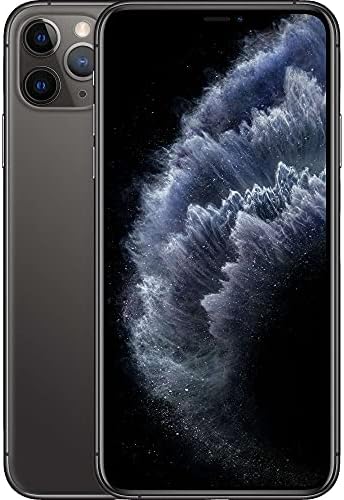
Figure 4: The iPhone 11 Pro's Super Retina XDR display in action, showing its vivid colors.
6. Coidados e mantemento
- Limpeza: Usa un pano suave e sen fiapos para limpar a pantalla e a carcasa. Evita materiais abrasivos ou produtos químicos agresivos.
- Resistencia á auga: The iPhone 11 Pro is splash, water, and dust resistant under controlled laboratory conditions. However, water and dust resistance are not permanent conditions and resistance might decrease as a result of normal wear. Do not attempt to charge a wet iPhone.
- Saúde da batería: To prolong battery life, avoid extreme temperatures. The device is guaranteed to have a minimum battery capacity of 80%.
- Actualizacións de software: Regularly update iOS to ensure optimal performance, security, and access to new features.
- Protección física: While inspected for minimal cosmetic damage, using a protective case and screen protector is recommended to prevent future wear.
7. Solución de problemas comúns
7.1 O dispositivo non responde
If your iPhone is unresponsive, perform a force restart:
- Preme e solta rapidamente o botón para subir o volume.
- Preme e solta rapidamente o botón para baixar o volume.
- Manteña premido o botón lateral ata que apareza o logotipo de Apple.
7.2 A batería esgótase rapidamente
- Check Battery Health in Settings > Battery > Battery Health.
- Reduce o brillo da pantalla.
- Disable Background App Refresh for apps you don't frequently use.
- Turn off Location Services for apps that don't require it.
7.3 Connectivity Issues (Wi-Fi/Bluetooth/Cellular)
- Activar e desactivar o modo avión.
- Restart your iPhone.
- Reset Network Settings (Settings > General > Transfer or Reset iPhone > Reset > Reset Network Settings).
- Ensure your SIM card is properly inserted and your carrier plan is active.
8. Garantía e soporte
This renewed iPhone 11 Pro has successfully passed a full diagnostic test, ensuring like-new functionality and removal of any prior-user personal information. It is inspected and guaranteed to have minimal cosmetic damage, not noticeable when held at arm's length.
For specific warranty details and support, please refer to the Amazon Renewed program terms and conditions or contact Amazon customer service directly. Protection plans may also be available for purchase.
Para obter máis asistencia, visite o Tenda renovada de Amazon.
Ask a question about this manual
Ask about setup, troubleshooting, compatibility, parts, safety, or missing instructions. Manuals+ will review the question and use this page’s manual context to help answer it.