
Introdución
Thank you for choosing the IMICE X9 Wired Optical Gaming Mouse. This manual provides detailed instructions for setting up, operating, maintaining, and troubleshooting your new gaming mouse. Please read this manual carefully to ensure optimal performance and longevity of your device.
Produto rematadoview
The IMICE X9 is a high-performance wired optical gaming mouse designed for precision and comfort. It features adjustable DPI settings, 6 programmable buttons, and vibrant LED lighting to enhance your gaming experience. Its ergonomic design ensures comfortable use during extended gaming sessions.
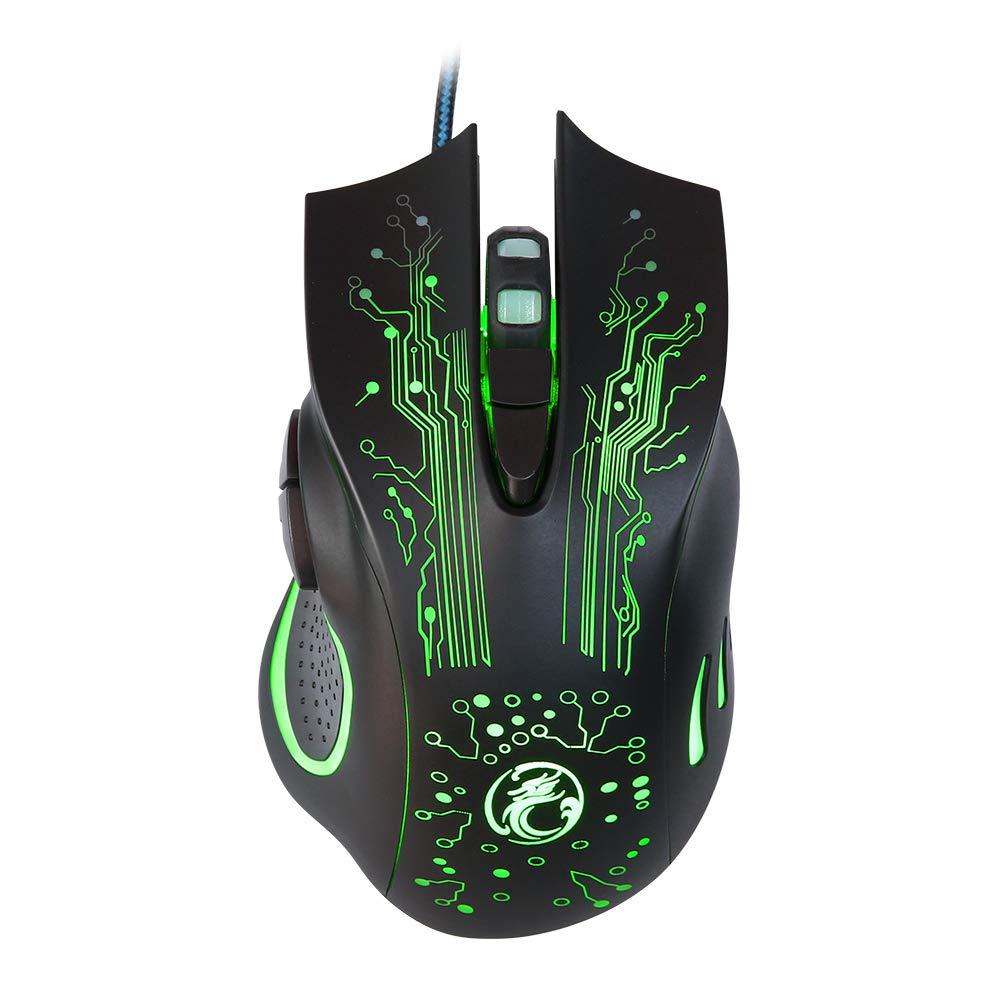
Image: The IMICE X9 gaming mouse showcasing its ergonomic design and dynamic LED lighting.
Configuración
Setting up your IMICE X9 gaming mouse is a simple plug-and-play process.
- Desembalar o rato: Carefully remove the IMICE X9 gaming mouse from its packaging.
- Conectar ao ordenador: Locate an available USB port on your computer (desktop or laptop). Insert the USB connector of the IMICE X9 mouse firmly into the USB port.
- Instalación de controladores: Your operating system (Windows, Linux) should automatically detect and install the necessary drivers. This process may take a few moments.
- Listo para usar: Once the drivers are installed, the mouse's LED lighting will illuminate, and it will be ready for immediate use.
Instrucións de funcionamento
Funcionalidade básica
- Clic esquerdo: Acción primaria, selección.
- Clic dereito: Secondary action, context menus.
- Roda de desprazamento: Scroll up/down in documents and web pages. Pressing the scroll wheel acts as a middle click.
Axuste de DPI
The IMICE X9 mouse features adjustable DPI (Dots Per Inch) settings, allowing you to change cursor sensitivity on the fly. The available DPI settings range from 800 to 2400 DPI.

Imaxe: Arriba view of the IMICE X9 mouse, showing the DPI adjustment button located behind the scroll wheel.
- Botón DPI: Press the dedicated DPI button (usually located behind the scroll wheel) to cycle through the available DPI settings. Each press will change the sensitivity, often indicated by a change in LED color or a brief flicker.
Botóns adicionais
The IMICE X9 includes additional buttons for enhanced productivity and gaming.

Imaxe: Lateral view of the IMICE X9 mouse, illustrating the placement of the two thumb buttons.
- Botón de avance: Typically located on the side, this button allows you to navigate forward in web navegadores ou file exploradores.
- Botón de retroceso: Also located on the side, this button allows you to navigate backward in web navegadores ou file exploradores.
Mantemento
Proper maintenance ensures the longevity and performance of your IMICE X9 gaming mouse.
- Limpeza: Usa un pano suave e seco para limpar a superficie do rato. Para a sucidade persistente, limpa lixeiramenteampEnxágüe o pano con auga ou unha solución de limpeza suave. Evite produtos químicos agresivos.
- Sensor óptico: Manteña o sensor óptico da parte inferior do rato limpo e libre de po ou residuos. Use un hisopo de algodón ou aire comprimido se é necesario.
- Coidado do cable: Evite dobrar bruscamente ou tirar demasiado do cable USB para evitar danos.
- Almacenamento: Cando non o use, garde o rato nun ambiente limpo e seco, lonxe de temperaturas extremas.
Resolución de problemas
If you encounter issues with your IMICE X9 gaming mouse, refer to the following common solutions:
| Problema | Causa posible | Solución |
|---|---|---|
| O rato non responde | Conexión USB solta, porto USB defectuoso, problema co controlador. | Try reconnecting the USB cable. Use a different USB port. Restart your computer. Check Device Manager for driver status. |
| O movemento do cursor é errático ou brusco | Sensor óptico sucio, superficie inadecuada da alfombrilla do rato. | Clean the optical sensor. Use a clean, non-reflective mouse pad. |
| LED lights are off or flickering | Power issue, software conflict. | Ensure the mouse is properly connected. Try a different USB port. Restart your computer. |
| O axuste de DPI non funciona | Button malfunction, temporary software glitch. | Press the DPI button firmly. Restart your computer. |
Se o problema persiste despois de probar estas solucións, póñase en contacto co servizo de atención ao cliente.
Especificacións
Detailed technical specifications for the IMICE X9 Wired Optical Gaming Mouse:
- Marca: IMICE
- Modelo: X9
- Tecnoloxía de conectividade: USB (con cable)
- Configuración de DPI: 800-2400 DPI (axustable)
- Método de seguimento: Óptica
- Número de botóns: 6
- Orientación das mans: Ambidiestro
- Características especiais: Ergonomic Design, LED Lighting
- Usos recomendados: Xogos
- Dispositivos compatibles: Ordenador portátil, ordenador persoal
- Sistemas operativos compatibles: Linux, Windows 10
- Estilo: Moderno
- Plataforma: PC
- Pilas incluídas: Non
- Número de peza do fabricante: YX1560214

Image: A display of three IMICE X9 gaming mice, highlighting the different LED color options (red, blue, green).
Garantía e Soporte
The IMICE X9 Wired Optical Gaming Mouse comes with a standard manufacturer's warranty. For specific warranty terms and conditions, please refer to the warranty card included with your product or visit the official IMICE website. For technical support, troubleshooting assistance beyond this manual, or warranty claims, please contact IMICE customer service through their official channels.