
Introdución
The Power Dynamics PDM25 is a compact and versatile 100V amplifier designed for small installations such as shops, restaurants, and offices. It offers easy operation, reliable performance, and a range of features including Bluetooth connectivity, an integrated MP3 player, USB input, AUX input, and a wireless remote control. This manual provides essential information for the safe and efficient use of your PDM25 ampmáis vivo.
Instrucións de seguridade
- Lea detidamente este manual antes de empregar o produto.
- Conserve este manual para futuras consultas.
- Observe todas as advertencias e siga todas as instrucións.
- Non use este aparello preto da auga.
- Limpar só cun pano seco.
- Non bloquee ningunha abertura de ventilación. Instáleo segundo as instrucións do fabricante.
- Non instale preto de fontes de calor como radiadores, rexistros de calor, cociñas ou outros aparellos (incluíndo amplificadores) que producen calor.
- Non derogue o propósito de seguridade do enchufe polarizado ou con conexión a terra. Un enchufe polarizado ten dúas láminas, unha máis ancha que a outra. Un enchufe con conexión a terra ten dúas láminas e unha terceira punta de conexión a terra. A folla ancha ou a terceira punta son proporcionadas para a súa seguridade. Se o enchufe proporcionado non encaixa na súa toma de corrente, consulte a un electricista para a substitución da toma obsoleta.
- Protexa o cable de alimentación para evitar que se pise ou se pinche, especialmente nos enchufes, tomas de corrente e no punto de saída do aparello.
- Use só anexos/accesorios especificados polo fabricante.
- Desenchufe este aparello durante tormentas eléctricas ou cando non se use durante longos períodos de tempo.
- Encargue toda a reparación a persoal de servizo cualificado. O mantemento é necesario cando o aparello resultou danado dalgún xeito, como o cable de alimentación ou o enchufe está danado, se derrama líquido ou caen obxectos no aparello, o aparello estivo exposto á choiva ou á humidade, non funciona normalmente. , ou foi abandonado.
- AVISO: Para reducir o risco de incendio ou descarga eléctrica, non expoña este aparello á choiva ou á humidade.
- PRECAUCIÓN: Do not open the cover. No user-serviceable parts inside. Refer servicing to qualified personnel only.
Produto rematadoview
The PDM25 amplifier features a user-friendly front panel with controls for various audio sources and volume adjustments, along with a clear digital display. The rear panel provides all necessary connections for speakers, external audio sources, and power.

Figura 1: Panel frontalview of the PDM25 Ampmáis vivo.

Figure 2: Rear Panel Connections of the PDM25 Ampmáis vivo.
Configuración
1. Desembalaxe
Elimina con coidado ampSaque o adaptador da súa embalaxe. Inspeccione a unidade para detectar calquera signo de danos durante o transporte. Conserve a embalaxe orixinal para futuros transportes ou almacenamentos.
2 Colocación
Coloca o amplifier on a stable, flat surface. Ensure adequate ventilation around the unit to prevent overheating. Avoid placing it near heat sources or in direct sunlight.
3. Conexión de altofalantes
The PDM25 supports both 100V line speakers and low impedance (4-16 Ohm) speakers.
- For 100V Line Speakers: Connect the positive (+) terminal of your 100V speaker system to the "100V" terminal on the amplifier's rear panel. Connect the negative (-) terminal to the "COM" terminal.
- For Low Impedance Speakers (4-16 Ohm): Connect the positive (+) terminal of your speaker to the "4-16 Ohm" terminal on the amplifier's rear panel. Connect the negative (-) terminal to the "COM" terminal.
Ensure correct polarity (+ to + and - to -) for optimal sound quality. Do not connect both 100V and low impedance speakers simultaneously to the same output.
4. Conexión de fonte de audio
- Entrada AUX: Connect external audio devices (e.g., CD player, mixer) to the RCA "AUX" input jacks on the rear panel using an RCA cable.
- Entrada de micrófono: Connect a microphone to the 6.3mm jack on the front panel.
- Entrada USB: Insira unha unidade flash USB que conteña MP3 files no porto USB do panel frontal.
5. Conexión de alimentación
Connect the supplied power cable to the AC inlet on the rear panel of the amplifier and then to a suitable mains power outlet (230 Vac/50 Hz).
Instrucións de funcionamento
1. Acendido/apagado
Press the "ON/OFF" switch on the front panel to power on or off the ampmáis vivo.
2. Selección da fonte
Use the "MODE" button on the front panel or the remote control to cycle through available input sources: Bluetooth, USB/MP3, AUX, and Radio. The selected mode will be displayed on the digital screen.

Figure 3: Front Panel Controls and USB Input.
3. Control de volume
- Volume principal: Adjust the main output volume using the large "VOLUME" knob on the front panel.
- Individual Source Volume: Adjust the volume for MP3, AUX, and MIC inputs using their respective smaller "VOLUME" knobs.
4. Control de ton
Use the "TREBLE" and "BASS" knobs on the front panel to adjust the high and low frequencies of the audio output.
5. Funcionamento Bluetooth
- Select "Bluetooth" mode using the "MODE" button. The display will show "BLUE".
- On your Bluetooth-enabled device (smartphone, tablet, etc.), search for available devices and select "PDM25".
- Unha vez emparellado, podes transmitir audio sen fíos ao ampmáis vivo.
6. USB/MP3 Player Operation
- Insert a USB flash drive into the USB port. The amplifier will automatically switch to USB mode and begin playing MP3 files.
- Use the play/pause, next, and previous track buttons on the front panel or remote control to manage playback.
7. Operación de radio
In Radio mode, use the control buttons to scan for and select radio stations.
8. Control remoto
The included remote control provides convenient access to power, mode selection, volume, track control, and equalizer presets.
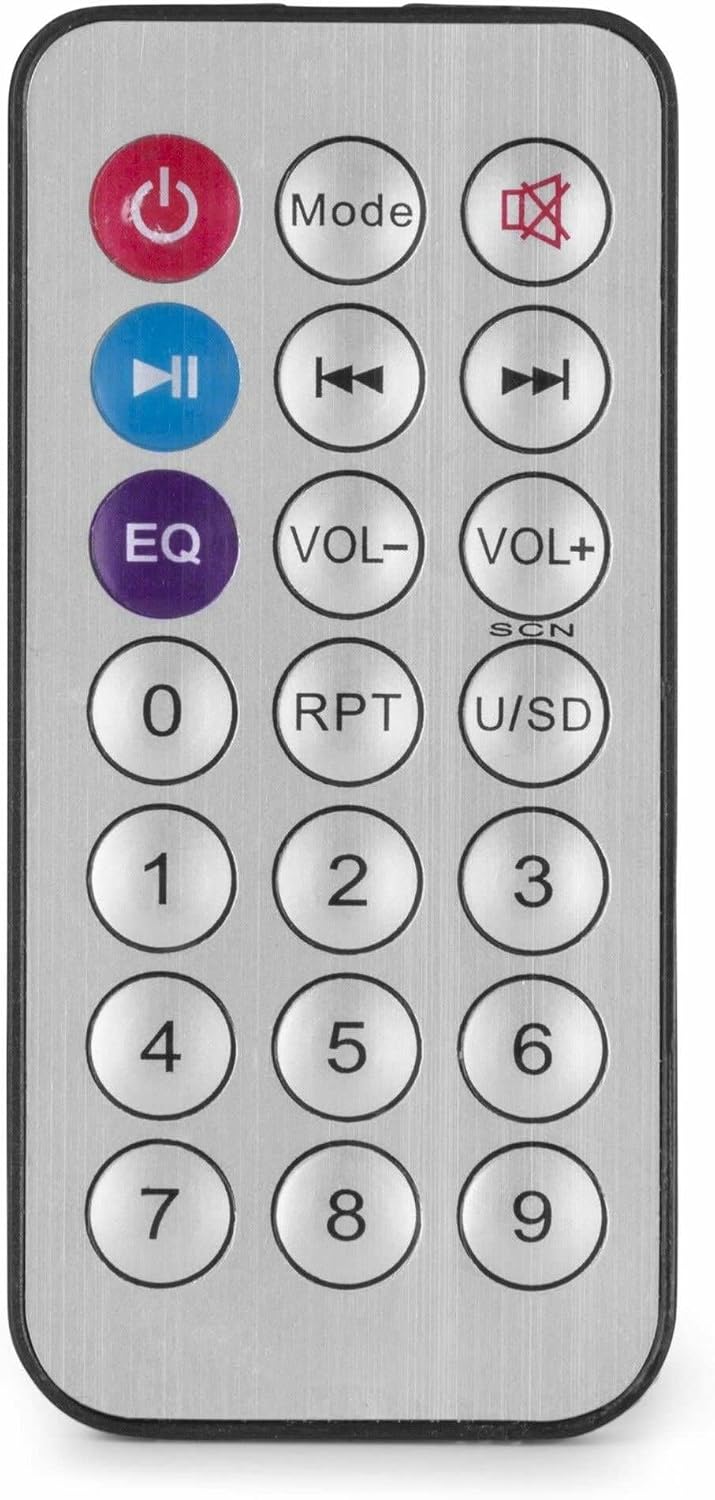
Figure 4: Wireless Remote Control.
Mantemento
- Limpeza: Desconecte a alimentación antes de limpar. Use un pano suave e seco para limpar o exterior do ampNon empregue produtos de limpeza líquidos nin aerosois.
- Ventilación: Ensure that the ventilation openings are clear of dust and debris to maintain proper airflow.
- Almacenamento: Se garda a unidade durante un período prolongado, desconéctea da corrente e gárdea nun lugar fresco e seco, preferiblemente na súa embalaxe orixinal.
Resolución de problemas
| Problema | Causa posible | Solución |
|---|---|---|
| Sen poder | Cable de alimentación non conectado; Toma de corrente avariada; Ampapagado do lifier. | Check power cable connection; Test power outlet; Ensure amplifier switch is ON. |
| Sen saída de son | Incorrect source selected; Volume too low; Speaker connections faulty; Mute activated. | Select correct input source; Increase master and source volume; Check speaker wiring; Deactivate mute function on remote. |
| Bluetooth non se conecta | Amplifier not in Bluetooth mode; Device too far; Device already paired with another unit. | Garantir amplifier is in Bluetooth mode ("BLUE" displayed); Move device closer; Disconnect from other devices and try again. |
| Problemas de reprodución por USB | Unidade USB non formatada correctamente; Incompatible file format; USB drive faulty. | Asegúrate de que a unidade USB estea formatada en FAT32; usa MP3 files; Proba cunha unidade USB diferente. |
| Son distorsionado | Volume too high; Incorrect impedance matching for speakers; Faulty audio source. | Reduce volume; Verify speaker impedance matches amplifier output; Test with a different audio source. |
Especificacións
- Potencia de saída: 25 W
- Saída do altofalante: 100V and 4-16 Ohm
- Rango de frecuencia: 50 Hz - 18 kHz
- Relación sinal-ruído: > 75 dB
- Conexión Voltage: 230 Vac/50 Hz
- Dimensións (L x W x H): 205 x 285 x 65 mm
- Peso: 1.5 kg
- Características: Bluetooth, USB MP3 Player, Radio, AUX Input, Microphone Input, Bass/Treble Control, Integrated Equalizer, Remote Control
- Número de modelo: PDM25
- Fabricante: Tronios BV
Garantía e Soporte
For warranty information and technical support, please refer to the documentation provided with your purchase or visit the official Power Dynamics websitio. Garda o comprobante de compra para calquera reclamación de garantía.
Fabricante: Tronios BV
Websitio: www.power-dynamics.eu