
Introdución
The JOVISION JVS-FLWIFI Floodlight Bulb WiFi Camera is an integrated security solution combining a bright 900 lumens floodlight with a 1080P Full HD Wi-Fi security camera. Designed for outdoor use, this system offers wireless connectivity, remote access, and night vision capabilities, providing comprehensive surveillance for your property. It features internal 16GB storage, eliminating the need for recurring cloud storage fees.
This product is protected by a patent approved by the United States Patent Office.
Produto rematadoview

Figura 1: The JVS-FLWIFI Floodlight Bulb WiFi Camera, showcasing its integrated camera and LED floodlight ring. This unit combines illumination with surveillance capabilities.

Figura 2: Un example of the JVS-FLWIFI Floodlight Camera installed on an outdoor ceiling fixture. The adjustable head allows for optimal camera positioning.
Configuración e instalación
The JVS-FLWIFI Floodlight Camera is designed for simple installation. Follow these steps to set up your device:
- Descarga a aplicación móbil: Download the free mobile application compatible with your device. Refer to the product packaging or manufacturer's website for the correct app name.
- Install the Floodlight: Twist the floodlight bulb into any standard E26 light socket. Ensure the socket is powered off before installation.
- Power On and Connect to Camera's Wi-Fi: Turn on the power to the light socket. The camera will power on. On your mobile device, go to your Wi-Fi settings and connect to the camera's temporary Wi-Fi network.
- Configurar a configuración da rede: Open the mobile application and follow the on-screen prompts to connect the camera to your home Wi-Fi network. This will enable remote access and control.
No wires to run and no holes to drill are typically required for installation into an existing E26 socket. The camera features a 360° adjustable rotating head for optimal angle adjustment.
Instrucións de funcionamento
Floodlight Operation
- The 900 lumens floodlight can be controlled via your normal light switch or through the mobile application.
- Modos de potencia: The device supports three power modes:
- Modo día: Camera operates in color. Floodlight typically off unless manually activated.
- Night/IR Mode: Camera uses infrared (IR) for black and white night vision. Floodlight off.
- Night/Color Mode: Floodlight LED's are turned on at night, allowing the camera to stream/record in full color.
Funcionalidade da cámara
- Transmisión de vídeo en directo: Access brilliant 1080P HD quality live video remotely from your phone, mobile device, or PC.
- Recorded Video Access: Recorded videos are stored on the internal 16GB storage and can be accessed remotely.
- Detección de movemento: The camera sends mobile alerts when motion is detected within its field of view.
- Visión nocturna: The camera provides clear surveillance 24/7. During the day, it records in true color. At night, it switches to black/white IR night vision, or full color if the floodlight is activated.

Figura 3: A daytime view captured by the JVS-FLWIFI camera, demonstrating clear image quality in natural light conditions.

Figura 4: A nighttime view captured by the JVS-FLWIFI camera with the floodlight activated, illustrating full-color visibility in low-light environments.
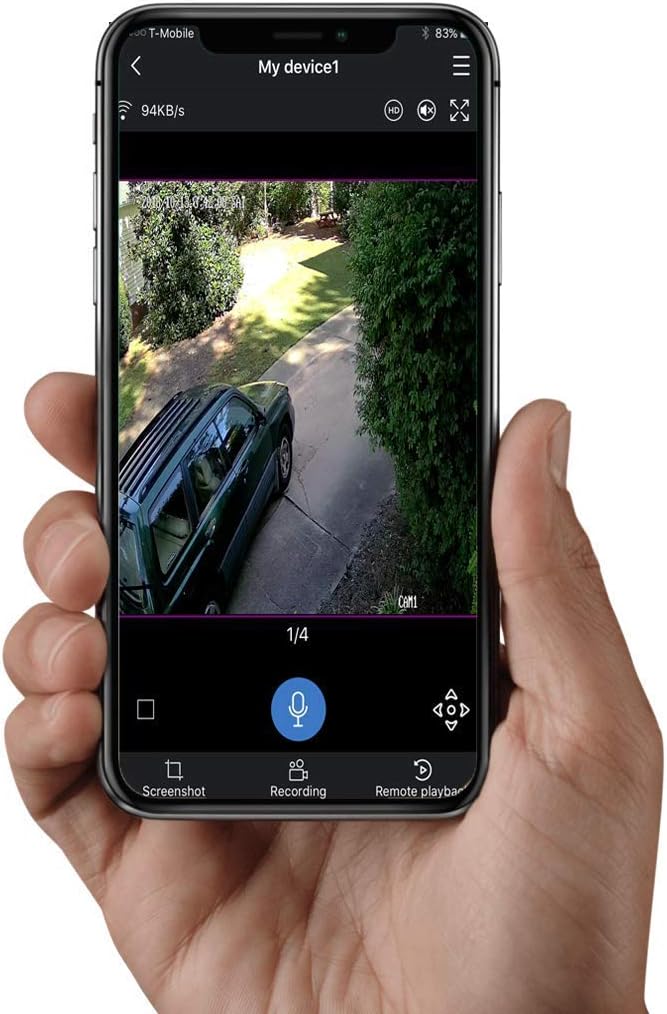
Figura 5: The mobile application interface displaying live video feed from the JVS-FLWIFI camera, with options for screenshot, recording, and remote playback.
Mantemento
- Limpeza: Periodically wipe the camera lens and floodlight surface with a soft, damp un pano para eliminar o po e os residuos. Evite produtos de limpeza abrasivos.
- Actualizacións de firmware: Check the mobile application regularly for firmware updates to ensure optimal performance and security.
- Estabilidade da rede: Ensure your Wi-Fi network is stable and strong in the area where the camera is installed for consistent performance.
Resolución de problemas
- A cámara non se conecta á wifi:
- Asegúrate de que a cámara estea dentro do alcance do teu enrutador Wi-Fi.
- Verifica que introduciches o contrasinal wifi correcto.
- Reinicia o teu enrutador Wi-Fi e a cámara.
- Baixa calidade do vídeo:
- Comproba a velocidade da túa conexión a internet.
- Limpar a lente da cámara.
- Ensure adequate lighting, especially at night.
- Alertas de movemento non recibidas:
- Verify motion detection settings are enabled in the app.
- Check app notification settings on your mobile device.
- Ensure the camera has a stable internet connection.
- Floodlight Not Turning On:
- Check the light switch controlling the socket.
- Verify floodlight settings in the mobile application.
- Asegúrese de que a lámpada estea correctamente atornillada ao enchufe.
Especificacións
| Característica | Detalle |
|---|---|
| Número de modelo | JVS-FLWIFI-2PACK |
| Resolución de captura de vídeo | 1080 p |
| Tecnoloxía de conectividade | Sen fíos (Wi-Fi) |
| Almacenamento interno | 16 GB |
| Floodlight Brightness | 900 lúmenes |
| Tipo de fonte de luz | LED |
| Visión Nocturna | IR Night Vision, Full Color Night Vision (with floodlight) |
| Sensor de movemento | Yes (Mobile Alerts) |
| Uso interior/exterior | Ao aire libre |
| Nivel de resistencia á auga | Impermeable (IP66) |
| Tipo de montaxe | Wall Mount (E26 Socket) |
| Consumo de enerxía | 3 vatios |
| Dispositivos compatibles | Desktop, Smartphone (Android) |
| Peso do elemento | 1 libras |
| Dimensións do paquete | 8 x 8 x 6 polgadas |
| UPC | 744702988173 |
Garantía e Soporte
JOVISION provides free lifetime technical support for the JVS-FLWIFI Floodlight Bulb WiFi Camera. Support is available via talk, text, or email, with nearly 24/7 availability from United States-based technical support.
For assistance, please refer to the contact information provided with your product packaging or visit the official JOVISION websitio.