
HOCO BS31 - Army green
Hoco BS31 Bright Sound Sports Wireless Speaker - Instruction Manual
1. Introdución
Thank you for choosing the Hoco BS31 Bright Sound Sports Wireless Speaker. This manual provides essential information for the proper setup, operation, and maintenance of your device. Please read it thoroughly before use to ensure optimal performance and longevity.
2. Produto rematadoview e Características
The Hoco BS31 is a compact and portable wireless speaker designed for versatile audio playback. It features robust connectivity options and a durable design, making it suitable for various environments.
- Wireless V4.2 JLAC6928B for stable and efficient connection.
- Integrated 53mm speaker for clear audio output.
- Class A polymer battery with 500mAh capacity for extended playback.
- Multiple playback modes: Wireless (Bluetooth), TF card, and AUX input.
- Compact and lightweight design, weighing only 140g.
- Supports A2DP, AVRCP, HFP, HSP protocols for broad compatibility.

Imaxe: Fronte view of the Hoco BS31 speaker in army green, showcasing its compact design and front controls.

Image: The Hoco BS31 speaker held in a hand, demonstrating its small, palm-sized, and portable nature.
3. Contido do paquete
Comprobe se o paquete contén os seguintes elementos:
- Hoco BS31 Wireless Speaker
- Cable de carga USB
- Manual de usuario
4. Controis e interfaces
Familiarize yourself with the speaker's buttons and ports for proper operation.
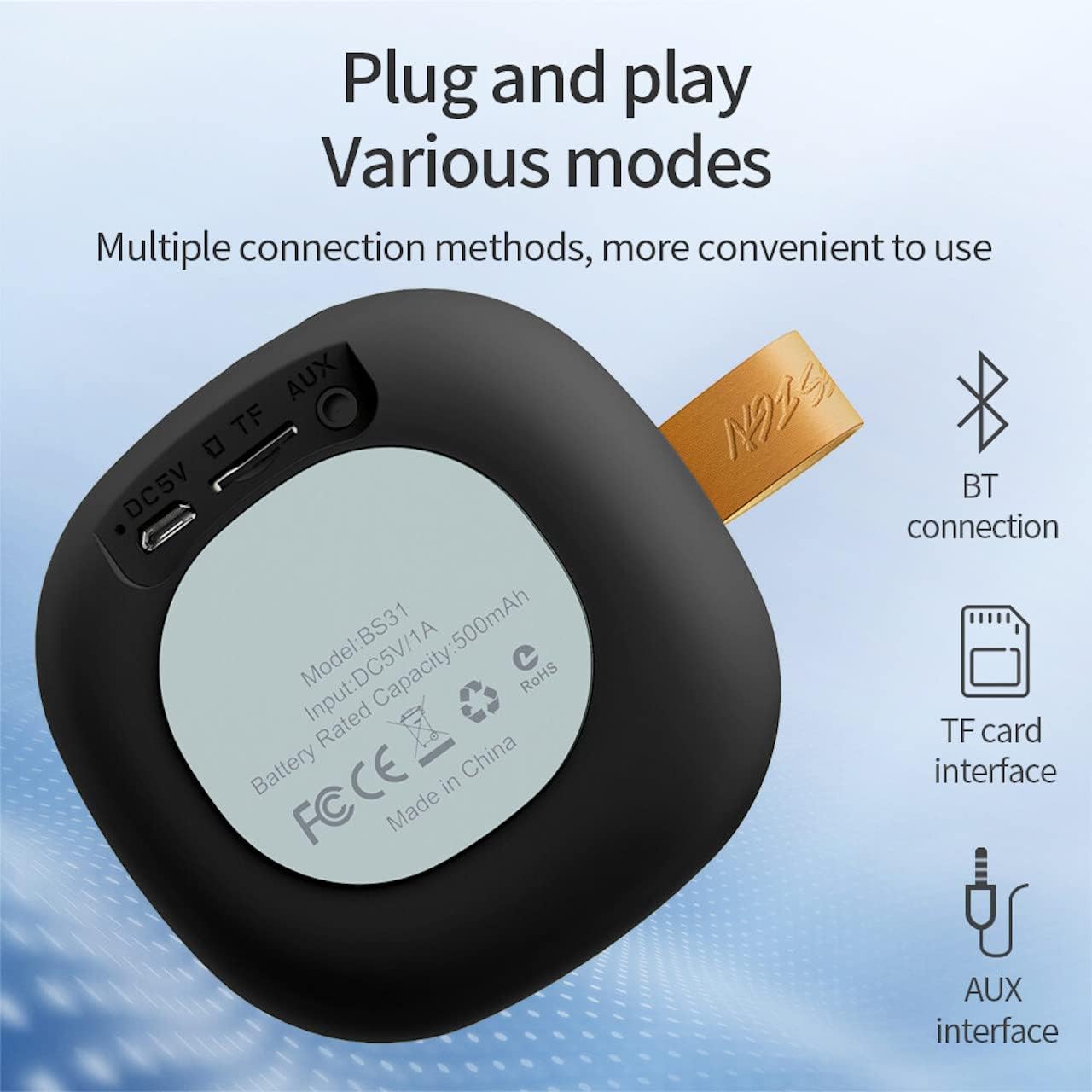
Image: A diagram illustrating the functions of the control buttons on the Hoco BS31 speaker.
- Botón de acendido/apagado (⏻): Press and hold to switch on/off. Short press to play/pause music or answer/end calls.
- Previous Song / Volume Up (⏮): Short press for previous song. Long press to increase volume.
- Next Song / Volume Down (⏭): Short press for next song. Long press to decrease volume.
- Mode Button (⏸): Short press to switch between Bluetooth, TF card, and AUX modes.

Imaxe: Traseira view of the Hoco BS31 speaker, highlighting the DC 5V charging port, TF card slot, and AUX input.
- Porta DC 5V: For charging the speaker using the provided USB cable.
- Ranura para tarxetas TF: Insira unha tarxeta TF (MicroSD) para reproducir música directamente.
- Porto AUX: Conecta dispositivos de son externos cun cable de son de 3.5 mm.
5. Configuración
5.1. Cargando o altofalante
Before first use, fully charge the speaker. Connect the provided USB charging cable to the DC 5V port on the speaker and the other end to a USB power adapter (not included) or a computer's USB port. The charging time is approximately 2 hours. The indicator light will show charging status (e.g., red for charging, off when fully charged).
5.2. Acendido/apagado
To power on the speaker, press and hold the Power button (⏻) until you hear an audible prompt. To power off, press and hold the Power button again until the speaker shuts down.
6. Instrucións de funcionamento
6.1. Emparellamento Bluetooth
- Ensure the speaker is powered on and in Bluetooth pairing mode (indicated by a flashing blue light or audible prompt). If not, short press the Mode button (⏸) to switch to Bluetooth mode.
- No teu dispositivo móbil (teléfono intelixente, tableta, etc.), activa o Bluetooth e busca os dispositivos dispoñibles.
- Select "Hoco BS31" from the list of found devices.
- Once paired, the speaker will indicate a successful connection (e.g., solid blue light or audible prompt).
- You can now play audio from your device through the Hoco BS31 speaker.
6.2. Modo tarxeta TF
Inserir unha tarxeta TF (MicroSD) con son MP3 files into the TF card slot. The speaker will automatically detect the card and switch to TF card playback mode. Use the Previous/Next Song buttons to navigate tracks.
6.3. Modo AUX
Connect one end of a 3.5mm audio cable (not included) to the AUX port on the speaker and the other end to the audio output jack of your external device (e.g., MP3 player, computer). The speaker will automatically switch to AUX mode. Control playback from your external device.

Image: Visual representation of the Hoco BS31's multiple connection methods, including Bluetooth, TF card, and AUX.
6.4. Music Playback and Call Functions
- Reproducir/Pausa: Short press the Power button (⏻).
- Próxima canción: Short press the Next Song button (⏭).
- Canción anterior: Short press the Previous Song button (⏮).
- Subir volume: Long press the Previous Song button (⏮).
- Baixar volume: Long press the Next Song button (⏭).
- Responder/Finalizar chamada: Short press the Power button (⏻) when a call comes in.
- Rexeitar a chamada: Press and hold the Power button (⏻) when a call comes in.

Image: The Hoco BS31 speaker positioned next to a smartphone, demonstrating its use for music playback.
7. Mantemento e coidados
- Manteña o altofalante seco. Non o expoña á auga nin a humidade excesiva.
- Limpa o altofalante cun pano suave e seco. Non empregues produtos de limpeza abrasivos nin disolventes.
- Avoid extreme temperatures. Do not store the speaker in very hot or cold environments.
- Do not attempt to disassemble or repair the speaker yourself. This will void the warranty and may cause damage.
- Cargue o altofalante regularmente, mesmo se non o está a usar, para manter a batería en bo estado.
8 Solución de problemas
| Problema | Causa posible | Solución |
|---|---|---|
| O altofalante non se acende. | Batería baixa. | Cargue o altofalante durante polo menos 30 minutos. |
| Non se pode sincronizar co dispositivo Bluetooth. | O altofalante non está en modo de emparellamento; o Bluetooth do dispositivo está desactivado; está demasiado lonxe. | Ensure speaker is in pairing mode. Turn Bluetooth on/off on device. Move devices closer. |
| Sen son. | Volume demasiado baixo; modo incorrecto; o dispositivo non está a reproducirse. | Increase speaker/device volume. Check correct mode (BT, TF, AUX). Ensure audio is playing on source device. |
| TF card not recognized. | Card inserted incorrectly; unsupported format; corrupted card. | Volva inserir a tarxeta TF. Asegúrese de fileOs discos teñen formato MP3. Proba cunha tarxeta TF diferente. |
9. Especificacións
| Característica | Detalle |
|---|---|
| Modelo | BS31 |
| Tamaño do altofalante | 53 mm |
| Dimensións | 86 x 86 x 44 mm |
| Peso | 140 g |
| Versión sen fíos | V4.2 (JLAC6928B) |
| Protocolos admitidos | A2DP, AVRCP, HFP, HSP |
| Capacidade da batería | 500mAh (Class A polymer battery) |
| Vol. De cargatage | DC 5 V |
| Tempo de carga | Aproximadamente 2 horas |
| Música/Tempo de chamada | Aproximadamente 3 horas |
| Opcións de conectividade | Wireless (Bluetooth), TF card, AUX |
| Potencia máxima de saída | 5 vatios |
10. Garantía e soporte
Hoco products are manufactured to high quality standards. For warranty information and technical support, please refer to the warranty card included with your product or visit the official Hoco websitio.
Oficial Websitio: www.hocotech.com
Ask a question about this manual
Ask about setup, troubleshooting, compatibility, parts, safety, or missing instructions. Manuals+ will review the question and use this page’s manual context to help answer it.