
Introdución
This manual provides detailed instructions for the setup, operation, maintenance, and troubleshooting of your Jedel W380 Wireless and Wired Laser Mouse. The Jedel W380 is a versatile mouse designed for personal computers, offering both wireless and wired connectivity options for flexible use.
Configuración
Contido do paquete
Antes de comezar, asegúrate de que todos os elementos estean presentes no paquete:
- Jedel W380 Mouse
- USB Receiver (for wireless connection)
- Cable de carga (USB-A a Micro-USB)
- Rechargeable Battery (may be pre-installed)

Image: The Jedel W380 mouse and its accessories, including the USB receiver, charging cable, and a rechargeable battery, displayed alongside its retail packaging.
Configuración da conexión sen fíos
- Inserir batería: Open the battery compartment on the underside of the mouse. Insert the rechargeable battery, ensuring correct polarity. Close the compartment.
- Conectar o receptor USB: Conecte o receptor USB a un porto USB dispoñible no seu ordenador.
- Acender o rato: Locate the power switch on the underside of the mouse and slide it to the 'ON' position.
- Conexión automática: The mouse should automatically connect to your computer. If it does not, move the mouse to wake it up or try a different USB port.
Configuración de conexión por cable
- Conectar o cable de carga: Plug the Micro-USB end of the charging cable into the port on the front of the mouse.
- Conectar ao ordenador: Plug the USB-A end of the charging cable into an available USB port on your computer.
- Recoñecemento automático: The mouse will be recognized as a wired device and should function immediately. The mouse will also charge while connected via cable.
Instrucións de funcionamento
The Jedel W380 mouse features standard controls for efficient navigation and interaction with your computer.
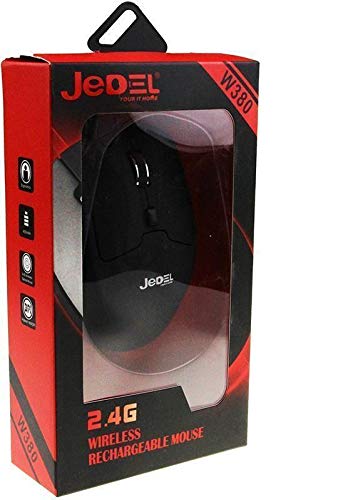
Image: A top-down perspective of the Jedel W380 mouse, highlighting its ergonomic shape, left and right click buttons, scroll wheel, and a small button below the scroll wheel.
Funcións básicas
- Clic esquerdo: Botón principal para seleccionar elementos, abrir files e executando comandos.
- Clic dereito: Botón secundario para acceder aos menús contextuais e a opcións adicionais.
- Roda de desprazamento: Roll up or down to scroll through documents and web páxinas. Prema a roda de desprazamento para a funcionalidade de clic central (se o software o admite).
- Botón DPI: A small button located below the scroll wheel allows you to cycle through different DPI (Dots Per Inch) settings, adjusting the cursor speed and sensitivity. Press this button to change the DPI to suit your preference.
- Botóns laterais: Two buttons on the left side of the mouse typically function as 'Forward' and 'Backward' for web navegación ou file navegación.
Modo de aforro de enerxía
To conserve battery life, the Jedel W380 mouse will enter a sleep mode after a period of inactivity. To wake the mouse, simply move it or click any button.
Mantemento
Limpeza
Para manter un rendemento e unha hixiene óptimos, limpa o rato regularmente:
- Disconnect the mouse from your computer (if wired) or turn it off (if wireless).
- Use un pano suave e sen pelusa dampmantelo con auga ou unha solución de limpeza suave.
- Wipe the surface of the mouse gently. Avoid getting liquid into any openings.
- For the optical sensor on the underside, use a dry cotton swab to carefully remove any dust or debris.
Cargando a batería
The Jedel W380 mouse uses a rechargeable battery. When the battery is low, the mouse's performance may degrade, or an indicator light (if present) may illuminate.
- Connect the Micro-USB end of the charging cable to the mouse's charging port.
- Connect the USB-A end of the cable to a powered USB port on your computer or a USB wall adapter.
- The mouse will charge. An indicator light may show charging status (e.g., red for charging, off or green for fully charged).
- Unha vez cargado por completo, desconecte o cable de carga.
Resolución de problemas
If you encounter issues with your Jedel W380 mouse, refer to the following common problems and solutions:
| Problema | Solución |
|---|---|
| O rato non responde (sen fíos) |
|
| O rato non responde (con cable) |
|
| O movemento do cursor é errático ou brusco |
|
| Os botóns ou a roda de desprazamento non funcionan |
|
Especificacións
Below are the technical specifications for the Jedel W380 Wireless and Wired Laser Mouse:
| Característica | Detalle |
|---|---|
| Marca | Jedel |
| Número de modelo | W380 |
| Cor | Negro |
| Tecnoloxía de conectividade | USB, Wired and Wireless |
| Tecnoloxía de detección de movemento | Láser |
| Orientación das mans | Ambidextrous (uses both hands) |
| Dispositivos compatibles | Ordenador persoal |
| Sistemas operativos | Linux, Windows 7, Windows XP |
| Estilo | Moderno |
| Plataforma de hardware | PC |
| Pilas incluídas | No (Refers to disposable batteries; device includes a rechargeable battery) |
| Fabricante | Jedel |
| Número de peza | W380 |
| ASIN | B081TLFLVH |
Garantía e Soporte
For warranty information and customer support regarding your Jedel W380 mouse, please refer to the documentation provided with your purchase or contact the retailer. Keep your proof of purchase for warranty claims.


