
1. Introdución
This manual provides comprehensive instructions for the IMILAB CMSXJ16A Smart Home Security Camera, a product of XIAOMI. It covers setup, operation, maintenance, and troubleshooting to ensure optimal performance and security monitoring. Please read this manual carefully before using the product and retain it for future reference.
2. Produto rematadoview
2.1 Contido do paquete
Verifica que todos os elementos estean presentes no paquete:
- IMILAB Home Security Camera Basic x 1
- Manual de instrucións x 1
- Cable de alimentación x 1
- Power Adapter (UK/EU/US) x 1
- Wall Mounting Package x 1 (includes screws and wall plugs)
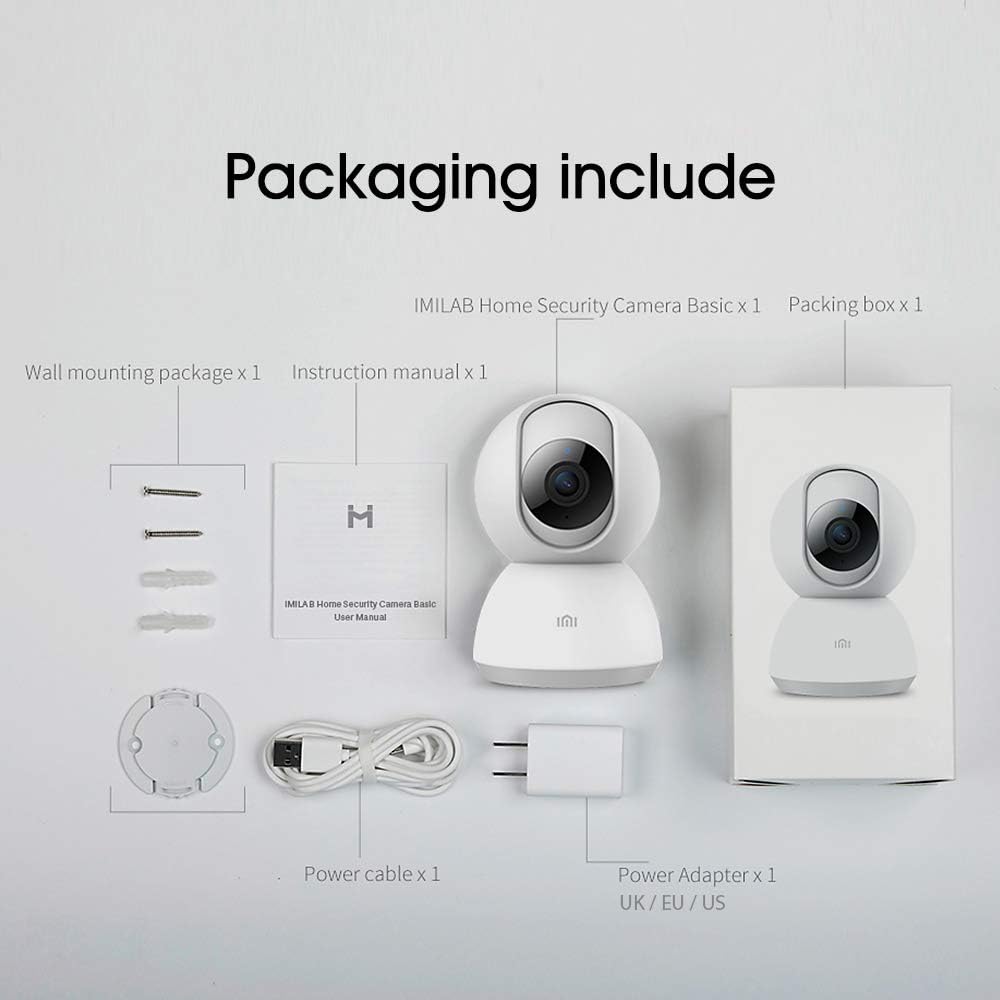
Image: Contents of the IMILAB CMSXJ16A camera package.
2.2 Compoñentes da cámara
The IMILAB CMSXJ16A camera features a compact, spherical design with a rotating base for 360-degree coverage. Key components include the lens, microphone, speaker, status indicator light, and power port.

Imaxe: Fronte view of the IMILAB CMSXJ16A camera.
2.3 Características principais
- FHD (1080P) Resolution: Provides clear and detailed image quality.
- Rotación 360°: Ofrece panorámicas viewing for comprehensive area coverage.
- Glare-Free Night Vision: Equipped with F2.1 aperture and 8x 940mm infrared LEDs for a visible distance of 10m.
- Visión nocturna en cor verdadeira: Maintains full color in low light conditions, even at 100 lumens.
- Detección humana AI: Advanced AI reduces unnecessary alerts by 70% for more accurate notifications.
- Crying Baby Notification: Alerts you to the sound of a crying baby.
- Múltiples opcións de almacenamento: Supports cloud storage, up to 64GB Micro TF card, and NAS storage.
- Codificación de vídeo H.265: Efficiently compresses video, saving storage space while maintaining quality.
3. Configuración
3.1 Acendido
- Connect the power cable to the camera's power port.
- Enchufe o adaptador de corrente a unha toma eléctrica estándar.
- The camera will power on, and the status indicator light will begin to flash, indicating it is ready for connection.
3.2 Instalación da aplicación
Download the official IMILAB Home Security app from your smartphone's app store. The app is compatible with Android 4.4 and above, and iOS 8.0 and above.
- Busca "IMILAB Home Security" in the Google Play Store (for Android) or Apple App Store (for iOS).
- Descarga e instala a aplicación.
- Abre a aplicación e sigue as instrucións en pantalla para crear unha conta ou iniciar sesión.
3.3 Conectando a Wi-Fi
Follow the in-app instructions to connect your camera to your home Wi-Fi network. This typically involves scanning a QR code generated by the app with the camera's lens.
3.4 Montaxe da cámara
The camera supports wall mounting. Use the provided wall mounting package for secure installation.
- Escolla un lugar axeitado para a montaxe, garantindo un campo despexado view e acceso a unha toma de corrente.
- Use the mounting base as a template to mark drill holes on the wall.
- Fai buratos e coloca os tacos de parede.
- Secure the mounting base to the wall with screws.
- Attach the camera to the mounting base.
4. Instrucións de funcionamento
4.1 En directo View e Control Remoto
Once connected, open the IMILAB Home Security app to access the live video feed from your camera. You can remotely control the camera's 360-degree rotation to view different areas of your space.

Image: Live view of the camera feed on mobile devices, demonstrating H.265 encoding efficiency.
4.2 Visión nocturna
The camera automatically switches to night vision mode in low light conditions. It features glare-free infrared night vision and true color night vision for clear visibility even in very dim environments.

Image: Demonstration of glare-free and true color night vision capabilities.
4.3 AI Human Detection and Notifications
The camera utilizes AI to detect human movement, significantly reducing false alarms from pets or other non-human movements. You will receive precise notifications on your smartphone when human activity is detected.

Image: AI movement notification interface in the mobile application.
4.4 Crying Baby Detection
Enable the crying baby detection feature in the app to receive alerts if the camera detects the sound of a baby crying, providing an additional layer of monitoring for nurseries.
4.5 Gravación e almacenamento de vídeo
The camera supports real-time video recording with multiple storage options:
- Almacenamento na nube: Subscribe to cloud services for secure off-site storage of your recordings.
- Tarxeta Micro TF: Insert a Micro TF card (up to 64GB, not included) into the camera for local storage.
- Almacenamento NAS: Connect the camera to a Network Attached Storage (NAS) device for expanded local storage capabilities.
4.6 H.265 Video Encoding
The camera uses H.265 video encoding, which allows for more efficient compression of video files. This means you can save the same quality video with approximately 50% less file size compared to H.264, optimizing storage and bandwidth usage.
5. Mantemento
Para garantir a lonxevidade e o rendemento óptimo da túa cámara, segue estas pautas de mantemento:
- Limpeza: Limpe con coidado a lente e o corpo da cámara cun pano suave e seco. Non empregue produtos químicos agresivos nin produtos de limpeza abrasivos.
- Colocación: Asegúrate de colocar a cámara nun ambiente estable, lonxe da luz solar directa, de temperaturas extremas e de alta humidade.
- Actualizacións de firmware: Consulta regularmente a aplicación para ver se hai actualizacións de firmware dispoñibles para asegurarte de que a túa cámara teña as últimas funcións e melloras de seguridade.
6 Solución de problemas
If you encounter issues with your IMILAB CMSXJ16A camera, refer to the following common solutions:
- Cámara sen conectar: Ensure your Wi-Fi network is 2.4GHz (5GHz is not supported). Check Wi-Fi signal strength. Restart the camera and your router.
- Mala calidade da imaxe: Clean the camera lens. Ensure adequate lighting in the environment. Check your internet connection speed.
- Sen notificacións: Verify that notifications are enabled in both the camera app settings and your smartphone's system settings. Check network connectivity.
- Cámara sen conexión: Check the power connection. Ensure your Wi-Fi network is active and the camera is within range. Restart the camera.
- Micro TF Card Not Detected: Ensure the card is inserted correctly. Format the card through the app if it's new or has issues. Use a compatible Micro TF card (up to 64GB).
7. Especificacións
| Característica | Especificación |
|---|---|
| Número de modelo | CMSXJ16A |
| Dimensións (L x W x H) | 10.8 x 7.6 x 7.6 cm |
| Peso | 211 gramos |
| Resolución de vídeo | 1080p (FHD) |
| Campo de View / Angle of View | 360 graos |
| Distancia de visión nocturna | 10 metros |
| LEDs infravermellos | 8 x 940 mm |
| Apertura | F2.1 |
| Tecnoloxía de conectividade | Wired, Wireless (Wi-Fi 2.4GHz) |
| Fonte de enerxía | Mains Powered (via 5V, 5W adapter) |
| Dispositivos compatibles | Teléfono intelixente (Android 4.4+, iOS 8.0+) |
| Opcións de almacenamento | Cloud, Micro TF Card (max 64GB), NAS |
| Formato de captura de vídeo | MP4 (H.265 encoding) |
| Uso interior/exterior | Interior |
| Tipo de montaxe | Soporte de parede |
8. Garantía e soporte
For warranty information and technical support, please refer to the official IMILAB websitio web ou póñase en contacto co servizo de atención ao cliente. Garde o recibo da compra como proba de compra para reclamacións de garantía.