
1. Introdución
This manual provides instructions for the FocalTop N2QAYB000953 replacement remote control. This remote is designed to function as a direct replacement for the original Panasonic Blu-ray Player remote control models N2QAYB000953, compatible with DMP-BDT360, DMP-BDT361, DMP-BDT460, and DMP-BDT460PS Blu-ray players.
No programming is required for this remote control. Simply insert batteries, and it is ready for use.
2. Configuración
2.1 Instalación da batería
- Localice o compartimento da batería na parte traseira do control remoto.
- Deslice a tapa do compartimento da batería cara abaixo para abrila.
- Insert two (2) AAA alkaline batteries (not included), ensuring the positive (+) and negative (-) terminals align correctly with the markings inside the compartment.
- Deslice a tapa do compartimento da batería de volta ao seu lugar ata que faga clic de forma segura.

Figure 2.1: Battery compartment with cover removed, showing battery placement.
Nota: Ensure batteries are inserted with correct polarity. Incorrect installation may prevent the remote from functioning.
3. Operación do mando a distancia
The FocalTop N2QAYB000953 remote control is designed for intuitive operation of your compatible Panasonic Blu-ray Player. Point the remote directly at the Blu-ray player's infrared sensor for optimal performance.
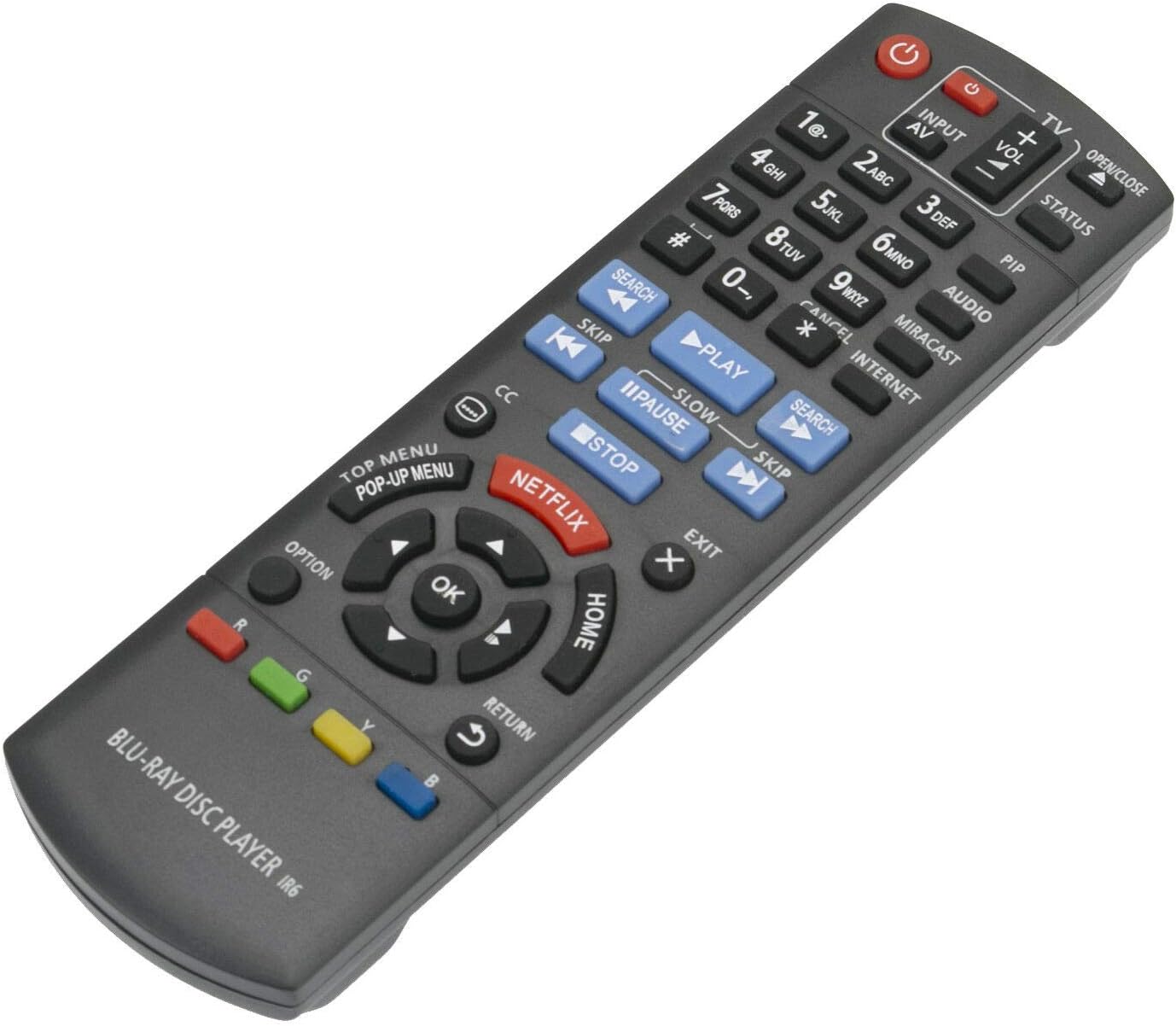
Figura 3.1: Fronte view do mando a distancia coa disposición dos botóns.
3.1 Funcións clave
- Potencia (⏻): Turns the Blu-ray player on or off.
- Input/AV: Selects the input source on your television.
- Volume (+/-): Adjusts the volume of the connected audio system (if supported by the Blu-ray player's HDMI-CEC or similar function).
- Botóns numéricos (0-9): Used for direct track selection or entering numerical data.
- Xogar (▶), Pausa (⏸), Pare (■): Controis estándar de reprodución multimedia.
- Saltar (⏭), Search (⏮): Navigate between tracks or fast-forward/rewind.
- Teclado direccional (Arriba, Abaixo, Esquerda, Dereita) e Aceptar: Navega polos menús e confirma as seleccións.
- INICIO: Returns to the main menu of the Blu-ray player.
- TOP MENU/POP-UP MENU: Accesses the disc's top menu or pop-up menu.
- NETFLIX: Botón de acceso directo para a aplicación de Netflix.
- DEVOLUCIÓN: Volta á pantalla ou ao menú anterior.
- OPCIÓN: Displays options relevant to the current screen or playback.
- Botóns de cores (vermello, verde, amarelo, azul): Used for specific functions within menus or applications, as indicated on-screen.
4. Mantemento
- Limpeza: Limpe o mando a distancia cun pano suave e seco. Non empregue produtos de limpeza líquidos nin materiais abrasivos.
- Substitución da batería: Replace batteries when the remote's response becomes sluggish or stops working. Always replace both batteries at the same time with new ones of the same type (AAA alkaline).
- Almacenamento: Se non se vai usar o mando a distancia durante un período prolongado, retire as pilas para evitar fugas e posibles danos.
- Ambiente: Avoid exposing the remote to extreme temperatures, direct sunlight, or high humidity.
5 Solución de problemas
| Problema | Causa posible | Solución |
|---|---|---|
| O control remoto non funciona. |
|
|
| Some buttons do not respond. |
|
|
| O control remoto funciona de forma intermitente. |
|
|
6. Especificacións
- Modelo: N2QAYB000953
- Marca: FocalTop
- Compatibilidade: Panasonic Blu-ray Player models DMP-BDT360, DMP-BDT361, DMP-BDT460, DMP-BDT460PS
- Tecnoloxía de conectividade: Infravermello (IR)
- Tipo de controlador: Control de botón
- Fonte de enerxía: 2 pilas alcalinas AAA (non incluídas)
- Característica especial: Deseño ergonómico
7. Garantía e soporte
This product is a replacement remote control. For specific warranty information or technical support, please refer to the documentation provided by the original seller or contact FocalTop directly. No explicit warranty information is provided within this manual.