
Tomshine 93d6461d-17a8-45d0-bfc9-82643fae0e7c
Tomshine Floor Lamp Manual de usuario
Model: 93d6461d-17a8-45d0-bfc9-82643fae0e7c
Introdución
This manual provides detailed instructions for the setup, operation, and maintenance of your Tomshine Floor Lamp. Designed for versatile lighting, this LED floor lamp features stepless dimming, four color temperature settings, and convenient control via both a touch sensor and a remote control. Its flexible gooseneck allows for precise light positioning, making it ideal for living rooms, bedrooms, offices, and reading areas.
Instrucións de seguridade
- Asegúrese de que a fonte de alimentación voltage coincide co lamp's requirements before plugging in.
- Non desmonte nin modifique o lampEncomende calquera tarefa de mantemento a persoal cualificado.
- Manteña o lamp lonxe da auga ou damp environments. This product is designed for indoor use only.
- Avoid direct eye exposure to the LED light source for prolonged periods.
- Coloque o lamp on a stable, flat surface to prevent tipping. The sturdy iron base is designed for stability, but caution is advised around children and pets.
- Desenchufe o lamp da toma de corrente antes de limpalo ou realizar calquera mantemento.
Contido do paquete
Comprobe que todos os compoñentes estean presentes antes da montaxe:
- Piso LED Lamp (Gooseneck head, multiple pole sections, base)
- Control remoto
- Adaptador de CA

Imaxe 1: Lamp Compoñentes e accesorios
Configuración e montaxe
Sigue estes pasos para montar o teu chanamp:
- Connect the power cable from the lamp base to the AC adapter.
- Carefully thread the power cable through the pole sections.
- Screw the pole sections together clockwise, ensuring a secure connection. Start from the base and work your way up to the gooseneck section.
- Once all sections are securely connected, plug the AC adapter into a standard wall outlet.
Video 1: Product Features and Assembly Guide. This video demonstrates the lamp's various lighting modes and provides a step-by-step guide for assembling the lamp components, including connecting the power cable and screwing the pole sections together.
Instrucións de funcionamento
Control de sensor táctil
O lamp features a touch control panel located on the stand below the gooseneck:
- Prensa curta: Tap the power icon to turn the lamp ON/OFF. Short press the sun icon to cycle through the 4 color temperatures (3000K, 4000K, 5000K, 6000K).
- Prensa longa: Slide your finger across the touch surface or long press the sun icon to adjust the brightness steplessly (20%-100%).
Control remoto
The included remote control offers comprehensive control over the lamp's functions. The remote can be conveniently adsorbed onto the lamp post via its magnetic feature.
- Botón de encendido: Xire o lamp ON/OFF.
- Axuste da temperatura da cor: Botóns para incrementarasing ou decreasing color temperature.
- Axuste de brillo: Botóns para incrementarasing ou decreasinbrillo g.
- Modos predefinidos: Dedicated buttons for various lighting scenes:
- Modo Lecer
- Modo de lectura
- Modo oficina
- Modo de lactancia materna
- Modo entretemento
- Modo de sono
- 100% Brillo: Instantly set the lamp a brillo completo.
- Sleeping Timer: Configura un temporizador de 1 horas para o apagado automático.

Figure 2: Remote Control and Touch Panel
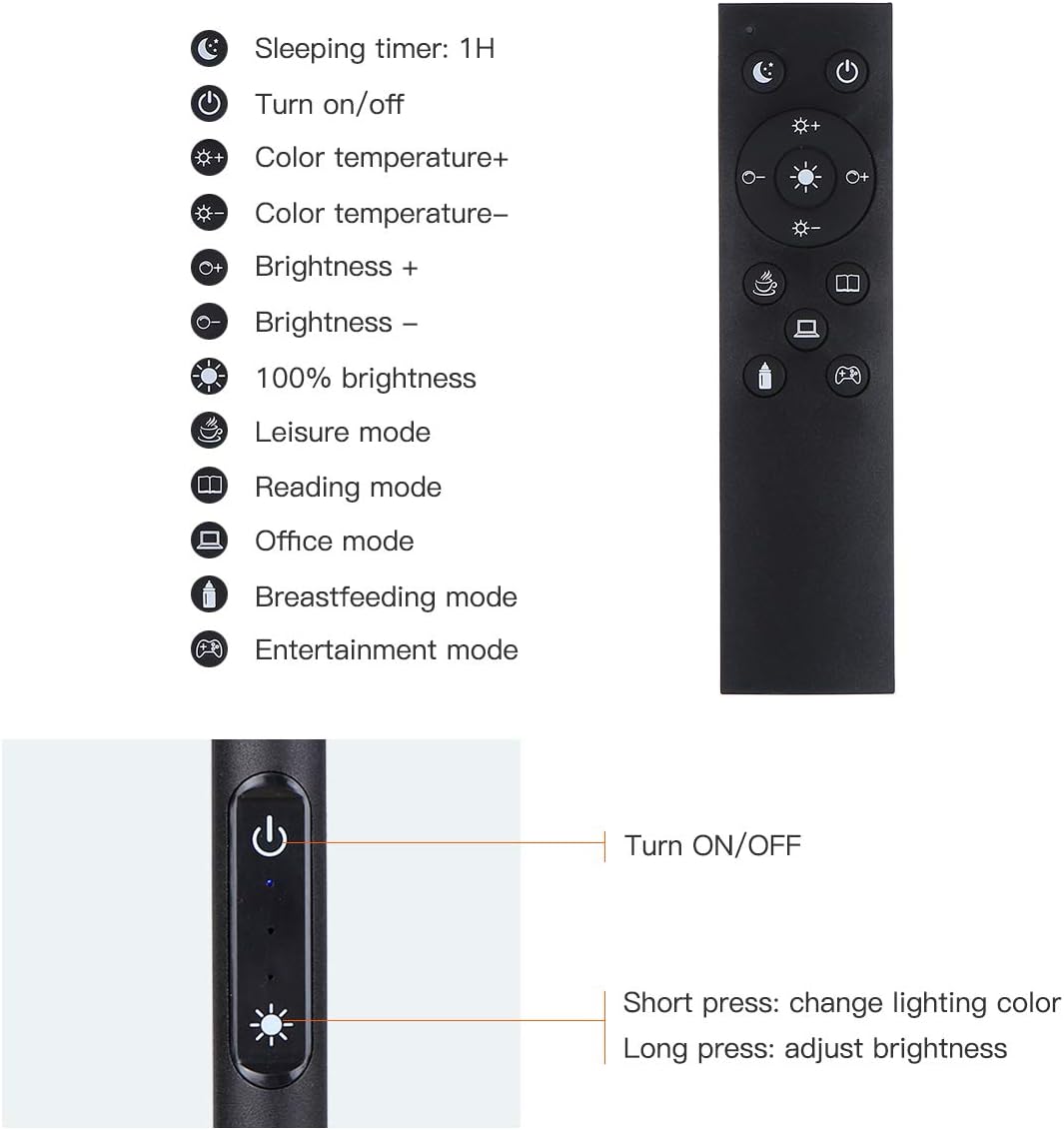
Figure 3: Remote and Touch Control Functions

Figure 4: Color Temperature and Brightness Options
Pescozo axustable
O lamp features a flexible gooseneck and a 360° swivel head, allowing you to direct light precisely where needed. The gooseneck maintains its position once adjusted, preventing drift or drooping.

Figure 5: Flexible Gooseneck and Dimensions
Mantemento
- Limpeza: Desconecte a alimentación antes de limpar. Use un pano suave e seco para limpar a lamp. Non use produtos de limpeza ou disolventes abrasivos.
- Fonte de luz LED: O lamp is equipped with integrated LED bulbs that are designed for long life and are not user-replaceable.
- Almacenamento: Se almacena o lamp for an extended period, disassemble it and store in its original packaging in a dry, cool place.
Resolución de problemas
| Problema | Causa posible | Solución |
|---|---|---|
| Lamp non acende. | Sen fonte de alimentación; conexión solta; adaptador defectuoso. | Check if the power plug is securely inserted into the outlet and the lamp. Ensure the adapter is functioning. Try a different outlet. |
| O control remoto non funciona. | Remote battery low or dead; remote out of range; obstruction. | Substitúe a batería do control remoto. Asegúrese de que non haxa obstáculos entre o control remoto e o lamp. Move closer to the lamp. |
| Brightness/Color temperature not adjusting. | Incorrect button pressed; lamp nun modo fixo. | Refer to the operating instructions for correct button functions. If in a preset mode, try switching to manual adjustment. |
| Lamp parpadea ou esmorece de forma inesperada. | Fonte de alimentación inestable; conexión solta. | Ensure the power connection is stable. Try plugging into a different outlet. If the issue persists, contact customer support. |
Especificacións
| Característica | Detalle |
|---|---|
| Marca | Tomshine |
| Número de modelo | 93d6461d-17a8-45d0-bfc9-82643fae0e7c |
| Lamp Tipo | Piso Lamp |
| Tipo de fonte de luz | LED |
| Brillo | 1500 lúmenes |
| Wattage | 10 vatios |
| Temperaturas de cor | 3000K, 4000K, 5000K, 6000K (4 modes) |
| Atenuación | Continuo (20%-100%) |
| Método de control | Toque, mando a distancia |
| Dimensións do produto | 63.78" D x 7.87" W x 63.6" H |
| Peso do elemento | 2.76 libras |
| Material base | Ferro |
| Material de sombra | Metal |
| Fonte de enerxía | Enchufe |
| Uso interior/exterior | Interior |
Garantía e Soporte
Tomshine products are manufactured to the highest quality standards. For any questions, technical support, or warranty claims, please contact Tomshine customer service through the retailer's platform or visit the official Tomshine store online. Please retain your proof of purchase for warranty purposes.
Para máis información, visite o Tomshine Store.
Ask a question about this manual
Ask about setup, troubleshooting, compatibility, parts, safety, or missing instructions. Manuals+ will review the question and use this page’s manual context to help answer it.