
Andoer HDV-201LM
Andoer HDV-201LM 1080p Digital Video Camera User Manual
Model: HDV-201LM
1. Introdución
This manual provides detailed instructions for the safe and effective use of your Andoer HDV-201LM Digital Video Camera. Please read this manual thoroughly before operating the device and retain it for future reference.
The Andoer HDV-201LM is a 1080p Full HD digital video camera featuring a 5-megapixel CMOS sensor, capable of capturing video at 1920x1080p at 30 frames per second and still images up to 24 megapixels (interpolated). It includes a 16X digital zoom, a 3.0-inch TFT-LCD screen with 270-degree rotation, and supports external accessories via a hot shoe mount.
2. Contido do paquete
Verifique que todos os artigos que se indican a continuación estean incluídos no seu paquete. Se falta algún artigo ou está danado, póñase en contacto co seu vendedor.
- 1 x Andoer HDV-201LM Digital Video Camera
- 1 bolsa para cámara
- 2 x Rechargeable 3.7V 800mAh Batteries (one pre-installed)
- 1 x cable USB
- 1 x Cable AV
- 1 x mando a distancia
- 1 x Camera User Manual (English)
- 1 x 0.39X Wide-Angle Lens
- 1 x micrófono externo
- 1 x Microphone Connection Cable
- 1 x Microphone User Manual (Chinese)
Note: A memory card is not included. A Class 10 or higher SD card (up to 32GB) is strongly recommended for optimal performance.
3. Identificación de pezas
Familiarize yourself with the various components of your digital video camera.

Figura 3.1: Fronte view of the Andoer HDV-201LM camera with attached wide-angle lens and external microphone.

Figura 3.2: detallada views highlighting the hot shoe mount, control buttons, battery compartment, and 1/4-inch tripod thread.
- Lente: Compoñente óptico principal para capturar imaxes e vídeos.
- Pantalla LCD: 3.0-inch TFT-LCD display for viewing and menu navigation. Rotates 270 degrees.
- Botón de encendido: Acende ou apaga a cámara.
- Record/Stop Button: Inicia ou detén a gravación de vídeo.
- Botón de foto: Captura imaxes fixas.
- Palanca de zoom (W/T): Adjusts digital zoom (Wide/Telephoto).
- Botón de menú: Accede á configuración da cámara.
- Botóns de navegación: Úsase para a navegación e selección de menús.
- Soporte de zapata quente: For attaching external accessories like microphones or LED lights.
- Rosca do trípode: 1/4-inch thread for mounting the camera on a tripod.
- Compartimento de batería: Alberga a batería recargable.
- Ranura para tarxetas SD: For inserting a memory card.
- Porto USB: For connecting to a computer or charging.
- Saída AV: Para conectar a un televisor.
- Luz de recheo LED: Ofrece iluminación adicional en condicións de pouca luz.
4. Configuración
4.1. Cargando a batería
- Abra a tapa do compartimento da batería.
- Insert the provided 3.7V 800mAh battery, ensuring correct polarity. If an insulator tab is present, remove it before insertion.
- Pecha a tapa do compartimento da batería.
- Connect the camera to a power source using the USB cable. The charging indicator will illuminate.
- Unha vez cargada completamente, a luz indicadora cambiará ou apagarase.
4.2. Inserción dunha tarxeta de memoria
- Asegúrese de que a cámara estea apagada.
- Localice a ranura da tarxeta SD.
- Insert a Class 10 or higher SD card (up to 32GB) into the slot until it clicks into place.
- Para retirala, prema suavemente a tarxeta ata que salte.
4.3. Attaching the Wide-Angle Lens
- Remove the protective cap from the camera lens.
- Carefully screw the 0.39X wide-angle lens onto the camera's main lens thread until secure.

Figure 4.1: The camera with the 0.39X super wide-angle lens attached, demonstrating its expanded field of view.
4.4. Attaching the External Microphone
- Slide the external microphone into the hot shoe mount on top of the camera.
- Connect the microphone cable to the camera's external microphone input port.
5. Funcionamento da cámara
5.1. Acendido/apagado
- To power on, open the LCD screen or press the Poder botón.
- To power off, close the LCD screen or press and hold the Poder botón.
5.2. Gravación de vídeos
- Ensure the camera is in video mode (indicated on the LCD screen). If not, press the Modo botón para cambiar.
- Preme o Gravar/Parar button to start recording. A red indicator will typically flash.
- Preme o Gravar/Parar botón de novo para deter a gravación.
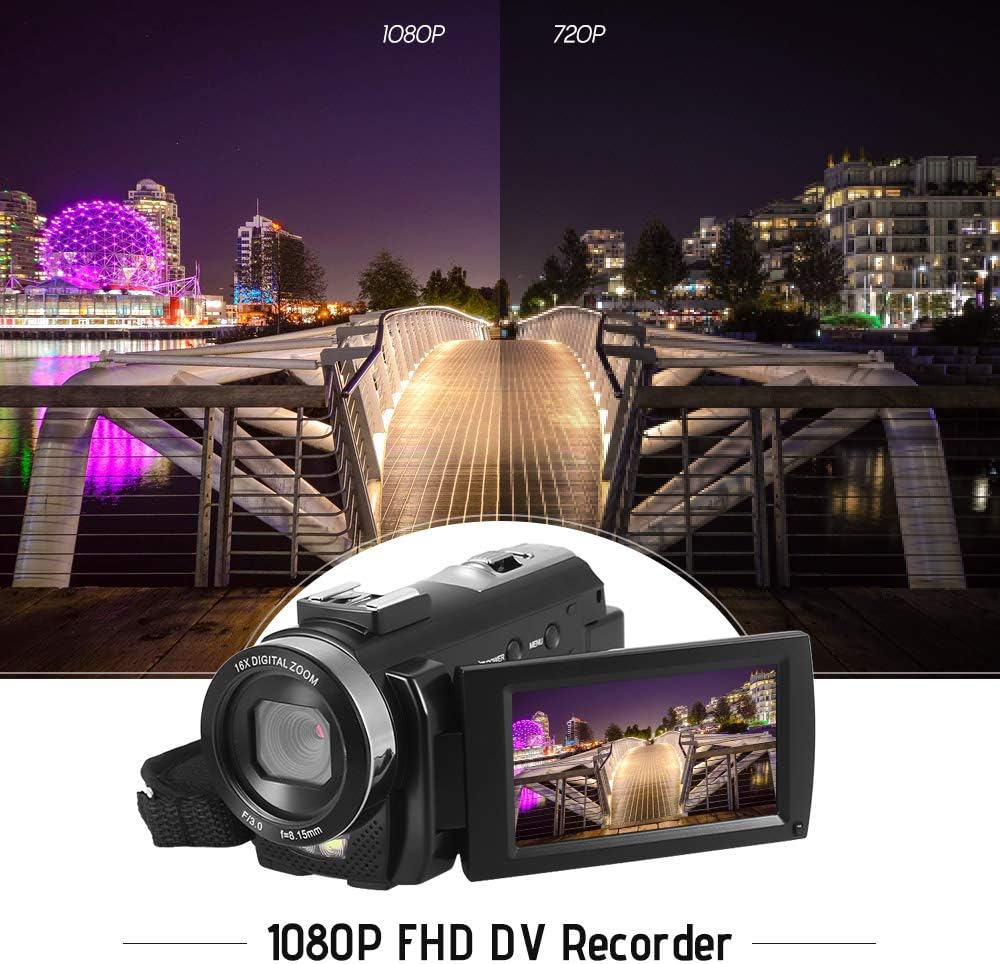
Figure 5.1: The camera is capable of recording in 1080p Full HD and 720p HD resolutions.
5.3. Facendo fotos
- Ensure the camera is in photo mode. If not, press the Modo botón para cambiar.
- Encadra a túa foto usando a pantalla LCD.
- Preme o Foto button to capture an image.
5.4. Uso do zoom dixital
- Usa o O (Ancho) e T (Teleobxectivo) lever to adjust the 16X digital zoom.

Figure 5.2: The camera's 16X digital zoom allows for closer views of subjects.
5.5. Configuración do menú
- Preme o Menú button to access settings.
- Use the navigation buttons to scroll through options such as:
- Balance de brancos: Auto, Daylight, Cloudy, Fluorescent, Tungsten.
- Modo escena: Auto, Night, Portrait, Landscape, Backlight, Sport, Party, Beach, High Sensitivity.
- Modo de disparo: Single, Continuous.
- Exposición: Adjust ±3.0EV.
- Temporizador automático: Off, 2s, 5s, 10s.
- Apagado automático: Off, 1min, 3min, 5min.
- Idioma: English, German, French, Spanish, Italian, Turkish, Russian, Portuguese, Dutch, Simplified Chinese, Traditional Chinese, Japanese, Polish.
- Outras funcións: Face Detection, Smile Capture, Beauty Face, Anti-Shake.
- Preme o OK or Gravar/Parar botón para confirmar as seleccións.
- Preme o Menú botón de novo para saír.
5.6. Conexión a un televisor
- Use the provided AV cable to connect the camera's AV output to your television's AV input.
- Select the correct AV input channel on your TV to view camera content.
6. Mantemento
6.1. Limpeza da cámara
- Use un pano suave e seco para limpar o corpo da cámara.
- Para a lente e a pantalla LCD, use un pano e unha solución de limpeza de lentes especializados. Evite produtos químicos agresivos.
6.2. Almacenamento
- Garde a cámara nun lugar fresco e seco, lonxe da luz solar directa e de temperaturas extremas.
- Retire a batería se a cámara non se utiliza durante un período prolongado.
7 Solución de problemas
| Problema | Causa posible | Solución |
|---|---|---|
| A cámara non se acende. | A batería está esgotada ou non está inserida correctamente. | Charge the battery fully. Ensure the battery is inserted with correct polarity and the insulator tab is removed. |
| Non se pode gravar vídeo nin sacar fotos. | A tarxeta de memoria está chea, non está inserida ou está danada. | Insira unha tarxeta de memoria. Elimine as innecesarias files or format the card (this will erase all data). Replace the card if corrupted. |
| Mala calidade de vídeo/imaxe. | Iluminación insuficiente, lente sucia ou axustes incorrectos. | Ensure adequate lighting. Use the LED fill light if necessary. Clean the lens. Adjust white balance and scene mode settings. |
| A cámara conxélase ou deixa de responder. | Fallo de software ou batería baixa. | Remove and reinsert the battery to reset the camera. Ensure the battery is charged. |
8. Especificacións
| Característica | Especificación |
|---|---|
| Marca | Andoer |
| Modelo | HDV-201LM |
| Sensor de imaxe | Sensor CMOS de 5 megapíxeles |
| Resolución de vídeo | 1920x1080P (FHD 30fps), 1280x720 (HD 30fps), 640x480 (VGA 30fps), 320x240 (VGA 30fps) |
| Formato de vídeo | AVI |
| Resolución da imaxe | 24MP (Interpolated), 20MP (Interpolated), 16MP (Interpolated), 12MP (Interpolated), 10MP (Interpolated), 7M Wide (Interpolated), 5MP, 3MP, 2M Wide, VGA |
| Formato de imaxe | JPG |
| Zoom dixital | 16X |
| Lente | ff (F/3.0 f=8.15mm) |
| Apertura máxima | 8.15 F |
| Pantalla LCD | 3.0-inch TFT-LCD (16:9), 270-degree rotation |
| Almacenamento | Tarxeta SD (ata 32 GB, recoméndase clase 10) |
| Conectividade | USB 2.0, AV Output (NTSC/PAL) |
| Fonte de alimentación | 1 batería recargable de 3.7 V e 800 mAh |
| Batería de control remoto | 1 x 3V CR2025 Battery |
| Soporte do sistema operativo | Windows XP/Vista/7/8/10 |
| Características especiais | Anti-shake, Face Detection, Smile Capture, Beauty Face, Self-Timer, LED Fill Light, Hot Shoe Mount |
| Dimensións | 13.5 x 5.5 x 6.5 cm (5.3 x 2.2 x 2.6 polgadas) |
| Peso | 273g (9.6oz) with battery |
| Cor | Negro |
9. Garantía e soporte
Para obter información sobre a garantía e asistencia técnica, consulte a documentación incluída coa súa compra ou póñase en contacto co seu vendedor. Garde o comprobante de compra para calquera reclamación de garantía.
Ask a question about this manual
Ask about setup, troubleshooting, compatibility, parts, safety, or missing instructions. Manuals+ will review the question and use this page’s manual context to help answer it.