
1. Introdución
This manual provides detailed instructions for the installation, operation, and maintenance of your POPP THC15A Digital Programmable Weekly Timer Switch. This device is designed to automatically control the power supply to electrical appliances based on programmed schedules, offering convenience and energy efficiency. Please read this manual thoroughly before use to ensure proper function and safety.
2. Información de seguridade
Observe sempre as seguintes precaucións de seguridade para evitar lesións ou danos no dispositivo:
- A instalación só debe ser realizada por un electricista cualificado.
- Asegúrese de que a fonte de alimentación estea desconectada antes da instalación ou mantemento.
- Do not exceed the maximum load rating of 16A / 3500W.
- Non expoña o dispositivo á humidade nin a temperaturas extremas.
- Este dispositivo é só para uso en interiores.
3. Produto rematadoview
3.1 Características
- Advanced pre-setting one week before.
- Digital electronic timer switch with daily and weekly programs.
- Repeat programs with up to 17 ON/OFF settings.
- Manual override function.
- Lithium battery power reserve for memory backup during power outages.
- Ideal for household use on DB panels, rated for 3500W/16A.
- 24 hours / 7 days a week programmable.
- Automatic time error correction of +/- 30 seconds weekly.
3.2 Compoñentes
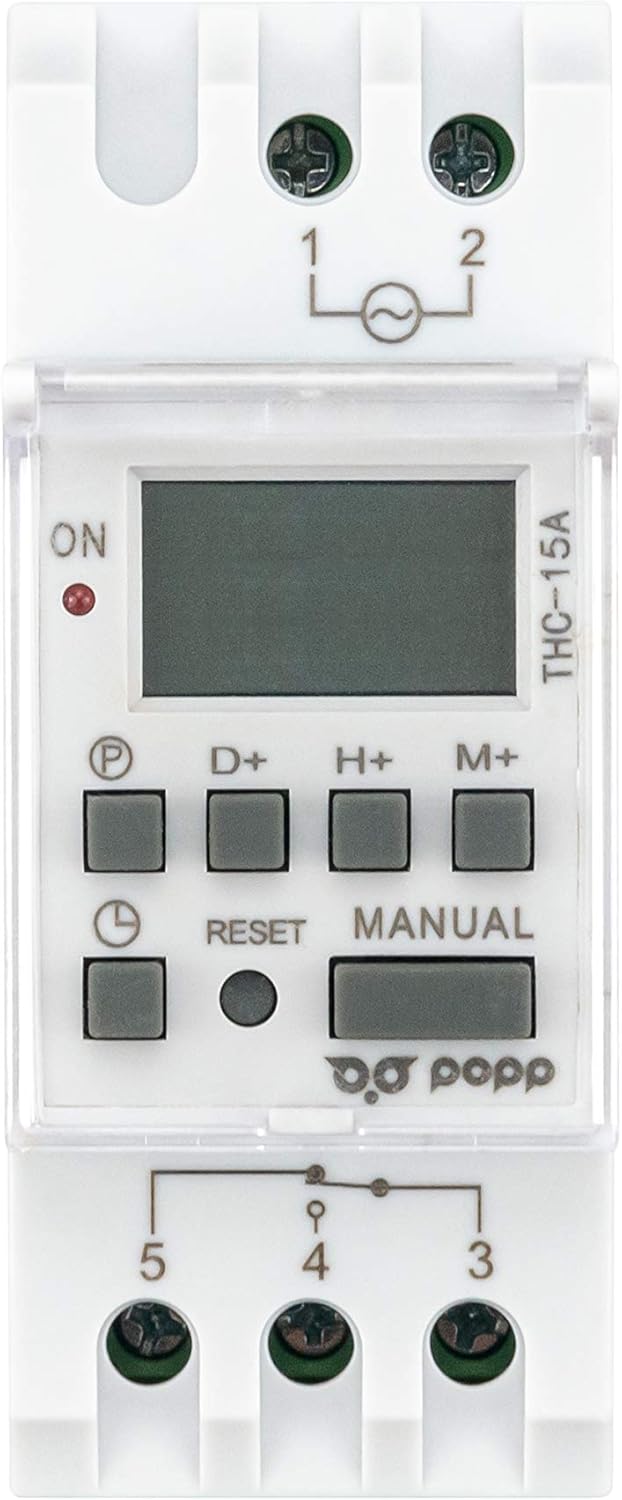
Figura 1: Fronte View of POPP THC15A Timer Switch. This image shows the front panel of the timer switch, featuring the LCD display, programming buttons (P, D+, H+, M+), Reset button, Manual button, and the ON indicator light.

Figura 2: En ángulo View of POPP THC15A Timer Switch. This image provides an angled perspective of the timer, highlighting its compact design and the protective clear cover over the display and buttons.
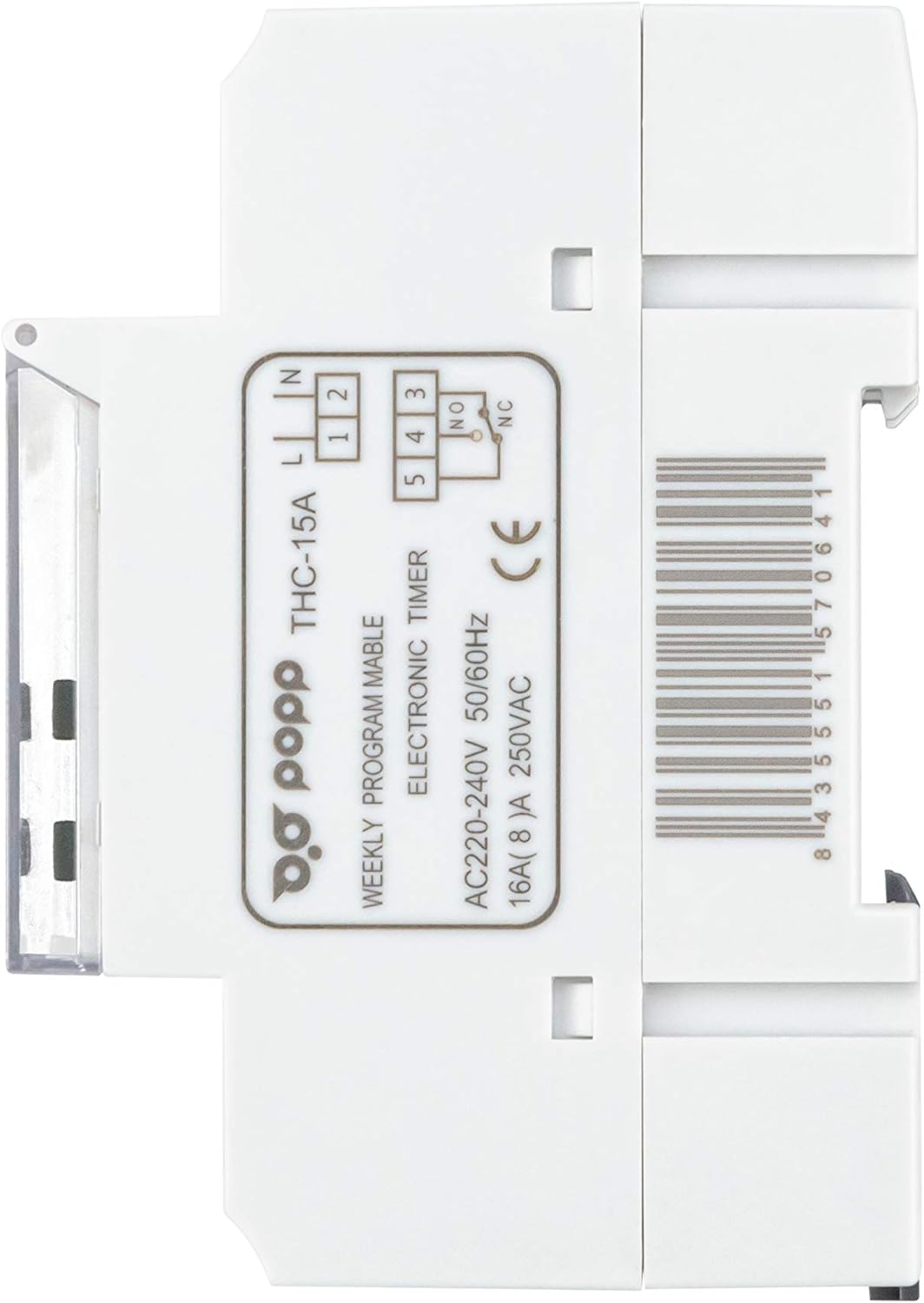
Figura 3: Lateral View of POPP THC15A Timer Switch. Esta imaxe mostra o lado profile of the timer switch, showing its depth and DIN rail mounting clips.

Figura 4: Atrás View con diagrama de cableado. This image shows the rear of the timer switch, including the terminal block for electrical connections and the printed wiring diagram for input (L, N) and output (NO, NC, COM).
4. Configuración
4.1 Instalación
The THC15A timer switch is designed for DIN rail mounting. Follow these steps for installation:
- Desconectar a enerxía: Ensure the main power supply to the installation area is completely switched off before proceeding.
- Montaxe: Clip the timer switch onto a standard 35mm DIN rail within your electrical panel.
- Cableado: Refer to the wiring diagram on the back of the device (Figure 4) and the instructions below for correct connections.
- Power Input (220V AC): Connect the Live (L) wire to terminal 1 and the Neutral (N) wire to terminal 2.
- Saída de carga: Connect the Live wire from the load to terminal 4 (Common). Connect the Live wire to be switched to terminal 3 (Normally Open, NO) for standard operation (power ON when timer is active). If a Normally Closed (NC) connection is required, use terminal 5.
- Ponteamento: For typical applications, a bridge wire is required between terminal 1 (Input Live) and terminal 4 (Output Common) if the load is to be powered by the same source as the timer.
- Conexións seguras: Asegúrese de que todas as conexións dos cables estean firmes e seguras.
- Restaurar enerxía: Once installation is complete and verified, restore the main power supply.
4.2 Initial Power-Up and Reset
Upon initial power-up or after a prolonged power outage, the display may be blank. The internal battery will charge, and the display should activate within a few minutes. If the display remains blank or shows erratic characters, perform a reset:
- Locate the small RESET button on the front panel (usually recessed).
- Use a pointed non-metallic object (e.g., a pen tip) to press the RESET botón.
- The display will clear, and the timer will return to its default settings (00:00, Monday).
5. Instrucións de funcionamento
5.1 Axuste da hora e do día actuais
Before programming, set the current time and day:
- Manteña premido o RELOXO button (often marked with a clock icon).
- Mentres sostén RELOXO, prema D+ to set the current day (MO, TU, WE, TH, FR, SA, SU).
- Mentres sostén RELOXO, prema H+ to set the current hour (0-23).
- Mentres sostén RELOXO, prema M+ to set the current minute (0-59).
- Soltar o RELOXO botón. A hora xa está axustada.
5.2 Programación de ciclos de acendido/apagado
The timer allows up to 17 ON/OFF programs. Follow these steps:
- Preme o P button (Program). The display will show '1 ON'.
- Preme D+ to select the day(s) for this program. You can choose individual days, blocks of days (e.g., MO-FR, SA-SU), or all days (MO-SU).
- Preme H+ para axustar a hora de acendido desexada.
- Preme M+ para axustar o minuto de acendido desexado.
- Preme P again. The display will show '1 OFF'.
- Repeat steps 2-4 to set the OFF time for the first program.
- Preme P again to move to the next program ('2 ON'). Repeat the process for all desired programs (up to 17 ON/OFF pairs).
- Para saír do modo de programación, prema RELOXO button. The timer will return to displaying the current time.
5.3 Anulación manual
O MANUAL button allows you to temporarily override the programmed settings:
- Preme MANUAL repeatedly to cycle through modes:
- AUTO ON: The output is currently ON, but will follow the next programmed OFF event.
- APAGADO AUTOMÁTICO: The output is currently OFF, but will follow the next programmed ON event.
- ACTIVADO: The output is forced ON, ignoring all programs.
- OFF: The output is forced OFF, ignoring all programs.
- To return to automatic operation, cycle through the modes until 'AUTO ON' or 'AUTO OFF' is displayed, depending on the current programmed state.
6. Mantemento
The POPP THC15A Digital Programmable Weekly Timer Switch requires minimal maintenance. Keep the device clean and free from dust. Do not use abrasive cleaners or solvents. Ensure the ventilation slots (if any) are not obstructed. The internal battery is designed for long-term use and is not user-replaceable.
7 Solución de problemas
If you encounter issues with your timer switch, refer to the table below:
| Problema | Causa posible | Solución |
|---|---|---|
| A pantalla está en branco. | No power supply; internal battery discharged. | Check power connections. Allow time for internal battery to charge (up to 15 minutes). If still blank, perform a reset. |
| Timer not switching load ON/OFF. | Incorrect wiring; program error; manual override active; load exceeds capacity. | Verify wiring according to Figure 4. Check programmed ON/OFF times. Ensure timer is in 'AUTO' mode. Confirm load does not exceed 16A/3500W. |
| O tempo é impreciso. | Initial setting error; significant power fluctuations. | Reset and re-set the current time and day. The device has automatic error correction of +/- 30 seconds weekly. |
| Non se pode entrar no modo de programación. | Buttons unresponsive; device malfunction. | Perform a reset. If the issue persists, contact customer support. |
8. Especificacións
| Marca | Popp |
| Número de modelo | THC15A |
| Cor | Branco |
| Dimensións do produto (L x W x H) | 6.5 x 3.6 x 8.6 cm (65P x 36l x 86H millimeters) |
| Material | Plástico |
| Peso do elemento | 140 gramos |
| Fabricante | POPP |
| Número de configuracións | Ata 17 programas de acendido/apagado |
| International Article Code (UPC) | 08435551570641 |
| Tamaño da pantalla | 2 polgadas |
| Voltage | 220-240V AC |
| Valoración actual | 16A |
| Frecuencia | 50/60 Hz |
9. Garantía e soporte
Specific warranty information for the POPP THC15A Digital Programmable Weekly Timer Switch is not provided in this document. For warranty details, technical support, or service inquiries, please refer to the product packaging or contact the manufacturer directly. Keep your purchase receipt as proof of purchase.