
1. Produto rematadoview
The JJC Metal Hand Grip L Bracket is designed to enhance the handling and functionality of your Fujifilm X-Pro3, X-Pro2, or X-Pro1 camera. Constructed from high-quality aluminum alloy, this sturdy and durable grip provides a more comfortable and secure hold, especially during extended shooting sessions. Its design integrates seamlessly with the camera body, offering both ergonomic benefits and practical features.

Figure 1: JJC Metal Hand Grip L Bracket attached to a Fujifilm X-Pro3 camera, offering a more comfortable and secure hold.
2. Características clave
- Agarre mellorado: Provides a more comfortable and secure hold for your camera, reducing fatigue during prolonged use.
- Battery and Memory Card Access: Features a large opening on the bottom, allowing direct access to the battery and memory card compartments without removing the grip.
- Arca Swiss Type Quick Release Plate: The base of the grip incorporates an Arca Swiss Type design, enabling quick and secure mounting to compatible tripods.
- 1/4"-20 Tripod Socket: Includes a standard 1/4"-20 tripod socket for mounting on other tripods or accessories.
- Buraco do altofalante: Designed with a speaker hole to ensure clear audio output from your camera.
- Hand Strap Connection: Allows for the attachment of a hand strap (sold separately) for additional security.
- Construción duradeira: Made from high-quality aluminum alloy with microfiber leather on the grip for a premium feel and anti-slip properties.
- LCD Screen Clearance: Does not obstruct the usage of your camera's fold-out LCD screen.

Figure 2: The grip offers a more comfortable and secure hold.

Figura 3: Abaixo view showing access to battery/memory card, speaker hole, and tripod socket.
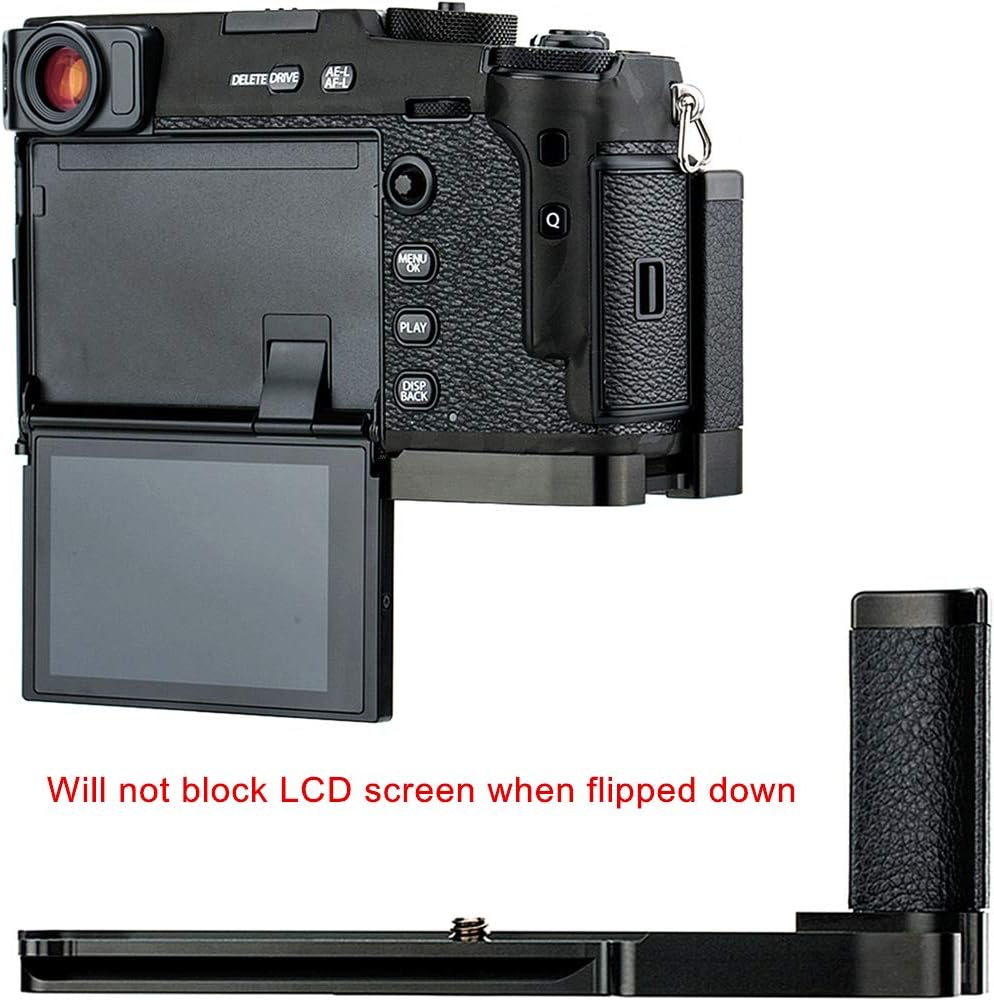
Figure 4: The grip does not block the LCD screen when flipped down.

Figure 5: Eyelet design for connecting a hand strap.

Figure 6: The grip adopts an Arca Swiss Type quick release plate design.
3. Compatibilidade
This JJC Metal Hand Grip L Bracket is specifically designed for the following Fujifilm camera models:
- Fujifilm X-Pro3
- Fujifilm X-Pro2
- Fujifilm X-Pro1
4. Instrucións de instalación
Follow these steps to correctly install the JJC Metal Hand Grip L Bracket onto your Fujifilm X-Pro series camera:
- Identify Screw Position: The grip has two possible screw positions on its base. For Fujifilm X-Pro1, use the screw position closer to the camera's front. For Fujifilm X-Pro2 and X-Pro3, use the screw position closer to the camera's rear. Refer to Figure 7 for visual guidance.
- Align the Grip: Carefully align the grip with the bottom of your camera, ensuring the screw hole on the grip matches the tripod socket on your camera.
- Asegurar o agarre: Insert the provided screw into the appropriate hole and tighten it securely using a coin or a flat-head screwdriver until the grip is firmly attached to the camera. Do not overtighten.

Figure 7: Screw positions for Fujifilm X-Pro1 and X-Pro2/X-Pro3.
Video guía de instalación
Video 1: Demonstrates the installation process and key features of the JJC Metal Hand Grip L Bracket for Fujifilm X-Pro series cameras.
5. Funcionamento
Once installed, the JJC Metal Hand Grip L Bracket enhances your camera's usability in several ways:
- Improved Handling: The ergonomic design provides a more substantial and comfortable grip, making it easier to hold your camera steady for both horizontal and vertical shooting.
- Quick Battery/Memory Card Access: The strategically placed opening allows you to change batteries or memory cards quickly without needing to remove the entire grip, minimizing downtime during shoots.
- Montaxe de trípode: Utilize the integrated Arca Swiss Type quick release plate for fast and secure mounting to compatible tripods. For other tripods, use the standard 1/4"-20 tripod socket.
- Hand Strap Integration: Attach a compatible hand strap to the designated eyelet for added security and comfort, especially when carrying the camera for extended periods.
6. Coidados e mantemento
To ensure the longevity and optimal performance of your JJC Metal Hand Grip L Bracket, follow these care and maintenance guidelines:
- Limpeza: Wipe the metal surfaces with a soft, dry cloth. For the microfiber leather grip, use a slightly damp cloth if necessary, then dry thoroughly. Avoid harsh chemicals or abrasive cleaners.
- Almacenamento: Store the grip in a clean, dry environment away from extreme temperatures and direct sunlight when not in use.
- Inspección: Periodically check the mounting screw for tightness to ensure the grip remains securely attached to your camera.
- Evitar impacto: While durable, avoid dropping the grip or subjecting it to strong impacts, which could cause damage.
7 Solución de problemas
If you encounter any issues with your JJC Metal Hand Grip L Bracket, refer to the following common troubleshooting tips:
- Grip Feels Loose: Ensure the mounting screw is fully tightened. Check that the correct screw position was used for your specific camera model (X-Pro1 vs. X-Pro2/X-Pro3).
- Difficulty Accessing Battery/Memory Card: Verify that the grip is correctly aligned and installed. The opening should directly correspond to your camera's compartment door.
- Camera Not Mounting Securely to Tripod: If using an Arca Swiss compatible tripod, ensure the quick release clamp is fully engaged with the grip's base. If using the 1/4"-20 socket, ensure the tripod screw is fully tightened.
- LCD Screen Obstruction: The grip is designed not to obstruct the fold-out LCD screen. If you experience obstruction, double-check the installation and ensure the camera's screen mechanism is functioning correctly.
Se estes pasos non resolven o problema, ponte en contacto co servizo de atención ao cliente.
8. Especificacións
| Material | Aluminum Alloy, Microfiber Leather |
| Cámaras compatibles | Fujifilm X-Pro3, X-Pro2, X-Pro1 |
| Soporte para trípode | Arca Swiss Type Quick Release Plate, 1/4"-20 Thread |
| Dimensións (aprox.) | 5.98 x 2.76 x 2.52 polgadas (15.19 x 7.01 x 6.40 cm) |
| Peso (aprox.) | 3.21 onzas (91 gramos) |
9. Garantía e soporte
JJC products are manufactured to high-quality standards. For warranty information or technical support, please refer to the documentation included with your purchase or visit the official JJC websitio. Garda o comprobante de compra para calquera reclamación de garantía.
If you require further assistance, please contact your retailer or JJC customer service directly.


