
1. Introdución
Grazas pola compraasing the ICON 12-inch Bluetooth Speaker. This manual provides detailed instructions for the safe and efficient operation of your new speaker. Please read this manual thoroughly before use and retain it for future reference.
2. Contido do paquete
- ICON 12-inch Bluetooth Speaker
- Cable de alimentación
- Micrófono sen fíos
- Control remoto
- Manual de usuario

Image: The ICON Bluetooth speaker shown with its included wireless microphone and remote control, highlighting the complete package contents.
3. Produto rematadoview
The ICON 12-inch Bluetooth Speaker is a versatile audio system designed for various applications, offering powerful sound output and multiple connectivity options. It features a built-in rechargeable battery for portability and integrated wheels and a retractable handle for easy transport.

Imaxe: Fronte view of the ICON 12-inch Bluetooth Speaker, showcasing its robust design and blue illuminated woofer.

Imaxe: Traseira view of the ICON 12-inch Bluetooth Speaker, displaying the main control panel and retractable handle.
Características principais:
- Powerful 6000W PMPO Output
- Bluetooth Connectivity for Wireless Streaming
- Reprodución por USB e tarxeta SD
- Entrada AUX de 3.5 mm
- Radio FM incorporada
- Entradas de micrófono e guitarra
- Rechargeable Battery for Extended Playtime
- Integrated Equalizer for Sound Customization
- TWS (True Wireless Stereo) Functionality for connecting multiple speakers
- Efectos de luz LED

Image: Visual representation of the ICON Bluetooth Speaker's key features, including excellent sound quality, Bluetooth compatibility, AUX input, rechargeable battery, FM radio, and equalizer.
4. Configuración
4.1 Carga inicial
Before first use, fully charge the speaker's internal battery. Connect the power cable to the AC INPUT port on the rear panel and plug it into a standard wall outlet. The charging indicator will illuminate. Charging time may vary.
4.2 Panel de control rematadoview
Familiarize yourself with the control panel located on the rear of the speaker.
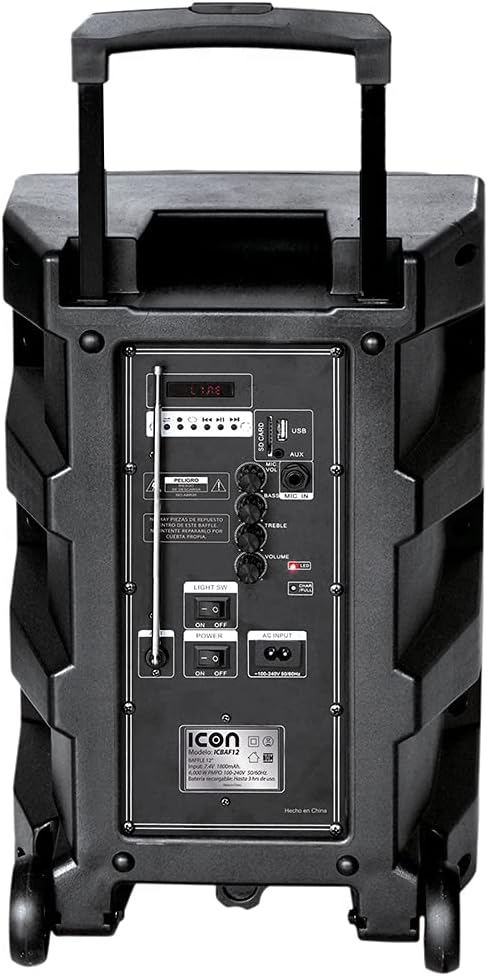
Imaxe: Detallada view of the ICON speaker's rear control panel, showing various inputs, volume, treble, and bass controls.
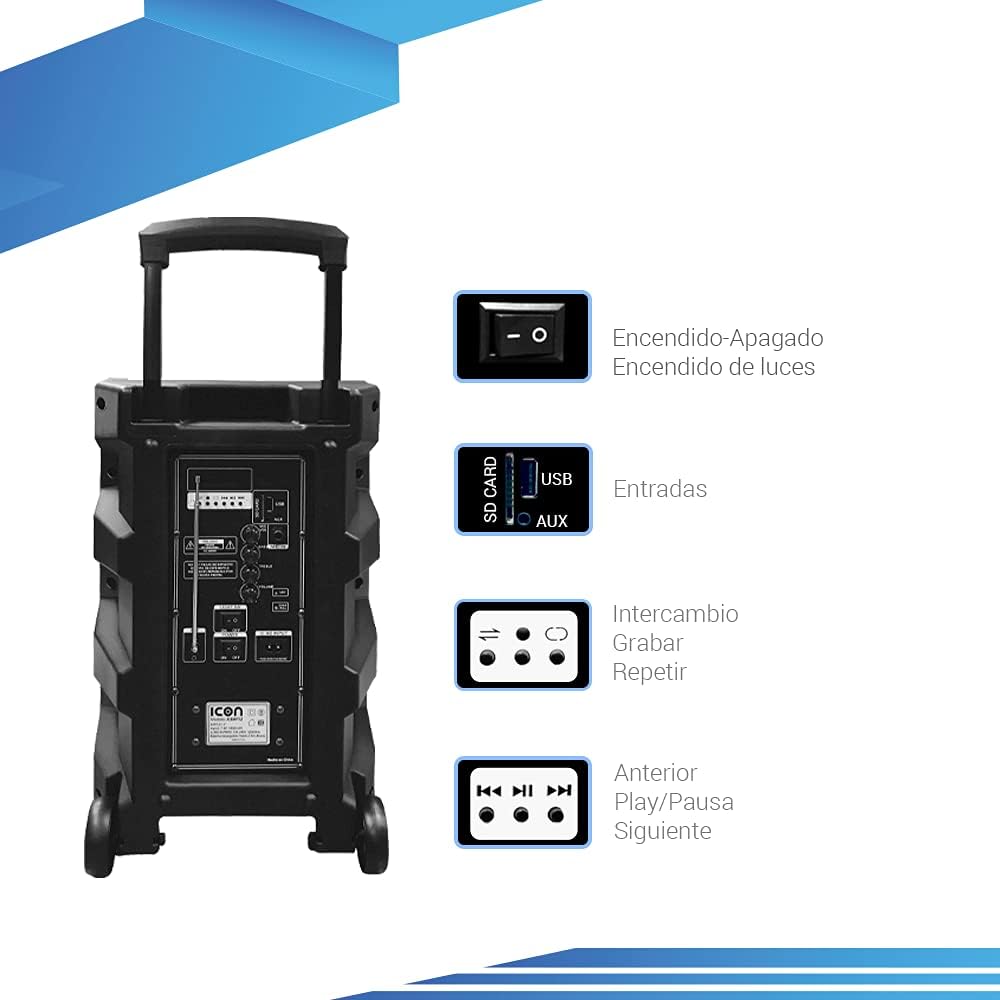
Image: Diagram illustrating key controls on the ICON speaker, including the power switch, light switch, input ports (SD Card, USB, AUX), and playback control buttons (Mode Switch, Record, Repeat, Previous, Play/Pause, Next).
- Interruptor POWER: Turns the speaker On or Off.
- SW LUZ: Toggles the LED light effects On or Off.
- SD CARD / USB / AUX Inputs: For connecting external media or devices.
- Interruptor de MODO: Cambia ciclicamente polos modos de entrada (Bluetooth, USB, SD, AUX, FM).
- Botón RECORD: Initiates recording (e.g., microphone input to USB/SD).
- Botón REPEAT: Repite a pista ou lista de reprodución actual.
- PREVIOUS / PLAY/PAUSE / NEXT Buttons: Controis estándar de reprodución multimedia.
- Botón VOLUME: Axusta o volume principal.
- TREBLE / BASS Knobs: Adjusts high and low frequencies.
- MIC INPUT / GUITAR INPUT: For connecting microphones and guitars.
5. Instrucións de funcionamento
5.1 Acendido/Apagado
To turn the speaker ON, flip the POTENCIA switch to the 'ON' position. To turn it OFF, flip the switch to 'OFF'.
5.2 Emparejamento Bluetooth
- Acenda o altofalante. Entrará automaticamente no modo de emparellamento Bluetooth, o que se indicará cunha icona de Bluetooth que parpadea na pantalla.
- No teu dispositivo móbil (teléfono intelixente, tableta, portátil), activa o Bluetooth e busca os dispositivos dispoñibles.
- Select "ICON Speaker" (or similar name) from the list of devices.
- Once paired, the speaker will emit a confirmation sound, and the Bluetooth icon will stop flashing. You can now play audio wirelessly from your device.
Reprodución de tarxetas USB/SD de 5.3
- Insira unha unidade flash USB ou unha tarxeta SD (con son MP3 files) no porto respectivo.
- The speaker will automatically switch to USB/SD mode and begin playing the first compatible track. If not, press the MODO button to select USB/SD mode.
- Usa o ANTERIOR, REPRODUCIR/PAUSA, e SEGUINTE botóns para controlar a reprodución.
5.4 Entrada AUX
Conecte un dispositivo de son externo (por exemplo, un reprodutor de MP3, un ordenador) ao AUX input using a 3.5mm audio cable. Press the MODO button until AUX mode is selected.
5.5 Funcionamento da radio FM
- Preme o MODO botón para cambiar ao modo de radio FM.
- Manteña premido o REPRODUCIR/PAUSA botón para buscar e gardar automaticamente as emisoras de FM dispoñibles.
- Usa o ANTERIOR e SEGUINTE botóns para navegar entre as emisoras gardadas.
5.6 Microphone and Guitar Usage
Plug your microphone or guitar into the respective ENTRADA MIC or ENTRADA DE GUITARRA jacks. Adjust the volume using the main VOLUME knob and any dedicated microphone/guitar volume controls if present.
Función TWS (estéreo sen fíos verdadeiro) 5.7
The TWS function allows you to connect two ICON speakers wirelessly for a true stereo sound experience.
- Asegúrate de que ambos altofalantes estean acendidos e non conectados a ningún dispositivo Bluetooth.
- On one speaker (this will be the master), press and hold the TWS button (if available, or a combination of buttons as per specific model instructions, often the 'Mode' button or a dedicated TWS button).
- The speaker will search for another TWS-compatible speaker. Once connected, you will hear a confirmation sound.
- Now, connect your mobile device to the master speaker via Bluetooth as described in section 5.2. Audio will play through both speakers in stereo.
6. Mantemento
6.1 Limpeza
Limpe o exterior do altofalante cun pano suave e seco. Non empregue produtos de limpeza abrasivos, ceras nin disolventes. Asegúrese de que non entren líquidos nas aberturas do altofalante.
6.2 Coidado coa batería
- Para prolongar a duración da batería, evite descargala completamente con frecuencia.
- Recharge the battery regularly, even if the speaker is not in use for extended periods (e.g., every 3 months).
- Garda o altofalante nun lugar fresco e seco cando non estea en uso.
6.3 Almacenamento
When storing the speaker for a long time, ensure it is turned off and disconnected from the power source. Store it in a clean, dry environment away from extreme temperatures and direct sunlight.
7 Solución de problemas
| Problema | Causa posible | Solución |
|---|---|---|
| O altofalante non se acende. | Battery is depleted; Power cable not connected; Power switch is OFF. | Charge the speaker; Ensure power cable is securely connected; Flip POWER switch to ON. |
| Sen son. | O volume é demasiado baixo; Seleccionouse o modo de entrada incorrecto; O dispositivo non está conectado correctamente. | Aumentar o volume; premer o botón MODE para seleccionar a entrada correcta; volver conectar o dispositivo/volver emparellar o Bluetooth. |
| A conexión Bluetooth falla. | Altofalante non en modo de emparellamento; Dispositivo demasiado lonxe; Interferencia. | Ensure speaker is in pairing mode; Move device closer; Turn off other Bluetooth devices. |
| Son distorsionado. | Volume demasiado alto; a calidade da fonte de son é deficiente. | Baixa o volume; proba cunha fonte de son diferente. |
| O micrófono non funciona. | Microphone not plugged in correctly; Microphone volume too low; Microphone batteries dead (if wireless). | Ensure microphone is fully inserted; Adjust microphone volume; Replace microphone batteries. |
8. Especificacións
| Característica | Especificación |
|---|---|
| Número de modelo | US-ICBAF12 |
| Potencia de saída | 6000 Watts PMPO |
| Tamaño do altofalante | 12 polgadas |
| Tecnoloxía de conectividade | Bluetooth, USB, AUX, SD Card |
| Dispositivos compatibles | Portátil, Smartphone |
| Fonte de enerxía | Rechargeable Battery, AC Input |
| Dimensións do produto (L x W x H) | 38 x 36.5 x 54 cm |
| Peso do produto | 7.62 kg |
| Características especiais | Bluetooth, FM Radio, Microphone Input, Guitar Input, TWS Function, LED Lights |

Image: Packaging of the ICON Bluetooth Speaker, displaying key features and product dimensions (37.5 cm x 36 cm x 54 cm).
9. Garantía e soporte
This product is covered by a limited warranty. Please refer to the warranty card included in your package for specific terms and conditions. For technical support, troubleshooting assistance, or warranty claims, please contact your retailer or the manufacturer's customer service department. Keep your purchase receipt as proof of purchase.
For more information, visit the official ICON store on Amazon: ICON Store