
Hoco W21 Graceful Charm Wired Headphones User Manual
Model: W21 Purple | Brand: HOCO
1. Introdución
Thank you for choosing the Hoco W21 Graceful Charm Wired Headphones. This manual provides detailed instructions for the proper use, setup, and maintenance of your new headphones. Please read this manual thoroughly before using the product to ensure optimal performance and longevity.
2. Características do produto
- Relator: 40mm drivers for clear audio.
- Potencia: Rated power of 10mW; maximum input power of 50mW.
- Conectividade: Standard Ø3.5mm audio plug for universal compatibility.
- Cable: High elastic braided cable with a length of 1.2m for durability and flexibility.
- Micrófono: Integrated controller with a microphone for hands-free communication.
- Control: One-button operation control for easy management of calls and music.
3. Contido do paquete
Comprobe o contido do paquete ao desembalar:
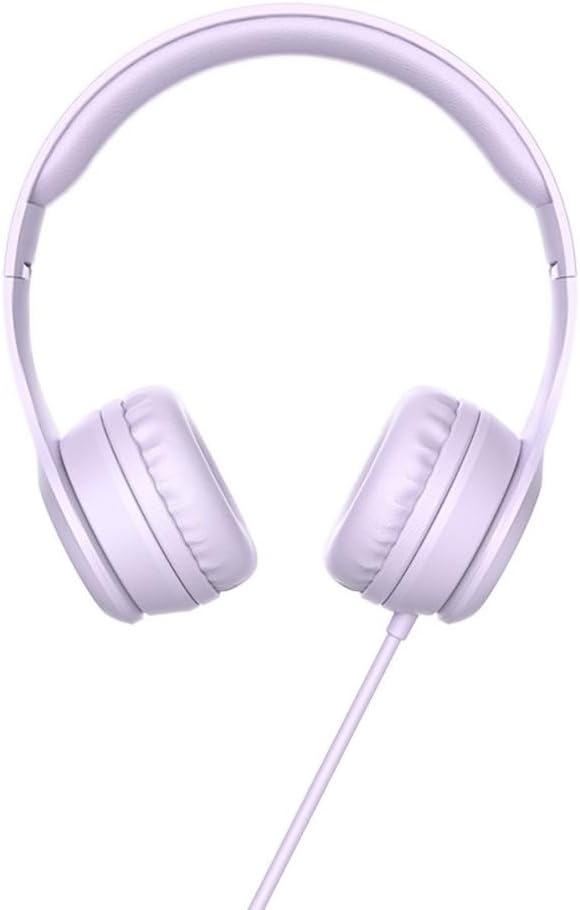
- Hoco W21 Graceful Charm Wired Headphones
- Manual de usuario (este documento)

4. Configuración
- Desempaquetar os auriculares: Retire con coidado os auriculares da súa embalaxe.
- Identify the Audio Plug: Locate the Ø3.5mm audio plug at the end of the headphone cable.
- Conectar ao dispositivo: Insert the Ø3.5mm audio plug into the headphone jack of your mobile phone, tablet, or any compatible audio device. Ensure the plug is fully inserted for proper audio output.
- Axustar axuste: Place the headphones over your ears. Adjust the headband to ensure a comfortable and secure fit. The earcups are designed to sit over the ear.

5. Instrucións de funcionamento
The Hoco W21 headphones feature a convenient one-button inline control for managing audio and calls.
5.1 Reprodución de música
- Reproducir/Pausa: Prema o botón unha vez para reproducir ou pausar a pista actual.
- Próxima pista: Prema o botón dúas veces rapidamente para saltar á seguinte pista.
- Pista anterior: Press the button three times quickly to go back to the previous track.
5.2 Xestión de chamadas
- Responder/Finalizar chamada: Press the button once to answer an incoming call or end an ongoing call.
- Rexeitar a chamada: Manteña premido o botón durante aproximadamente 2 segundos para rexeitar unha chamada entrante.

6. Mantemento
Proper maintenance will extend the life of your headphones.
- Limpeza: Usa un pano suave e seco para limpar os auriculares e a diadema. Non empregues produtos químicos agresivos nin materiais abrasivos.
- Almacenamento: When not in use, store the headphones in a clean, dry place away from extreme temperatures and direct sunlight. Avoid tangling the cable.
- Evitar a humidade: Do not expose the headphones to water or excessive moisture. They are not waterproof.
- Manipular con coidado: Avoid dropping the headphones or subjecting them to strong impacts. Do not pull the cable forcefully.

7 Solución de problemas
| Problema | Causa posible | Solución |
|---|---|---|
| Sen son nin baixo volume |
|
|
| O micrófono non funciona |
|
|
| Distorsión do son |
|
|
8. Especificacións
| Número de modelo | W21 Purple |
| Marca | HOCO |
| Diámetro do altofalante | 40 mm |
| Potencia nominal | 10 mW |
| Potencia de entrada máxima | 50 mW |
| Enchufe de audio | Ø 3.5 mm |
| Tipo de cable | High elastic braid |
| Lonxitude do cable | 1.2 m |
| Micrófono | Controller with mic |
| Control de fíos | One-button operation control |
| Dimensións do produto | 19.4 x 17.3 x 7.4 cm |
| Peso do produto | 109 g |
| Cor | Roxo |
9. Garantía e soporte
Hoco products are manufactured to high quality standards. For information regarding warranty coverage and customer support, please refer to the warranty card included with your purchase or visit the official Hoco websitio. Garde o recibo da compra como proba de compra para calquera reclamación de garantía.
For technical assistance or further inquiries, please contact your retailer or the authorized service center in your region.