

Introdución
Thank you for choosing the XO B24 Foldable Bluetooth Headphones. This manual provides essential information for the safe and efficient use of your device. Please read it carefully before use and retain it for future reference.
The XO B24 headphones are designed for comfort and portability, featuring high-quality materials and a secure fit for an optimal audio experience.
Produto rematadoview
The XO B24 headphones offer both wired and wireless connectivity, a built-in microphone for calls, and a foldable design for easy storage and transport.
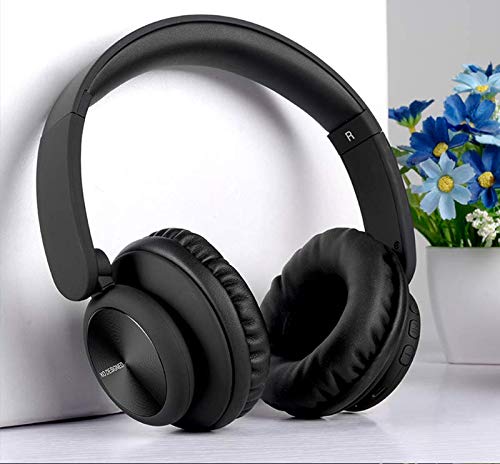
Image: XO B24 Foldable Bluetooth Headphones, showcasing their over-ear design and black color.
Especificacións
| Característica | Descrición |
|---|---|
| Nome da marca | XO |
| Nome do modelo | B24 |
| Número de modelo | XO-B24 |
| Cor | Negro |
| Factor de forma dos auriculares | De orella |
| Tecnoloxía de conectividade | Con cable, sen fíos (Bluetooth) |
| Conector para auriculares | Jack de 3.5 mm |
| Tecnoloxía de comunicación sen fíos | Bluetooth |
| Características especiais | Includes Microphone, Foldable Design |
| Micrófono | Si |
| Cancelación de ruído | Non |
| Tipo de control | Volume Control, Touch Control |
| Dispositivos compatibles | Multidispositivo |
| Requírese batería | Si |
Configuración
1. Carga dos auriculares
- Conecta o cable de carga USB fornecido ao porto de carga dos auriculares.
- Plug the other end of the USB cable into a compatible USB power source (e.g., computer, wall adapter).
- O indicador LED acenderase durante a carga e apagarase ou cambiará de cor unha vez que estea completamente cargado.
2. Emparellamento Bluetooth
- Asegúrate de que os auriculares estean completamente cargados.
- Manteña premido o botón de acendido/apagado dos auriculares ata que o indicador LED parpadee rapidamente, indicando o modo de emparellamento.
- No teu dispositivo (teléfono intelixente, tableta, ordenador), activa o Bluetooth e busca os dispositivos dispoñibles.
- Select "XO B24" from the list of found devices.
- Once paired, the LED indicator will stop flashing and may show a solid light or flash slowly.
3. Conexión con cable (opcional)
- Insert one end of the 3.5mm audio cable into the headphone jack on the XO B24.
- Plug the other end of the 3.5mm audio cable into the audio output jack of your device.
- The headphones will operate in wired mode, conserving battery life.
Instrucións de funcionamento
Encendido/apagado
- Encendido: Manteña premido o botón de acendido durante aproximadamente 3 segundos ata que o indicador LED se acenda.
- Apagado: Press and hold the Power button for approximately 3-5 seconds until the LED indicator turns off.
Reprodución de música
- Reproducir/Pausa: Press the Multi-function button (often the Power button) once.
- Próxima pista: Mantén premido o botón para subir o volume ou un botón específico para "Seguinte".
- Pista anterior: Mantén premido o botón para baixar o volume ou un botón específico para "Anterior".
Control de volume
- Aumentar o volume: Preme o botón Subir volume.
- Diminuír o volume: Prema o botón para baixar o volume.
Xestión de chamadas
- Responder/Finalizar chamada: Prema o botón multifunción unha vez.
- Rexeitar a chamada: Prema e manteña premido o botón multifunción durante aproximadamente 2 segundos.
Mecanismo de plegado
- To fold the headphones for storage, gently rotate the earcups inwards towards the headband until they are compact.
- To unfold, reverse the process, ensuring the earcups click securely into place.
Mantemento
- Limpeza: Usa un pano suave e seco para limpar os auriculares. Non empregues produtos de limpeza abrasivos nin disolventes.
- Almacenamento: Cando non os use, garde os auriculares nun lugar fresco e seco, lonxe da luz solar directa e de temperaturas extremas. Utilice o deseño plegable para un almacenamento compacto.
- Coidado da batería: Para prolongar a duración da batería, evite descargar completamente os auriculares con frecuencia. Cárgueos regularmente, mesmo se non os usa de forma constante.
- Evitar a humidade: Manteña os auriculares lonxe da auga e da humidade excesiva.
Resolución de problemas
| Problema | Solución |
|---|---|
| Os auriculares non se acenden. | Asegúrate de que os auriculares estean completamente cargados. Conéctaos a unha fonte de alimentación e inténtao de novo. |
| Non se pode emparellar por Bluetooth. | Make sure the headphones are in pairing mode (LED flashing rapidly). Disable and re-enable Bluetooth on your device. Move closer to the headphones. |
| Sen son ou volume baixo. | Check the volume levels on both the headphones and your connected device. Ensure the headphones are properly paired or the 3.5mm cable is securely connected. |
| A calidade do son é baixa. | Ensure there are no obstructions between the headphones and your device. Try moving closer to your device. Disconnect and reconnect the Bluetooth connection. |
| O micrófono non funciona. | Ensure the headphones are properly connected and selected as the audio input device on your system. Check if the microphone is muted on your device. |
Garantía e Soporte
The XO B24 Foldable Bluetooth Headphones come with a standard manufacturer's warranty. Please refer to the warranty card included in your product packaging for specific terms and conditions.
For technical support, troubleshooting assistance, or warranty claims, please contact your retailer or the official XO customer service. Contact information can typically be found on the product packaging or the manufacturer's websitio.