
1. Introdución
This manual provides essential information for setting up, operating, and maintaining your HP EliteOne 800 G5 All-in-One (AiO) computer. The HP EliteOne 800 G5 AiO is designed to offer a streamlined computing experience with its integrated display and powerful components. Please read this manual thoroughly before using your device to ensure proper functionality and longevity.
2. Contido do paquete
Verifica que todos os elementos estean presentes no paquete:
- HP EliteOne 800 G5 All-in-One Computer
- Adaptador de alimentación e cable
- Teclado
- Rato
- Documentación (Guía de inicio rápido, Información de garantía)
3. Produto rematadoview
Familiarize yourself with the main components of your HP EliteOne 800 G5 AiO computer.
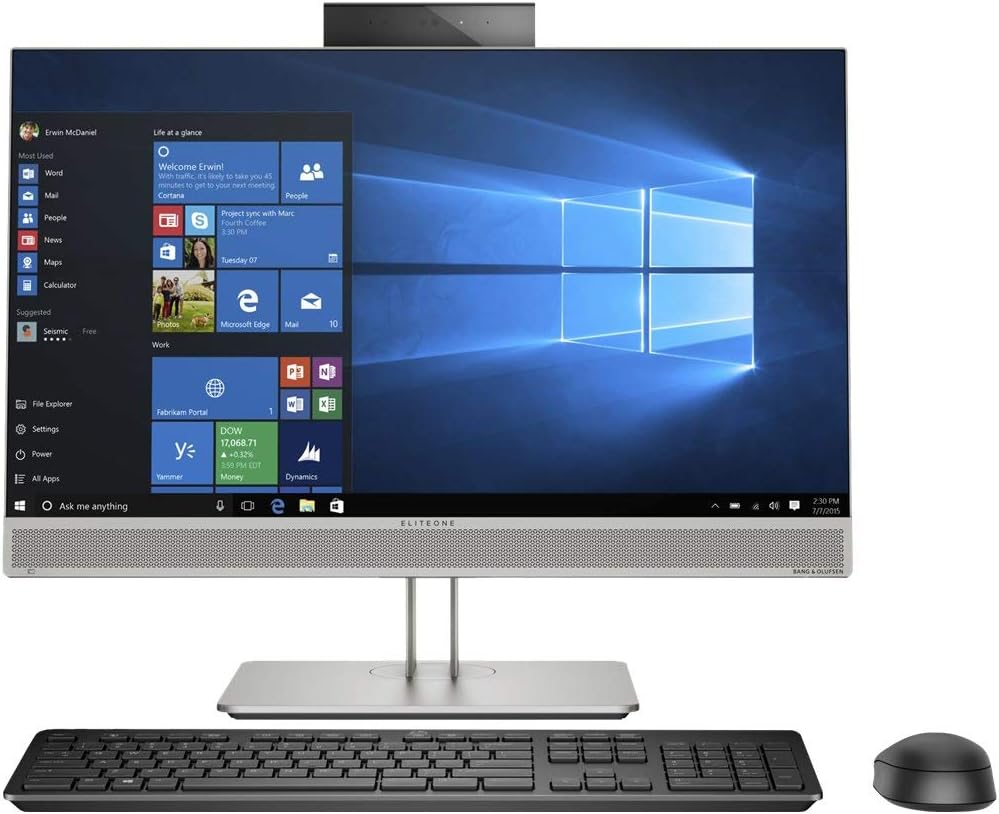
Figura 3.1: Fronte view of the HP EliteOne 800 G5 All-in-One computer, displaying the screen, integrated webcam, speakers, and accompanying keyboard and mouse.

Figura 3.2: En ángulo view of the HP EliteOne 800 G5 All-in-One computer, showcasing the slim display profile and the stand, along with the keyboard and mouse.

Figura 3.3: Outro ángulo view of the HP EliteOne 800 G5 All-in-One computer, highlighting the display and the included peripherals.
Compoñentes clave:
- Visualización: 23.8-inch Full HD (1920x1080) anti-glare screen.
- Webleva: Integrated camera for video conferencing.
- Relatores: Saída de audio integrada.
- Portos: Various USB ports, audio jacks, and video output ports (locations may vary).
- Unidade óptica: DVD-Writer for disc media.
4. Instrucións de configuración
Siga estes pasos para a configuración inicial:
- Unpack the Computer: Retire coidadosamente todos os compoñentes da embalaxe.
- Position the AiO: Place the HP EliteOne 800 G5 on a stable, flat surface. Ensure adequate ventilation around the device.
- Conectar periféricos:
- Connect the USB keyboard to an available USB port on the computer.
- Connect the USB mouse to another available USB port.
- Conectar enerxía: Connect the power cable to the power adapter, then connect the adapter to the computer's power input. Plug the power cable into a grounded electrical outlet.
- Encendido: Press the power button, typically located on the side or bottom bezel of the display.
- Configuración inicial de Windows: Siga as instrucións que aparecen en pantalla para completar a configuración de Windows 10 Pro, incluíndo o idioma, a rexión, a conexión de rede e a creación da conta de usuario.
5. Instrucións de funcionamento
Operación básica:
- Encendido/apagado: Press the power button to turn the computer on. To turn off, click the Start button, then Power > Shut down.
- Reiniciar: Fai clic no botón Inicio e, a seguir, en Acendido/Apagado > Reiniciar.
- Modo de suspensión: Click the Start button, then Power > Sleep.
Using the Operating System (Windows 10 Pro):
Navigate the Windows 10 Pro interface using the mouse and keyboard. The Start Menu provides access to applications, settings, and system functions. Use the taskbar for quick access to frequently used programs and system notifications.
Conexión a unha rede:
Your AiO supports both wired (Ethernet) and wireless (Wi-Fi) network connections. To connect to Wi-Fi, click the network icon in the taskbar, select your desired network, and enter the password if prompted.
Using the DVD-Writer:
Insert a CD or DVD into the optical drive. The operating system will typically prompt you with options for playing media or accessing files no disco.
6. Mantemento
Regular maintenance helps ensure optimal performance and extends the lifespan of your computer.
- Limpeza: Usa un pano suave e sen fiapos para limpar a pantalla e o chasis. Para marcas difíciles, limpa lixeiramenteampEnxugue o pano con auga ou un limpador de pantallas. Evite produtos químicos agresivos.
- Actualizacións de software: Regularly check for and install Windows updates and driver updates from the HP support website to ensure security and performance.
- Copia de seguridade de datos: Fai copias de seguridade importantes periodicamente files a unha unidade externa ou almacenamento na nube para evitar a perda de datos.
- Ventilación: Asegúrese de que as aberturas de ventilación non estean bloqueadas para evitar o sobrequecemento.
7 Solución de problemas
Se tes problemas, proba estes pasos habituais para a súa resolución:
- Sen enerxía: Check if the power cable is securely connected to the computer and the electrical outlet. Try a different outlet.
- Sen visualización: Ensure the computer is powered on. If using an external monitor, check its connections.
- Rendemento lento: Close unnecessary applications. Check for malware. Ensure sufficient free disk space.
- Periférico non funciona: Ensure the peripheral is correctly connected to a functional USB port. Try restarting the computer.
- Problemas de conectividade a Internet: Check your network cable or Wi-Fi connection. Restart your router/modem.
For more complex issues, consult the HP support websitio web ou póñase en contacto co servizo de atención ao cliente de HP.
8. Especificacións
| Característica | Especificación |
|---|---|
| Número de modelo | 7YD11UT#ABA |
| Procesador | Intel Core i5-9500 (9th Gen), 3 GHz |
| RAM | 8 GB DDR4 SDRAM |
| Almacenamento | SSD de 256 GB (ATA serie) |
| Mostrar | 23.8 Inches, 1920 x 1080 (Full HD) |
| Gráficos | Gráficos Intel UHD 630 (integrados) |
| Sistema Operativo | Windows 10 Pro |
| Unidade óptica | Grabadora de DVD |
| Portos USB | 1x USB 2.0 (additional USB ports may be present) |
| Dimensións (LxWxH) | 7.1 x 21.2 x 18.4 polgadas |
| Peso | 19.2 libras |
| Cor | Negro |
9. Garantía e soporte
Your HP EliteOne 800 G5 All-in-One computer comes with a standard limited warranty. For detailed warranty terms and conditions, please refer to the warranty documentation included with your product or visit the official HP support website. For technical assistance, driver downloads, and further support resources, please visit www.hp.com/support.