
1. Introdución
This manual provides detailed instructions for the installation, operation, and maintenance of your PLZ Wireless Double Din 7" Car Stereo. Please read this manual thoroughly before using the product to ensure proper functionality and safety. This car stereo features wireless Apple CarPlay and Android Auto, a QLED touch screen, Bluetooth 5.3, and support for a backup camera, enhancing your in-car entertainment and navigation experience.

Figure 1.1: PLZ Wireless Double Din 7" Car Stereo
2. Características do produto
- Apple CarPlay e Android Auto sen fíos: Seamlessly integrate your smartphone for navigation, music, calls, and more, all wirelessly.
- Upgraded QLED Touch Screen: Experience unparalleled color accuracy, brightness, and contrast with a 1280 x 720 pixel resolution, supporting up to 1920 x 1080P content.
- Enhanced Bluetooth 5.3 & Dual Microphone: Enjoy stable, high-quality hands-free calling and audio streaming with improved transmission efficiency and reduced static noise.
- 4.2 Channel Output: Supports front, rear, and two high RMS power subwoofer outputs for outstanding sound quality and powerful bass.
- Steering Wheel Control (SWC) Support: Control various functions directly from your steering wheel for enhanced convenience and safety.
- 1080P Backup Camera Included: Proporciona unha clara view for safe reversing, with support for an optional front camera.
2.1 Conectividade sen fíos
The stereo supports wireless Apple CarPlay and Android Auto, allowing for automatic phone connection upon vehicle startup. This enables access to navigation apps, music streaming, and voice assistants like Siri or Google Assistant.

Figura 2.1: Interface sen fíos de CarPlay e Android Auto
Tecnoloxía de pantalla QLED 2.2
The QLED display offers superior visual clarity and vibrant colors compared to standard screens, with a resolution of 1280x720 pixels for sharp imagery.

Figure 2.2: HD QLED Touch Screen Visuals
2.3 Sistema de audio
Equipped with a built-in DSP, 4.2 channel pre-amplifier, and support for two high-power subwoofers, this unit delivers rich and customizable audio. A 10-band EQ allows for fine-tuning of sound preferences.

Figure 2.3: Built-in DSP and Audio Outputs
2.4 Backup Camera Support
The included 1080P backup camera provides a wide 170-degree viewing angle, high definition, and night vision capabilities, making parking and reversing safer. It is also waterproof for durability.

Figure 2.4: Backup Camera Functionality
3. Contido do paquete
Ao abrir o paquete, comprobe que todos os elementos enumerados a continuación estean presentes e en bo estado:

Figura 3.1: Lista de paquetes
- Unidade principal (estéreo do coche)
- Frame (x2, various sizes for fitment)
- Traseira View Cámara
- Cable de cámara de respaldo
- Harness (Wiring)
- Control remoto
- Corchetes
- Ferramenta de desmontaxe
- Screws (various)
- Manual de usuario
4. Configuración e instalación
Proper installation is crucial for optimal performance. It is highly recommended to have the unit installed by a professional car audio shop. Ensure your dashboard opening size fits the stereo. Additional accessories such as a suitable dash kit, wire harness adapter, and radio antenna adapter may be required for your specific car model.
4.1 Dimensions and Fitment
The stereo unit has specific dimensions. Please refer to the diagram below to ensure compatibility with your vehicle's dashboard opening.

Figure 4.1: Versatile Frame Fitment
4.2 Conexión de cableado
Follow the wiring diagram carefully for correct connections. Incorrect wiring can damage the unit or vehicle's electrical system.

Figure 4.2: Instruction for Connection to Dashboard
Notas importantes sobre o cableado:
- The Red wire of the harness receives switched 12V power (car key must be turned on).
- The Yellow wire of the harness receives constant 12V power.
- The Black ground wire of the harness must be properly connected.
- If the ACC line (Red wire) and the B+ line (Yellow wire) are reversed, the product will lose its memory function after power is turned off.
- The car stereo is not designed for vehicles with voltage exceeding 14V. Use a step-down conversion wire if necessary.
4.3 Backup Camera Connection
Connect the backup camera to the designated input. Ensure the camera's trigger wire is connected to your vehicle's reverse light circuit for automatic activation when shifting into reverse.

Figure 4.3: AHD Backup Camera Wiring
5. Instrucións de funcionamento
5.1 CarPlay sen fíos e Android Auto
Once connected, your phone will automatically link to the stereo when the car starts. You can access navigation, music, and communication features directly from the stereo's touch screen.
5.2 Voice Control and Navigation
Utilize voice commands through Siri or Google Assistant for hands-free operation of navigation, calls, and music playback, allowing you to stay focused on the road.

Figure 5.1: Voice Control & Live Navigation Interface
5.3 Controis do volante (SWC)
If your vehicle supports SWC, you can program the stereo to respond to your steering wheel buttons. This requires an additional interface (not included) for some car models.

Figure 5.2: Supporting Steering Wheel Controls
5.4 Reprodución multimedia
The stereo supports FM/AM radio, Bluetooth audio streaming, and media playback via TF card and USB. Adjust audio settings using the built-in equalizer.

Figure 5.3: Media Source Selection
5.5 MirrorLink Functionality
The unit supports wired MirrorLink for both iOS and Android devices, allowing you to mirror your phone's screen onto the stereo display. Note that MirrorLink may not support Apple iOS 18.0 or above yet.

Figure 5.4: Wired MirrorLink
5.6 Disabling Automatic Connection
If you wish to prevent automatic connection for CarPlay or Android Auto, follow these steps:
Para CarPlay:
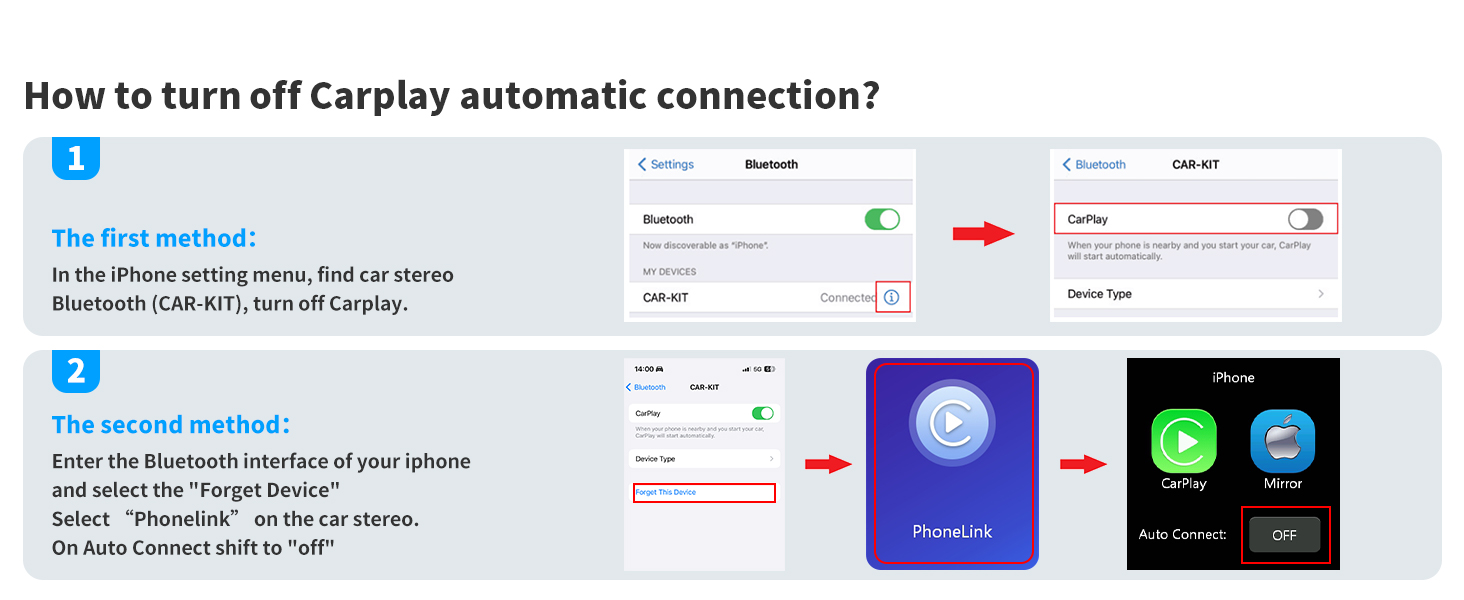
Figure 5.5: Turning Off CarPlay Auto-Connect
- In your iPhone settings, navigate to Bluetooth and find your car stereo's Bluetooth name (e.g., CAR-KIT). Turn off CarPlay.
- Alternatively, enter the Bluetooth interface on your iPhone, select "Forget Device" for the car stereo. On the car stereo, select "Phonelink" and shift "Auto Connect" to "OFF".
Para Android Auto:
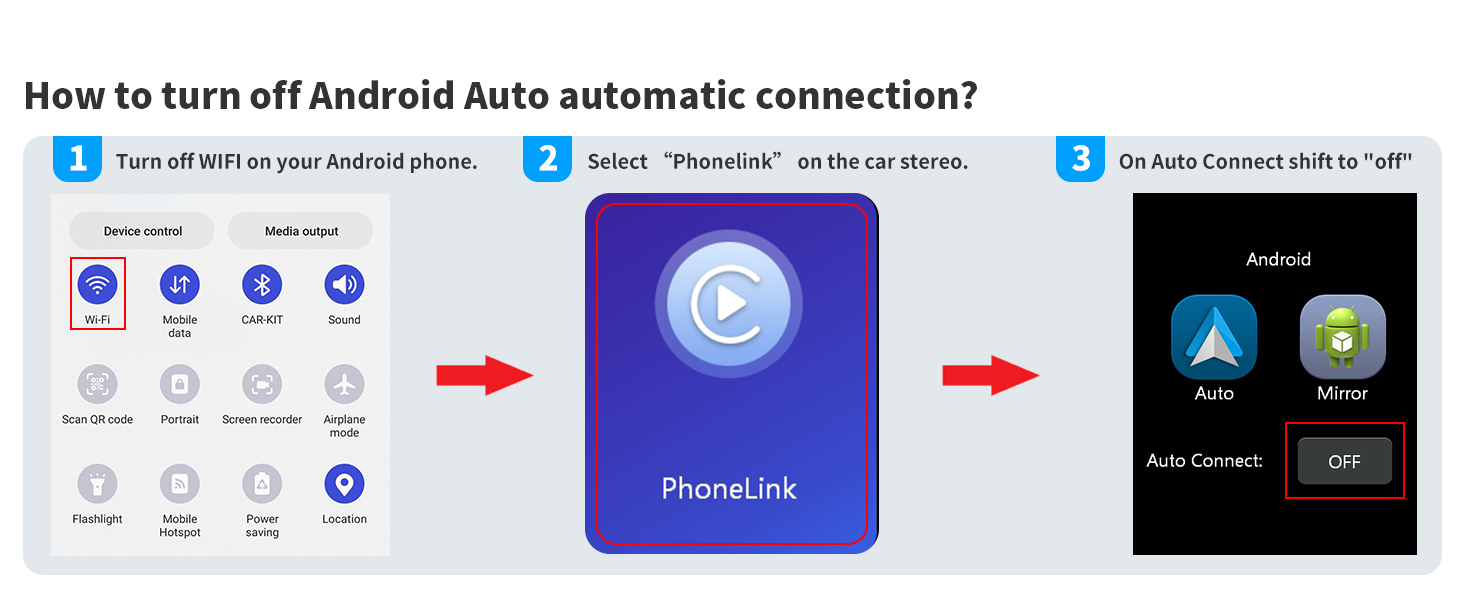
Figure 5.6: Turning Off Android Auto Auto-Connect
- Turn off Wi-Fi on your Android phone.
- Select "Phonelink" on the car stereo.
- Shift "Auto Connect" to "OFF".
6. Mantemento
- Limpeza: Usa un pano suave e seco para limpar a pantalla e a unidade. Evita produtos de limpeza abrasivos ou solventes.
- Temperatura: Non expoña a unidade a temperaturas extremas nin á luz solar directa durante períodos prolongados.
- Humidade: Keep the unit dry. Avoid contact with water or other liquids.
7 Solución de problemas
Consulta os seguintes problemas comúns e as súas solucións:

Figure 7.1: Troubleshooting Guide
7.1 Head Unit Powers On for a Few Seconds and Then Shuts Down Automatically
Some cars have ACC wires controlled by Canbus or feature a "delayed shut off" for radios and other components. In such cases, the car may not output stable 12V power to your radio. You may need to purchase an appropriate harness adapter that provides accessory power or supports "Retained Accessory Power" for your specific car model. Alternatively, if you prefer not to buy the adapter, you can find ACC power elsewhere in your vehicle and connect your red wire there.
Necessary conditions for powering on the unit are:
- The Red wire of our harness receives switched 12V power (Car key must be turned on).
- The Yellow wire of our harness receives 12V power.
- The Black ground wire of our harness is properly connected.
If you have an electric pen, you can test these three wires. If the ACC line (Red wire) and the B+ line (Yellow wire) are reversed during installation, the product will lose its memory function after the power is turned off.
If you encounter any installation or usage confusion, rest assured we're here to promptly assist you with resolving the issue.
8. Especificacións
| Especificación | Valor |
|---|---|
| Marca | PLZ |
| Número de modelo | MP-800 |
| Dimensións do produto | 7.01 x 3.94 x 2.52 polgadas |
| Peso do elemento | 2 libras |
| Tamaño de visualización | 7 polgadas / 18 cm |
| Resolución de visualización | 1280 x 720 píxeles |
| Versión Bluetooth | 5.3 |
| Modo de saída de audio | Estéreo (4.2 canles) |
| Potencia de saída | 240 vatios |
| Tecnoloxía de conectividade | Bluetooth, USB, RCA |
| Dispositivos compatibles | Smartphone (Apple CarPlay, Android Auto) |
| Baterías | Requírese 1 pila CR2 (incluída) |
9. Garantía e soporte
For detailed warranty information and further assistance, please refer to the official User Guide PDF available for download or contact PLZ customer support. The User Guide PDF can be accessed via this link: PLZ Car Stereo User Guide (PDF).