
1. Introdución
This manual provides essential information for the proper use and care of your ProGrade Digital microSDXC UHS-II V60 memory card. This 256GB card is engineered for high-performance applications, including aerial and action cameras, as well as DSLR and mirrorless cameras. It offers UHS-I DDR-104 and U3 speed class ratings for broad compatibility, with read speeds up to 250MB/s and write speeds up to 130MB/s, facilitating efficient capture and transfer of high-resolution photos and 4K video.

Imaxe 1.1: Fronte view of the ProGrade Digital 256GB microSDXC V60 memory card, highlighting its capacity and speed ratings.
2. Características clave
- Rendemento de alta velocidade: Features fast write speeds of up to 130MB/s and read speeds of up to 250MB/s, enabling quick capture of high-resolution content and rapid data transfer.
- Compatibilidade versátil: Designed for aerial cinematographers, action camera users, and photographers using DSLR or mirrorless cameras. Includes a V60 speed rating for consistent performance in demanding recording scenarios.
- Authenticity and Quality: Each card features a laser-etched custom serial number, ensuring authenticity and quality control. Cards undergo meticulous inspection at the ProGrade Digital Lab.
- Data Recovery Support: Compatible with ProGrade Digital Refresh Pro software (available separately) for advanced data recovery and card maintenance, helping to restore lost photos and videos and optimize card performance.
- Optimized Workflow: Supports efficient data transfer to workstations, reducing waiting times for content offloading.

Image 2.1: A sports car on a road, illustrating the high speed and performance capabilities of the memory card.
3. Configuración e instalación
To begin using your ProGrade Digital microSD Card, follow these steps:
- Identificar a ranura: Locate the microSD card slot on your device (e.g., camera, drone, smartphone, tablet). If your device uses a standard SD card slot, use the included microSD to SD adapter.
- Inserir tarxeta: Gently insert the microSD card into the slot with the gold contacts facing down (or as indicated by your device's manual). Ensure it clicks into place. If using the adapter, insert the microSD card into the adapter first, then insert the adapter into the device's SD card slot.
- Formato da tarxeta: For optimal performance and to ensure compatibility, it is recommended to format the card using your device's internal formatting function before first use. Refer to your device's instruction manual for specific formatting procedures. Nota: A formatación borrará todos os datos da tarxeta.
- Verificar o recoñecemento: After formatting, check your device's display or settings to confirm that the microSD card is recognized and shows the correct storage capacity.
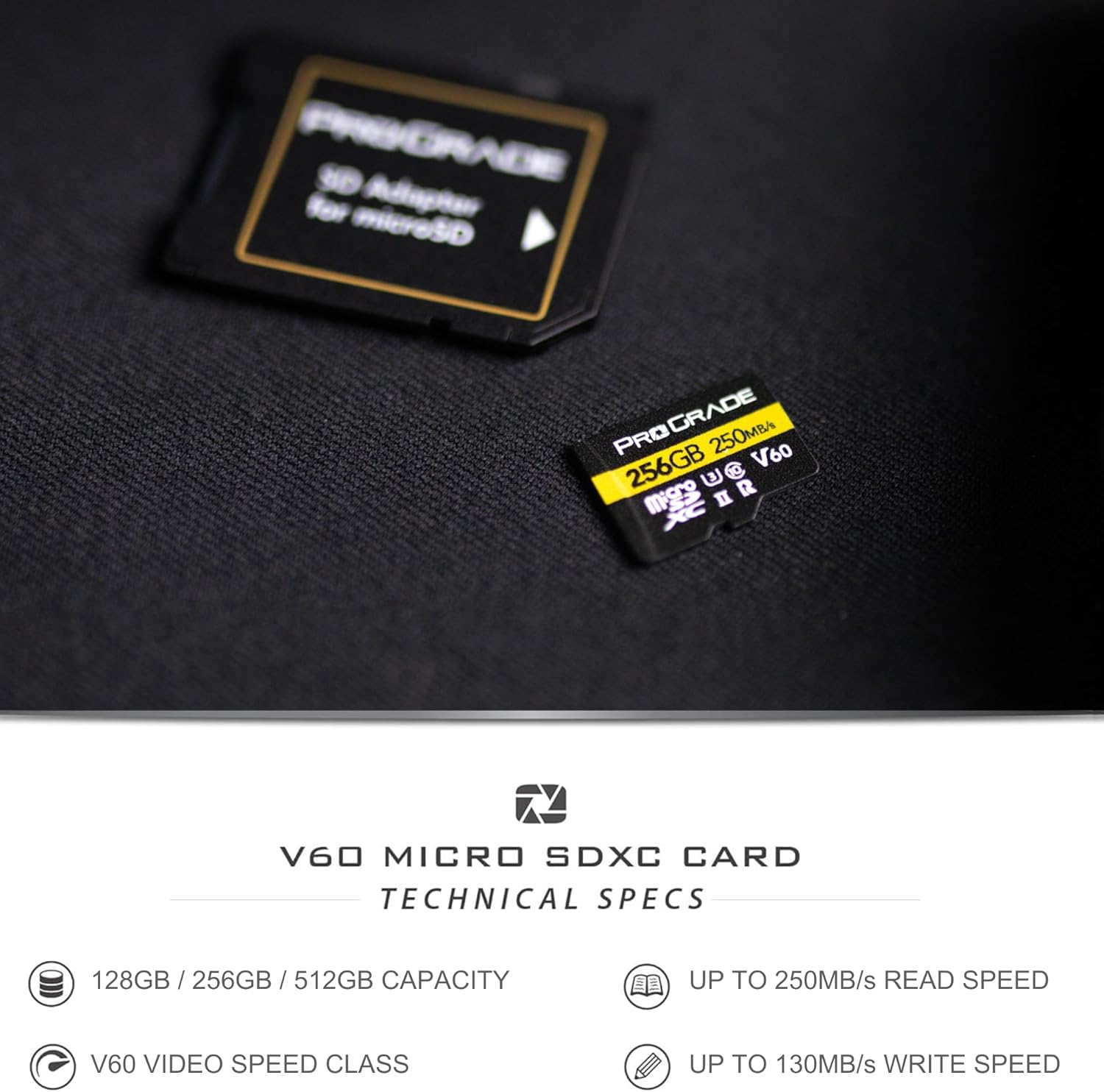
Image 3.1: The ProGrade Digital microSD card shown with its accompanying SD adapter, illustrating how it can be used in devices with standard SD card slots.
4. Instrucións de funcionamento
Once the microSD card is installed and formatted, you can begin using it to store data.
4.1. Recording Photos and Videos
- Ensure the card is properly inserted and recognized by your camera or device.
- Select your desired recording settings (e.g., resolution, frame rate, compression). The V60 speed class supports high-bitrate 4K video recording.
- Begin recording as per your device's operational instructions. The card's high write speed ensures smooth capture of continuous bursts and high-resolution video.

Image 4.1: A person operating a drone, demonstrating the card's use in aerial photography and videography.

Image 4.2: A photographer with a camera and tripod, representing the card's suitability for professional photography with DSLR and mirrorless cameras.
4.2. Transferencia de datos
- To transfer data to a computer, remove the microSD card from your device.
- Insert the microSD card into a compatible card reader (or the included SD adapter and then into an SD card reader).
- Connect the card reader to your computer. The card will appear as a removable drive.
- Arrastra e solta files or use your operating system's file management tools to copy data. The high read speed of 250MB/s will facilitate quick transfers.

Image 4.3: A visual representation of a digital workflow, showing how the card optimizes data transfer and content creation on computers.
5. Mantemento e coidados
Proper care extends the life and performance of your memory card:
- Protección física: Store the card in its protective case when not in use to prevent damage from dust, moisture, and static electricity.
- Evita condicións extremas: Do not expose the card to extreme temperatures, direct sunlight, or strong magnetic fields.
- Contactos limpos: Se é necesario, limpe con coidado os contactos dourados cun pano suave e sen fiapos. Evite tocar os contactos directamente cos dedos.
- Eliminación segura: Expulse sempre de forma segura a tarxeta do seu ordenador ou dispositivo antes de extraela fisicamente para evitar a corrupción dos datos.
- Actualizar o software Pro: Consider using ProGrade Digital Refresh Pro software (available separately) to maintain optimal card performance and monitor card health. Flash memory can degrade over time, and this software can help refresh the card's internal memory.
6 Solución de problemas
If you encounter issues with your microSD card, try the following solutions:
- Tarxeta non recoñecida:
- Asegúrate de que a tarxeta estea completa e correctamente inserida no dispositivo ou adaptador.
- Proba a tarxeta nun dispositivo ou lector de tarxetas compatible diferente para descartar un problema co dispositivo.
- Check if the card's contacts are clean and free of debris.
- Rendemento lento:
- Ensure your device and card reader support UHS-II speeds to fully utilize the card's capabilities.
- The card may be nearly full; transfer data to free up space.
- Consider using ProGrade Digital Refresh Pro software to optimize card performance.
- Corrupción/erros de datos:
- Expulse sempre a tarxeta de forma segura antes de retirala.
- If data is corrupted, ProGrade Digital Refresh Pro software may be able to recover files.
- Reformat the card (after attempting data recovery) if errors persist.
Se os problemas persisten, póñase en contacto co servizo de atención ao cliente de ProGrade Digital para obter máis axuda.
7. Especificacións
| Característica | Detalle |
|---|---|
| Marca | ProGrade Dixital |
| Nome do modelo | secure-digital-cards |
| Tipo de memoria flash | Micro SDXC |
| Capacidade | 256 GB |
| Velocidade de lectura | Ata 250 MB/s |
| Velocidade de escritura | Ata 130 MB/s |
| Clase de velocidade SD | Clase 10 |
| Clase de velocidade de vídeo | V60 |
| Clase de velocidade UHS | U3 |
| Interface de hardware | microSDXC |
| Dispositivos compatibles | Camera, smartphone, tablet, personal computer |
| Cor | Negro |
| Peso do elemento | 11 gramos |
| Dimensións do produto | 5 x 5 x 1 cm |
| UPC | 850009524881 |
8. Garantía e soporte
8.1. Garantía limitada
This ProGrade Digital microSD Card comes with a Limited Warranty. For specific terms and conditions of the warranty, please refer to the warranty documentation included with your product or visit the official ProGrade Digital websitio.
8.2. Atención ao cliente
For technical assistance, troubleshooting, or warranty claims, please contact ProGrade Digital customer support. You can find contact information on the official ProGrade Digital websitio web ou a través do vendedor onde adquiriu o produto.
Recursos en liña:
- Visita o ProGrade Digital Store on Amazon para obter información e actualizacións do produto.
- Check the official ProGrade Digital websitio web con preguntas frecuentes, artigos de soporte e datos de contacto.


