
Introdución
Thank you for choosing the Xiaomi Mi Smart Standing Fan 2 Lite. This manual provides essential information for the safe and efficient operation, maintenance, and troubleshooting of your new smart fan. Please read this manual thoroughly before use and retain it for future reference.

Un cheo view of the Xiaomi Mi Smart Standing Fan 2 Lite, showcasing its minimalist white design and standing structure.
Instrucións de seguridade
Para garantir un funcionamento seguro, siga sempre as seguintes precaucións:
- Non use este ventilador en damp environments such as bathrooms or near water sources.
- Ensure the power cord is not damaged and is properly connected to a suitable power outlet.
- Manteña os dedos, o cabelo e a roupa solta lonxe das aspas do ventilador durante o funcionamento.
- Do not allow children to operate the fan unsupervised.
- Desconecte o ventilador antes de limpalo ou realizar calquera mantemento.
- Do not attempt to repair or modify the fan yourself. Contact qualified service personnel for assistance.
Contido do paquete
Verifica que todos os compoñentes estean presentes no paquete:
- 1 x Xiaomi Mi Smart Standing Fan 2 Lite
- 1 x cable de alimentación
- 1 x bolsa de parafusos
- 1 x Manual de usuario (este documento)
Configuración e montaxe
The Xiaomi Mi Smart Standing Fan 2 Lite is designed for easy assembly. Follow these general steps:
- Desempaquete todos os compoñentes da caixa.
- Attach the fan pole to the base using the provided screws.
- Mount the motor unit onto the top of the fan pole.
- Install the rear grille, fan blades, and front grille, securing them according to the visual instructions in the included quick start guide.
- Connect the power cable to the fan and then to a power outlet.
Funcionamento do ventilador
Panel de control
The fan features an intuitive control panel located on the top of the motor unit. Refer to the image below for button identification:

Un detallado view of the fan's top-mounted control panel, featuring buttons for power on/off, oscillation, fan mode selection, and timer settings. LED indicators are also visible.
- Botón de encendido: Prema para acender ou apagar o ventilador.
- Botón de oscilación: Press to activate or deactivate the oscillation function.
- Mode/Speed Button: Press to cycle through fan speeds or modes.
- Botón do temporizador: Press to set a timer for automatic shutdown.
Fan Speeds and Airflow
The fan offers multiple speed settings to suit your comfort needs:

This image visually represents the three distinct fan speed settings. Speed 1 is depicted as a gentle breeze, Speed 2 as a cool and comfortable airflow, and Speed 3 as a powerful, invigorating air current.
- Velocidade 1: Gentle breeze, ideal for quiet environments or light air circulation.
- Velocidade 2: Cool and comfortable airflow for general use.
- Velocidade 3: Invigorating air current for maximum cooling.
Oscilación e inclinación
The fan features a wide oscillation angle and adjustable tilt for comprehensive air distribution:
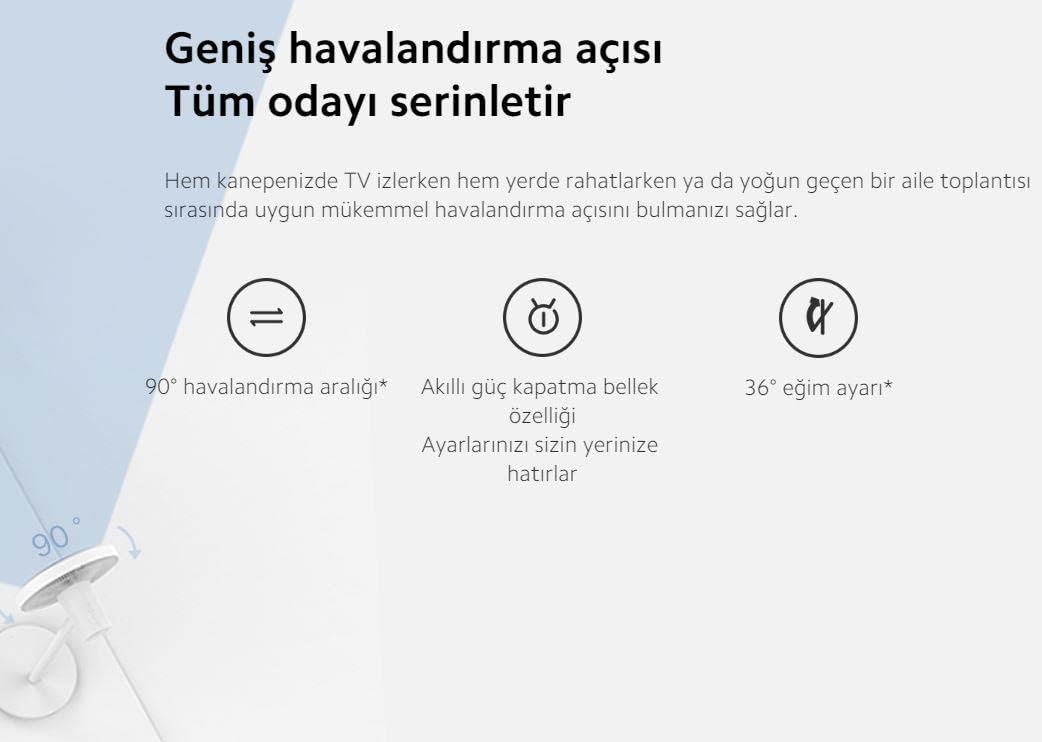
An illustration highlighting the fan's wide 90-degree oscillation range and 36-degree tilt adjustment capability. It also mentions a smart power-off memory feature that retains user settings.
- Oscilación de 90°: Distributes air across a wide area, cooling the entire room.
- Axuste de inclinación de 36°: Manually adjust the fan head vertically to direct airflow as needed.
- Smart Memory Feature: The fan remembers your last settings even after being powered off.
Smart Features (App & Voice Control)
Enhance your experience by connecting the fan to the Mi Home app or integrating with voice assistants:
- Mi Home App: Download the Mi Home app to control the fan remotely, set schedules, and access additional features.
- Google Assistant & Alexa: The fan is compatible with Google Assistant and Amazon Alexa, allowing for voice control of basic functions like power on/off and speed adjustment.
Mantemento
Unha limpeza regular garante un rendemento óptimo e unha maior duración do teu ventilador.
Instrucións de limpeza
- Desconectar o ventilador: Always disconnect the fan from the power outlet before cleaning.
- Exterior limpo: Limpe as superficies exteriores cun suave, damp pano. Non use produtos de limpeza ou disolventes abrasivos.
- Clean Fan Blades and Grilles: The fan can be disassembled for thorough cleaning of the blades and grilles. Carefully remove the front grille, then the fan blade assembly, and finally the rear grille. Use a soft cloth or brush to remove dust. Ensure all parts are completely dry before reassembling.
- Remontaxe: Reassemble the fan in reverse order, ensuring all parts are securely fastened.
Resolución de problemas
Se tes problemas co teu ventilador, consulta os seguintes problemas e solucións comúns:
| Problema | Causa posible | Solución |
|---|---|---|
| O ventilador non se acende | No power supply; Power cord not connected; Fan is off. | Comprobe a toma de corrente; asegúrese de que o cable de alimentación estea ben conectado; prema o botón de acendido/apagado. |
| O ventilador fai un ruído inusual | Pezas soltas; obstrución nas aspas do ventilador; ventilador non sobre unha superficie estable. | Check for loose components and tighten; Ensure nothing is blocking the blades; Place fan on a flat, stable surface. |
| Cannot connect to Mi Home app | Wi-Fi issue; Incorrect pairing process; App version outdated. | Ensure Wi-Fi is active and fan is within range; Follow app pairing instructions carefully; Update Mi Home app to the latest version. |
| Fluxo de aire débil | Fan speed too low; Dust accumulation on blades/grilles. | Increase fan speed; Clean fan blades and grilles as per maintenance section. |
Especificacións do produto
Detailed technical specifications for the Xiaomi Mi Smart Standing Fan 2 Lite:
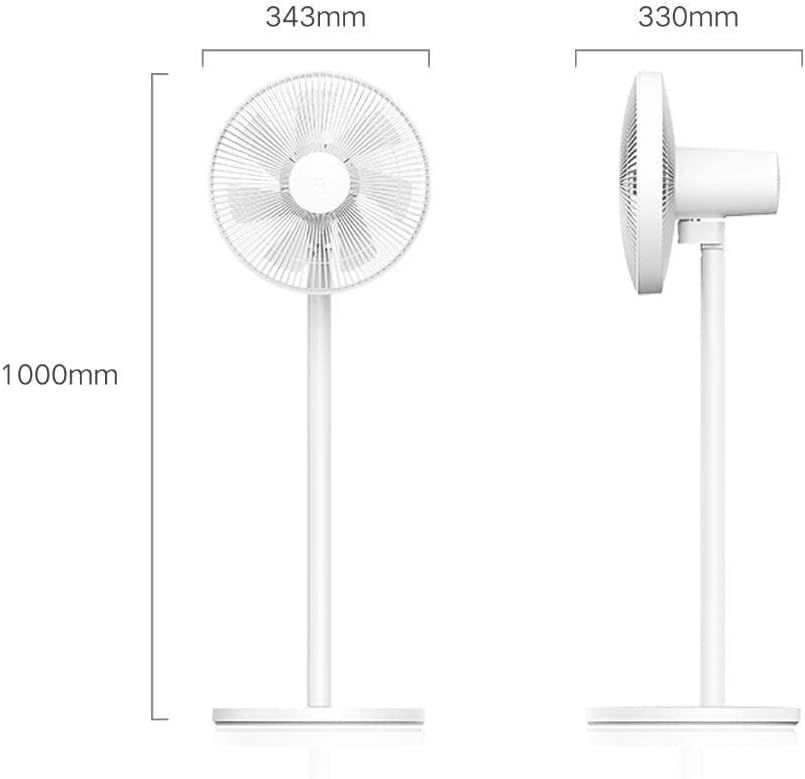
An illustration detailing the physical dimensions of the fan, including its height (1000mm), fan head width (343mm), and base depth (330mm).
| Característica | Detalle |
|---|---|
| Marca | XIAOMI |
| Modelo | Mi Smart Standing Fan 2 Lite |
| Peso do elemento | 3.5 quilogramos |
| Dimensións do produto | 33 D x 34.3 W x 100 H centímetros |
| Fonte de enerxía | Eléctrico con cable |
| Deseño de ventiladores eléctricos | Blower / Pedestal |
| Características especiais | Adjustable Height, Smart Control (App/Voice) |
| Requírese montaxe | Yes (Minor Assembly) |
| Compoñentes incluídos | Fan unit, Power Cable, Screws, User Manual |
| Certificacións | CE |
Información da garantía
The Xiaomi Mi Smart Standing Fan 2 Lite comes with a 12 meses de garantía desde a data de compra. Esta garantía cobre defectos de fabricación en condicións de uso normal. Conserve o comprobante de compra para reclamacións de garantía. Para coñecer os termos e condicións específicos, consulte a tarxeta de garantía incluída co produto ou póñase en contacto co servizo de atención ao cliente.
Atención ao cliente
If you require further assistance, have questions not covered in this manual, or need to make a warranty claim, please contact Xiaomi customer support through their official website or the contact information provided in your product packaging. When contacting support, please have your product model and purchase details ready.