
Xiaomi XM800010
Manual do usuario do rato sen fíos Xiaomi Mi Dual Mode Silent Edition
Model: XM800010
Introdución
The Xiaomi Mi Dual Mode Wireless Mouse Silent Edition is designed for seamless connectivity and quiet operation. This manual provides detailed instructions to help you set up, operate, maintain, and troubleshoot your mouse, ensuring optimal performance and user experience.
Produto rematadoview
Familiarize yourself with the components and features of your Xiaomi Mi Dual Mode Wireless Mouse.

Figura 1: En ángulo view of the Xiaomi Mi Dual Mode Wireless Mouse Silent Edition, showcasinpolo seu deseño ergonómico e o seu acabado negro.

Figura 2: Arriba abaixo view of the mouse, highlighting the scroll wheel and the mode switch button.

Figura 3: Abaixo view of the mouse, showing the power switch, mode switch button, and the battery compartment cover.

Figura 4: The mouse positioned next to a laptop, illustrating its compact size and suitability for various workspaces.
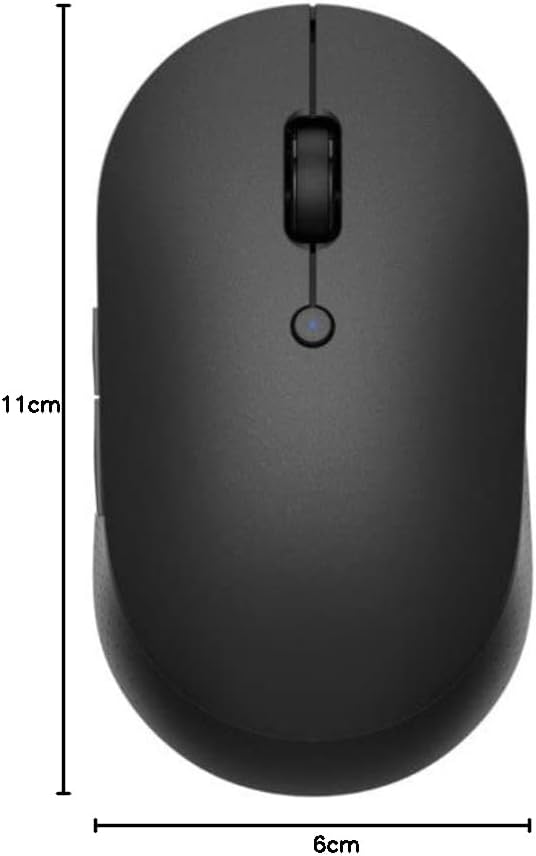
Figura 5: Visual representation of the mouse dimensions, approximately 11 cm in length and 6 cm in width.
Configuración
1. Instalación da batería
The mouse requires two AAA batteries (not included). Follow these steps to install them:
- Locate the battery compartment cover on the bottom of the mouse (refer to Figure 3).
- Deslice a tapa para abrir.
- Insert two AAA batteries, ensuring correct polarity (+ e −) as indicated inside the compartment.
- Pecha a tapa do compartimento da batería de forma segura.
2. Acendido
On the bottom of the mouse, slide the power switch to the "ON" position.
3. Conectando ao teu dispositivo
The Xiaomi Mi Dual Mode Wireless Mouse supports two connection modes: 2.4GHz RF (via USB receiver) and Bluetooth LE 4.0.
3.1. 2.4GHz RF Connection (USB Receiver)
- Locate the USB receiver inside the battery compartment.
- Retire o receptor USB.
- Conecte o receptor USB a un porto USB dispoñible no seu ordenador.
- Ensure the mouse is in 2.4GHz mode. Press the mode switch button on the bottom of the mouse until the indicator light turns green (refer to Figure 3 for button location).
- Your computer should automatically detect and install the necessary drivers. The mouse is ready for use.
3.2. Conexión Bluetooth
- Asegúrate de que o Bluetooth do teu ordenador estea activado.
- Press the mode switch button on the bottom of the mouse until the indicator light turns blue (refer to Figure 3 for button location).
- Press and hold the mode switch button for 3 seconds until the blue light starts blinking rapidly. This indicates pairing mode.
- No teu ordenador, vai á configuración de Bluetooth e busca novos dispositivos.
- Select "Mi Mouse Silent Edition" (or similar) from the list of available devices and click "Pair" or "Connect".
- Once paired, the blue light on the mouse will stop blinking and remain solid for a few seconds before turning off. The mouse is now connected.
Instrucións de funcionamento
Funcións básicas
- Clic esquerdo: Selección e activación primarias.
- Clic dereito: Abre menús contextuais.
- Roda de desprazamento: Scrolls content vertically. Pressing the scroll wheel acts as a middle click.
- Botóns laterais: The mouse features two side buttons, typically configured for "Forward" and "Back" navigation in web navegadores e file exploradores.
Switching Between Devices (Dual Mode)
The dual-mode feature allows you to seamlessly switch between two connected devices (one via 2.4GHz RF and one via Bluetooth). Simply press the mode switch button on the bottom of the mouse to toggle between the green (2.4GHz) and blue (Bluetooth) connection modes.
DPI (puntos por polgada)
The mouse operates at a resolution of 1200 DPI, providing precise and smooth cursor movement for most tasks.
Mantemento
Limpeza
- To clean the mouse, use a soft, dry, lint-free cloth.
- Para a sucidade persistente, d lixeiramenteampen the cloth with water or a mild, non-abrasive cleaner. Do not spray cleaner directly onto the mouse.
- Avoid using harsh chemicals, solvents, or abrasive materials, as these can damage the surface.
- Regularly clean the optical sensor on the bottom of the mouse to ensure accurate tracking.
Substitución da batería
When the mouse performance degrades or the indicator light flashes, it may be time to replace the batteries. Follow the "Battery Installation" steps in the Setup section to replace the two AAA batteries.
Almacenamento
When not in use for extended periods, turn off the mouse using the power switch on the bottom to conserve battery life. Store the mouse in a cool, dry place away from direct sunlight and extreme temperatures.
Resolución de problemas
| Problema | Causa posible | Solución |
|---|---|---|
| O rato non responde | Low battery; Mouse is off; Incorrect connection mode; USB receiver not plugged in (for 2.4GHz); Bluetooth not paired. | Replace batteries; Turn on the mouse; Switch to correct mode (green for 2.4GHz, blue for Bluetooth); Plug in USB receiver; Re-pair Bluetooth. |
| O movemento do cursor é errático ou brusco | Sensor óptico sucio; superficie inadecuada; interferencia. | Clean the optical sensor; Use on a clean, non-reflective surface (e.g., mouse pad); Move mouse closer to receiver/device; Reduce other wireless interference. |
| Non se pode cambiar entre dispositivos | Mode switch button not pressed correctly; One mode not properly connected. | Ensure a firm press on the mode switch button; Verify both 2.4GHz and Bluetooth connections are established. |
| Batería de curta duración | Frequent usage; Low-quality batteries; Mouse left on when not in use. | Use high-quality alkaline batteries; Turn off mouse when not in use. |
Especificacións
- Modelo: XM800010
- Conectividade: Dual Mode (2.4GHz RF via USB receiver, Bluetooth LE 4.0)
- DPI: 1200 ppp
- Botóns: 4 (Left, Right, Scroll Wheel/Middle, Side 1, Side 2)
- Rango: Ata 10 metros (Bluetooth)
- Potencia: 2 x pilas AAA
- Dimensións: Aproximadamente 11 x 6 x 3.5 cm
- Peso: Aproximadamente 56 g (sen baterías)
- Material: ABS plastic, aluminum alloy (scroll wheel)
- Compatibilidade do sistema operativo: Windows, macOS, Linux, Android, iPadOS (Bluetooth dependent)
Garantía e Soporte
Para obter información sobre a garantía e asistencia técnica, consulte a páxina oficial de Xiaomi. website or contact your local authorized Xiaomi service center. Keep your purchase receipt as proof of purchase for warranty claims.
Soporte en liña: Visit Xiaomi Global Support
Ask a question about this manual
Ask about setup, troubleshooting, compatibility, parts, safety, or missing instructions. Manuals+ will review the question and use this page’s manual context to help answer it.