
Introdución
Thank you for choosing the Mi Dual Mode Wireless Mouse Silent Edition. This manual provides essential information for setting up, operating, and maintaining your new wireless mouse. Please read it thoroughly before use to ensure optimal performance and longevity of the product.
Características do produto
- Conectividade de modo dual: Seamlessly switch between 2.4GHz wireless (via USB receiver) and Bluetooth connectivity.
- Clics silenciosos: Designed for quiet operation, reducing click noise for a more peaceful working environment.
- Deseño ergonómico: Agarre cómodo para uso prolongado.
- DPI axustable: Customize cursor sensitivity to suit your needs.
- Batería de longa duración: Efficient power consumption for prolonged use.
Contido do paquete
- Edición silenciosa do rato sen fíos Mi modo dual
- Receptor USB (almacenado dentro do rato)
- Manual de usuario
- Pila AA (pode estar incluída ou non dependendo da rexión)
Guía de configuración
1. Instalación da batería
The mouse requires one AA battery. To install:
- Levante con coidado a tapa superior do rato pola parte traseira para revelar o compartimento da batería.
- Insira unha pila AA, asegurándose de que os terminais positivo (+) e negativo (-) estean aliñados correctamente coas marcas do interior do compartimento.
- Locate the USB receiver inside the battery compartment. Remove it for 2.4GHz wireless connection.
- Volva colocar a tapa superior, asegurándose de que encaixe firmemente no seu lugar.

Figura 1: Abaixo view of the mouse showing the battery compartment and USB receiver.

Figure 2: The Mi Dual Mode Wireless Mouse Silent Edition.
2. Conectando o rato
The mouse supports two connection modes: 2.4GHz Wireless and Bluetooth.
2.1. Conexión sen fíos de 2.4 GHz (receptor USB)
- Conecte o receptor USB a un porto USB dispoñible no seu ordenador.
- Acende o rato usando o interruptor de acendido situado na parte inferior.
- The mouse should automatically connect to your computer. If not, press the mode switch button on top of the mouse until the indicator light turns green, indicating 2.4GHz mode.
2.2. Conexión Bluetooth
- Acende o rato usando o interruptor de acendido situado na parte inferior.
- Press the mode switch button on top of the mouse until the indicator light turns blue, indicating Bluetooth mode.
- No teu ordenador, vai á configuración de Bluetooth.
- Busca new devices and select "Mi Mouse" or similar from the list.
- Siga as indicacións en pantalla para completar o proceso de vinculación.
Instrucións de funcionamento
Cambio de modo
The small button located above the scroll wheel allows you to switch between 2.4GHz wireless mode and Bluetooth mode. The indicator light will change color to confirm the active mode:
- Luz verde: Modo sen fíos de 2.4 GHz
- Luz azul: Modo Bluetooth

Figura 3: Arriba view of the mouse showing the mode switch button.
Funcións básicas
- Clic esquerdo: Acción primaria, selección.
- Clic dereito: Menú contextual.
- Roda de desprazamento: Scroll up/down. Pressing the wheel often acts as a middle click.
- Botóns laterais: (If present) Typically for forward/backward navigation in web navegadores.
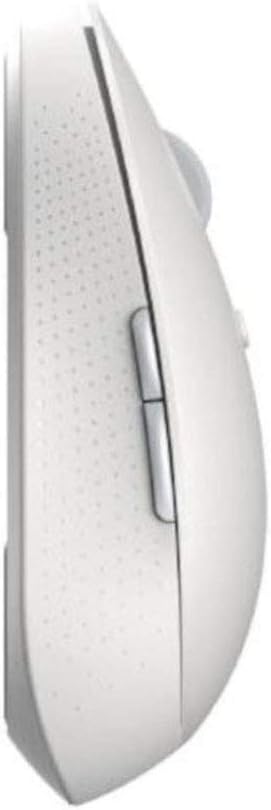
Figura 4: Lateral view of the mouse with side buttons.

Figure 5: Mouse in use, demonstrating ergonomic design.
Mantemento
- Limpeza: Usa un pano suave e seco para limpar o rato. Para a sucidade persistente, usa un pano lixeiramente seco.amp Pódese usar un pano, pero asegúrese de que non entre humidade nos compoñentes internos.
- Substitución da batería: Replace the AA battery when the mouse performance degrades or the indicator light signals low battery (if applicable).
- Almacenamento: When not in use for extended periods, turn off the mouse to conserve battery life. Store the USB receiver inside the mouse to prevent loss.
Resolución de problemas
| Problema | Posible Solución |
|---|---|
| O rato non responde |
|
| Cursor errático ou non se move con suavidade |
|
| Dificultade para cambiar de modo |
|
Especificacións
| Característica | Detalle |
|---|---|
| Dimensións do produto | 4.41 x 2.47 x 1.45 polgadas |
| Peso do elemento | 2.47 onzas |
| Número de modelo | XM800009 |
| Pilas necesarias | 1 Lithium Polymer battery (AA size) |
| Tecnoloxía de conectividade | Wireless (2.4GHz USB, Bluetooth) |
| Características especiais | Soundless, Wireless |
| Detección de Movemento | Optical or Laser |
| Cor | Branco |
Garantía e Soporte
This product comes with a standard manufacturer's warranty. For detailed warranty information, please refer to the warranty card included in your package or visit the official Xiaomi website. For technical support or service inquiries, please contact Xiaomi customer service.
Conserve o comprobante de compra para reclamacións de garantía.