
1. Información importante de seguridade
Before operating the Razor T25 Electric Scooter, please read and understand all safety warnings and instructions. Failure to follow these instructions may result in serious injury or property damage.
- Use sempre o equipo de seguridade axeitado, incluíndo un casco, xeondeiras e cóbadas.
- Observe all local laws and regulations regarding electric scooter use.
- Do not ride in wet conditions, on uneven surfaces, or at night without proper lighting.
- Ensure the battery is fully charged and all components are securely fastened before each ride.
- The scooter is designed for riders aged 18 and up, with a maximum weight limit of 220 pounds (100 kg).
2. Produto rematadoview
The Razor T25 Electric Scooter is a foldable and portable electric scooter designed for urban commuting and travel. It features a 250-watt brushless hub-driven motor and a 36V lithium-ion battery, offering a balance of speed and range for adult riders.
Características principais:
- Motor: 250-watt, kick-to-start, variable-speed, brushless, hub-driven motor.
- Batería: UL certified rechargeable 36V lithium-ion battery pack.
- Velocidade: Up to 15.5 mph (25 km/h).
- Rango: Up to 18 miles (29 km) on a single charge.
- Modos de conducción: Three selectable modes (Pedestrian, Cruising, Sport).
- Freos: Hand-operated electronic front brake and rear disc brake.
- Visibilidade: LED headlight, brake-activated taillight, and reflectors.
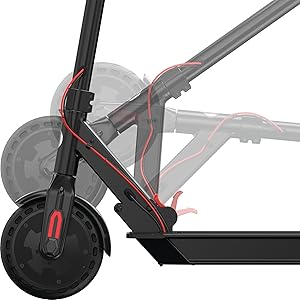
- Portabilidade: Folding design for easy storage and transport.

3. Configuración
3.1 Desembalaxe e montaxe inicial
The Razor T25 Electric Scooter comes partially assembled. Follow these steps to complete the setup:
- Retire coidadosamente todos os compoñentes da embalaxe.
- Despregue o scooter soltándooasing the folding mechanism. Ensure it locks securely into the upright position.
- Insert the handlebar assembly into the stem.
- Secure the handlebars using the provided four screws and Allen wrench. Ensure they are tightened firmly.
3.2 Carga inicial da batería
Before first use, fully charge the scooter's battery. The initial charge time is approximately 8 hours.
- Locate the charging port, typically on the bottom of the scooter deck.
- Connect the charger to the scooter and then to a standard wall outlet.
- A luz indicadora do cargador cambiará (por exemplo, de vermello a verde) cando remate a carga.
- Non sobrecargues a batería. Desconecta o cargador unha vez que a carga estea completa.
4. Instrucións de funcionamento
4.1 Acendido/Apagado
To power on the scooter, press and hold the power button on the handlebar display until the display illuminates. To power off, press and hold the power button again until the display turns off.

4.2 Modos de condución
The T25 offers three riding modes to suit different preferences and environments:
- Modo peonil: Approximately 9.3 mph (15 km/h) maximum speed. Suitable for crowded areas or when a slower pace is desired.
- Modo de cruceiro: Approximately 12.4 mph (20 km/h) maximum speed. A balanced mode for general riding.
- Modo deportivo: Approximately 15.5 mph (25 km/h) maximum speed. For maximum performance and speed.
Switch between modes using the dedicated button on the handlebar display.
4.3 Aceleración
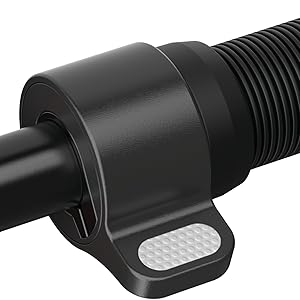
The scooter features a thumb-activated acceleration control. Gently press the thumb lever to engage the motor and increase speed. The scooter is kick-to-start, meaning you need to push off with your foot to initiate movement before the motor engages.
4.4 Freada
The T25 is equipped with a single hand-operated control that activates both the electronic front brake and the rear disc brake. Apply gentle pressure to the brake lever to slow down. Practice braking in a safe, open area to become familiar with its response, as the disc brake can be quite responsive.


5. Cargando a batería
The Razor T25 Electric Scooter is powered by a 36V lithium-ion battery. Proper charging procedures ensure battery longevity and safe operation.
- Use only the charger supplied with your Razor T25 scooter.
- Asegúrate de que o porto de carga estea limpo e seco antes de conectar o cargador.
- Connect the charger to the scooter's charging port, then plug the charger into a standard 100-240V AC wall outlet.
- The charging indicator light on the charger will typically be red during charging and turn green when the battery is fully charged.
- A full charge from empty takes approximately 8 hours.
- Do not leave the scooter charging unattended for extended periods after the light indicates a full charge.
- Store the scooter and charger in a dry, well-ventilated area away from direct sunlight and extreme temperatures.
6. Mantemento
Regular maintenance helps ensure the safety and longevity of your Razor T25 Electric Scooter.
6.1 Coidado e limpeza xerais
- Limpar o scooter con anunciosamp un pano despois de cada uso. Evite o uso de produtos químicos agresivos ou produtos de limpeza abrasivos.
- Do not use a high-pressure washer or submerge the scooter in water.
- Inspect the frame for any cracks or damage before each ride.
6.2 Rodas e pneumáticos
The T25 features airless tires, which require less maintenance than pneumatic tires. However, regularly inspect them for wear, cuts, or embedded debris.
6.3 freos
- Regularly check the brake lever for proper function and responsiveness.
- Ensure the rear disc brake is clean and free of obstructions.
- If the brakes feel too grabby or too loose, consult a qualified technician for adjustment.
6.4 Almacenamento
When not in use, store the scooter in a cool, dry place. If storing for an extended period, ensure the battery is partially charged (around 50%) and recharge it every 30-60 days to prevent deep discharge.
7 Solución de problemas
This section addresses common issues you might encounter with your Razor T25 Electric Scooter.
7.1 Scooter Not Powering On
- Asegúrese de que a batería estea completamente cargada.
- Comprobe se todas as conexións dos cables están soltas ou danadas.
- Se o problema persiste, póñase en contacto co servizo de atención ao cliente.
7.2 Loss of Power or Reduced Range
- Verify the battery is fully charged before each ride.
- Riding conditions (e.g., uphill, heavy loads, cold weather) can affect range and power.
- O rendemento da batería pode degradarse co tempo debido ao uso intensivo.
7.3 Throttle Malfunction
If the throttle is unresponsive or inconsistent, inspect the thumb lever for any physical damage or obstruction. Issues with the throttle may require professional service.
8. Especificacións
| Característica | Especificación |
|---|---|
| Marca | Navalla |
| Nome do modelo | T25 |
| Motor | 250-watt, brushless, hub-driven |
| Batería | 36 V de iones de litio |
| Velocidade máxima | 15.5 mph (25 km/h) |
| Rango máximo | 18 millas (29 km) |
| Límite de peso | 220 libras (100 kg) |
| Peso do elemento | 27 libras (12.2 kg) |
| Material do marco | Aluminio |
| Material da roda | Poliuretano |
| Tamaño da roda | 200 milímetros |
| Altura do manexo | 42.5 polgadas (108 cm) |
| Estilo de freo | Hand-operated, electric front and rear disc |
| Franxa de idade (descrición) | Adulto |
9. Garantía e soporte
9.1 Información da garantía
The Razor T25 Electric Scooter comes with a 90-day Limited Manufacturer Warranty. This warranty covers manufacturing defects and workmanship under normal use. Please retain your proof of purchase for warranty claims. For full details, refer to the warranty documentation included with your product or visit the official Razor websitio.
9.2 Atención ao cliente
For technical assistance, troubleshooting not covered in this manual, or warranty inquiries, please contact Razor USA, LLC customer support.
- Fabricante: Razor USA, LLC
- Soporte en liña: Visita o Tenda de afeitadoras en Amazon para obter información sobre o produto e recursos de asistencia.