
Introdución
Welcome to your new Gembird GHS-U-5.1-01 USB 5.1 Surround Headset. This manual provides essential information for setup, operation, and maintenance to ensure optimal performance and an immersive audio experience.
Contido do paquete
O paquete debe conter os seguintes elementos:
- Gembird GHS-U-5.1-01 USB 5.1 Surround Headset

Image: Retail packaging for the Gembird GHS-U-5.1-01 USB 5.1 Surround Headset, showing the headset inside a clear window.
Produto rematadoview
The Gembird GHS-U-5.1-01 is a USB headset designed for immersive audio experiences with 5.1 surround sound. It features an adjustable microphone, built-in volume control, comfortable ear pads, and an adjustable headband for extended use.
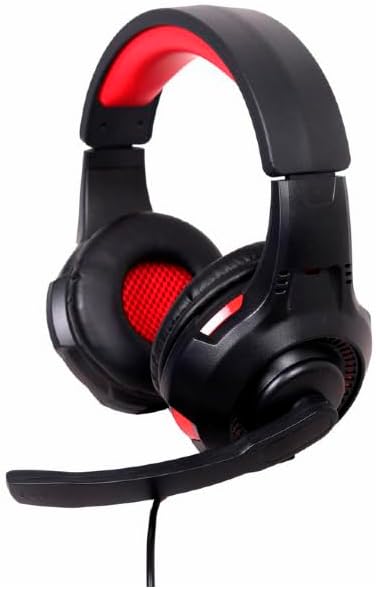
Imaxe: En ángulo view of the Gembird GHS-U-5.1-01 USB 5.1 Surround Headset, showcasing its black and red design with the microphone boom extended.
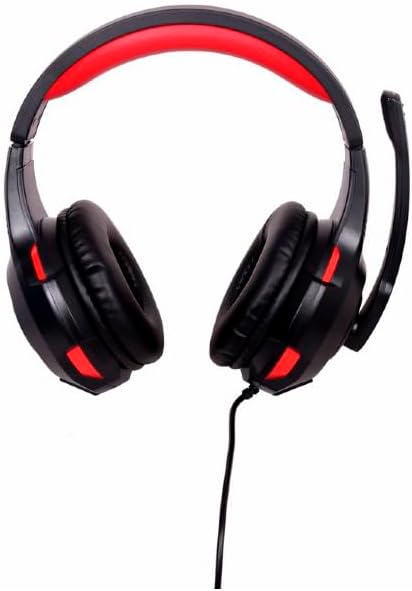
Imaxe: Fronte view of the Gembird GHS-U-5.1-01 USB 5.1 Surround Headset, highlighting the adjustable headband and earcups.

Image: Close-up of the in-line control unit for the Gembird GHS-U-5.1-01 headset, showing volume up/down and microphone mute buttons.
Configuración
Conectando os auriculares
The Gembird GHS-U-5.1-01 headset connects via a standard USB port.
- Localiza un porto USB dispoñible no teu ordenador.
- Conecte o conector USB dos auriculares ao porto USB.
- O teu sistema operativo debería detectar e instalar automaticamente os controladores necesarios. Este proceso pode tardar uns intres.
- Once installed, the headset will be ready for use as an audio input and output device.
Audio Settings Configuration
For optimal 5.1 surround sound experience, you may need to configure your computer's audio settings.
- Windows: Go to "Sound Settings" (right-click speaker icon in taskbar) > "Sound Control Panel" > "Playback" tab. Select the Gembird headset, click "Configure," and choose "5.1 Surround."
- macOS: Go to "System Preferences" > "Sound" > "Output" tab. Select the Gembird headset.
Instrucións de funcionamento
Control de volume
The headset features an in-line remote control for easy volume adjustment.
- Usa o "+" botón para aumentar o volume.
- Usa o "-" botón para baixar o volume.
Uso do micrófono
The adjustable microphone boom allows for precise positioning.
- Position the microphone approximately 1-2 inches from your mouth for clear voice capture.
- Use the microphone mute button on the in-line remote to toggle the microphone on or off.
Axuste de confort
Adjust the headband to fit comfortably on your head. The ear pads are designed for extended use.
Mantemento
Para garantir a lonxevidade e o rendemento dos seus auriculares, siga estas pautas de mantemento:
- Limpeza: Use a soft, dry cloth to wipe the headset. Do not use harsh chemicals or abrasive cleaners.
- Almacenamento: Store the headset in a clean, dry place away from extreme temperatures.
- Coidado do cable: Evite dobrar bruscamente ou tirar demasiado do cable USB para evitar danos.
Resolución de problemas
No Sound or Microphone Not Working
- Comprobar a conexión USB: Asegúrate de que o conector USB estea completamente inserido no porto. Proba cun porto USB diferente.
- Check Volume Levels: Verify that the volume on the in-line control, your computer's system volume, and application-specific volumes are not muted or set too low.
- Check Audio Settings: Confirm that the Gembird headset is selected as the default playback and recording device in your computer's sound settings.
- Reiniciar o ordenador: Sometimes a simple restart can resolve driver or software conflicts.
Problemas de calidade do son
- Actualización do controlador: Asegúrate de que os controladores do teu sistema operativo estean actualizados.
- Calidade da fonte: Poor audio quality may stem from the audio source itself. Test with different audio files ou aplicacións.
Especificacións
| Nome do modelo | GHS-U-5.1-01 |
| Conectividade | USB con cable |
| Factor de forma | Na Orella |
| Cor | Negro |
| Material | Aluminio (Carcasa) |
| Peso | 0.4 quilogramos |
| Características adicionais | Adjustable microphone boom, Built-in volume control, Comfortable ear pads, Adjustable headband |
Información da garantía
This Gembird headset comes with a 24 Month Manufacturer Guarantee. Please retain your proof of purchase for warranty claims. For detailed warranty terms and conditions, refer to the documentation provided with your product or contact Gembird customer support.
Apoio
If you encounter issues not covered in this manual or require further assistance, please visit the official Gembird website or contact their customer support for technical assistance.