
BTMETER BT-570CAPP
BTMETER Cl dixitalamp Manual do usuario do multímetro BT-570S-APP
Model: BT-570CAPP | Brand: BTMETER
1. Introdución
This manual provides instructions for the safe and effective operation of the BTMETER Digital Clamp Multimeter, model BT-570S-APP. This True-RMS clamp meter is designed for professional and home use, offering a wide range of measurement capabilities including AC/DC voltage, AC/DC current, resistance, capacitance, frequency, temperature, diode, and continuity tests. It also features Non-Contact Voltage (NCV) detection and Bluetooth connectivity for app-based data monitoring and logging.
2. Información de seguridade
Always adhere to basic safety precautions when using this product to reduce the risk of fire, electric shock, or personal injury. Read all instructions before use.
- Non exceda os valores de entrada máximos especificados para cada rango de medición.
- Asegúrese de que os cables de proba estean conectados correctamente e que o selector de función estea axustado no rango correcto antes de realizar medicións.
- Teña extrema precaución ao traballar co voltagpor riba de 30 V CA RMS, 42 V pico ou 60 V CC. Estes voltagsupoñen un perigo de descarga.
- Before measuring current, ensure the circuit is de-energized and the clamp jaws are properly closed around a single conductor.
- Non faga funcionar o medidor se parece estar danado ou se as puntas de proba están danadas.
- Substitúa a batería inmediatamente cando apareza o indicador de batería baixa para garantir lecturas precisas.
3. Contido do paquete
Verify that all items listed below are included in your package. If any items are missing or damaged, contact BTMETER customer support.

The image displays the complete package contents for the BTMETER BT-570S-APP. This includes the main clamp multimeter unit, a pair of red and black test leads, a yellow temperature probe, a 9V battery, a small screwdriver for battery compartment access, a black zippered carrying case, and the user manual.
- 1 x BTMETER BT-570S-APP Digital Clamp Multímetro
- 1 par de cables de proba (vermello e negro)
- 1 x K-Type Temperature Probe
- 1 batería de 9 V (6F22)
- 1 destornillador pequeno
- 1 x Maletín de transporte
- 1 x Manual de usuario
4. Produto rematadoview
The BTMETER BT-570S-APP is a versatile clamp multimeter designed for various electrical measurements. Familiarize yourself with its components and features.

This image provides a detailed breakdown of the multimeter's physical features. It shows the large LCD display capable of 6000 counts, the 26mm opening clamp jaws for non-contact current measurement, the central rotary switch for function selection, and the double insulation design for enhanced safety. The overall dimensions of the device are also indicated: 225mm (8.8in) length, 77mm (3.0in) width, and 45mm (1.7in) height.
Características principais:
- Pantalla LCD: 6000 counts digital display with full function symbol indication.
- Clamp Mandíbulas: Opens up to 26mm to enclose conductors for current measurement.
- Interruptor rotativo: Used to select desired measurement functions and ranges.
- Double Insulation Design: Provides enhanced protection during operation.
- Test Lead Ports: COM, VΩHzT+ for connecting test leads and temperature probe.
- Botóns de función: SELECT, MAX/MIN, REL, Hz/Duty, HOLD.
- Sensor NCV: Para non contacto voltage detección.

This graphic illustrates 15 distinct features of the BT-570S-APP. These include Continuity testing, Bluetooth connectivity, AC/DC Current measurement, Auto Ranging, Diode testing, AC/DC Voltage measurement, True RMS capability, Capacitance measurement, Resistance measurement, Frequency measurement, Duty Cycle measurement, Temperature testing, Relative Value (REL) function for auto zero, Data Hold, and Backlight for the display.
5. Configuración
5.1 Instalación da batería
- Localiza a tapa do compartimento da batería na parte traseira do multímetro.
- Use the provided screwdriver to loosen the screw securing the cover.
- Remove the cover and insert the 9V battery, observing the correct polarity (+/-).
- Coloque a tapa do compartimento da batería e aperte o parafuso.
5.2 Descarga da aplicación e conexión Bluetooth
The BT-570S-APP features Bluetooth connectivity for remote monitoring and data logging via a dedicated mobile application.
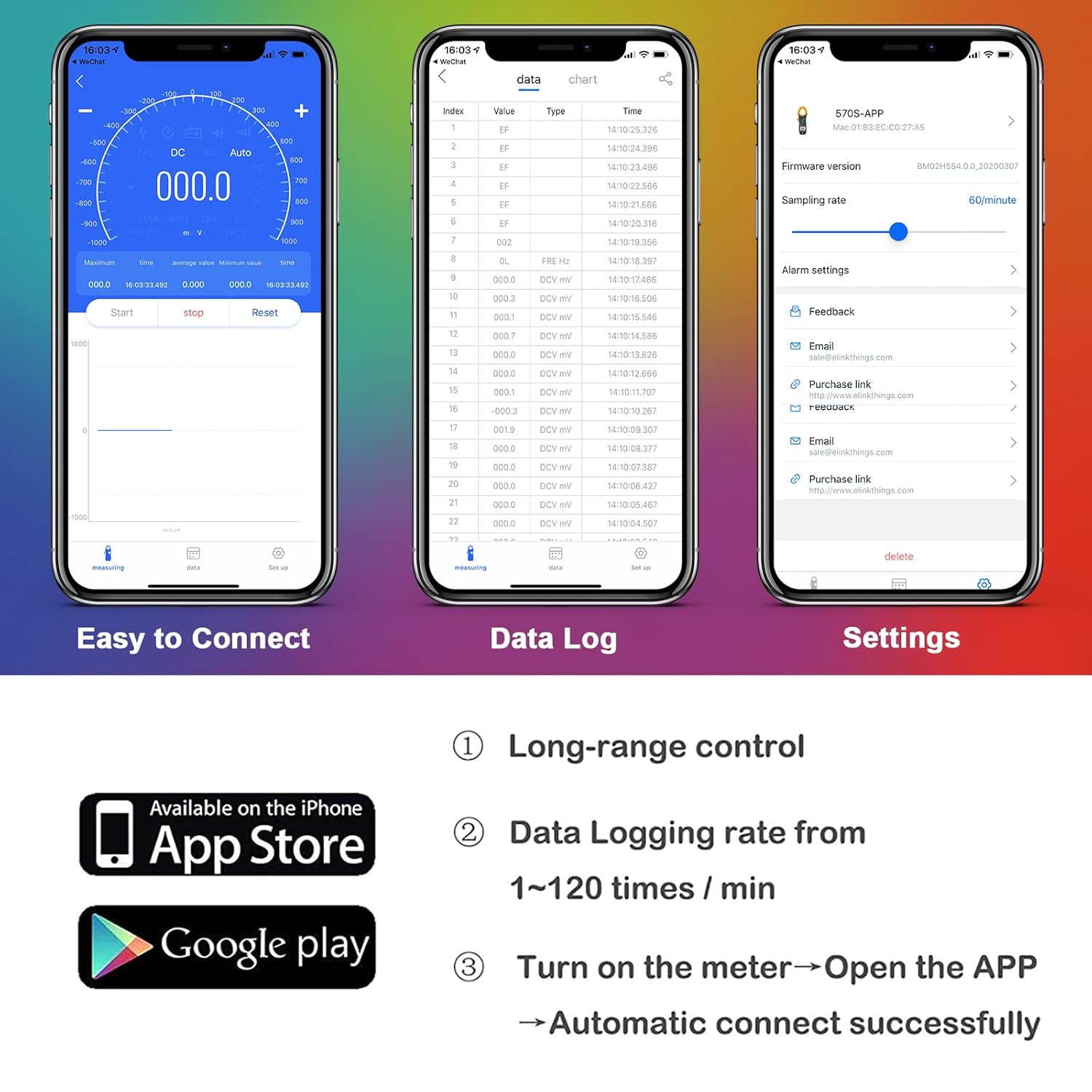
This image illustrates the mobile application's interface, highlighting its ease of connection, data logging capabilities, and settings menu. It also shows icons for downloading the app from the Apple App Store and Google Play Store, indicating cross-platform compatibility. The app allows for long-range control, data logging rates from 1-120 times/min, and automatic connection upon opening the app with the meter turned on.
- Download the customized BTMETER app from the Google Play Store (for Android) or the Apple App Store (for iOS). Busca "BTMETER" or refer to the QR code in the physical manual.
- Asegúrate de que o Bluetooth estea activado no teu smartphone.
- Turn on the BT-570S-APP multimeter by rotating the switch from OFF to any measurement function.
- Open the BTMETER app on your phone. The app should automatically detect and connect to the multimeter.
- Once connected, you can monitor live readings, view maximum/minimum/average values, graph data, record, save, and export measurements directly from the app.

This image highlights the Smart Mobile APP Connection feature, showing the BT-570S-APP multimeter wirelessly connected to a smartphone. The phone's screen displays real-time measurement data, demonstrating the app's capability to display and record maximum/minimum/average values, as well as save and export data for further analysis. The connection range is indicated as 0-15 meters.
6. Instrucións de funcionamento
6.1 Funcionamento xeral
- Turn the rotary switch to the desired measurement function.
- The meter features auto-ranging, automatically selecting the appropriate range for the measurement.
- Connect the test leads or position the clamp jaws as required for the specific measurement.
- Lea o valor da medición na pantalla LCD.
- To turn off the meter, rotate the switch to the "OFF" position.
6.2 Funcións de medición

This banner image titled 'Multimeter Functions' visually represents the diverse measurement capabilities of the device. It includes small illustrative images for DC Voltage, AC Voltage, DC Current, AC Current, Resistance, Capacitance, Frequency, and Continuity, demonstrating the meter's comprehensive functionality.
- AC / DC Voltage (V∼ / V—): Insert test leads into COM and VΩHzT+ ports. Select V∼ or V— on the rotary switch. Connect leads in parallel to the circuit.
- AC/DC Current (A∼ / A—): Rotate the switch to A∼ or A—. Open the clamp jaws and enclose a single conductor. Ensure the jaws are fully closed. Do not use test leads for current measurement via clamp.
- Resistencia (Ω): Insert test leads into COM and VΩHzT+ ports. Select Ω on the rotary switch. Connect leads across the component to be measured. Ensure the circuit is de-energized.
- Capacitancia (F): Insert test leads into COM and VΩHzT+ ports. Select F on the rotary switch. Connect leads across the capacitor. Ensure the capacitor is discharged before measurement.
- Frecuencia (Hz) / Ciclo de traballo (%): Insert test leads into COM and VΩHzT+ ports. Select Hz on the rotary switch. Connect leads to the signal source. Press the Hz/Duty button to toggle between frequency and duty cycle.
- Temperatura (℃/℉): Insert the K-type temperature probe into the COM and VΩHzT+ ports, observing polarity. Select ℃/℉ on the rotary switch. The display will show the ambient temperature. Place the probe tip on or in the object to measure its temperature.
- Proba de díodos (→|): Insert test leads into COM and VΩHzT+ ports. Select Diode on the rotary switch. Connect the red lead to the anode and the black lead to the cathode of the diode.
- Proba de continuidade (): Insert test leads into COM and VΩHzT+ ports. Select Continuity on the rotary switch. If the resistance is below approximately 50Ω, the buzzer will sound.
- Vol. Sen contactotage (NCV): Rotate the switch to NCV. Move the NCV sensor area of the meter close to the conductor. If AC voltage is detected, the LED indicator will flash, and the buzzer will sound. The intensity of the alarm increases with voltage forza.

This image shows the BT-570S-APP multimeter actively measuring temperature. A K-type temperature probe is immersed in a blue liquid within a beaker, and the multimeter's display shows a reading of -02.72 ℃. This demonstrates the device's capability for precise temperature measurement.

This image demonstrates the Non-Contact Voltage (NCV) detection feature. The BT-570S-APP multimeter is shown with its NCV detection area near an electrical outlet. Visual cues (flashing 'bi' text) and an audible alarm (represented by sound waves) indicate the presence of AC voltage without direct contact. The 45mm jaws support measuring AC voltage from 90 to 1000V without contacting the wires.
6.3 Funcións especiais
- Retención de datos (HOLD): Prema o botón "HOLD" para conxelar a lectura actual na pantalla. Prema de novo para desactivala.
- Retroiluminación: Press and hold the "HOLD" button for more than 2 seconds to turn on the LCD backlight. Press and hold again to turn it off.
- Valor relativo (REL): Press the "REL" button to zero out the current reading, allowing subsequent measurements to be displayed as a relative difference from that reference point. Press again to exit relative mode.
- Máximo/Mínimo (MÁX/MÍN): Press the "MAX/MIN" button to enter MAX/MIN recording mode. The meter will display the maximum value measured. Press again to cycle through minimum value and exit.

This image highlights the 'Backlight & Data Hold' features. Pressing the "HOLD" key briefly freezes the reading on the display for easy recording. Pressing the "HOLD" key for more than 2 seconds activates the LCD backlight, improving visibility in low-light conditions.

This image illustrates the 'Auto Zero & MAX/MIN Mode' functions. The "REL" (relative value) key allows users to zero out a reading before measurement. The "MAX/MIN" key records and displays the maximum or minimum measured values, aiding in diagnosing problems and improving troubleshooting efficiency.
7. Mantemento
7.1 Limpeza
Limpar o contador con anunciosamp un pano e un deterxente suave. Non empregue abrasivos nin disolventes. Manteña o medidor seco.
7.2 Substitución da batería
When the low battery indicator appears on the display, replace the 9V battery as described in the "Battery Installation" section (5.1). Remove the battery if the meter is not used for an extended period.
8 Solución de problemas
- Sen pantalla ou lecturas erráticas: Check battery level and replace if necessary. Ensure test leads are properly connected.
- Problemas de conexión Bluetooth: Ensure the meter is turned on and within range of your smartphone. Restart the app and the meter. Check phone's Bluetooth settings.
- Lecturas inexactas: Verify the correct function and range are selected. Check for damaged test leads. Ensure proper contact with the circuit.
- NCV non detecta volumetage: Ensure the NCV sensor area is close to the live conductor. The NCV function is designed for AC voltage só.
9. Especificacións
| Parámetro | Valor |
|---|---|
| Número de modelo | BT-570CAPP |
| Mostrar | 6000 contas |
| DC Voltage Alcance | 0.1 mV ~ 1000 V |
| Vol. ACtage Alcance | 1 mV ~ 750 V |
| DC & AC Current Range | 100 mA ~ 1000 A |
| Rango de resistencia | 0.1Ω ~ 60MΩ |
| Rango de capacitancias | 1pF ~ 60mF |
| Rango de frecuencias | 0.001 ~ 9.999MHz |
| Rango de temperatura | -4 ~ 1832℉ (℃/℉ Optional) |
| Apertura da mandíbula | 45 mm |
| Fonte de enerxía | Batería de 9 V |
| Peso do elemento | 45 gramos |
| Dimensións do paquete | 10.16 x 4.96 x 2.24 polgadas |
| Conectividade | Bluetooth (App for Android/iOS) |
| Características especiais | True-RMS, Auto Ranging, NCV, Data Hold, Backlight, REL, MAX/MIN |
10. Garantía e soporte
BTMETER provides a 12-month quality warranty for the BT-570S-APP Digital Clamp Multimeter. Life-time technical support is also available.
For technical assistance, warranty claims, or any product-related inquiries, please contact BTMETER customer service through the contact information provided in your product packaging or on the official BTMETER websitio.