
Bluenin T30
Bluenin T30 True Wireless Earbuds User Manual
Modelo: T30
Introdución
Thank you for choosing the Bluenin T30 True Wireless Earbuds. These earbuds are designed to provide a superior audio experience with advanced features such as Bluetooth 5.0 connectivity, CVC8.0 noise-canceling microphone, and IPX7 waterproofing, making them ideal for various activities including sports and travel. This manual will guide you through the setup, operation, and maintenance of your new earbuds.
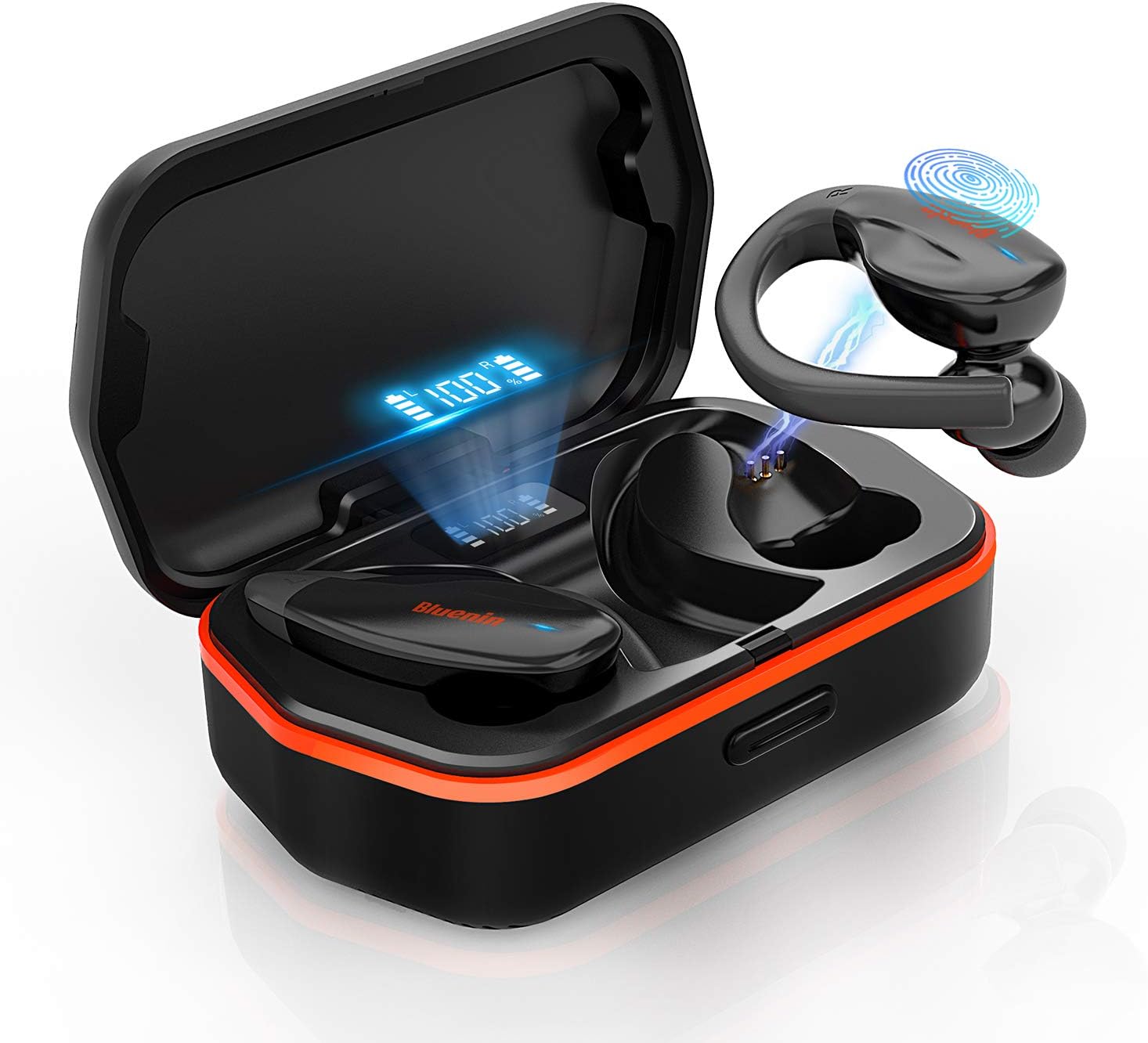
Image: The Bluenin T30 True Wireless Earbuds, showcasing their design and the charging case with a digital battery display.
Configuración
Desembalaxe e carga inicial
Upon receiving your Bluenin T30 earbuds, carefully open the packaging. Inside, you will find the earbuds, the charging case, and a USB charging cable. It is recommended to fully charge the earbuds and the charging case before first use.
Usando os auriculares
The Bluenin T30 earbuds feature an ergonomic anti-fall earhook design for a secure and comfortable fit, especially during active use. Gently insert the eartips into your ears and adjust the earhook to rest comfortably around your ear.

Image: A person demonstrating the secure and comfortable fit of the Bluenin T30 earbuds with their ergonomic anti-fall earhook design.
Emparejamento nun paso
The T30 earbuds utilize Bluetooth 5.0 technology for stable and fast connections. To pair them with your device:
- Asegúrate de que o Bluetooth do teu dispositivo estea activado.
- Saca os dous auriculares da caixa de carga. Acenderanse automaticamente e entrarán no modo de emparellamento.
- On your device, search for Bluetooth devices and select "Bluenin T30" from the list.
- Unha vez conectado, escoitarás unha mensaxe de confirmación e os auriculares estarán listos para usar.

Image: A visual representation of the one-step pairing process, showing the earbuds connecting to a smartphone via Bluetooth.
En funcionamento
Controis táctiles
The Bluenin T30 earbuds feature sensitive touch controls for easy management of your audio and calls. The touch sensitive area is located on the outer surface of each earbud.
| Acción | Control |
|---|---|
| Volume +/- | Specific touch gesture (refer to quick start guide for exact gesture) |
| Reproducir/Pausa | Toca un só auricular en calquera dos auriculares |
| Pista seguinte/anterior | Double tap (right for next, left for previous) |
| Responder / Rexeitar chamada | Single tap to answer, long press to reject |
| Encendido / Apagado | Long press or place in/remove from case |

Image: An illustration detailing the various touch control functions available on the Bluenin T30 earbuds for media and call management.
Audio Quality and Noise Cancellation
The T30 earbuds deliver premium HiFi sound with deep bass and crystal clear treble. They are equipped with CVC 8.0 Noise Cancellation technology, which helps to reduce ambient noise for clearer calls and a more immersive listening experience.

Image: Highlighting the premium HiFi sound, Bluetooth 5.0, and CVC 8.0 Noise Cancellation features of the Bluenin T30 earbuds.
Mantemento
Cargando os auriculares e o estuche
The Bluenin T30 earbuds offer a long-lasting playtime of up to 6 hours on a single charge, with the charging case providing an additional 23 recharges, totaling up to 136 hours of playtime. The charging case also functions as a backup power bank for your personal devices.
- To charge the earbuds, place them back into the charging case. The digital display on the case will show their charging status.
- To charge the case, connect it to a power source using the provided USB cable. The display will indicate the case's battery level.

Image: The Bluenin T30 charging case acting as a power bank, illustrating its long-lasting playtime capabilities and ability to charge other devices.
Resistencia á auga (IPX7)
The T30 earbuds are IPX7 waterproof, meaning they are resistant to sweat, water, and rain. This makes them suitable for workouts and outdoor activities. While they can withstand splashes and brief immersion, they are not designed for swimming or prolonged submersion.
- After exposure to sweat or water, ensure the earbuds are dry before placing them back into the charging case to prevent damage to the charging contacts.
- Clean the earbuds regularly with a soft, dry cloth to remove any earwax or debris.

Image: The Bluenin T30 earbuds submerged in water, illustrating their IPX7 waterproof rating, making them resistant to sweat, water, and rain.
Resolución de problemas
Problemas comúns e solucións
- Auriculares sen emparellamento: Ensure both earbuds are out of the case and fully charged. Turn off and on your device's Bluetooth. If issues persist, try forgetting the device in your Bluetooth settings and re-pairing.
- Só funciona un auricular: Volve colocar os dous auriculares na caixa de carga, pecha a tapa, agarda uns segundos e volve retiralos. Isto adoita volver sincronizalos.
- Sen son: Comproba o nivel de volume tanto no teu dispositivo como nos auriculares. Asegúrate de que os auriculares estean conectados correctamente ao teu dispositivo.
- Problemas de carga: Clean the charging contacts on both the earbuds and inside the case with a dry cotton swab. Ensure the charging cable is securely connected and the power source is active.
- Mala calidade de son: Ensure the earbuds are securely fitted in your ears. Check for any debris blocking the speaker mesh. Move closer to your connected device to avoid interference.
Especificacións
| Característica | Detalle |
|---|---|
| Nome do modelo | T30 |
| Marca | Bluenin |
| Tecnoloxía de conectividade | Sen fíos (Bluetooth 5.0) |
| Factor de forma | Intraauricular con gancho para a orella |
| Control de ruído | Cancelación de ruído CVC 8.0 |
| Nivel de resistencia á auga | Impermeable IPX7 |
| Método de control | Toca |
| Duración da batería (auriculares) | Ata 6 horas |
| Tempo de reprodución total (con estuche) | Ata 136 horas |
| Función de estuche de carga | Backup Power Bank |
| Material | Silicona |
| Dimensións do produto | 4.72 x 2.36 x 1.97 polgadas |
| Peso do elemento | 8.8 onzas |
Garantía e Soporte
Bluenin products are designed for reliability and performance. For warranty information, technical support, or service inquiries, please refer to the contact details provided in your product packaging or visit the official Bluenin websitio. Garde o comprobante de compra para reclamacións de garantía.
Para obter máis axuda, tamén podes contactar directamente co vendedor a través da plataforma onde compraches o produto.
Ask a question about this manual
Ask about setup, troubleshooting, compatibility, parts, safety, or missing instructions. Manuals+ will review the question and use this page’s manual context to help answer it.