
VIZIO V51x-J6
VIZIO V-Series 5.1 Home Theater Sound Bar User Manual
Model: V51x-J6
Introdución
The VIZIO V-Series 5.1 Home Theater Sound Bar system is designed to deliver an immersive audio experience for your home entertainment. This system includes a sound bar, a wireless subwoofer, and two satellite speakers, providing 5.1-channel surround sound with Dolby Audio and DTS Digital Surround support. It offers versatile connectivity options including HDMI ARC and Bluetooth for seamless integration with your devices.

Image: The complete VIZIO V-Series 5.1 Home Theater Sound Bar system, showcasing the soundbar, wireless subwoofer, and two compact satellite speakers.
O que hai na caixa
Verifica que todos os compoñentes estean presentes no teu paquete:
- Barra de son
- Subwoofer sen fíos
- Control remoto
- 2 altofalantes satélite
- Cables de alimentación (para barra de son e subwoofer)
- Cable HDMI
- Cable de audio óptico
- RCA to 3.5mm Audio Cable (for satellite speakers)
- Guía de inicio rápido
Configuración
1 Colocación
Optimal placement of your sound system components is crucial for the best audio experience.
- Barra de son: Place the soundbar centrally below your TV. Ensure it is not obstructed.
- Subwoofer sen fíos: Position the subwoofer anywhere in the room, preferably in a corner or near a wall for enhanced bass. Ensure it is within wireless range of the soundbar.
- Altofalantes satélite: Connect the satellite speakers to the wireless subwoofer using the provided RCA cables. Place them behind your main listening area, one on the left and one on the right, facing towards the listener for optimal surround sound.

Image: A visual representation of a typical 5.1 home theater setup, illustrating the recommended positions for the soundbar, wireless subwoofer, and two satellite speakers relative to the viewárea de ing.
2. Conexións
Connect the soundbar to your TV and other devices using the appropriate cables.
- HDMI ARC (recomendado): Connect one end of the HDMI cable to the HDMI ARC port on your soundbar and the other end to the HDMI ARC/eARC port on your TV. This allows for high-quality audio and control via your TV remote.
- Audio óptico: If your TV does not have an HDMI ARC port, connect the optical audio cable from the soundbar's Optical In port to your TV's Optical Out port.
- Auxiliary (AUX): For connecting devices with a 3.5mm audio output, use an AUX cable.
- USB: The USB port is available for playing audio files desde unha unidade USB.
- Potencia: Connect the power cables to the soundbar and wireless subwoofer, then plug them into a power outlet.

Image: The back panel of the wireless subwoofer, displaying the power input and the RCA output jacks for connecting the satellite speakers.
3. Emparellamento de subwoofers sen fíos
The wireless subwoofer should automatically pair with the soundbar upon initial power-up. If pairing fails:
- Asegúrate de que tanto a barra de son como o subwoofer estean acendidos.
- Press and hold the "Pair" button on the back of the subwoofer for 5 seconds. The LED indicator on the subwoofer will flash.
- On the soundbar, press and hold the "Bluetooth" button for 5 seconds. The LED indicators on the soundbar will flash.
- Once paired, the LED on the subwoofer will turn solid white.
Instrucións de funcionamento
1. Controis básicos
The soundbar features on-device controls and comes with a remote control for comprehensive operation.
- Botón de encendido: Activa ou desactiva o sistema da barra de son.
- Botón de entrada: Cycles through available audio inputs (HDMI ARC, Optical, Bluetooth, AUX, USB).
- Subir/Baixar o volume: Axusta o nivel de volume xeral.
- Botón Bluetooth: Inicia o modo de emparellamento Bluetooth.

Image: The top surface of the VIZIO soundbar, highlighting the integrated power, input, volume, and Bluetooth control buttons.
2. Funcións de control remoto
The included remote control provides full access to all system settings and features.
- Visualización: The remote features a small LCD screen to show current settings and input.
- Botón EQ: Cycles through preset equalizer modes (e.g., Movie, Music, Dialogue).
- Botón de nivel: Adjusts individual channel levels (e.g., Bass, Treble, Center, Surround, Subwoofer).
- Botón de efecto: Activates or deactivates audio effects like DTS Virtual:X.
- Botón de silencio: Silencia ou activa o audio.
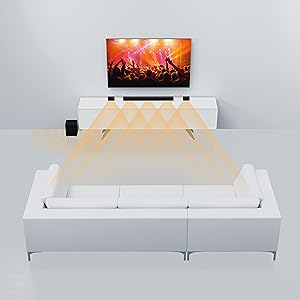
Image: The remote control for the VIZIO soundbar, featuring an LCD display at the top and clearly labeled buttons for input selection, volume, EQ, level adjustments, and sound effects.
3. Transmisión por Bluetooth
To stream audio from your Bluetooth-enabled device:
- Press the Bluetooth button on the soundbar or remote. The soundbar's LED indicators will pulse.
- On your device, enable Bluetooth and search for "VIZIO V51x-J6".
- Select the soundbar from the list to pair. Once connected, the soundbar's LEDs will stop pulsing and remain solid.

Image: A smartphone screen showing a music application, positioned next to the VIZIO soundbar, illustrating the Bluetooth streaming capability.
4. Compatibilidade co asistente de voz
The V51x-J6 is compatible with voice assistant devices. Connect your voice assistant device to the soundbar via the AUX VA port for integrated control and audio playback through the sound system.
Mantemento
Proper care ensures the longevity and performance of your VIZIO sound system.
- Limpeza: Use a soft, dry, lint-free cloth to clean the surfaces of the soundbar, subwoofer, and satellite speakers. Do not use liquid cleaners or aerosol sprays.
- Ventilación: Ensure adequate airflow around all components. Do not block ventilation openings.
- Ambiente: Evite colocar o sistema baixo a luz solar directa, preto de fontes de calor ou en zonas con moita humidade ou po.
- Cables: Comprobe periodicamente todas as conexións dos cables para asegurarse de que estean ben fixadas e non presenten danos.
Resolución de problemas
Se tes problemas, consulta as seguintes solucións habituais:
| Problema | Solución |
|---|---|
| Sen poder | Asegúrate de que os cables de alimentación estean conectados correctamente á barra de son/subwoofer e a unha toma de corrente que funcione. |
| Sen son |
|
| O subwoofer non se emparella | Refer to the "Wireless Subwoofer Pairing" section in Setup. Ensure subwoofer is within range and free from interference. |
| Son distorsionado |
|
| O control remoto non funciona | Substitúa as pilas. Asegúrate de que non haxa obstrucións entre o mando a distancia e a barra de son. |
Especificacións
Key technical specifications for the VIZIO V-Series 5.1 Home Theater Sound Bar (V51x-J6):
- Nome do modelo: V51x-J6
- Tipo de altofalante: Surround Sound, Soundbar, Subwoofer
- Configuración da canle de son envolvente: 5.1
- Compoñentes incluídos: Soundbar, Subwoofer, Remote, Satellite speakers
- Dimensións do produto (barra de son): 3.2" D x 36" W x 2.28" H
- Peso do artigo: 5 libras
- Tecnoloxía de conectividade: Auxiliary, HDMI, Bluetooth, Wi-Fi (for voice assistant compatibility)
- Tecnoloxía de comunicación sen fíos: Bluetooth
- Tecnoloxía de conectividade do subwoofer: Sen fíos
- Diámetro do subwoofer: 5 polgadas
- Potencia de saída máxima do altofalante: 50 vatios
- Relación sinal-ruído: 96 dB
- Resposta en frecuencia: 20000 Hz
- Método de control: Voice (via compatible voice assistant), Remote
- Fonte de enerxía: AC
- Baterías: Requírese 1 batería de ións de litio (incluída para o control remoto)

Image: A diagram illustrating the key dimensions of the VIZIO V-Series 5.1 Sound Bar components, including the soundbar, subwoofer, and satellite speakers.
Garantía e Soporte
This VIZIO product comes with a Limited Warranty. For detailed warranty information, product registration, and technical support, please refer to the official VIZIO website or the full user manual PDF available for download. You can also contact VIZIO customer support directly for assistance.
Manual de usuario oficial (PDF): Descarga aquí
Guía oficial do usuario (PDF): Descarga aquí