
ELECDER D19
ELECDER D19 True Wireless Earbuds User Manual
Model: D19 | Brand: ELECDER
1. Introdución
The ELECDER D19 True Wireless Earbuds are designed to provide a superior audio experience with advanced features such as Bluetooth 5.0 connectivity, noise cancellation, and IPX7 waterproofing. This manual provides comprehensive instructions for setting up, operating, and maintaining your earbuds to ensure optimal performance and longevity.
Características principais:
- Bluetooth 5.0: Fast and stable wireless transmission with CVC8.0 noise cancellation for clear calls.
- Premium Hi-Fi Stereo Audio: APTX audio for lossless transmission, delivering immersive sound with crystal clarity and deep bass.
- Impermeable IPX7: Resistant to sweat, water, and rain, ideal for workouts and outdoor activities.
- Deseño ergonómico: Lightweight (5g per earbud) with flexible silicone ear-fins and S/M/L ear caps for a secure and comfortable fit.
- Quick Pairing Technology: Automatic power-on and pairing upon removal from the charging case.
- USB Quick Charge & Wireless Charging: Up to 4.5 hours of music on a single charge, with an additional 18 hours from the charging case, supporting both USB and wireless charging.
2. Produto rematadoview

Figure 2.1: ELECDER D19 True Wireless Earbuds in their charging case. The earbuds are black, sleek, and designed for in-ear use, while the compact charging case is also black with a smooth finish.
Que hai na caixa:
- ELECDER D19 True Wireless Earbuds (Left and Right)
- Estuche de carga
- Cable de carga USB
- Almofadas para os oídos (tamaños S/M/L)
- Manual de usuario (este documento)
3. Guía de configuración
3.1 Carga dos auriculares e da funda
Before first use, fully charge the earbuds and the charging case. The charging case supports both USB cable charging and wireless charging.
- Carga USB: Connect the provided USB cable to the charging port on the case and plug the other end into a USB power source (e.g., computer, wall adapter). The indicator light on the case will show charging status.
- Carga sen fíos: Place the charging case on a compatible wireless charging pad. The indicator light will flash to confirm charging.

Figure 3.1: The ELECDER D19 charging case being charged wirelessly on a charging pad, also showing the Micro USB port for wired charging. This image highlights the dual charging capabilities of the case.
A full charge for the earbuds provides approximately 4.5 hours of music playback, and the charging case provides an additional 18 hours of battery life.
3.2 Emparellamento co teu dispositivo
The ELECDER D19 earbuds feature quick pairing technology for seamless connection.
- Paso 1: Open the charging case and take out both earbuds. They will automatically power on and pair with each other.
- Paso 2: No teu teléfono intelixente ou dispositivo con Bluetooth, vai á configuración de Bluetooth.
- Paso 3: Busca available devices and select "Elecder D19" from the list to connect.
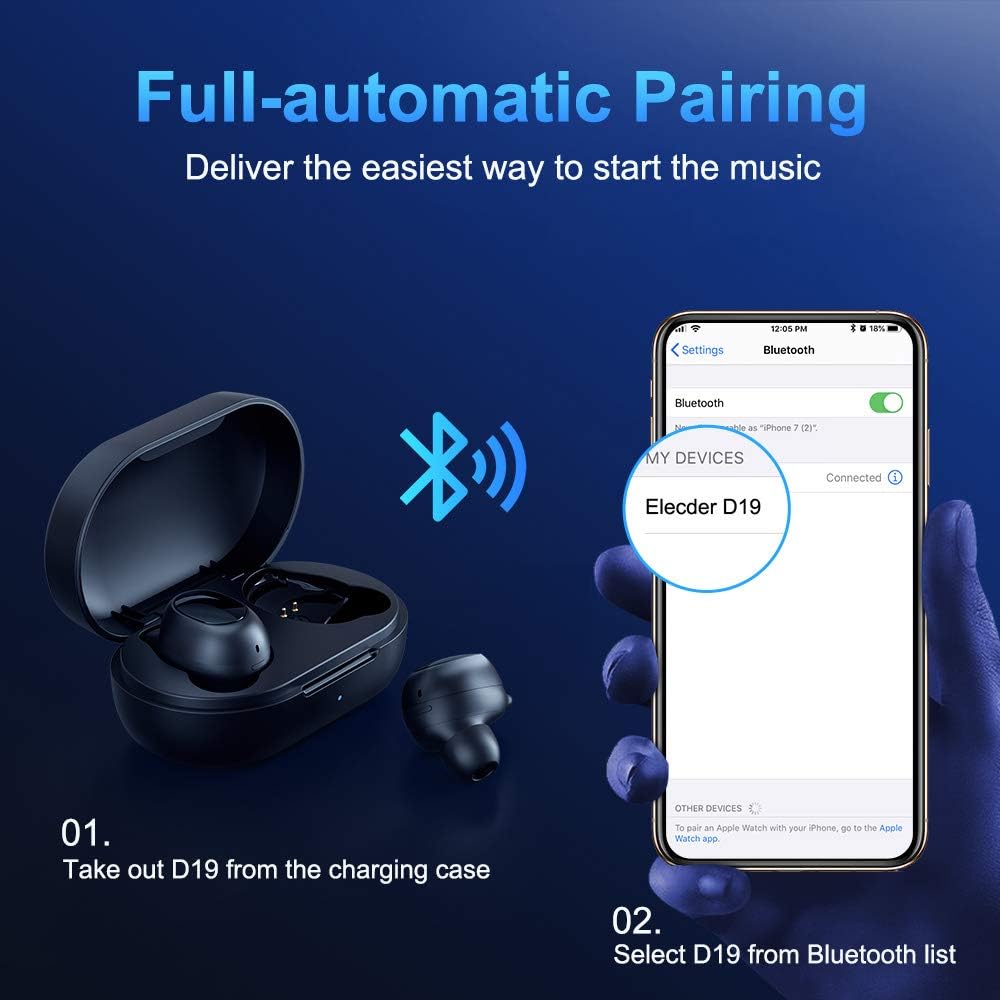
Figure 3.2: A visual guide demonstrating the automatic pairing process. The image shows the earbuds being taken out of the case and then the "Elecder D19" option appearing in a smartphone's Bluetooth settings for connection.
After the initial pairing, the earbuds will automatically connect to the last paired device when taken out of the charging case.

Figure 3.3: An illustration showing the stable Bluetooth connection between the ELECDER D19 earbuds and various smart devices, including smartphones and tablets.
4. Instrucións de funcionamento
4.1 Uso dos auriculares
For optimal sound quality and comfort, choose the ear tips that best fit your ears. The earbuds come with S, M, and L sizes. Insert the earbuds into your ears and gently rotate them to find a secure and comfortable fit. The ergonomic ear-fin design helps ensure stability during movement.
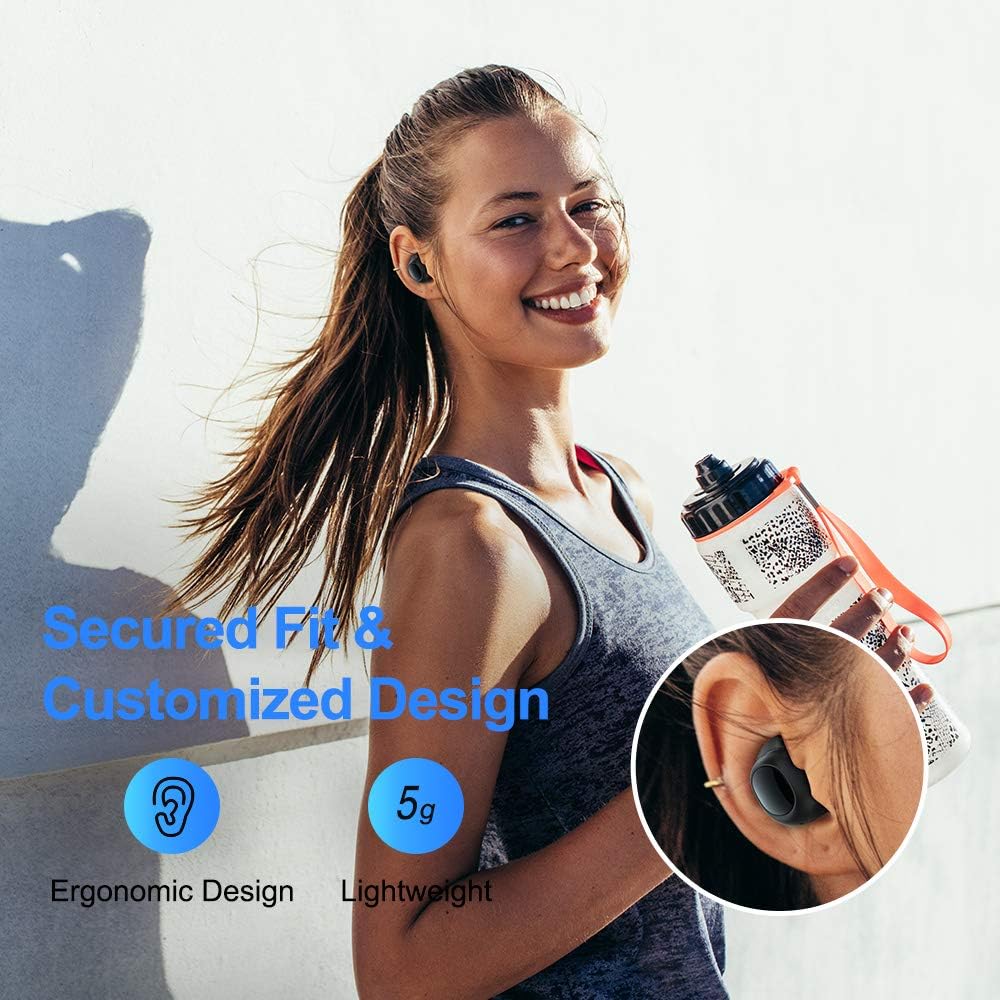
Figure 4.1: A person wearing the ELECDER D19 earbuds during a workout, demonstrating the secure and comfortable fit provided by the ergonomic design and customizable ear tips.
4.2 Control de medios
The ELECDER D19 earbuds feature physical buttons for media control. Specific button functions may vary slightly based on the device and operating system, but common controls include:
- Reproducir/Pausa: Presión única en calquera dos auriculares.
- Próxima pista: Prema dúas veces no auricular dereito.
- Pista anterior: Prema dúas veces no auricular esquerdo.
- Subir volume: Triple press on the right earbud.
- Baixar volume: Triple press on the left earbud.
4.3 Xestión de chamadas
Xestiona as túas chamadas directamente desde os auriculares:
- Responder/Finalizar chamada: Presión única en calquera dos auriculares.
- Rexeitar a chamada: Mantén premido calquera dos auriculares durante 2 segundos.
- Activar o asistente de voz: Press and hold either earbud for 3 seconds (e.g., Siri, Google Assistant).
5. Mantemento e coidados
Proper maintenance ensures the longevity and optimal performance of your ELECDER D19 earbuds.
5.1 Limpeza
- Limpa regularmente os auriculares e a funda de carga cun pano suave, seco e sen fiapos.
- Retire as almofadas dos oídos e límpeas con auga e xabón suave, logo séqueas ben antes de volvelas colocar.
- Use a cotton swab or small brush to gently clean the charging contacts on both the earbuds and the case.
- Evite o uso de materiais abrasivos, alcol ou produtos de limpeza químicos.
5.2 Resistencia á auga (IPX7)
The ELECDER D19 earbuds are IPX7 waterproof, meaning they can withstand submersion in up to 1 meter of water for 30 minutes. This makes them suitable for protection against sweat, rain, and accidental splashes.

Figure 5.1: The ELECDER D19 earbuds shown with water droplets, illustrating their IPX7 waterproof rating, which protects them from sweat, rain, and splashes.
Nota: The charging case is not waterproof. Ensure earbuds are dry before placing them back into the charging case.
5.3 Almacenamento
Cando non estean en uso, garda os auriculares no seu estoxo de carga para protexelos e mantelos cargados. Garda o estoxo nun lugar fresco e seco, lonxe de temperaturas extremas e da luz solar directa.
6 Solución de problemas
If you encounter issues with your ELECDER D19 earbuds, refer to the following common solutions:
| Problema | Causa posible | Solución |
|---|---|---|
| Os auriculares non se emparellan co dispositivo. | O Bluetooth está desactivado no dispositivo; os auriculares non están en modo de emparellamento; o dispositivo emparellado previamente está a interferir. | Ensure Bluetooth is enabled. Place earbuds back in case, then take them out to re-enter pairing mode. Forget "Elecder D19" from your device's Bluetooth list and re-pair. |
| Só funciona un auricular. | Auriculares sen emparellamento; batería baixa nun dos auriculares. | Place both earbuds back into the charging case, close the lid, wait a few seconds, then open and take them out again. Ensure both earbuds are charged. |
| Sen son ou volume baixo. | Device volume too low; ear tips not properly sealed; debris in earbud nozzle. | Increase volume on your device. Adjust earbud position or try different sized ear tips for a better seal. Clean earbud nozzles. |
| A caixa de carga non carga. | Faulty cable/charger; improper placement on wireless charger. | Try a different USB cable and power adapter. Ensure the case is correctly aligned on the wireless charging pad. |
| Conexión Bluetooth inestable. | Interference; distance from device; low earbud battery. | Reduce distance between earbuds and device. Avoid environments with strong Wi-Fi or other Bluetooth signals. Ensure earbuds are fully charged. |
7. Especificacións
Detailed technical specifications for the ELECDER D19 True Wireless Earbuds:
| Característica | Detalle |
|---|---|
| Nome do modelo | ELECDER D19 |
| Tecnoloxía de conectividade | Sen fíos (Bluetooth 5.0) |
| Alcance Bluetooth | 33 pés |
| Colocación do oído | En Orella |
| Factor de forma | En Orella |
| Control de ruído | Active Noise Cancellation (CVC8.0) |
| Micrófono | Incluído |
| Nivel de resistencia á auga | Impermeable IPX7 |
| Duración da batería (auriculares) | Up to 4.5 hours (music) / 4 hours (calling) |
| Charging Case Additional Playtime | 18 horas |
| Tempo de carga | Aproximadamente 2 Horas |
| Interfaz de carga | Micro USB, Wireless Charging |
| Peso do elemento | 1.92 ounces (total) / 5g (each earbud) |
| Dimensións do produto | 3.89 x 3.89 x 1.65 polgadas |
| Dispositivos compatibles | iOS and Android Smartphones |
| Material | Silicona (puntas para os oídos) |
| Cor | Negro |

Figure 7.1: An infographic detailing the battery life of the ELECDER D19 earbuds and charging case, showing 4 hours for calls, 4.5 hours for music, and a total of 18 hours with the 500mAh charging case.
8. Garantía e soporte
ELECDER products are manufactured to high quality standards. For information regarding warranty coverage, technical support, or service inquiries, please refer to the contact information provided with your product packaging or visit the official ELECDER websitio.
Para obter máis axuda, tamén podes contactar co vendedor onde compraches o produto.
Ask a question about this manual
Ask about setup, troubleshooting, compatibility, parts, safety, or missing instructions. Manuals+ will review the question and use this page’s manual context to help answer it.