
SKYLOONG GK61
SKYLOONG GK61/SK61 Mechanical Gaming Keyboard User Manual
Comprehensive guide for your SKYLOONG 60% Mechanical Gaming Keyboard.
1. Introdución
The SKYLOONG GK61/SK61 is a compact 60% mechanical gaming keyboard designed for performance and customization. Featuring 61 keys, RGB illumination, and Gateron Optical Brown Switches, it offers a responsive and tactile typing experience. This keyboard is wired, programmable, and built with durability in mind, including waterproof capabilities.

Figura 1: Máisview of the SKYLOONG GK61/SK61 Mechanical Gaming Keyboard with its vibrant RGB backlighting.
2. Contido do paquete
Verifique que todos os elementos estean presentes no seu paquete:
- SKYLOONG GK61/SK61 Mechanical Gaming Keyboard
- Cable USB Tipo-C
- Tirador de chaves
- Extractor de interruptor
- Manual de usuario (este documento)

Figure 2: Contents typically found in the SKYLOONG GK61/SK61 keyboard retail box, showing the keyboard, USB cable, and included tools.
3. Guía de configuración
3.1 Conexión do teclado
The SKYLOONG GK61/SK61 keyboard connects via a detachable USB Type-C cable, ensuring a stable and reliable connection for gaming and typing.
- Localiza o porto USB tipo C na parte traseira do teclado.
- Connect one end of the provided USB Type-C cable to the keyboard's port.
- Connect the other end of the USB cable to an available USB port on your computer (PC or Mac).
- The keyboard will be automatically recognized by your operating system, and the RGB backlighting will illuminate.

Figure 3: The USB Type-C interface for connecting the keyboard to your computer.
3.2 Software Installation (Optional for Advanced Features)
For full customization, including advanced RGB lighting effects, key remapping, and macro programming, download the official SKYLOONG software (often referred to as GK6XPlus driver). This software is compatible with Windows and macOS.
- Visit the official SKYLOONG websitio para descargar a última versión do software.
- Instale o software seguindo as instrucións que aparecen na pantalla.
- Launch the software to access customization options.
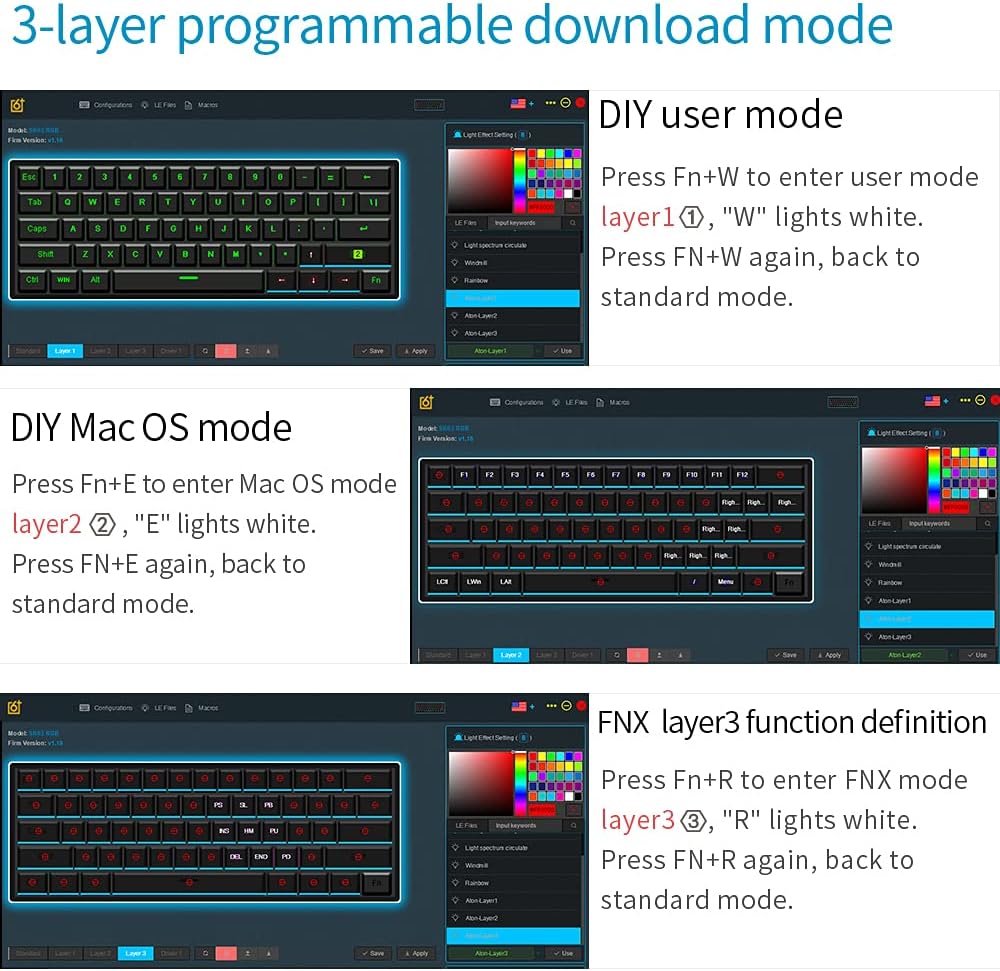
Figure 4: The software interface for managing the keyboard's programmable layers and lighting effects.
4. Instrucións de funcionamento
4.1 Basic Functions and Fn Layer
The GK61/SK61 is a 60% keyboard, meaning some functions are accessed via a Function (Fn) layer. The Fn key is typically located on the bottom right of the keyboard.
| Combinación | Función |
|---|---|
| Fn + 1! - 0) | F1 - F10 |
| Fn + -= | F11 |
| Fn + [+={ | F12 |
| Fn + Q | Layer 1 (User Mode) |
| Fn + E | Layer 2 (Mac OS Mode) |
| Fn + R | Layer 3 (FNX Mode) |
| Fn + W | Switch between User Mode and Standard Mode |
| Fn + barra de espazo | Change RGB lighting effects |
| Fn + Alt (Right) | Adjust RGB brightness |
4.2 Control da retroiluminación RGB
The keyboard features 16.8 million color RGB backlighting with multiple adjustable modes. Use the following combinations to control the lighting:
- Fn + Barra espaciadora: Cycle through various RGB lighting effects.
- Fn + Alt dereita: Adjust the brightness of the backlighting.
- Fn + Ctrl dereita: Change the speed of dynamic lighting effects.
4.3 Teclas e macros programables
The SKYLOONG GK61/SK61 supports full key programmability and on-the-fly macro recording through its 3-layer programmable download mode. This allows for extensive customization of key functions and complex command sequences.
- DIY User Mode (Layer 1): Preme Fn + W to enter. The 'W' key will light white. Press Fn + W again to return to standard mode. This layer is for user-defined key mappings.
- DIY Mac OS Mode (Layer 2): Preme Fn + E to enter. The 'E' key will light white. Press Fn + E again to return to standard mode. This layer is optimized for macOS specific functions.
- FNX Layer 3 Function Definition (Layer 3): Preme Fn + R to enter. The 'R' key will light white. Press Fn + R again to return to standard mode. This layer allows for advanced function definitions.
Detailed programming instructions are available within the GK6XPlus software.
5. Mantemento
5.1 Limpeza do teclado
Unha limpeza regular axuda a manter o rendemento e a aparencia do teclado.
- Desconecte o teclado do ordenador antes de limpalo.
- Usa un cepillo suave ou aire comprimido para eliminar o po e os residuos que hai entre as tapas das teclas.
- For surface cleaning, gently wipe the keycaps and chassis with a slightly damp, pano que non solte fiapos. Evite a humidade excesiva.
- The keyboard has an IP68 waterproof rating, offering protection against spills. However, it is recommended to clean up any liquid spills immediately to prevent long-term damage.

Figure 5: The keyboard's waterproof design, allowing for enhanced durability against spills.
5.2 Switch Replacement (Hot-Swap Feature)
The SKYLOONG GK61/SK61 features hot-swappable Gateron Optical Switches, allowing you to easily change switches without soldering. This is only compatible with other Gateron Optical Switches.
- Using the provided keycap puller, carefully remove the desired keycap.
- Insert the switch puller around the top and bottom clips of the switch.
- Gently squeeze the clips and pull the switch straight up to remove it from the PCB.
- Align the pins of the new Gateron Optical Switch with the holes on the PCB.
- Press the new switch firmly into place until it clicks. Ensure it is seated properly.
- Substitúa a tapa das teclas.

Figure 6: The hot-swap capability of the Gateron optical switches, allowing for easy replacement.
6 Solución de problemas
If you encounter issues with your SKYLOONG GK61/SK61 keyboard, please refer to the following common solutions:
- O teclado non responde:
- Asegúrate de que o cable USB tipo C estea conectado correctamente tanto ao teclado como ao ordenador.
- Tenta conectar o teclado a un porto USB diferente do teu ordenador.
- Proba o teclado noutro ordenador para descartar problemas específicos do sistema.
- A iluminación RGB non funciona ou está atascada:
- Preme Fn + barra de espazo para alternar entre os modos de iluminación.
- Preme Fn + Alt dereito para axustar o brillo.
- Ensure the keyboard is not in a specific programmable layer that might override lighting settings.
- If using the software, check lighting settings within the application.
- As teclas non se rexistran ou se escriben dúas veces:
- Carefully remove the keycap and switch (if hot-swappable) for the affected key. Check for any debris or obstruction.
- Re-seat the switch firmly. If the issue persists, consider replacing the switch.
- Ensure the keyboard firmware is up to date via the official software.
- Programmable functions not working:
- Ensure you are in the correct programmable layer (Fn + W, Fn + E, or Fn + R).
- Verify your settings within the GK6XPlus software.
- Make sure the software is running and properly communicating with the keyboard.
7. Especificacións
| Característica | Detalle |
|---|---|
| Modelo | GK61 / SK61 |
| Maquetación | 60% (61 teclas) |
| Tipo de cambio | Gateron Optical Brown (Hot-swappable for optical switches only) |
| Conectividade | Wired (USB Type-C detachable cable) |
| Retroiluminación | RGB (16.8 million colors, multiple modes) |
| Programabilidade | Full keys programmable, 3-layer download mode, on-the-fly macro recording |
| Durabilidade | IP68 Waterproof/Dustproof/Anti-Corrosion, 100 million keystrokes lifetime |
| Chaves | ABS dual-color |
| Compatibilidade | Windows 2000/XP/Vista/Win7/Win8/Win10, Mac OS |
| Dimensións | Approx. 292mm x 104mm (Refer to Figure 2 for visual) |
| Peso | Aprox. 1.32 libras (0.6 kg) |

Figure 7: Ergonomic design of the keyboard, featuring a five-level height arc surface for comfortable typing.

Figure 8: Internal hardware architecture, highlighting the 32-bit M3 MCU, 8M Flash memory, and 3 channels 256 professional level RGB color management chip.
8. Garantía e soporte
SKYLOONG products are designed for reliability and performance. For warranty information, technical support, or service inquiries, please refer to the official SKYLOONG websitio web ou póñase en contacto co seu vendedor. Garde o comprobante de compra para reclamacións de garantía.
For the latest drivers and software, please visit the official SKYLOONG support page.
Ask a question about this manual
Ask about setup, troubleshooting, compatibility, parts, safety, or missing instructions. Manuals+ will review the question and use this page’s manual context to help answer it.