
PowerPac PPFS212B 2-in-1 Dual-Usage Stand Fan Instruction Manual
Model: PPFS212B
1. Información importante de seguridade
Lea atentamente todas as instrucións antes de usar este aparello e gárdeas para futuras consultas. O incumprimento destas instrucións pode provocar descargas eléctricas, incendios ou lesións graves.
- Asegurar o voltagO voltaxe indicado na etiqueta de clasificación coincide co voltaxe da rede eléctricatage.
- Do not immerse the fan, plug, or cord in water or other liquids.
- Desconecte o ventilador da toma de corrente antes de limpar, montar ou desmontar pezas.
- Manteña os dedos, lapis ou calquera outro obxecto fóra da grella do ventilador cando estea en funcionamento.
- Non faga funcionar o ventilador cun cable ou enchufe danados. Póñase en contacto co persoal de servizo cualificado para a súa reparación.
- This appliance is equipped with thermal fuse protection against overheating. If the fan stops working unexpectedly, unplug it and allow it to cool before attempting to restart.
- Este aparello non está pensado para o seu uso por persoas (incluídos nenos) con capacidades físicas, sensoriais ou mentais reducidas, ou con falta de experiencia e coñecementos, a menos que teñan supervisión ou instrucións sobre o uso do aparello por unha persoa responsable da súa seguridade. .
2. Produto rematadoview
The PowerPac PPFS212B is a versatile 2-in-1 dual-usage stand fan designed for efficient cooling in indoor environments. It features 7 blades for maximum airflow, 3-speed settings, and an oscillation function for wider air distribution. The fan is equipped with thermal fuse protection for enhanced safety.
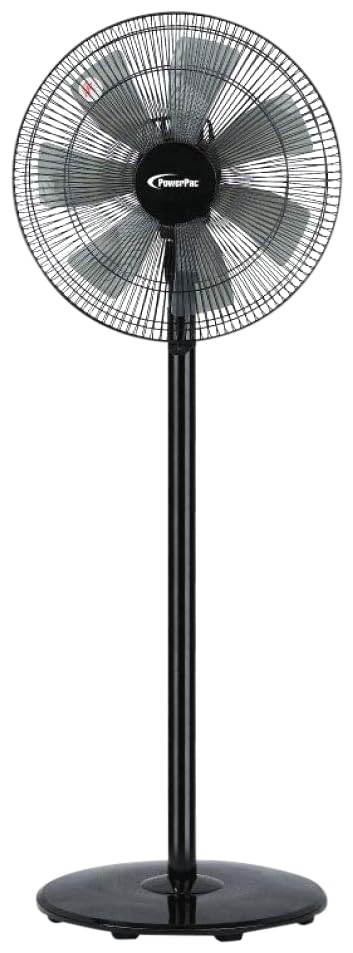
Image: PowerPac PPFS212B 2-in-1 Dual-Usage Stand Fan, showcasing its black finish and stand configuration.
3. Contido do paquete
Please check the package contents upon opening to ensure all parts are present and undamaged:
- 1 x PowerPac PPFS212B Stand Fan (includes fan head, stand pole, and base)
4. Instrucións de montaxe
Follow these steps to assemble your PowerPac PPFS212B fan:
- Desembalar coidadosamente todos os compoñentes da embalaxe.
- Attach the stand pole to the fan base. Ensure it is securely fastened according to the markings or locking mechanism.
- Mount the fan head assembly onto the top of the stand pole. Align the connection points and secure it firmly.
- Ensure all screws and fasteners are tightened to prevent wobbling during operation.
- Coloque o ventilador montado sobre unha superficie estable e plana.
Image: Illustrative diagram of the PowerPac PPFS212B fan assembly, showing the base, stand, and fan head components.
5. Instrucións de funcionamento
To operate your PowerPac PPFS212B fan:
- Enchufe o cable de alimentación nunha toma eléctrica adecuada.
- Encendido/apagado: Press the 'ON/OFF' button (or corresponding button) on the control panel to turn the fan on or off.
- Axuste de velocidade: Press the 'SPEED' button repeatedly to cycle through the 3 available speed settings (Low, Medium, High).
- Función de oscilación: Press the 'OSC' button (or corresponding button) to activate or deactivate the oscillation feature, which allows the fan head to sweep from side to side.
- When finished, press the 'ON/OFF' button to turn off the fan and unplug it from the power outlet.
6. Mantemento e Limpeza
Regular cleaning and maintenance will help ensure optimal performance and longevity of your fan:
- Desenchufe sempre o ventilador da fonte de alimentación antes de limpar.
- Use un suave, damp cloth to wipe the exterior surfaces of the fan. Do not use abrasive cleaners, solvents, or harsh chemicals.
- To clean the fan blades, carefully remove the front grille (if detachable) according to the product design. Wipe the blades with a soft cloth. Ensure all parts are dry before reassembling.
- Non deixe que gotee auga na carcasa do motor.
- Garde o ventilador nun lugar fresco e seco cando non o use durante períodos prolongados.
7 Solución de problemas
If you encounter issues with your fan, refer to the following table for common problems and solutions:
| Problema | Causa posible | Solución |
|---|---|---|
| O ventilador non se acende. | Sen fonte de alimentación. Thermal fuse activated. | Comprobe se o enchufe está ben inserido na toma de corrente. Asegúrese de que a toma de corrente funcione. Unplug and allow the fan to cool down for 30 minutes before restarting. |
| Fluxo de aire débil ou nulo. | Velocidade do ventilador axustada demasiado baixa. As aspas do ventilador están sucias. | Aumenta a configuración da velocidade do ventilador. Unplug the fan and clean the blades as per maintenance instructions. |
| O ventilador non oscila. | A función de oscilación está desactivada. | Prema o botón "OSC" para activar a oscilación. |
| Ruído inusual durante o funcionamento. | Pezas soltas. Obstrución. | Unplug the fan and check for any loose components or obstructions around the blades or motor. Tighten any loose parts. |
Se o problema persiste despois de intentar estas solucións, póñase en contacto co servizo de atención ao cliente.
8. Especificacións
| Característica | Especificación |
|---|---|
| Marca | PowerPac |
| Número de modelo | PPFS212B |
| Tipo | 2-in-1 Dual-Usage Stand Fan |
| Número de láminas | 7 |
| Número de velocidades | 3 |
| Fonte de enerxía | Eléctrico con cable |
| Wattage | 50 vatios |
| Método de control | Pulsador |
| Características especiais | Oscillating, Thermal Fuse Protection |
| Material | Plástico |
| Uso interior/exterior | Interior |
| Cor | Negro |
9. Garantía e soporte
This PowerPac PPFS212B fan comes with a 2 ano de garantía desde a data de compra. Esta garantía cobre defectos de fabricación en condicións de uso normais.
For warranty claims, technical support, or any inquiries regarding your product, please contact PowerPac customer service. Keep your proof of purchase for warranty validation.