
HUMAX R8716
Manual do usuario do receptor de satélite Humax Digital HD Fox R8716
1. Introdución
This manual provides essential information for the setup, operation, and maintenance of your Humax Digital HD Fox R8716 satellite receiver. Please read these instructions carefully before using the device to ensure proper functionality and to maximize your viewexperiencia ing.

The Humax HD Fox digital satellite receiver, shown with its accompanying remote control, designed for high-definition television reception.
The Humax HD Fox R8716 is a DVB-S2 satellite receiver capable of receiving free-to-air satellite programs in high definition (up to 1080i/1080p). It features a pre-installed channel list for quick setup and offers versatile connectivity options, including HDMI and Scart, to support both modern and older television sets. The device also includes a 12V power input, making it suitable for mobile use, such as in camping ambientes.
2. Contido do paquete
Verifique que o seu paquete inclúa todos os seguintes elementos:
- Humax HD Fox R8716 Satellite Receiver
- Control remoto
- Pilas AAA (2x)
- Adaptador de alimentación (12 V)
- Manual de usuario (inglés)

An illustration of the items included in the package: the Humax HD Fox satellite receiver, its remote control, and the power adapter.
3. Configuración
3.1 Conexión do receptor
Follow these steps to connect your satellite receiver to your television and satellite dish:
- Conexión vía satélite: Connect the satellite cable from your dish to the 'LNB IN' port on the rear of the receiver.
- Conexión de vídeo/audio:
- For HD TVs: Connect an HDMI cable from the 'HDMI OUT' port on the receiver to an available HDMI input on your TV.
- For older TVs: Connect a Scart cable from the 'SCART' port on the receiver to the Scart input on your TV.
- Conexión de alimentación: Connect the provided 12V power adapter to the '12V DC' input on the receiver and then plug the adapter into a power outlet.
- Conexión USB (opcional): If you plan to use PVR functions, connect a USB storage device to the 'USB' port on the front panel.

Detallado view of the rear panel connections, including satellite input, HDMI output, optical audio output, Scart port for older TVs, and the 12V DC power input.
3.2 Instalación por primeira vez
Upon first power-on, the receiver will guide you through an initial setup process. The Humax HD Fox R8716 comes with a pre-installed channel list for Astra satellites, allowing for immediate use without a lengthy channel scan. If you are connecting to a different satellite or wish to perform a new scan, follow the on-screen prompts to access the installation menu and initiate a channel search.

The Humax HD Fox receiver positioned with a satellite dish in the background, illustrating its primary function for receiving satellite television signals.
Note: The transition from SD to HD broadcasting is ongoing. Modern HD-capable receivers like the Humax HD Fox R8716 are designed to continue receiving public-service programs after the SD shutdown, which is scheduled for January 7, 2025.

This image highlights the SD shutdown on January 7, 2025, and confirms that modern HD-capable receivers will continue to receive public-service programs.
4. Funcionamento do receptor
4.1 Funcións básicas
- Encendido/apagado: Preme o POTENCIA botón do mando a distancia ou do panel frontal para acender ou apagar o receptor.
- Selección de canles: Usa o CH+ / CH- buttons to navigate through channels. Alternatively, enter the channel number directly using the numeric keypad.
- Control de volume: Axuste o volume empregando o VOL + / VOL- botóns.
- Acceso ao menú: Preme o MENÚ botón para acceder ao menú principal de configuración e funcións.
4.2 Funcións de control remoto
The remote control provides full access to all receiver functions. Familiarize yourself with the button layout:

The remote control for the Humax HD Fox receiver, featuring buttons for power, channel selection, volume control, menu navigation, and other functions.
- Teclado numérico (0-9): Entrada directa ao canal.
- Botón Aceptar: Confirms selections in menus and displays channel information.
- Botóns de frecha: Navigate through menus and channel lists.
- Botón EXIT: Sae dos menús ou volve á pantalla anterior.
- Botón INFO: Mostra información do programa.
- Botón EPG: Accede á Guía electrónica de programas.
- Botóns de cores (vermello, verde, amarelo, azul): Used for specific functions as indicated on-screen.
4.3 PVR Ready Functionality
The Humax HD Fox R8716 is PVR Ready. This means you can record television programs by connecting an external USB storage device (e.g., a USB hard drive or flash drive) to the USB port on the front panel. Once connected, you can typically schedule recordings via the EPG or initiate instant recordings. Refer to the on-screen menu for detailed PVR setup and operation instructions.
4.4 Saída de audio
The receiver supports Dolby Digital audio output, providing enhanced sound quality. Ensure your audio system or television is configured to receive and process Dolby Digital signals for optimal audio experience.

The satellite receiver includes a pre-installed channel list and Dolby Digital audio output for an enhanced viewexperiencia ing.
5. Mantemento
To ensure the longevity and optimal performance of your Humax HD Fox R8716 receiver, follow these simple maintenance guidelines:
- Limpeza: Use a soft, dry cloth to clean the exterior of the receiver. Do not use liquid cleaners, aerosols, or abrasive materials, as these can damage the finish or internal components.
- Ventilación: Ensure the receiver is placed in a well-ventilated area. Do not block the ventilation openings on the device, as this can lead to overheating.
- Apagado: Se o receptor non se vai usar durante un período prolongado, é recomendable desconectalo da toma de corrente.
6 Solución de problemas
Se tes problemas co teu receptor, consulta os seguintes problemas e solucións comúns:
| Problema | Causa posible | Solución |
|---|---|---|
| Sen imaxe nin son | Loose cable connections, incorrect input selected on TV, receiver not powered on. | Check all cable connections (satellite, HDMI/Scart, power). Ensure your TV is set to the correct input source (e.g., HDMI 1, AV). Press the power button on the receiver or remote. |
| Mensaxe "Sen sinal" | Satellite dish misalignment, LNB issue, satellite cable disconnected. | Check the satellite cable connection to the receiver. Ensure the satellite dish is correctly aligned. If the problem persists, contact a qualified technician. |
| O control remoto non funciona | Dead batteries, obstruction, remote not pointed at receiver. | Replace the batteries in the remote control. Ensure there are no obstructions between the remote and the receiver. Point the remote directly at the receiver's front panel. |
| Channels missing or scrambled | Outdated channel list, satellite signal issues. | Perform a new channel scan through the receiver's menu. Check satellite signal strength and quality in the settings. |
If these solutions do not resolve the issue, please contact Humax customer support for further assistance.
7. Especificacións
Technical specifications for the Humax Digital HD Fox R8716 satellite receiver:
| Característica | Detalle |
|---|---|
| Número de modelo | R8716 |
| Marca | HUMAX |
| Cor | Negro |
| Dimensións (D x W x H) | 9.6 cm x 15 cm x 3.6 cm |
| Peso | 374 gramos |
| Tecnoloxía de conectividade | HDMI, Scart |
| Total de portos HDMI | 1 |
| Total de portos USB | 1 |
| Modo de saída de audio | Digital Dolby |
| Formato de audio compatible | Dolby Dixital |
| Dispositivos compatibles | Televisión |
| Fonte de alimentación | 12V DC (suitable for camping) |
| Funcionalidade PVR | PVR Ready (requires external USB storage) |
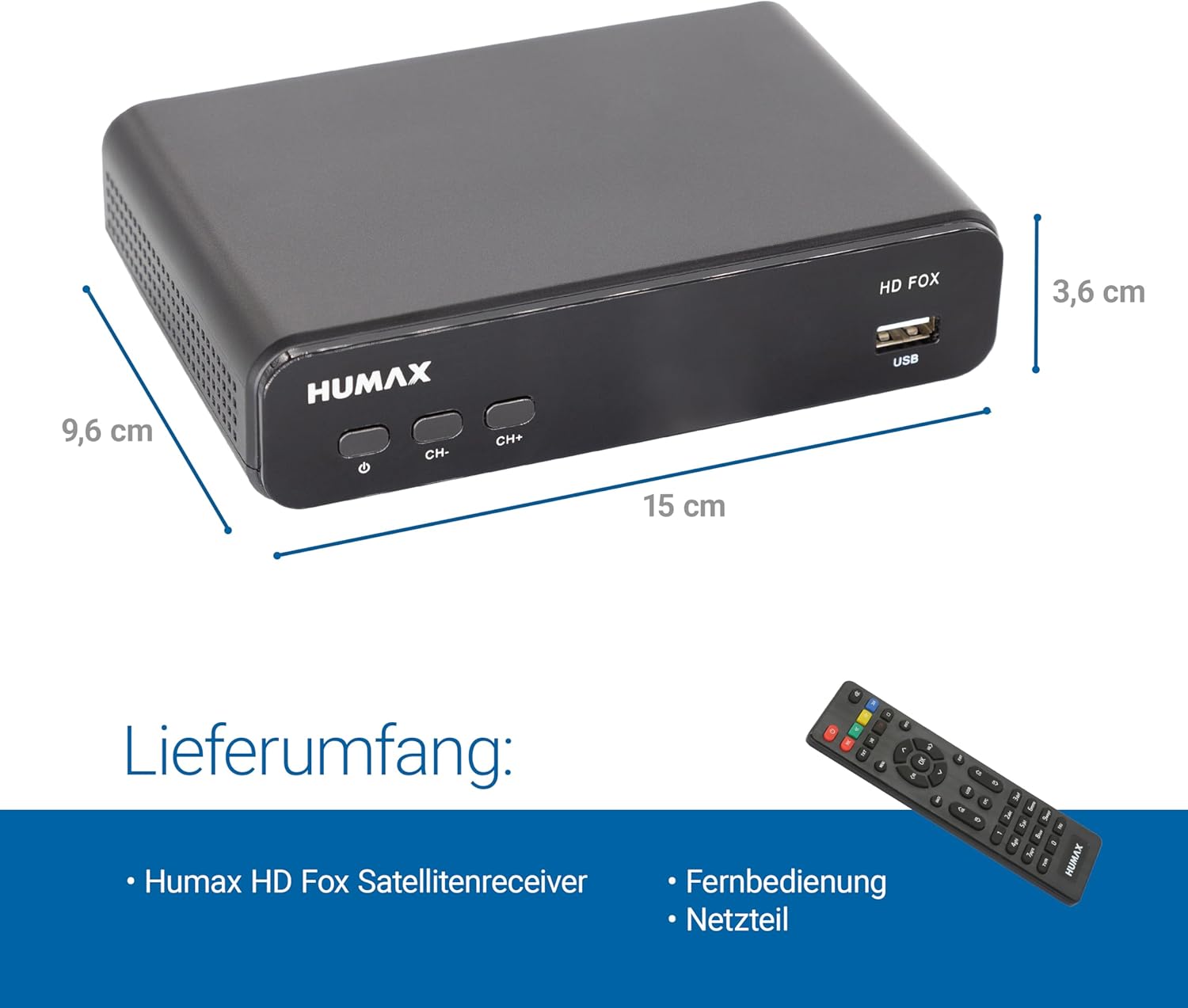
The Humax HD Fox receiver displaying its compact dimensions, measuring 9.6 cm in depth, 15 cm in width, and 3.6 cm in height.
8. Garantía e soporte
For warranty information, please refer to the documentation provided at the time of purchase or visit the official Humax website. If you require technical support or have questions not covered in this manual, please contact Humax customer service through their official channels.
Ask a question about this manual
Ask about setup, troubleshooting, compatibility, parts, safety, or missing instructions. Manuals+ will review the question and use this page’s manual context to help answer it.