
1. Introdución
1.1 Produto superadoview
The Renkforce RF-HC-100 is a compact 16-megapixel trail camera designed for outdoor monitoring. It features a time-lapse function, night vision capabilities, and a durable, camouflage brown housing. This camera is suitable for wildlife observation, property surveillance, and other outdoor recording needs.
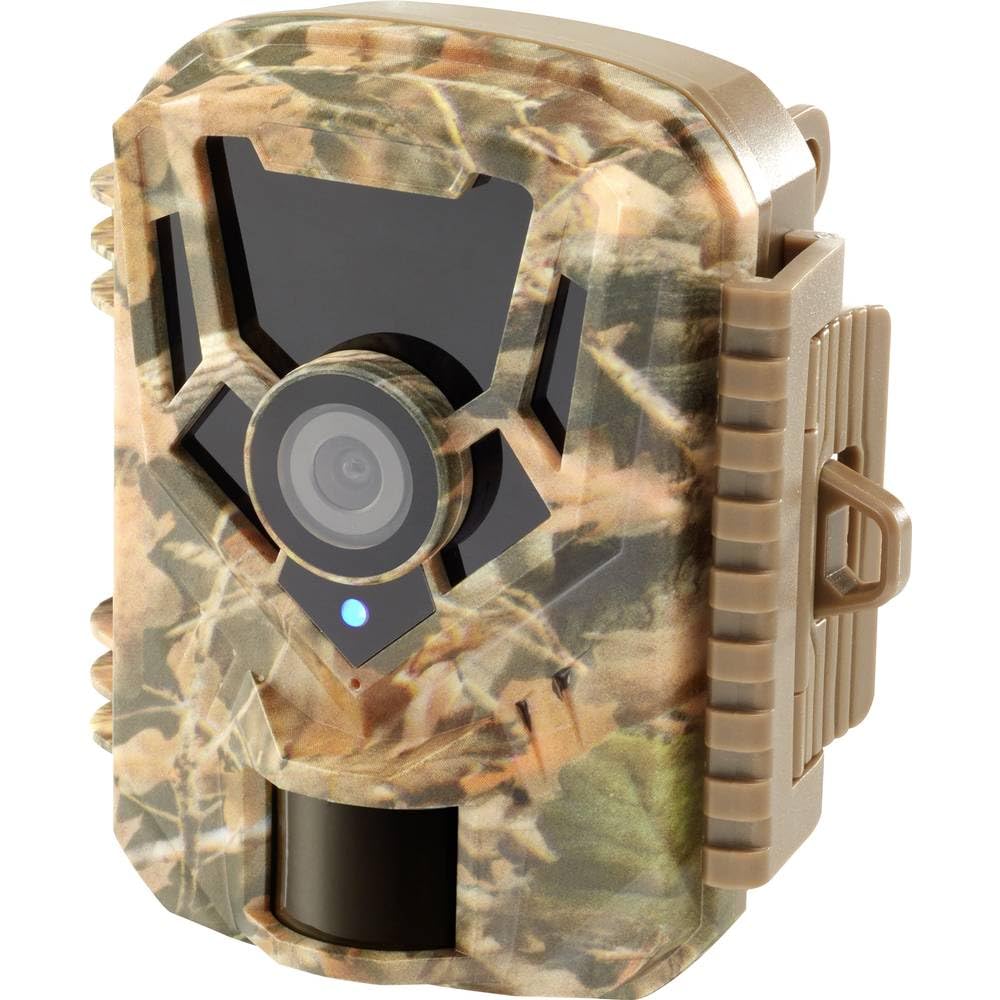
Imaxe: Fronte view of the Renkforce RF-HC-100 Trail Camera, showcasing its compact design and camouflage pattern.

Imaxe: Fronte view of the Renkforce RF-HC-100 Trail Camera, highlighting the main lens and motion sensor.
1.2 Contido do paquete
- 1 x Renkforce RF-HC-100 Trail Camera Unit
- Note: Additional accessories such as mounting straps, USB cables, or user manuals may be included depending on the specific package.
2. Información de seguridade
- Lea atentamente todas as instrucións antes de utilizar o dispositivo.
- Do not expose the camera to extreme temperatures, direct sunlight for prolonged periods, or corrosive liquids.
- Ensure the battery compartment is properly sealed to maintain the IP65 weather resistance.
- Desfágase das baterías segundo a normativa local. Non mesture baterías vellas e novas nin baterías de diferentes tipos.
- Manteña o dispositivo fóra do alcance dos nenos.
- Non intente desmontar nin modificar a cámara, xa que isto anulará a garantía e podería causar danos.
3. Características do produto
The Renkforce RF-HC-100 Trail Camera offers the following key features:
- Imaxes de alta resolución: 16 Megapixel effective capture resolution for clear photos and 1080p video recording.
- Visión nocturna: Equipped with color night vision for monitoring in low-light conditions.
- Time-Lapse Function: Capture images at set intervals to observe long-term events.
- Ranura para tarxetas SD: Supports external SD cards for ample storage of photos and videos.
- Resistencia á intemperie: IP65 international protection rating ensures durability in various outdoor environments.
- Deseño compacto: Miniature form factor with a camouflage brown finish for discreet placement.
- Gran Angular View: 90-degree angle of view to cover a broad area.
- Conectividade: Features wired connectivity (USB, AV ports) and Wi-Fi protocol for data transfer and control via application.
- Opcións de montaxe: Includes support for wall mounting.
4. Configuración
4.1 Instalación da batería
- Abra a carcasa da cámara soltando os clips laterais.
- Localiza o compartimento da batería.
- Insert the required number of AA batteries (not included) according to the polarity markings (+/-).
- Pecha o compartimento da batería de forma segura.
4.2 Instalación da tarxeta SD
- Coa carcasa da cámara aberta, localiza a ranura para tarxetas SD.
- Insert a compatible SD card (up to 32GB, Class 10 recommended) into the slot with the metal contacts facing down until it clicks into place.
- To remove, push the SD card in again until it springs out.

Image: The Renkforce RF-HC-100 Trail Camera with its housing open, revealing the control panel, USB, AV, and DC ports, and the ON/SETUP/OFF switch.
4.3 Montaxe da cámara
The camera can be mounted using a strap or a wall mount bracket (if included or purchased separately).
- Montaxe da correa: Thread a mounting strap through the slots on the back of the camera and secure it to a tree or pole.
- Montaxe na parede: Use the integrated mounting points or a compatible wall mount bracket to attach the camera to a flat surface. Ensure the camera is stable and pointed in the desired direction.
5. Instrucións de funcionamento
5.1 Acendido/apagado e selección de modo
Locate the ON/SETUP/OFF switch inside the camera housing.
- OFF: Powers off the camera.
- MONTAR: Enters setup mode, allowing you to configure settings via the internal display.
- ACTIVADO: Activates the camera for recording based on the configured settings.
5.2 Configuración dos axustes
In SETUP mode, use the navigation buttons (if available) to access the menu and adjust parameters such as:
- Resolución de foto/vídeo
- Sensibilidade do sensor PIR
- Retraso de detección
- Intervalo de tempo-lapso
- Data e Hora
- Recording Mode (Photo, Video, Photo+Video, Time-Lapse)
5.3 Recuperación de datos
Para acceder gravado files:
- Vía USB: Connect the camera to a computer using a USB cable. The camera will appear as a removable disk.
- Mediante tarxeta SD: Remove the SD card from the camera and insert it into a computer's card reader.
6. Mantemento
- Limpeza: Use a soft, dry cloth to clean the camera lens and housing. For stubborn dirt, a slightly damp Pódese usar un pano, pero asegúrese de que non entre humidade no dispositivo.
- Substitución da batería: Replace batteries when the low battery indicator appears or when performance degrades.
- Xestión da tarxeta SD: Regularly format the SD card (after backing up important data) to maintain optimal performance and prevent errors.
- Almacenamento: Cando non a use durante períodos prolongados, retire as pilas e garde a cámara nun lugar fresco e seco, lonxe da luz solar directa.
7 Solución de problemas
| Problema | Causa posible | Solución |
|---|---|---|
| A cámara non se acende. | Low or dead batteries; incorrect battery installation; power switch in OFF position. | Replace batteries; ensure correct polarity; set switch to ON or SETUP. |
| Mala calidade de imaxe/vídeo. | Dirty lens; low light conditions; incorrect resolution settings. | Clean the lens; ensure adequate lighting or use night vision; adjust resolution settings. |
| Camera not recording. | SD card full or faulty; incorrect mode selected; PIR sensor blocked. | Format or replace SD card; select appropriate recording mode; clear sensor path. |
| Non se pode conectar ao ordenador. | Faulty USB cable; camera not in correct mode; driver issues. | Try a different USB cable; ensure camera is in connection mode (if applicable); try another computer or card reader. |
8. Especificacións
| Nome do modelo | RF-HC-100 (RF-4466574) |
| Effective Capture Resolution | 16 megapíxeles |
| Resolución de vídeo | 1080 p |
| Dimensións (L x W x H) | 21 x 12 x 9 cm (8.27 x 4.72 x 3.54 polgadas) |
| Peso | 186 gramos (0.41 libras) |
| Tecnoloxía de conectividade | Wired (USB, AV), Wi-Fi Protocol (for control/transfer) |
| Características especiais | Local Recording, Night Vision (Color Night Vision) |
| Ambiente de uso | Ao aire libre |
| Clasificación de protección internacional | IP65 |
| Fonte de enerxía | Manual Operation (Battery-powered, batteries not included) |
| Wattage | 1.5 vatios |
| View Ángulo | 90 graos |
| Cor | Camouflage Brown |
| Material | Metal (internal) |
| Tipo de montaxe | Soporte de montaxe en parede |
9. Garantía e soporte
Renkforce provides support for its products. Spare parts availability is indicated for 1 year from the date of purchase. For technical assistance, troubleshooting beyond this manual, or warranty claims, please refer to the contact information provided with your product packaging or visit the official Renkforce websitio.