
Introdución
This manual provides comprehensive instructions for the Lexmark MS431dw Monochrome Laser Printer. It covers setup, operation, maintenance, and troubleshooting to ensure optimal performance and longevity of your device. The Lexmark MS431dw is designed for efficient monochrome printing, offering speeds up to 40 pages per minute and automatic duplex printing.

Imaxe: Fronte dereita view of the Lexmark MS431dw Monochrome Laser Printer.
Configuración
1. Desembalaxe da impresora
Carefully remove the printer from its packaging. Ensure all packing materials, tapes, and protective films are removed from the exterior and interior of the printer. Retain the packaging for future transport if needed.
2. Instalación do cartucho de tóner
- Abra a tapa frontal da impresora.
- Remove the new toner cartridge from its packaging and gently shake it to distribute the toner.
- Insert the toner cartridge into the designated slot until it clicks into place.
- Pecha a tapa frontal.
3. Cargando papel
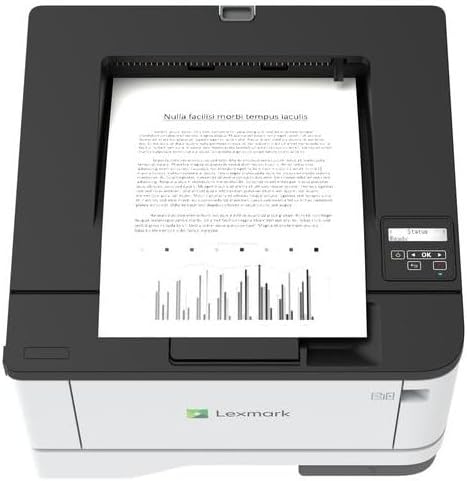
Imaxe: Arriba view of the Lexmark MS431dw with paper loaded in the input tray.
Open the paper tray and adjust the paper guides to fit the size of your paper. Load the paper stack into the tray, ensuring it is flat and below the maximum fill line. Close the paper tray. The printer supports various media types, including card stock.
4. Potencia de conexión
Conecte o cable de alimentación á entrada de alimentación da impresora e despois a unha toma de corrente con conexión a terra.
5. Connecting to a Network/Computer
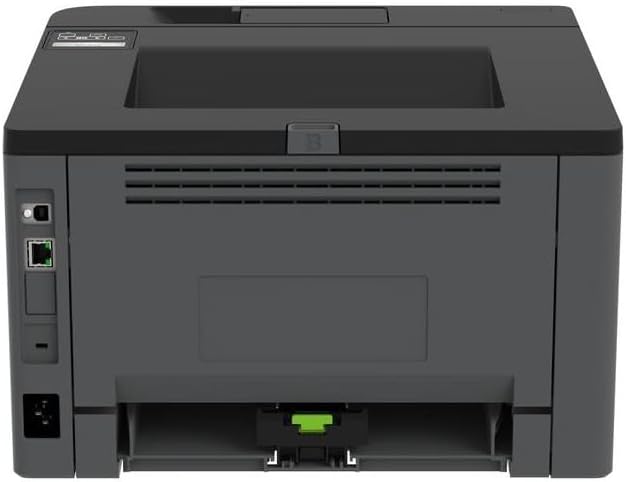
Imaxe: Traseira view of the Lexmark MS431dw, highlighting the Ethernet and power connection ports.
The Lexmark MS431dw supports Ethernet connectivity. Connect an Ethernet cable from your network router or switch to the Ethernet port on the back of the printer. For direct connection to a computer, use a USB cable (not included) if available, or configure network printing.
6. Instalación de controladores
Turn on the printer. Insert the driver CD (if provided) into your computer, or download the latest drivers from the official Lexmark support websitio. Siga as instrucións que aparecen na pantalla para completar a instalación do controlador.
Instrucións de funcionamento
1. Panel de control rematadoview

Imaxe: Arriba view of the Lexmark MS431dw, showing the printer's control panel with display and buttons.
The control panel features a display screen and navigation buttons (Up, Down, OK, Back) to access printer settings, status, and functions. Refer to the on-screen menus for specific options.
2. Impresión básica
- Asegúrate de que a impresora estea acendida e conectada ao teu ordenador ou á rede.
- Abre o documento que queres imprimir no teu ordenador.
- Seleccione Imprimir desde o menú da aplicación (por exemplo, File > Imprimir).
- Choose the Lexmark MS431dw from the list of available printers.
- Adjust print settings as desired (e.g., number of copies, paper size).
- Fai clic Imprimir.
3. Automatic Duplex Printing
The MS431dw supports automatic two-sided (duplex) printing. To enable this feature:
- In the print dialog box on your computer, navigate to the printer properties or preferences.
- Look for an option related to "Two-sided printing" or "Duplex printing."
- Seleccione a opción de impresión dúplex desexada (por exemplo, encadernación polo lado longo, encadernación polo lado curto).
- Confirma a túa selección e continúa coa impresión.
Mantemento
1. Replacing the Toner Cartridge
When the toner level is low, the printer's display will indicate a warning. To replace the cartridge:
- Asegúrese de que a impresora estea acendida.
- Abra a tapa frontal.
- Remove the old toner cartridge by pulling it out.
- Unpack a new Lexmark-compatible toner cartridge and gently shake it.
- Insert the new cartridge until it locks into place.
- Pecha a tapa frontal.
2. Limpeza da impresora
Unha limpeza regular axuda a manter a calidade de impresión e prolonga a vida útil da impresora.
- Exterior: Limpe as superficies exteriores cun suave, damp, pano que non solte fiapos. Non empregue produtos de limpeza abrasivos nin disolventes.
- Interior: Periodically open the front cover and gently remove any dust or paper debris from accessible areas using a dry, lint-free cloth. Avoid touching the fuser unit.
Resolución de problemas
This section addresses common issues you might encounter. For more detailed troubleshooting, refer to the Lexmark support websitio.
1. Atascos de papel
- If a paper jam occurs, the printer display will show an error message indicating the location of the jam.
- Abra con coidado as cubertas ou bandexas indicadas.
- Tire con coidado do papel atascado na dirección da ruta do papel. Evite rasgar o papel.
- Close all covers and trays. The printer should resume printing.
2. Mala calidade de impresión
- Impresións descoloridas: Pode que o cartucho de tóner estea baixo. Substitúao se é necesario.
- Raias ou manchas: Clean the printer's interior as described in the Maintenance section. Ensure the toner cartridge is properly seated.
- Páxinas en branco: Verify the toner cartridge is installed correctly and has toner. Check printer drivers and print settings.
3. Problemas de conectividade
- Impresora non atopada: Ensure the Ethernet cable is securely connected to both the printer and the network. Verify network settings on the printer and computer.
- Estado sen conexión: Check the printer's power and network connection. Restart both the printer and your computer.
Especificacións
| Característica | Detalle |
|---|---|
| Número de modelo | 29S0110 |
| Tecnoloxía de impresión | Láser |
| Saída da impresora | Monocromo |
| Velocidade máxima de impresión (monocromo) | Ata 40 ppm (páxinas por minuto) |
| Tecnoloxía de conectividade | Ethernet |
| Característica especial | Auto-Duplex (Automatic Two-sided Printing) |
| Capacidade máxima da folla de entrada | 900 follas |
| Soporte de medios impresos | Card stock, Plain paper |
| Peso do elemento | 9300 gramos (aprox. 20.5 libras) |
| Wattage | 570 vatios |
| UPC | 734646695558 |
Nota: as especificacións están suxeitas a cambios sen previo aviso.
Garantía e Soporte
Información da garantía
Your Lexmark MS431dw printer is covered by a standard manufacturer's warranty. For specific terms, conditions, and duration of your warranty, please refer to the documentation included with your product or visit the official Lexmark websitio. Garda o comprobante de compra para reclamacións de garantía.
Atención ao cliente
For technical assistance, driver downloads, or further support, please visit the official Lexmark support portal.
Visit the Lexmark Store for Support