1. Introdución
The UNIWA E1801 is a user-friendly mobile phone designed with large buttons and a clear display, making it ideal for seniors. It features essential functions such as calling, messaging, FM radio, MP3/MP4 playback, and a built-in flashlight. This manual provides comprehensive instructions for setting up, operating, and maintaining your device.
2. Información de seguridade
- Non desmonte nin modifique o dispositivo.
- Use only original or approved batteries and chargers.
- Evite expoñer o teléfono a temperaturas extremas, á luz solar directa ou á humidade.
- Keep the phone away from medical devices to prevent interference.
- Desfágase do teléfono e da batería de forma responsable segundo a normativa local.
3. Contido do paquete
Comprobe o contido do paquete ao desembalar. Se falta algún artigo ou está danado, póñase en contacto co seu vendedor.
- UNIWA E1801 Mobile Phone
- BL-5C 800mAh Battery
- Cargador
- Manual de usuario (este documento)
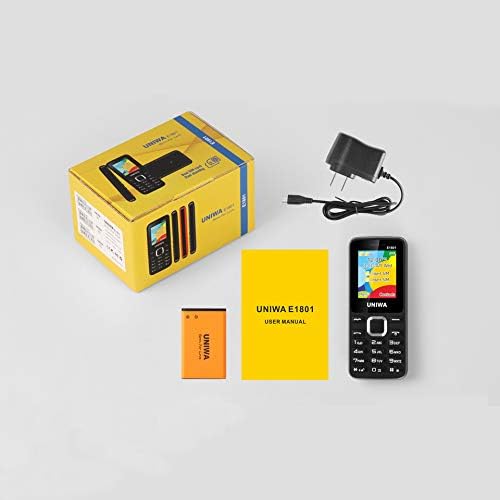
Image: Contents of the UNIWA E1801 package, showing the phone, battery, charger, and user manual neatly arranged next to the product box.
4. Produto rematadoview
Familiarize yourself with the physical components of your UNIWA E1801 phone.

Image: The UNIWA E1801 mobile phone held in a hand, showcasing its compact size, large keypad, and clear color display with the UNIWA logo.
- Visualización: 1.77-inch QQVGA screen (160 x 128 pixels) for clear visibility.
- Teclado: Large, ergonomic buttons with clear numbering for easy dialing and navigation.
- Teclas de navegación: Plated navigation keys for intuitive menu control.
- Cámara traseira: 0.08 MP camera for basic photo capture.
- Relator: Integrated 2030 box speaker for loud and clear audio.
- Lanterna: Built-in LED flashlight for convenience.
- Non-slip Frame: Textured frame design for a secure grip.

Imaxe: Primeiro plano view of the UNIWA E1801's keypad, highlighting the ergonomic design and the metallic finish of the central navigation keys.

Image: The UNIWA E1801 phone with an inset showing the detailed texture of its non-slip frame, designed for a secure grip.

Image: The rear of the UNIWA E1801 phone, with an overlay illustrating the powerful 2030 box speaker and its sound projection.
5. Configuración
5.1. Installing SIM Cards
The UNIWA E1801 supports dual SIM cards, allowing you to use two different numbers simultaneously.
- Retire a tapa traseira do teléfono.
- Locate the SIM card slots.
- Insira con coidado as tarxetas SIM nas ranuras designadas cos contactos dourados cara abaixo.
- Asegúrate de que as tarxetas SIM estean ben colocadas.

Image: The back of the UNIWA E1801 phone with the cover removed, clearly showing the two SIM card slots and an illustration of two SIM cards.
5.2. Instalación da batería
- After inserting the SIM cards, place the BL-5C 800mAh battery into the battery compartment, aligning the gold contacts.
- Gently press down until the battery is securely in place.
- Volva colocar a tapa traseira, asegurándose de que encaixe no seu lugar.
5.3. Cargando o teléfono
Antes do primeiro uso, carga completamente a batería do teléfono.
- Connect the charger to the charging port on the phone.
- Conecte o cargador a unha toma de corrente.
- O indicador da batería na pantalla mostrará o estado de carga.
- Unha vez cargado completamente, desconecte o cargador.
6. Instrucións de funcionamento
6.1. Acendido/apagado
- Para acender: Manteña premido o botón de acendido/finalizar chamada ata que a pantalla se ilumine.
- Para apagar: Press and hold the Power/End Call button until the power off options appear, then select "Power off".
6.2. Facer chamadas
- Dende a pantalla de repouso, introduza o número de teléfono co teclado numérico.
- Prema o botón verde de chamada para iniciar a chamada.
- Para finalizar unha chamada, prema o botón vermello Finalizar chamada.
6.3. Envío de mensaxes
- Vaia a "Menú" > "Mensaxes" > "Escribir mensaxe".
- Introduce a túa mensaxe usando o teclado numérico.
- Introduza o número de teléfono do destinatario ou seleccione un dos contactos.
- Press "Send".
6.4. Using the FM Radio
The phone features a wireless FM radio.
- Vaia a "Menú" > "Radio FM".
- Select "Auto search" to find available stations.
- Use the navigation keys to switch between stations.

Image: The UNIWA E1801 phone displaying its FM radio interface, showing a frequency of 142.2 MHz, with musical notes and a classic radio in the background, indicating its wireless FM capability.
6.5. Usando a lanterna
The built-in flashlight can be easily activated.
- Typically, a dedicated button or a long press on a specific key (refer to your phone's quick guide) activates the flashlight.
- Alternatively, access it via "Menu" > "Tools" > "Flashlight".

Image: The UNIWA E1801 phone with a bright beam of light emanating from its top, illustrating the built-in flashlight function.
6.6. Outras características
- MP3/MP4 Playback: Supports multimedia playback. Transfer files to a TF card (up to 16GB, not included) and access them via the "Multimedia" menu.
- Axenda telefónica: Store up to 300 contacts.
- Ferramentas: Includes games, calendar, alarm clock, calculator, world clock, and recorder.
7. Mantemento
- Limpeza: Usa un pano suave e seco para limpar a superficie do teléfono. Non uses produtos de limpeza líquidos nin aerosois.
- Almacenamento: Garda o teléfono nun lugar fresco e seco, lonxe da luz solar directa e de temperaturas extremas.
- Coidado da batería: Avoid fully discharging the battery frequently. Charge it regularly to prolong its lifespan.
8 Solución de problemas
| Problema | Causa posible | Solución |
|---|---|---|
| O teléfono non se acende. | A batería está baixa ou non está instalada correctamente. | Cargue a batería. Asegúrese de que a batería estea inserida correctamente. |
| Non se poden facer nin recibir chamadas. | Sen tarxeta SIM, a tarxeta SIM non está inserida correctamente ou sen sinal de rede. | Ensure SIM card is inserted. Check network signal strength. Contact your service provider. |
| Mala calidade de audio. | Low volume, poor network signal, or speaker/microphone obstruction. | Adjust volume. Move to an area with better signal. Clean speaker/microphone openings. |
| A batería esgotarase rapidamente. | Frequent use, background applications, or old battery. | Reduce o brillo da pantalla. Pecha as aplicacións que non uses. Considera substituír a batería se é antiga. |
9. Especificacións
| Característica | Detalle |
|---|---|
| Número de modelo | E1801 |
| Dimensións | 108 x 45 x 14 mm |
| Peso | 68 g |
| CPU | SC6531E |
| Rede de banda | 2G: GSM850/900/1800/1900 MHz, GPRS |
| Tarxeta SIM | Dual SIM, Dual Standby |
| Capacidade da axenda telefónica | 300 entradas |
| Mostrar | 1.77 inch QQVGA, 160 x 128 pixels |
| Cámara | 0.08 MP Rear Camera, 640 x 480 pixels |
| Multimedia | MP3, MP4 |
| Memoria | Supports TF card up to 16 GB (max) |
| Bluetooth | V2.1 |
| Batería | BL-5C 800 mAh |
| Tempo de conversa | Ata 240 minutos |
| Tempo de espera | Ata 200 horas |
| Linguas | English, Russian, Hebrew, Arabic, French, Spanish, Polish, German, Italian, Portuguese, Chinese |
| Características | Games, Calendar, Alarm Clock, Calculator, World Clock, Flashlight, E-book, WAP, Recorder |
10. Garantía e soporte
Your UNIWA E1801 mobile phone comes with a standard manufacturer's warranty. Please refer to the warranty card included in your package for specific terms and conditions.
For technical support, troubleshooting assistance, or warranty claims, please contact your point of purchase or the official UNIWA customer service. Keep your purchase receipt as proof of purchase.
For more information, visit the official UNIWA websitio web ou póñase en contacto cos seus canais de asistencia.