
Introdución
The Fostex 6301DT is a compact and versatile 4-inch powered studio monitor, designed for broadcast, production facilities, mobile setups, project studios, and home recording environments. Building upon the legacy of the 6301-series, this model incorporates a D-class power amplifier and a new driver unit, featuring an energy-saving auto stand-by function. The 6301DT integrates Dante network audio capabilities, allowing playback of any two channels of Dante network audio signals, alongside traditional 1/4-inch TS analog inputs. Its ultra-rugged die-cast aluminum enclosure ensures durability for professional use.
Información de seguridade
- Fonte de enerxía: Conecte a unidade só á fonte de alimentación especificada do vol.tage. Ensure the power cord is securely connected.
- Ventilación: Non bloquee as aberturas de ventilación. Asegúrese de que haxa un fluxo de aire axeitado arredor da unidade para evitar o sobrequecemento.
- Humidade: Non expoña a unidade á choiva, á humidade ou ao exceso de humidade. Evite colocar obxectos cheos de líquido enriba da unidade.
- Obxectos estranxeiros: Do not insert any objects into the unit's openings.
- Servizo: Encomende calquera tarefa de mantemento a persoal de servizo cualificado. Non intente abrir nin reparar a unidade vostede mesmo.
- Colocación: Place the monitor on a stable surface. Avoid locations with excessive vibration, dust, or direct sunlight.
Contido do paquete
Verifica que todos os elementos estean presentes no paquete:
- Fostex 6301DT Active Monitor Speaker
- Cable de alimentación IEC
Produto rematadoview
Panel frontal

Figura 1: Controis do panel frontal
- Botón de encendido: Press to turn the unit ON or OFF. An LED indicator shows the power status.
- Botón de volume: Adjusts the output level of the monitor.
Panel traseiro
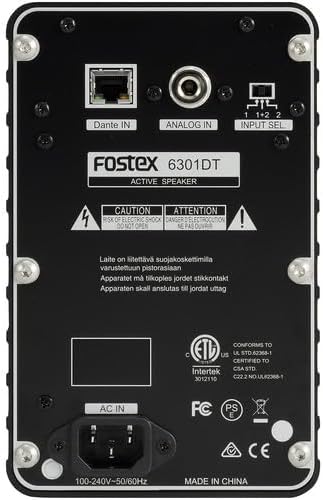
Figura 2: Conexións do panel traseiro
- Dante IN (RJ45): Connects to a Dante network for digital audio input.
- Analog IN (1/4" TS): Connects to an analog audio source using a 1/4-inch TS cable.
- Interruptor de selección de entrada: Selects the audio input channel for monitoring (1, 2, or 1+2 mixed).
- AC EN: Conecta o cable de alimentación IEC subministrado.
Configuración
Colocación
Place the Fostex 6301DT on a stable, flat surface. For optimal sound reproduction, position the monitor at ear level and equidistant from your listening position. An optional EB-6301 mounting bracket (not included) allows for easy surface-mounting at various angles.

Figura 3: ExampConfiguración da aplicación
Conexión de alimentación
- Ensure the monitor's power button is in the OFF position.
- Connect the supplied IEC power cord to the AC IN port on the rear panel of the monitor.
- Conecte o outro extremo do cable de alimentación a unha toma de corrente alterna adecuada.
Conexións de audio
The 6301DT supports both analog and Dante network audio inputs.
- Entrada analóxica: Connect your analog audio source (e.g., mixer, audio interface) to the 1/4" TS Analog IN port on the rear panel using a 1/4-inch TS cable.
- Dante Network Input: Connect an RJ45 Ethernet cable from your Dante network switch or device to the Dante IN port on the rear panel.
En funcionamento
Encendido/apagado
Press the Power button on the front panel to turn the monitor ON. The power indicator LED will illuminate. Press the button again to turn the monitor OFF.
Axuste de volume
Rotate the Volume knob on the front panel clockwise to increase the output level and counter-clockwise to decrease it. Start with a low volume setting and gradually increase it to a comfortable listening level.
Selección de entrada
Use the Input Select switch on the rear panel to choose the desired audio source:
- Analóxico: Selects the 1/4" TS analog input.
- Dante Channel 1: Monitors the first Dante audio channel.
- Dante Channel 2: Monitors the second Dante audio channel.
- Dante Channel 1+2 (Mixed): Monitors a mix of both Dante channels.
Dante Network Configuration
For Dante network operation, you will need to use Audinate's Dante Controller software on a computer connected to the same Dante network. This software allows you to route audio signals to the Fostex 6301DT and configure its network settings. The 6301DT supports sampling frequencies of 44.1 kHz, 48 kHz, 88.2 kHz, and 96 kHz.
Mantemento
- Limpeza: Use a soft, dry cloth to clean the exterior of the monitor. Do not use abrasive cleaners, waxes, or solvents.
- Almacenamento: Se garda a unidade durante un período prolongado, desconéctea da corrente e gárdea nun lugar fresco e seco, lonxe da luz solar directa e de temperaturas extremas.
- Ventilación: Asegúrate de que as aberturas de ventilación estean libres de po e residuos.
Resolución de problemas
| Problema | Causa posible | Solución |
|---|---|---|
| Sen saída de son |
|
|
| Son distorsionado |
|
|
| Dante connection issues |
|
|
Especificacións

Figura 4: Dimensións do produto
| Característica | Especificación |
|---|---|
| Número de modelo | AMS-6301DT |
| Tipo de altofalante | Monitor de estudio alimentado |
| Tamaño do altofalante | 4 polgadas |
| Diámetro do woofer | 4 polgadas |
| AmpTipo máis vivo | Clase-D |
| Potencia máxima de saída | 20 vatios |
| Modo de saída de audio | Estéreo |
| Número de canles de audio | 2.0 |
| Tecnoloxía de conectividade | RJ45 (Dante), 1/4" TS (Analog) |
| Protocolo de conectividade | Dante |
| Apoiado Sampling Frequencies | 44.1/48/88.2/96 kHz |
| Relación sinal-ruído | 85 dB |
| Fonte de enerxía | Eléctrico con cable |
| Material do recinto | Aluminio fundido |
| Cor | Negro |
| Dimensións do artigo (D x W x H) | 4.7" x 7.5" x 4.7" |
| Peso do elemento | 5.1 libras |
| Características adicionais | Auto stand-by function, Recessed front-panel controls |
Garantía e Soporte
Información da garantía
The Fostex 6301DT is covered by a Garantía limitada do fabricante dun anoConserva o comprobante de compra para reclamacións de garantía.
Atención ao cliente
For technical assistance, troubleshooting, or warranty service, please contact American Music and Sound, the manufacturer, or your authorized Fostex dealer. Refer to the Fostex official websitio web para obter a información de contacto de asistencia máis actualizada.