
Introdución
The FLAMMA FS05 Multi Modulation Pedal is a versatile stereo effects pedal designed for electric guitar. It offers 11 distinct modulation effects and 7 storable preset slots, providing a wide range of tonal possibilities for musicians.
Información de seguridade
Always ensure proper power supply connections and use the pedal in a dry environment. Avoid exposing the unit to extreme temperatures or humidity. Disconnect power when not in use or during cleaning.
Contido do paquete
- FLAMMA FS05 Multi Modulation Pedal
- Manual de instrucións (este documento)
- (Fonte de alimentación non incluída)
Produto rematadoview
The FS05 pedal features a compact design with intuitive controls for easy operation and sound shaping.

Figure 1: FLAMMA FS05 Multi Modulation Pedal front view.
Controis e conexións
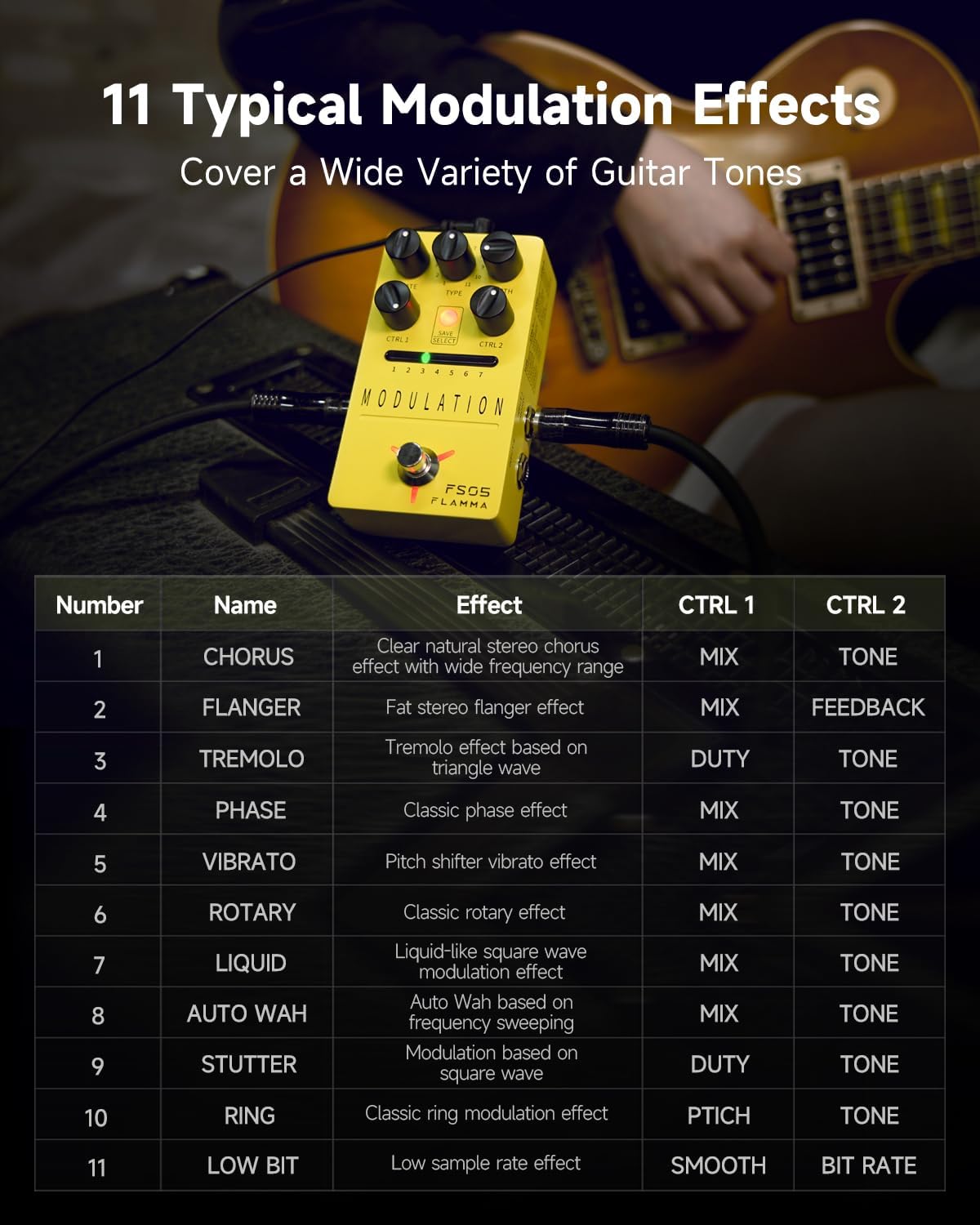
Figura 2: detallada view of the FS05 control knobs.
- Botón de VELOCIDADE: Axusta a velocidade do efecto de modulación.
- Mando TIPO: Selects one of the 11 modulation effects.
- Botón DE PROFUNDIDADE: Controls the intensity or depth of the modulation.
- CTRL 1 Knob: Adjusts a primary parameter specific to the selected effect (e.g., Mix, Duty, Pitch).
- CTRL 2 Knob: Adjusts a secondary parameter specific to the selected effect (e.g., Tone, Feedback, Smooth, Bit Rate).
- SAVE/SELECT Button: Used to save presets or select between them.
- LED Indicators (1-7): Show the currently selected preset slot.
- Pedal: Activates/deactivates the pedal.
- Input L (Mono) / Input R: Audio input jacks.
- Output L (Mono) / Output R: Audio output jacks.
- DC IN: Power input (9V DC, center negative).
Vídeo 1: Produto oficial rematadoview of the FLAMMA FS05 Multi Modulation Pedal, demonstrating its features and 11 modulation effects.
Configuración
Fonte de alimentación
The FLAMMA FS05 pedal requires a 9V DC power supply with a minimum current of 302mA (center negative). The power supply is NOT INCLUDED with the pedal. Insufficient current may cause operational issues.
Conectando o Pedal
The FS05 supports both mono and stereo connections, offering flexibility for various setups.

Figure 3: Diagram illustrating stereo and mono to stereo connection setups for the FS05 pedal.
- Configuración monofónica: Connect your guitar to Input L (Mono) and your amplifier to Output L (Mono).
- Configuración estéreo: Connect your guitar to Input L (Mono) and Input R. Connect Output L (Mono) and Output R to your stereo amplifier ou interface de audio.
Instrucións de funcionamento
Selecting Modulation Effects
The FS05 offers 11 distinct modulation effects, ranging from classic to experimental tones. Use the TYPE knob to cycle through the available effects.
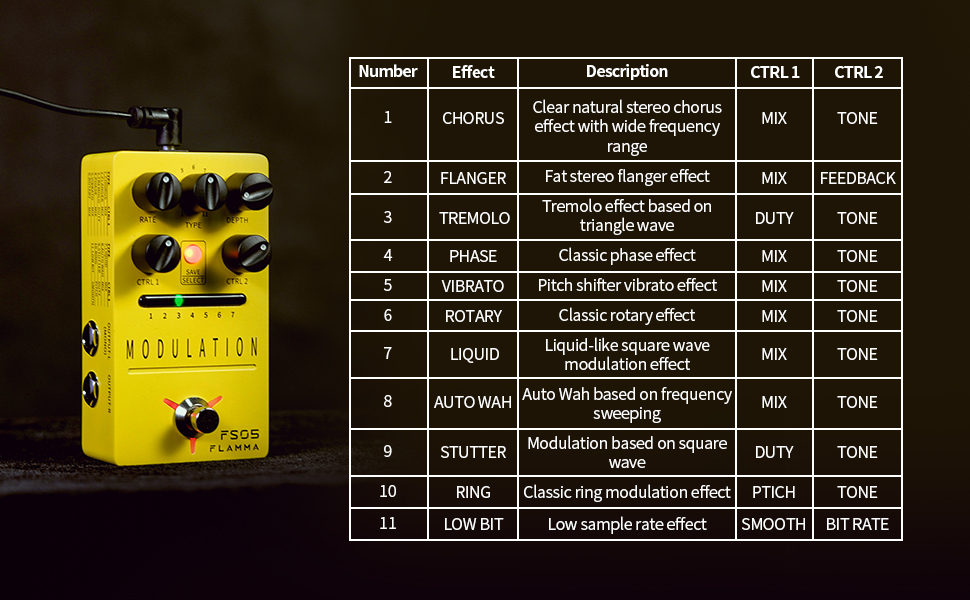
Figure 4: List of 11 modulation effects and their corresponding CTRL 1 and CTRL 2 parameters.
The available effects include Chorus, Flanger, Tremolo, Phase, Vibrato, Rotary, Liquid, Auto Wah, Stutter, Ring, and Low Bit.
Adjusting Effect Parameters
Each effect has adjustable parameters via the RATE, DEPTH, CTRL 1, and CTRL 2 knobs. Refer to Figure 4 for specific parameter functions per effect.

Figure 5: The FS05 pedal highlighting its versatile control knobs.
Gardar e recuperar predefinicións
The pedal features 7 preset slots to save your customized settings. Use the SAVE/SELECT button and LED indicators to manage your presets.

Figure 6: The FS05 pedal showing the 7 preset slots and SAVE/SELECT button.
- Salvar: Adjust the parameters to your desired settings. Press and hold the SAVE/SELECT button until the LED for the current slot flashes, indicating the preset is saved.
- Para recordar: Briefly press the SAVE/SELECT button to cycle through the 7 preset slots. The corresponding LED will illuminate.
True Bypass / Buffer Bypass
The FS05 features True Bypass to minimize signal loss when the pedal is disengaged. Some videos also mention a low-noise buffer bypass, which helps maintain signal integrity over long cable runs.
Video 2: Demonstration of the FLAMMA FS05 Multi Modulation Pedal's features, including its true bypass functionality and various effects.
Mantemento
Clean the pedal's exterior with a soft, dry cloth. Do not use abrasive cleaners or solvents. Ensure all connections are secure before and after use.
Resolución de problemas
- Sen enerxía: Ensure the 9V DC power supply is correctly connected and provides sufficient current (minimum 302mA).
- Sen son: Check all audio cables and connections. Verify the pedal is engaged (footswitch LED illuminated).
- Ruído non desexado: Ensure proper grounding and use a high-quality, isolated power supply.
Especificacións
- Modelo: FS05
- Peso do artigo: 10.5 onzas (0.3 quilogramos)
- Dimensións do produto: 2.75 cm de longo x 4.78 cm de ancho x 1.97 cm de alto
- Voltage: 9 voltios DC
- Sorteo actual: >302mA (Power Supply NOT INCLUDED)
- Tipo de conector: 2.1mm DC power jack
- Formato do sinal: Dixital
- Interface de hardware: USB (for potential firmware updates, not for audio)
- Efectos: 11 Modulation Effects (Chorus, Flanger, Tremolo, Phase, Vibrato, Rotary, Liquid, Auto Wah, Stutter, Ring, Low Bit)
- Presets: 7 Storable Slots
- Bypass: True Bypass
Garantía e soporte
Para obter información sobre a garantía e asistencia técnica, consulte o sitio web oficial do fabricante websitio web ou póñase en contacto co seu distribuidor local. Garde o recibo de compra como proba de compra.