
1. Introdución
Grazas pola compraasing the BESTISAN 28-inch Soundbar. This manual provides detailed instructions for setting up, operating, and maintaining your new soundbar to ensure optimal performance and an immersive audio experience. Please read this manual thoroughly before use and retain it for future reference.
2. Contido do paquete
Verifique que todos os elementos que se indican a continuación estean incluídos no seu paquete:
- Barra de son
- Control remoto
- Adaptador de alimentación
- Cable óptico dixital
- Cable de audio RCA estéreo a 3.5 mm
- Guía de usuario
- Mount Kits (Wall mount template, Mount screws, Wall mount brackets)

3. Produto rematadoview
3.1. Controis e indicadores do panel frontal

- Botón de encendido: Short press to turn on, long press for 2 seconds to turn off. Short press to switch modes (BT-HDMI-AUX-OPT-BT).
- Volume + / Next Button: Short press to increase volume step by step, long press for the next song (in Bluetooth mode).
- Volume - / Previous Button: Short press to decrease volume step by step, long press for the previous song (in Bluetooth mode).
- Botón Reproducir/Pausa: Short press to play/pause songs (in Bluetooth mode).
- Mode LED Indicator: Displays the current input mode (Standby, Bluetooth, Optical, ARC, AUX, USB).
3.2. Conexións do panel traseiro
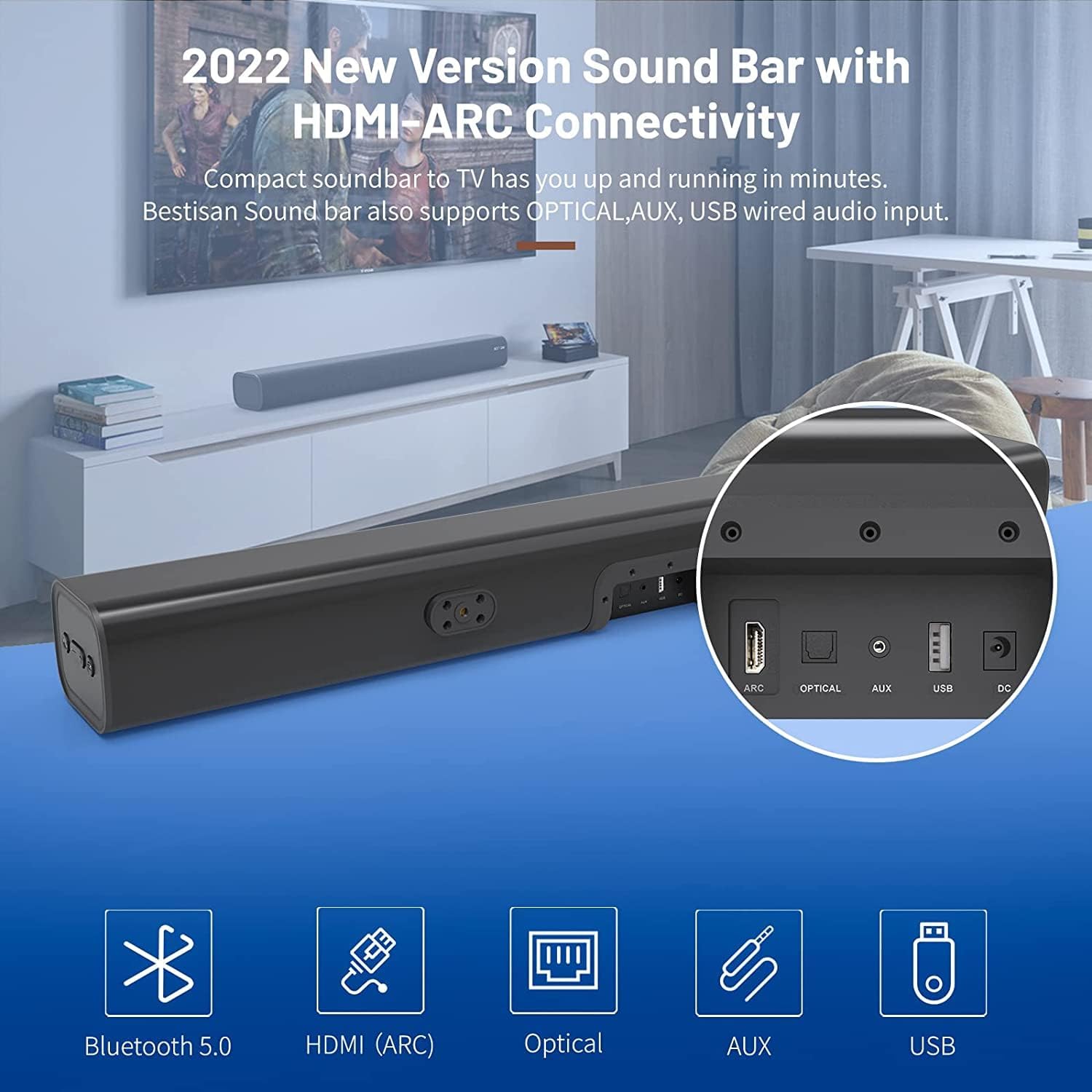
- HDMI ARC (TV): Connects to your TV's HDMI ARC port for high-quality audio transmission.
- ÓPTICO: Entrada de audio óptico dixital.
- AUX IN: 3.5mm auxiliary audio input.
- USB: USB input for media playback.
- DC IN: Entrada de alimentación para a barra de son.
4. Configuración
4.1. Opcións de colocación
The BESTISAN Soundbar offers flexible placement options to suit your home theater setup:
- Colocación do escritorio: Place the soundbar on a flat surface in front of your TV. Ensure it does not obstruct the TV's remote sensor.
- Montaxe na parede: Use the included wall mount kit to securely attach the soundbar to the wall below your TV. A wall mounting template is provided for easy installation.


4.2. Acender
- Connect the power cord to the DC IN port on the back of the soundbar.
- Conecte o outro extremo do cable de alimentación a unha toma de corrente alterna.
- Press the Power button on the soundbar or the remote control to turn it on. The LED indicator will light up.
Vídeo 1: This video demonstrates the easy setup process for the soundbar, including connecting the power adapter and turning on the device. It highlights the various input options available on the back of the soundbar.
5. Conectando ao teu televisor
The soundbar offers multiple connection options for your TV. Choose the method that best suits your TV's available ports.
5.1. HDMI ARC Connection
- Connect one end of the HDMI cable (not included) to the HDMI ARC port on the soundbar.
- Connect the other end of the HDMI cable to your TV's HDMI ARC port.
- On your TV settings, set the audio output to "HDMI ARC" and the digital sound format to "PCM" or "Passthrough".
5.2. Conexión óptica
- Connect one end of the Digital Optical Cable (included) to the OPTICAL port on the soundbar.
- Connect the other end of the Digital Optical Cable to your TV's optical audio output port.
- On your TV settings, set the audio output to "Optical" and the digital sound format to "PCM".
5.3. Conexión AUX
- Connect one end of the Stereo RCA to 3.5mm Audio Cable (included) to the AUX IN port on the soundbar.
- Connect the RCA ends of the cable to your TV's RCA audio output ports (usually red and white).
- On your TV settings, ensure the audio output is set to "External Speakers" or "Headset".
5.4. Conexión Bluetooth
- Turn on the soundbar and press the "BT" button on the remote or the mode button on the soundbar until the LED indicator flashes blue, indicating Bluetooth pairing mode.
- Activa o Bluetooth no teu dispositivo móbil (teléfono intelixente, tableta, etc.).
- Busca "BESTISAN" or "ST08" in the list of available Bluetooth devices and select it to pair.
- Unha vez conectado, o indicador LED volverá azul fijo.
6. Funcionamento da barra de son
6.1. Usando o mando a distancia
The included remote control provides full functionality for your soundbar:
- Potencia: Activar/desactivar a barra de son.
- Silenciar: Mute/unmute the sound.
- Volume +/-: Axuste o nivel de volume.
- Reproducir/Pausa: Play or pause audio (Bluetooth mode).
- Anterior/Seguinte: Skip to the previous or next track (Bluetooth mode).
- Mode Selection (OPT, BT, ARC, AUX, USB): Cambia entre as fontes de entrada.
- Sound Modes (Movie, Music, Dialogue): Select optimized equalizer settings for different content types.
- Agudos +/-: Adjust treble levels.
- Baixo +/-: Adjust bass levels.
6.2. Sound Modes (DSP Technology)
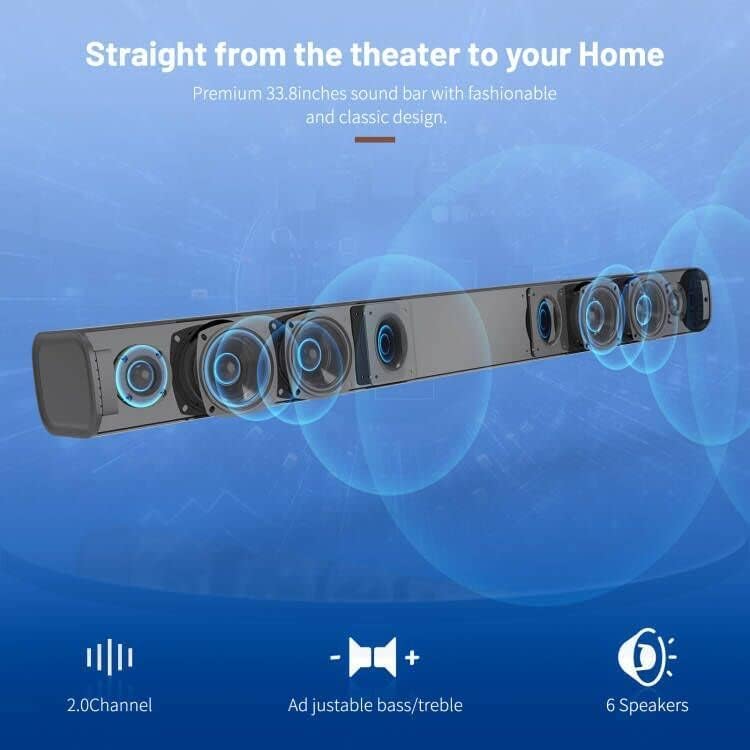
The soundbar features DSP (Digital Signal Processing) technology with three preset equalizer modes:
- Modo de película: Enhances cinematic audio with dynamic range and impactful bass.
- Modo de música: Optimiza o audio para a reprodución de música, proporcionando un son equilibrado.
- Modo de diálogo: Clarifies speech, making conversations easier to understand.

7. Mantemento
- Clean the soundbar with a soft, dry cloth. Do not use liquid cleaners or aerosols.
- Evite expoñer a barra de son a temperaturas extremas, humidade ou luz solar directa.
- Non intente desmontar nin reparar a unidade vostede mesmo. Póñase en contacto co servizo de atención ao cliente para obter axuda.
8 Solución de problemas
| Problema | Posible Solución |
|---|---|
| Sen poder | Asegúrate de que o adaptador de corrente estea conectado correctamente á barra de son e a unha toma de corrente que funcione. |
| Sen son |
|
| Problemas de vinculación Bluetooth |
|
| O control remoto non funciona |
|
9. Especificacións
- Marca: BESTISÁN
- Nome do modelo: ST08, SE08
- Tipo de altofalante: Barra de son
- Tecnoloxía de conectividade: HDMI (ARC), Optical, Aux, USB, Bluetooth 5.0
- Modo de saída de audio: Estéreo
- Potencia de saída máxima do altofalante: 100 vatios
- Dimensións do produto: 3.4" D x 33.79" W x 4.4" H
- Peso do artigo: 5.19 libras
- Tipo de montaxe: Soporte de parede
- Característica especial: Bass Boost, DSP Technology (Dialogue, Movie, Music modes)
10. Garantía e soporte
For warranty information, technical support, or customer service inquiries, please refer to the contact details provided in your User's Guide or visit the official BESTISAN websitio.
Fabricante: Bestisan
Data de primeira dispoñibilidade: 3 de novembro de 2020